

A Valheim server from DoomHosting installs itself the first time you start it, and your group can be standing in the world a few minutes later. This guide takes you from a server you just bought to friends playing on it, and hands off to the deeper guides for everything after that.
What happens on the first boot
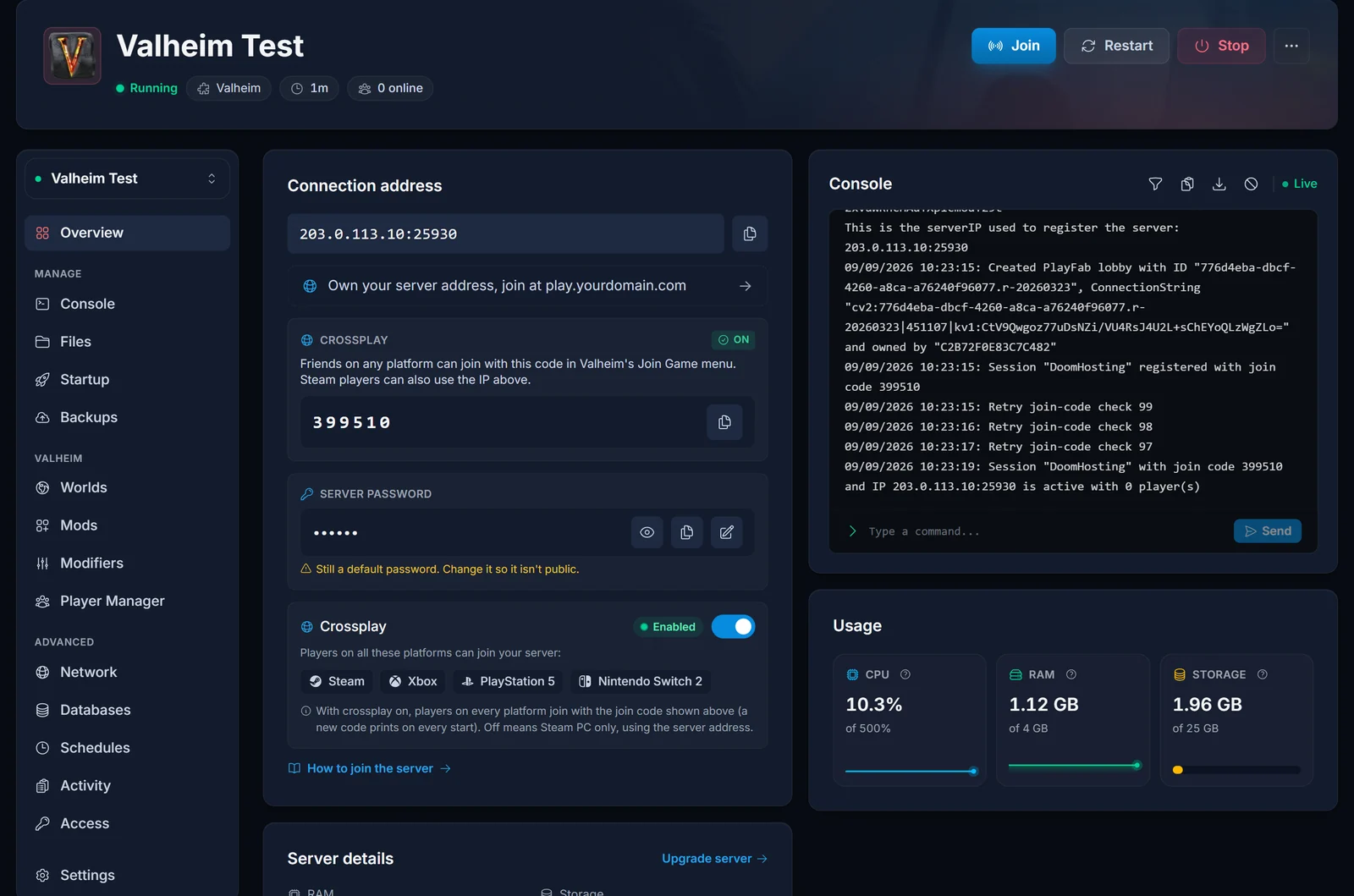
Open your server in the DoomHosting control panel and press Start, then leave it alone for a few minutes. The first boot runs SteamCMD, which downloads the Valheim dedicated server files (Steam app 896660) onto your server, and only then launches the game. Nothing is wrong while that is happening, it is a download.
Two things about a brand new server are worth knowing before you decide something is broken:
- Valheim does not write the world file until its first autosave, roughly 30 minutes after the server starts. A world that looks like it has not been generated yet, minutes after a first boot, is behaving normally.
- That same SteamCMD step runs on every later boot, which is how your server stays current. There is no update button because there does not need to be one, and restarting is the whole mechanism.
The three settings that matter, and one trap
Your server name, password and world name all live on the Startup tab:
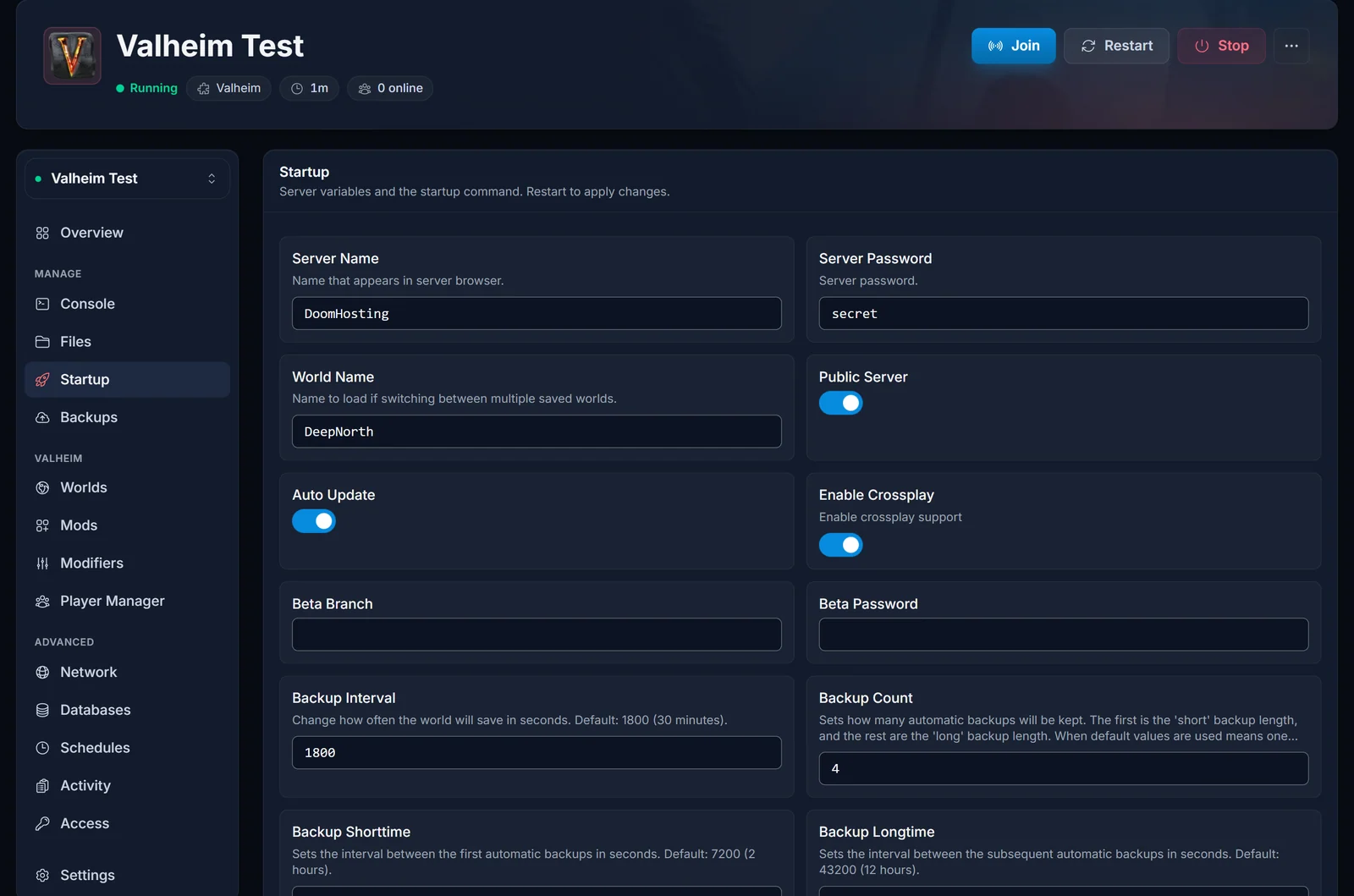
- Server name: what players see in the in-game server browser. Up to 60 characters.
- Password: required, between 5 and 20 characters. Valheim asks every player for it as they connect. It is not your DoomHosting account password. The Overview tab also has a Server password card that reveals, copies and edits the same value without leaving the page: how to set or change your Valheim server password.
- World: the name of the save, up to 20 characters. Renaming this field does not rename a world, it points the server at a different one. Use the Worlds tab instead: it creates a world from any seed, switches which one is active, and uploads one from your own game. Bringing your single-player world over is how to upload your Valheim world save.
Now the trap, because it catches more first day customers than anything else: Valheim refuses to start if the password appears anywhere inside the server name or the world name. Call the server Vikings and set the password to Vikings123 and the process quits instead of booting. If your server will not stay up right after you edited these fields, check this before anything else.
Valheim reads all three when it boots, so restart the server after changing any of them.
Crossplay is already on
New Valheim servers here are created with crossplay enabled, so there is nothing for you to switch on. The Crossplay card on the Overview tab shows the live state and holds the on/off switch if you ever want it off: how to turn off crossplay on a Valheim server. With Valheim 1.0, released on 9 September 2026, that covers PC, Mac and Linux plus Xbox One, Xbox Series X|S, PlayStation 5 and Nintendo Switch 2. PS5 and Switch 2 are new platforms with this release.
Crossplay is also what produces the join code, which is the only practical way onto a server from a controller. Console players get their own walkthrough: how to join a Valheim server on Xbox, PS5 and Switch 2.
Getting your friends in
Everything a player needs sits on the Connection address card on the Overview tab:
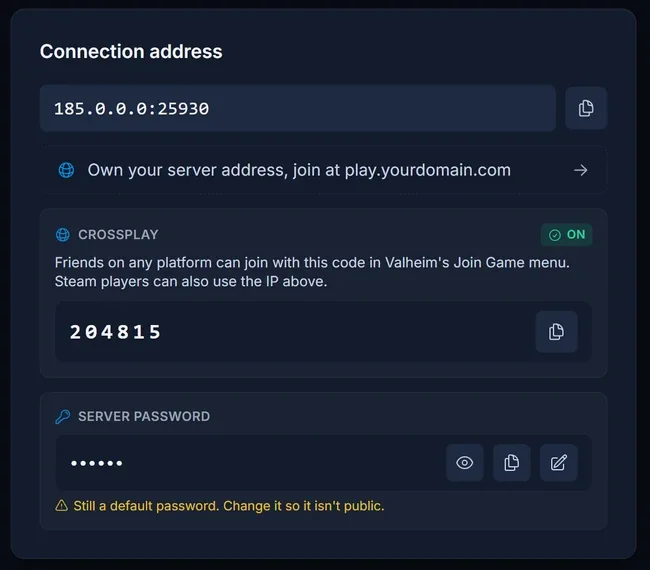
There are two routes in, and both end with Valheim asking for the server password:
- The join code, a numeric code shown while crossplay is on. A player pastes it into Add server in Valheim's Join Game menu. It works from every store and every platform, so it is the one to send when you do not know what somebody is playing on.
- The address, written as
IP:port, pasted into that same box. This is the classic route for Steam players on PC.
One warning before you send anything out: Valheim mints a new join code every time the server boots. A code that worked yesterday is dead after a restart. It is not broken, it is old, and it is by far the most common piece of confusion with Valheim servers. Copy the current one out of the panel each time.
Both routes step by step, plus the Steam favorites trick and the port detail it needs, are in how to join a Valheim server.
Reading the console
The Console tab is your server's own text output, not a games console. It is where you look when something is not behaving:
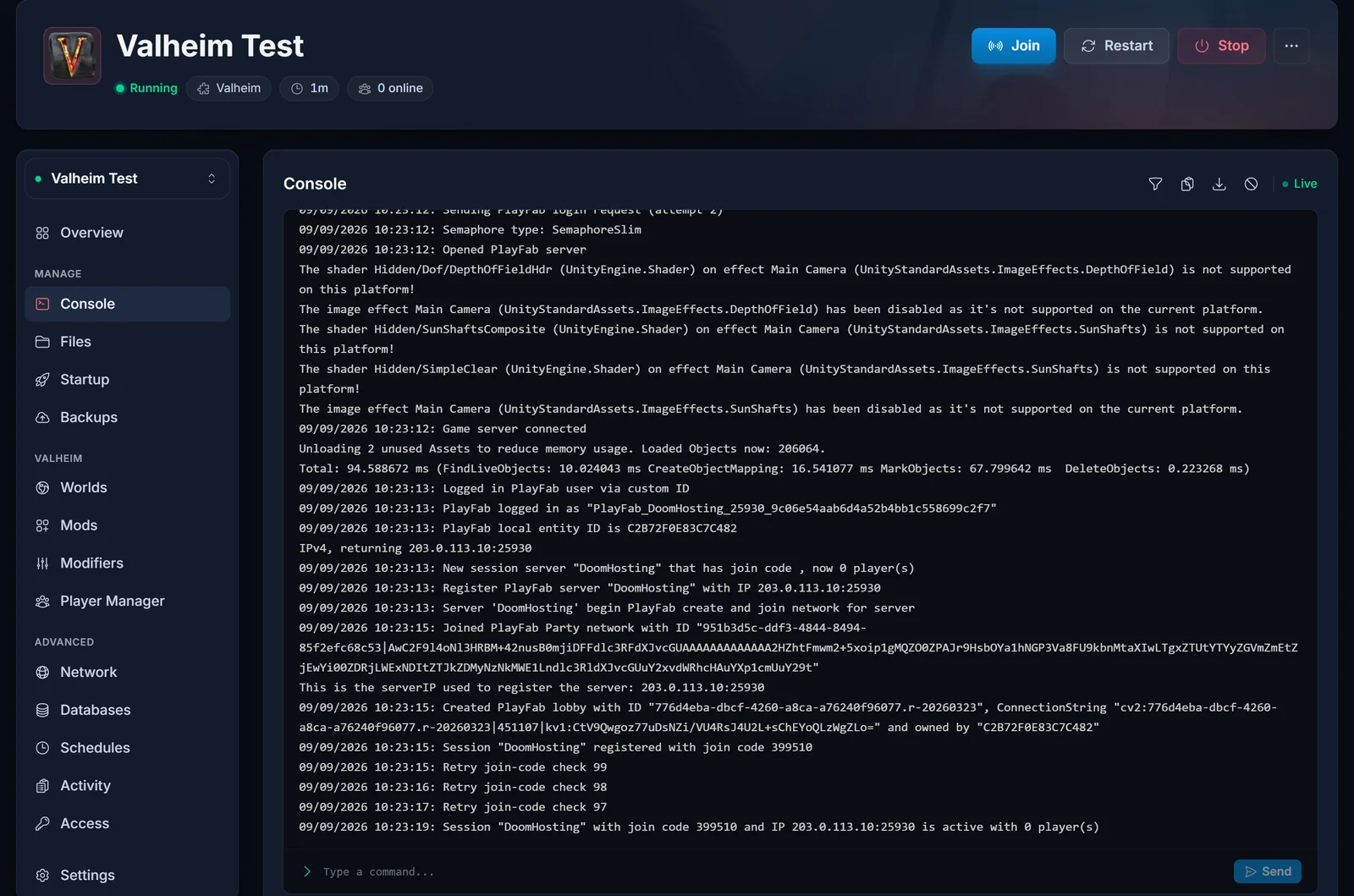
A healthy start runs in that order: SteamCMD checks for a game update and pulls one if Iron Gate has published it, the game launches, and a few seconds later the join code appears in the output. The panel reads the code straight out of that output, which is why a freshly started server briefly shows nothing where the code will be.
You do not have to become a log reader. The panel watches the console for the failure signatures that actually mean something, a crashed mod or the server running out of memory, and offers the matching fix when it sees one.
Backups run without you
Valheim takes its own world backups on a timer while it runs. The defaults on your server are a backup every 1800 seconds, so every 30 minutes, and the last 4 are kept. There is nothing to enable and nothing to schedule.
Where to go next
- Mods. New servers run vanilla Valheim. Mods need BepInEx, the loader that lets them run at all, and the panel's Mods tab handles that switch for you when you install your first one. Check crossplay afterwards, because the modded configuration does not carry the same default: how to install BepInEx mods on your Valheim server.
- More than 10 players. Valheim's cap is compiled into the game and no setting raises it, but a server side mod does, and nobody joining has to install anything: how to get more than 10 players.
- Admin, kick and ban. Admins are granted by SteamID64 and the command list is short and specific: Valheim admin commands and how to become admin.
- Difficulty, raids and drop rates. The Modifiers tab sets them from dropdowns, no launch arguments to type: how to change world modifiers on your Valheim server.
- Updates. How to update your Valheim server.
- A fresh Deep North world. Terrain you have already explored keeps the biome it had, so the 1.0 content generally wants unexplored map or a new world: how to start a fresh Deep North world.
- When something breaks. Common Valheim server problems and fixes.
Common issues
The server starts and then stops again. Check the password rule first: it cannot appear inside the server name or the world name, and it has to be between 5 and 20 characters.
A setting I changed did nothing. Valheim reads its settings when it boots. Restart the server.
Valheim says "Failed to connect". That message covers several different causes and they each have a different fix: Valheim failed to connect, how to fix it.
My friend says the join code does not work. The server restarted and the code changed. Send them the current one from the panel.
Steam says the server is not responding. Steam's server browser talks to the query port, which is your game port plus one, not the port on the connection card. The join guide has the detail.
devcommands and spawn do nothing. Valheim's cheats do not work on a dedicated server at all. What an admin does get is a short list of real commands (kick, ban, unban, banned, save, setworldmodifier, setworldpreset), typed with no leading slash. Our Valheim command reference lists them.
Is the server actually up? Check it from outside the panel with the Valheim server status checker.
Not got a server yet? Our Valheim server hosting runs on Ryzen 9 hardware with crossplay on from the first boot.
