
Xbox, PlayStation 5 and Nintendo Switch 2 players can all sit on the same Valheim dedicated server as their friends on Steam, but none of those consoles can run the server. That single limitation is what this guide is about: how a console player gets onto a hosted Valheim server, and why somebody in the group has to rent one.
This is the console half of joining. If everyone you play with is on PC and you want the IP address route or the Steam favorites trick, read how to join a Valheim server with a join code or direct IP instead. Here we stay on the one method that works from a controller: the crossplay join code.
Why a console group needs a rented server
Iron Gate states it plainly in their crossplay FAQ: you cannot set up a dedicated server on an Xbox, but you can join a dedicated server from an Xbox console just as normal, provided that both your Xbox and the server have crossplay enabled. Nothing Iron Gate has published suggests PS5 or Switch 2 will be different. The dedicated server software ships as PC, Linux and Mac binaries.
So a console group has two choices. Either one person keeps a PC copy of the game running and everyone plays only while that machine is switched on, or you rent a server that stays up on its own. The second option is what most console groups end up doing, because the world keeps ticking whether or not the owner is awake.
Our Valheim servers provision with crossplay already enabled, so the join code exists from the first boot and console players are covered without you changing a setting.
Find the join code in your panel
Open your server in the DoomHosting control panel. The Overview tab has a Connection address card:
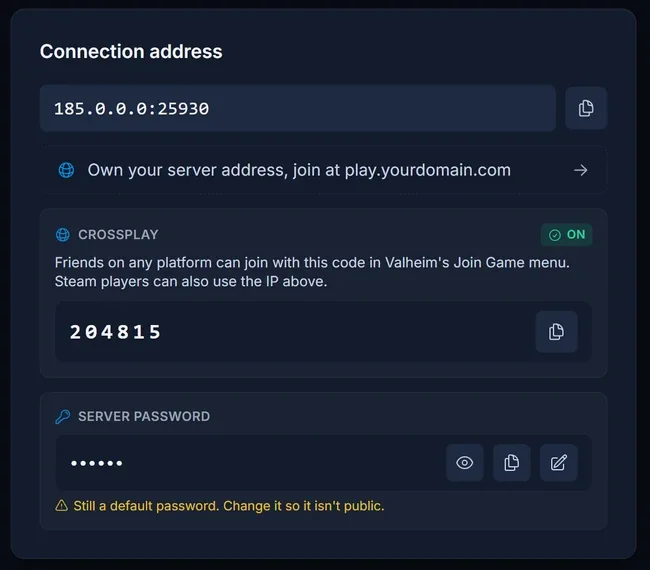
Three things on that card matter for console players:
- The join code, a numeric code shown whenever crossplay is on. This is the only value a console player needs.
- The crossplay badge, marked
ONorOFF, so you can see at a glance whether console players can reach the server at all. - The server password, hidden behind a reveal button. Valheim asks every player for it while connecting.
The same card is one click away from anywhere in the panel through the Join button in the server header:
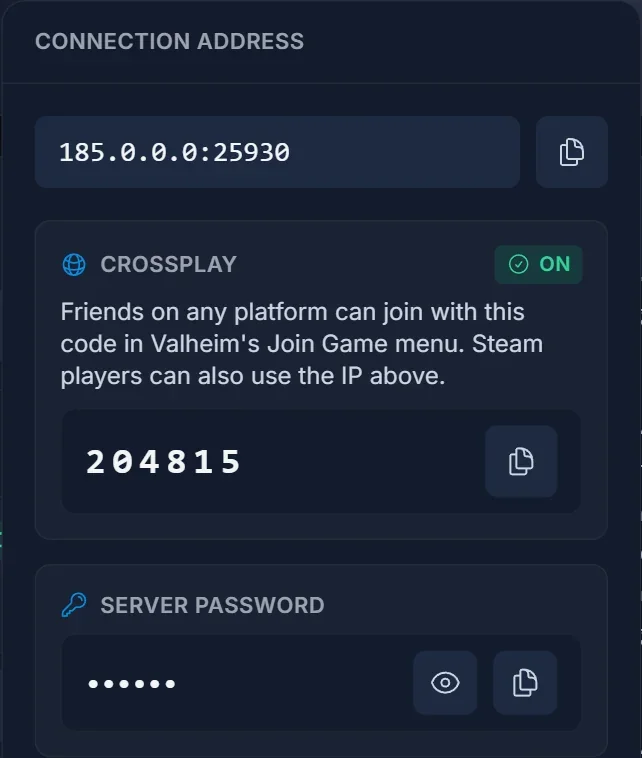
Read this before you send the code to anyone: Valheim mints a brand new join code every time the server boots. A code that worked yesterday is dead after a restart. It is not broken, it is simply old, and it is by far the most common reason a console player reports that a server has vanished. Copy the current code from the panel each time.
How to join on Xbox
Xbox works today, including Game Pass. The steps are the ones Iron Gate documents for sharing a server with a friend:
- Get the current join code from whoever owns the server.
- Launch Valheim and pick or create your character.
- Open Join Game.
- Select Add server.
- Enter the join code with the on-screen keyboard.
- Enter the server password when Valheim asks for it.
The server is saved to your list afterwards, so you do not repeat this every session. Just remember the saved entry points at a code that changes on the next restart, so re-add it with the fresh code when the owner reboots the server.
Game Pass on PC uses the same Microsoft Store build as the console, so those players should follow these steps too rather than the IP address route.
PlayStation 5 and Nintendo Switch 2
Valheim 1.0 launched on 9 September 2026 on PC, Linux, Mac, Xbox One, Xbox Series X|S, PlayStation 5 and Nintendo Switch 2, with full crossplay between all of the platforms. A PS5 player and a Switch 2 player sit on the same server as your Steam friends.
Nothing changes on the server side. Your server is already running on Valheim's crossplay backend, and the join code your Xbox and PC friends use is the same one a PS5 or Switch 2 player enters. There is no migration and no reinstall.
The route is the Xbox one above: Join Game, then Add server, then the code, then the server password.
Crossplay has to be on at both ends
There are two switches, and a console player only gets in when both are on.
On the server. Our Valheim servers ship with crossplay enabled, and the connection card shows the live state as an ON or OFF badge. When it is off, the server never registers with Valheim's crossplay backend, no join code is generated at all, and consoles have no way in. The switch itself is on the Crossplay card on the Overview tab, and turning it off is a deliberate choice with real consequences for console players: how to turn off crossplay on a Valheim server.
One thing to watch: if you switch your server to the BepInEx loader to run mods, check the crossplay badge afterwards. The modded loader is a separate configuration and does not always carry the same default.
On the console. Crossplay is also a setting in Valheim itself on the player's machine. Iron Gate notes that if you cannot find the option to enable crossplay, you may need to adjust your parental control settings, which can hide it entirely on a child account.
Does the IP address work on console?
Iron Gate's dedicated server guide says a crossplay server can be reached by public IP address and port, by join code, or through the server list, and that a local or loopback address never works. The join code is the route Iron Gate documents for getting a friend in, and it is the one that needs no typing of numbers and colons on a controller. Use the code on console, and leave the IP address for the PC players who want it.
Common issues
The code my friend sent does not work. The server restarted and the code changed. Open the panel, copy the current one, send it again.
The server disappeared from my list overnight. Same cause. The saved entry points at an expired code, so delete it and add the server again with the current code.
The join code area in the panel says it is waiting. Valheim prints the code a few seconds after the server finishes booting, and the panel reads it from the console output as it appears. Give a freshly started server a moment.
The panel shows crossplay OFF. No join code exists in that state and no console player can connect. Flip the switch on the Crossplay card on the Overview tab back on and restart the server.
Valheim says "Failed to connect". Several different causes hide behind that one message: Valheim failed to connect, how to fix it. When a player is stuck on the crossplay login rather than on your server, deleting their PlayFab account makes Valheim create a fresh one on the next launch.
A Game Pass PC player cannot connect. They are on the Microsoft Store build, which behaves like the Xbox version. Send them the join code rather than the IP address.
Valheim rejects the password. Check the player is entering the server password from the panel, not the join code, and not a DoomHosting account password. Changing it is one field on the Overview tab: how to set or change your Valheim server password.
I want to make a console player an admin. A console player has no SteamID64. They read their Platform User ID off Valheim's F2 panel in game, and you paste that string into the panel's Player Manager: Valheim admin commands and how to become admin.
Do we need to open ports on a router? No. The server sits on a public IP in our datacentre and the ports are already open. NAT, port forwarding and double NAT are problems for people hosting from their own console or PC, and they simply do not apply to a rented server.
Frequently asked questions
Can I host a Valheim server from my Xbox, PS5 or Switch 2? No. Iron Gate rules out setting up a dedicated server on an Xbox, and the server software is PC, Linux and Mac only. Joining one from a console is fully supported.
Does my join code stay the same? No. It is regenerated on every server boot. This is the single biggest source of confusion with Valheim servers.
Will my character move between platforms? Only between Xbox and PC, and only when you launch the PC copy from the Microsoft Store. Iron Gate has confirmed there is no other cross platform save sync, so a Steam character and a PS5 character stay separate. Your progress on the server world itself is stored on the server, not on your console.
How many people can be on at once? Valheim 1.0 is a game for 1 to 10 players. That cap can be raised with a server side mod that nobody joining has to install: see how to get more than 10 players on your Valheim server.
Does the server have to be online for consoles to play? Yes, but that is the point of renting one. It runs continuously, so nobody in the group has to be online for the others to play.
Is my server actually up? Check it from outside the panel with our Valheim server status checker.
Not got a server yet? Our Valheim server hosting runs on Ryzen 9 hardware with crossplay enabled out of the box, so the join code your console friends need is there from the first boot.
