

A Valheim server updates itself when it restarts. Automatic updates are on by default, the server asks Steam for the newest build every single time it boots, and that is the whole mechanism. Stopping and starting your server is the update. There is no update button in the panel because none is needed.
This is worth knowing today in particular. Valheim 1.0 landed on 9 September 2026, every client on Steam has already updated itself, and any server that has not been restarted since is still sitting on the old build with nobody able to get in.
The version mismatch, and why it happens
The symptom that brings most people here is always the same. Your friends launched the game, Steam quietly updated their client in the background, and now Valheim refuses to connect to your server.
The two halves run on completely different schedules:
- The client updates itself through Steam, usually before the player has noticed anything happened.
- The server updates on its next boot, and only on its next boot. Left alone it will happily keep running a months-old build.
So the moment Iron Gate ships an update, every client races ahead while your server stays exactly where it was, and the game will not talk across that gap. Restart the server and the mismatch is gone. If people still cannot connect afterwards, the update was not your problem: how to join a Valheim server covers the join code, the direct IP and the Steam favorites route.
If only one player sees "Incompatible version" while everyone else gets in, their own game is the one behind: how to fix the Valheim Incompatible version error walks them through it.
Restart your server from the panel
Open your server in the DoomHosting control panel. The power controls sit in the server header, at the top of every tab:

- Open the server in the panel.
- Click Restart in the header.
- Switch to the Console tab and watch it come back up.
Restart is only clickable while the server is running. If your server is currently stopped, the button you want is Start, and for updating purposes it does exactly the same job: the update runs on boot either way.
Give it more time than a normal reboot. One with nothing to download is back in under a minute; one pulling a multi-gigabyte release can work for several minutes. A slow boot right after a big patch is the update doing its job, so do not kill it.
Confirm the update actually landed
Read the console. The update step runs before the game does, so the top of a fresh boot log is SteamCMD, not Valheim. You will see it check for the update and apply it, then hand over to the server binary.
If SteamCMD runs and immediately moves on to starting the game, that is a success too. It means Steam had nothing newer to hand over, which is what a check looks like on an already-current server.
Once the game itself is up, it prints the build it is running. The console has a text filter above the output, so type Valheim version into it and the log collapses to that one line:
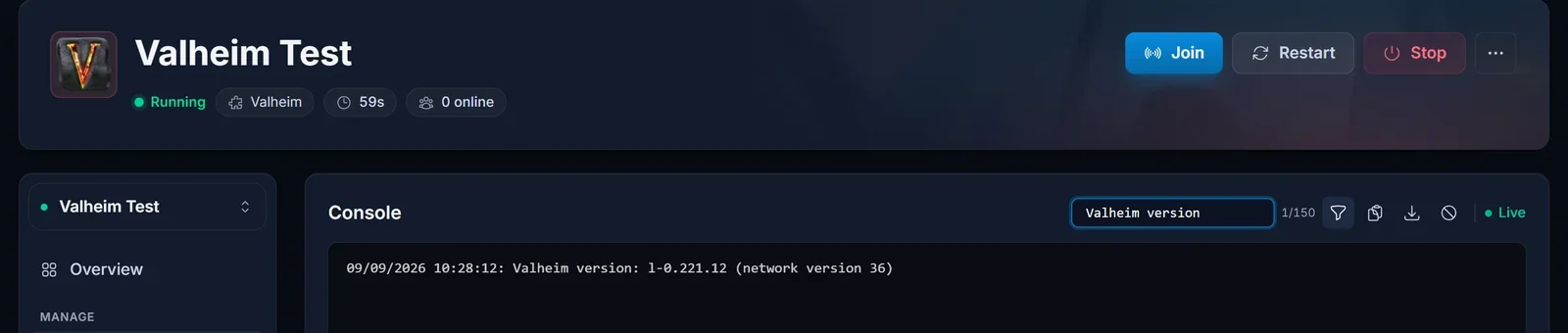
The line has this shape, with your own numbers in it:
<date> <time>: Valheim version: l-<build> (network version <number>)
That is how you confirm which build your server actually came back on. The value in brackets is the one that has to match between client and server, and a mismatched network version is exactly why a friend gets refused right after a game update.
Read the installed build id. Steam records it in a manifest file you can open from the Files tab:
steamapps/appmanifest_896660.acf
896660 is the Valheim dedicated server on Steam, not the game itself, which is app 892970. Inside the manifest there is a buildid line:
"buildid" "21981590"
The number in your file will be different. Note it, restart, look again, and if it changed then the new build is installed.
The automatic update switch
Every Valheim server we provision has automatic updates turned on, on both our vanilla configuration and the BepInEx one. The setting lives in the Startup tab, as a switch labelled Auto Update:
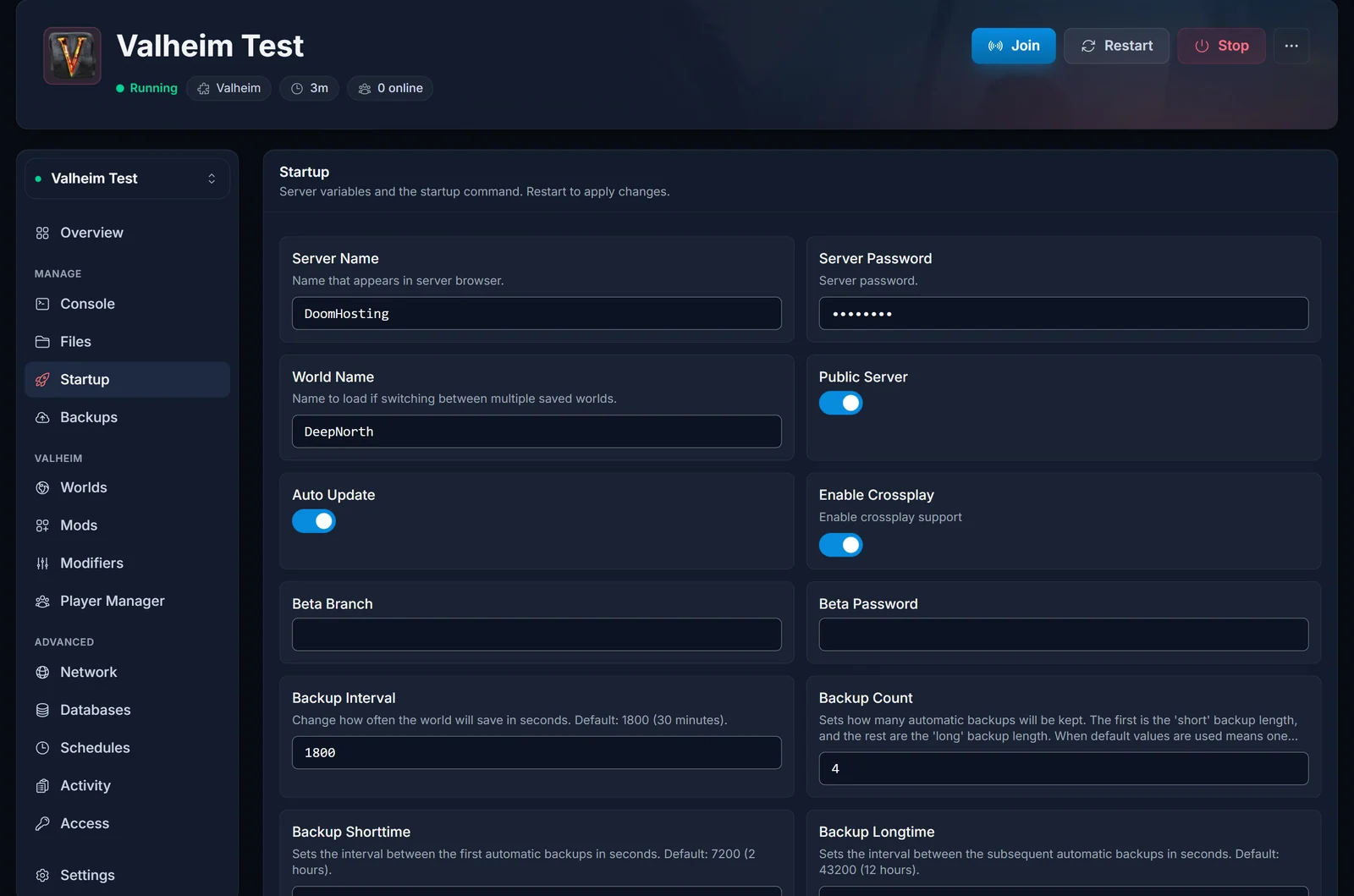
The variable behind it is AUTO_UPDATE and it defaults to on. Left alone, it does the right thing.
Turning it off is a legitimate choice, not a trap. It pins your server to the build it currently has, so a game update cannot arrive mid-session and take your mods down with it. If you run a heavily modded server, switching it off for a few days after a major release and back on once your mods have caught up is a sensible way to control when the breakage happens.
One warning: remember that you did it. A server deliberately pinned to an old build looks identical, from the outside, to a server nobody has restarted.
Beta branches stay where you put them
SRCDS_BETAID and SRCDS_BETAPASS in the Startup tab decide which branch the server pulls from. They are empty by default, meaning the ordinary public branch, and that is where nearly everyone should be.
A server you have set to a beta branch stays on it across every restart. It updates within the branch, not to the public build, so it will not move to the live release however many times you reboot it. Clear both fields and restart to come back to public.
After a big update, expect your mods to break
A major game update breaks mods, and your server will boot anyway. BepInEx loads what it can, skips what it cannot, and Valheim starts up looking perfectly healthy while some of your plugins are silently not running. Nothing in the game tells you, and nothing in the panel status tells you.
It is worse than usual after a release of this size. Iron Gate shipped no public test branch ahead of 1.0, so no mod author had the final build to test against before launch day. Nothing was validated in advance and the fixes land over the following days.
The console is where the truth is. A mod missing something it depends on looks like this:
[Error : BepInEx] Could not load [Epic Loot 0.12.15] because it has missing dependencies: com.ValheimModding.NewtonsoftJsonDetector
A mod that broke against the new game code, the classic post-update failure, looks like one of these:
[Error  :   BepInEx] Error loading [<plugin>] : <message>
[Error  :   BepInEx] Could not load [<plugin>] because it is incompatible with: <list>
Ignore everything else. A modded Valheim server prints alarming-looking warnings on every completely healthy boot, and the lines above are the ones that mean something. Our panel matches all of them automatically and offers the matching fix, so you do not have to read the console line by line.
Our advice after a big release is to wait rather than fight it. Mod authors usually update within days, so check Thunderstore, update the mod, restart. If one mod is holding the server hostage, take it out and put it back later: how to install BepInEx mods on your Valheim server covers both directions. For anything not mod related, common Valheim server problems and how to fix them has the rest.
Your world survives, but explored ground does not change
Updating does not touch your save. Your world, your buildings and your characters all come through intact.
What an update cannot do is rewrite terrain you have already visited. Valheim generates the map as players reach it, and a chunk keeps the biome it was generated with. So a new biome appears in unexplored map, or effectively nowhere on a world you have crossed for a year. For Deep North, Iron Gate recommends starting over: starting a fresh Deep North world shows how, without throwing away the world you already have.
Back up before a big update
Open the Backups tab and click Create backup before any update you know is a big one. That captures the whole server, world and configs together, and you can restore or download it later from the same screen. It costs about a minute.
Valheim also keeps rolling world backups on a timer (BACKUP_INTERVAL, 1800 seconds by default, and BACKUP_COUNT, 4). Those roll over as new ones are written, so they are not a substitute for a snapshot you took deliberately.
Common issues
I restarted and the version still has not changed. Check the AUTO_UPDATE switch in the Startup tab is on, then check SRCDS_BETAID is empty. A pinned server and a branch-locked server both survive a restart unchanged.
The console shows SteamCMD but nothing downloads. That is a normal, successful check. Steam had nothing newer to give, so your server is already on the current build.
The Restart button is greyed out. The server is not running. Use Start instead, which runs the same update on boot.
My friends can play together but I cannot join. The mismatch is on your end. Let Steam finish updating your own client and try again.
The server booted fine but my mods do nothing. Search the console for the error lines above. A skipped plugin does not stop the server, it just quietly does not run.
Do I lose my world when the server updates? No. Saves carry across game updates. Take a backup anyway before a major release.
Is the server actually back up? Check it from outside the panel with our Valheim server status checker.
Not got a server yet? Our Valheim server hosting runs on Ryzen 9 hardware with automatic updates on from the first boot, so keeping up with Iron Gate is a restart and nothing more.
