

Valheim's dedicated server stops accepting players at 10. There is no startup flag, no config key and no admin command that changes it, because the limit is baked into the game code. The only way past it is a server-side mod, and the good news is that only the server needs it: nobody joining you has to install anything.
This guide raises the cap using MaxPlayerCount, a BepInEx plugin that patches the check the server runs when someone connects. On a DoomHosting server the whole job is a loader switch, a one-click install and one number in a text file.
Why Valheim caps you at 10 players
The 10-player limit is a constant compiled into the server build. Iron Gate picked it because Valheim's networking sends world state to every connected client, so the bandwidth and CPU cost climbs with each player rather than staying flat.
That is why the usual suspects do nothing:
-public 1controls whether the server shows in the community browser, not capacity.-crossplaychanges the network backend (PlayFab instead of Steam), not capacity.- There is no
-maxplayersargument. Valheim's own server manual does not document one.
Anything claiming to change the cap without a mod is changing something else.
What you need
Two pieces:
- The BepInEx loader. BepInEx is the mod framework Valheim mods are built on. Your server has to be running it before any plugin loads.
- MaxPlayerCount by Azumatt. A small plugin whose only job is overriding the player-count check. Its README is explicit: "Only required to be installed on the server."
That second point is what makes this approach worth choosing. The older route most guides still recommend, ValheimPlus, has to be installed by every single player, and anyone without it is rejected with a version mismatch. MaxPlayerCount patches the server's own check, so your friends connect with a stock, unmodded game.
Step 1: get your server onto the BepInEx loader
Open your server in the DoomHosting control panel and go to the Mods tab. At the top are two loader tiles, Vanilla and BepInEx, with an "Active" badge on whichever one your server is running. Below them is the Thunderstore mod browser.
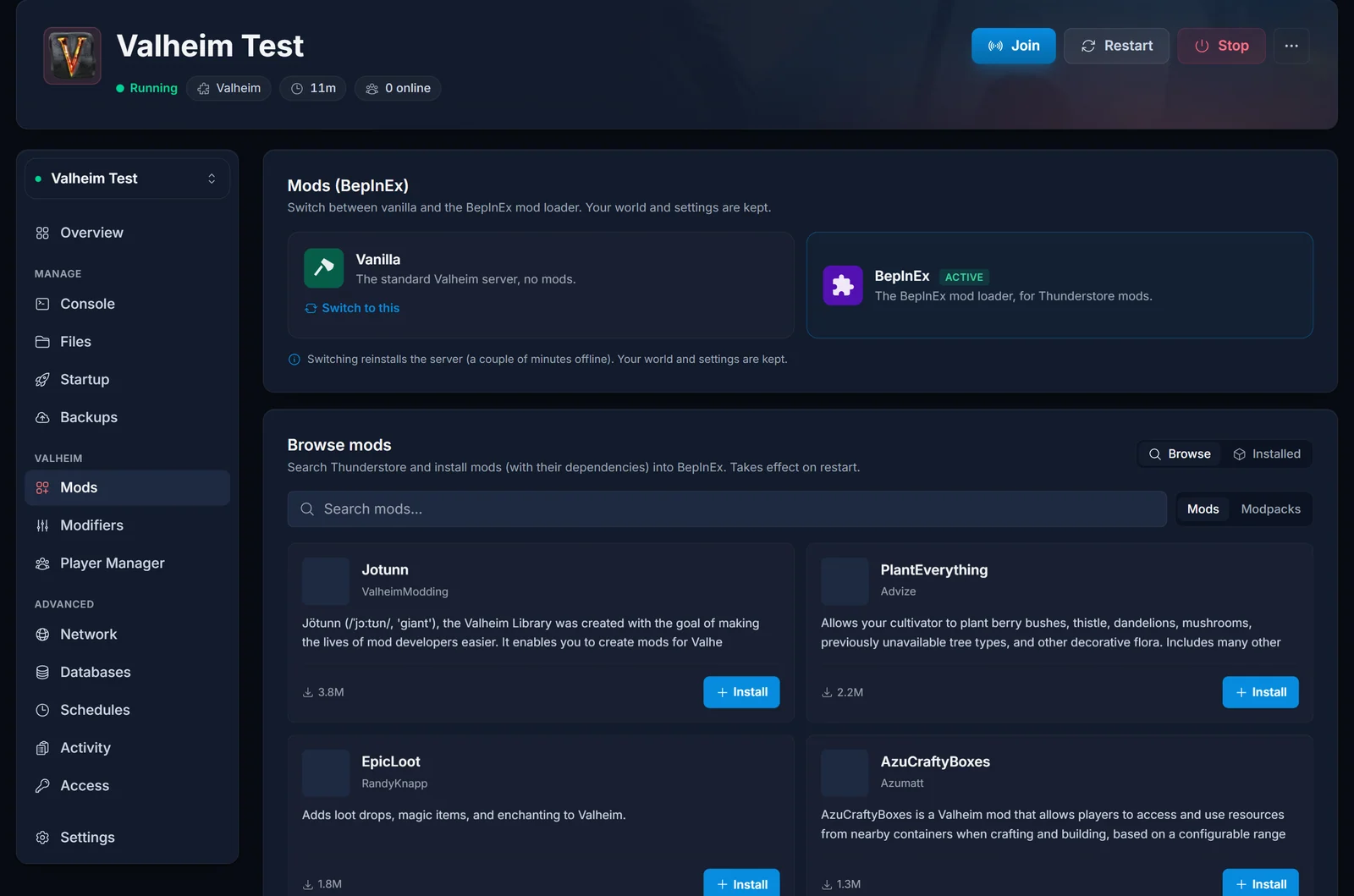
If BepInEx is already active, skip to Step 2.
If you are on Vanilla, you have two ways to go, and the second is fewer clicks:
- Click the BepInEx tile and confirm the switch.
- Or just search for the mod and click Install. The browser works on a vanilla server too, and an install from there prompts you to switch the loader first. The panel remembers which mod you picked, performs the switch, and offers the install again once the server is back, so it stays one job rather than two.
Either way there is a checkbox to take a backup first, which is worth using. Your world and configs are kept: the switch reinstalls the server files onto the BepInEx build and leaves your saves alone. The reinstall takes a few minutes.
Step 2: install MaxPlayerCount
In the Mods tab's Thunderstore browser, search for MaxPlayerCount and install the entry by Azumatt.
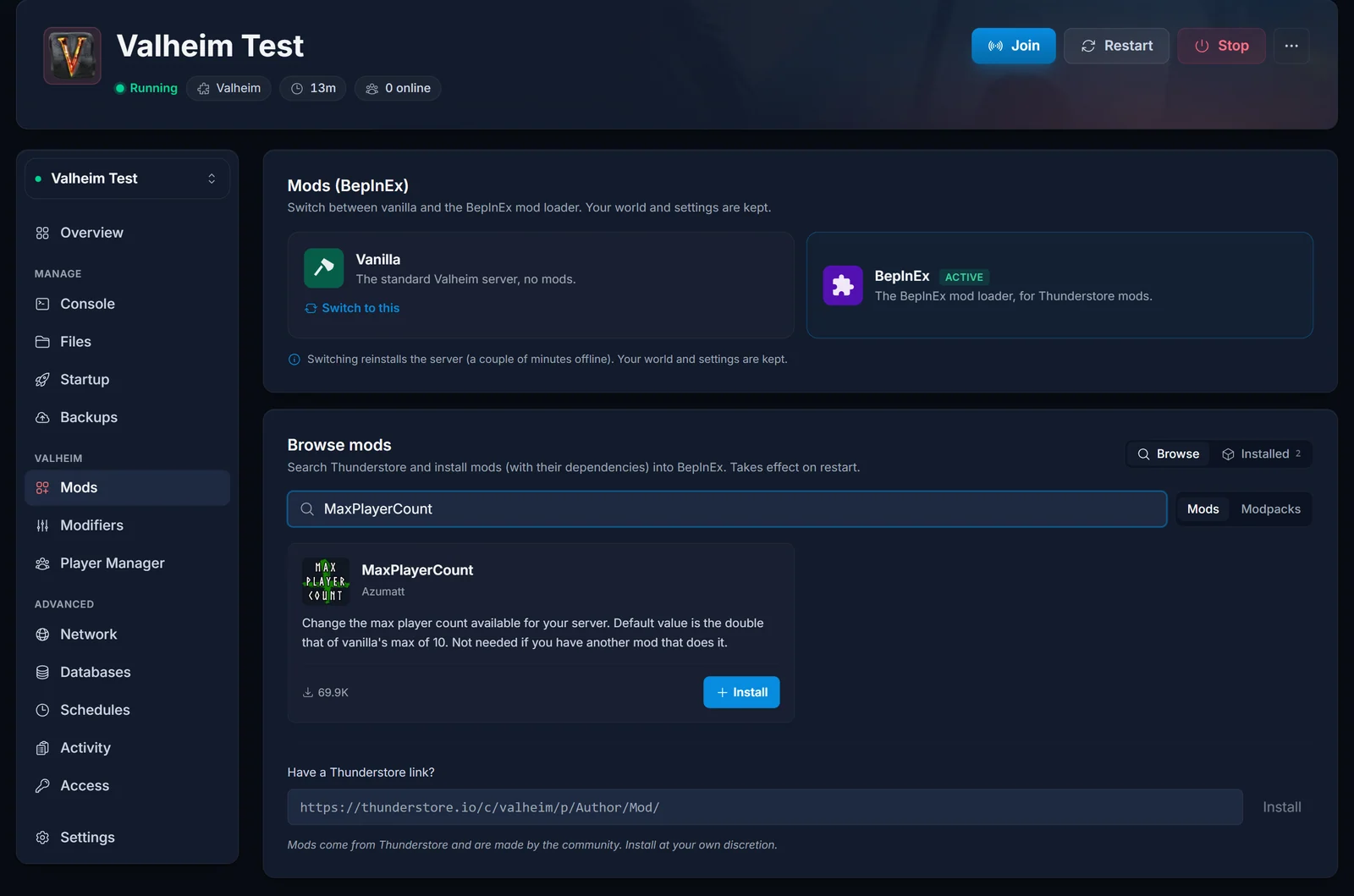
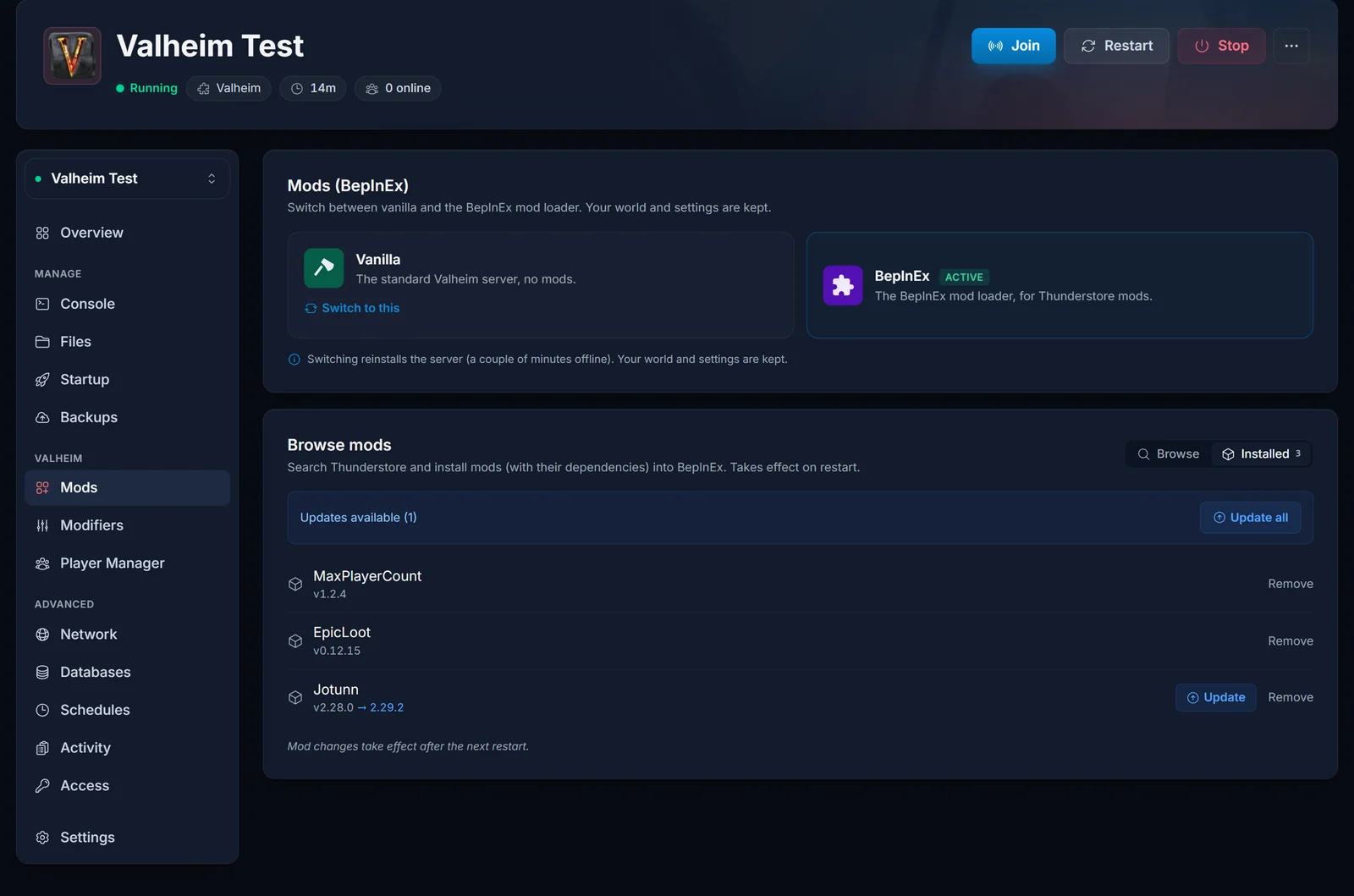
The panel pulls the package straight from Thunderstore into its own folder under BepInEx/plugins, so mods never overwrite each other. Once it finishes, MaxPlayerCount appears in your installed list.
Step 3: start the server once
This is the step most guides skip, and it is why people go looking for a config file that is not there yet.
BepInEx plugins write their config file the first time they load, not when they are installed. So start the server and let it come fully online. Only then does BepInEx/config/Azumatt.MaxPlayerCount.cfg exist.
Worth knowing: the mod ships with a default of 20, so after this first start your server already accepts 20 players. If 20 is the number you wanted, you are finished. Continue only if you want a different limit.
Step 4: set your player limit
Go back to the Mods tab. Now that the config file exists, MaxPlayerCount has a Settings button in your installed list. Click it and the panel builds a form from that file: MaxPlayerCount is a number field with the plugin's own description above it, and the form only accepts values the plugin accepts. Type your number, click Save, and the panel writes back the one line you changed and leaves the rest of the file alone.
No Settings button means the config file is not there yet, which is Step 3: start the server once with the mod loaded.
Fallback: edit the file yourself
The form edits an ordinary text file, so you can still open it directly. In the Files tab, browse to BepInEx/config and open Azumatt.MaxPlayerCount.cfg. It looks like this:
## Settings file was created by plugin MaxPlayerCount v1.2.4
## Plugin GUID: Azumatt.MaxPlayerCount

[1 - General]

## Override the player count that valheim checks for. Default is the vanilla max of 10.
# Setting type: Int32
# Default value: 20
MaxPlayerCount = 20
Change MaxPlayerCount to the number of slots you want, then save.
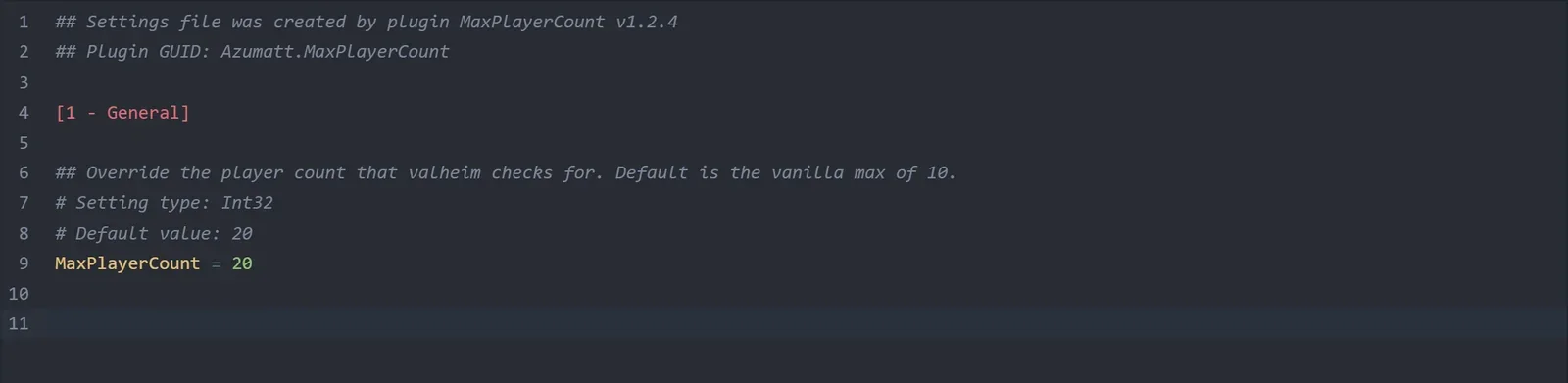
Two details that trip people up: the value belongs under the [1 - General] section heading, and the lines starting with # are comments the plugin regenerates. Editing the # Default value: 20 comment does nothing. Only the MaxPlayerCount = line matters.
Step 5: restart and verify
Restart the server from the power controls in the server header, which are on every tab. The setting is read as the plugin loads, so a restart is required. Saving on its own is not enough.
To confirm it took effect, open the Console tab and look for the plugin in the startup output:
[Info : BepInEx] Loading [MaxPlayerCount 1.2.4]
If that line is there, the patch is active and the server is enforcing your number instead of 10.
How many players can Valheim actually handle
Raising the cap is a two-minute job. Surviving it is a hardware question, and it is worth being honest about this because the game was never tuned for large groups.
What actually degrades, in the order you will notice it:
- Instance count. Every dropped item, tamed boar and placed build piece is a networked object. Big shared bases with many players cost far more than the player count alone suggests.
- RAM. Explored world area is the main driver, and more players means more of the map loaded at once. Budget roughly 512MB per couple of extra players on top of your base allocation, and work it out for your setup with the Valheim RAM calculator.
- Bandwidth. Valheim sends world updates to each client separately, so this scales with players rather than being shared.
In practice 15 to 20 players on a well-specced server is comfortable. Past that, expect rubber-banding during raids and in dense base areas no matter what hardware you throw at it. If your group is pushing 20 or more, running two servers for two regions usually plays better than one large one.
Troubleshooting
The config file does not exist. The server has not started with the mod loaded yet. Start it, wait until it is fully online, then look again. If it still is not there, check the Console tab for the Loading [MaxPlayerCount ...] line.
Players are still capped at 10. Almost always the server is still on the vanilla loader. Open the Mods tab and check which loader tile carries the "Active" badge. If it is Vanilla, no plugin is loading at all, whatever the installed list says. Switch to BepInEx and start again from Step 2.
The mod is installed but never loads. Check the Console tab for a BepInEx banner at startup. No banner means no BepInEx, which again points to the loader.
It worked, then stopped after an update. A Valheim patch can break plugin compatibility until the mod author rebuilds. Check the mod's Thunderstore page for a newer version and update it from the Mods tab.
Everyone gets a version mismatch. That is a symptom of a different mod, not this one. MaxPlayerCount is server-side and does not change what clients need. If you have other plugins installed, one of them is client-side and everyone needs it.
Frequently asked questions
Do my friends need to install the mod? No. MaxPlayerCount runs on the server only, and players join with an unmodified game.
Does this work with crossplay? Yes. The patch covers the connection check on both the Steam and PlayFab paths, so it applies whether or not you run with crossplay enabled.
Will switching to BepInEx wipe my world? No. The loader switch keeps your world and configs, and the panel offers a backup before it runs. Uploading a world is a separate job, covered in how to upload your Valheim world save.
What is the highest value I can set? The setting is a 32-bit integer, so there is no practical ceiling in the mod. Your server hardware is the real limit, not the number in the file.
Can I lower the limit instead? Yes. Setting a value below 10 works the same way, which is handy if you want to keep a small server small.
Do I need ValheimPlus? No, and you should not run both. They patch the same check and MaxPlayerCount states it is not needed alongside another mod that changes the cap. ValheimPlus has also gone quiet since 2024. If you are looking at wider mod options, see our roundup of the best Valheim server mods.
Running a group bigger than 10 on hardware that can keep up? Our Valheim server hosting runs on Ryzen 9 machines with the BepInEx loader and Thunderstore installs built into the panel, so the whole process above is a few clicks rather than an FTP session.
