

Almost every Valheim server problem traces back to a short list of causes, and nearly all of them announce themselves in the server console. Find your symptom below: each section names what is actually happening underneath, and what to do about it.
Start with the console, it tells you what happened
Open your server in the DoomHosting control panel and go to the Console tab. That is Valheim's own live output, with the lines our daemon prints around it.
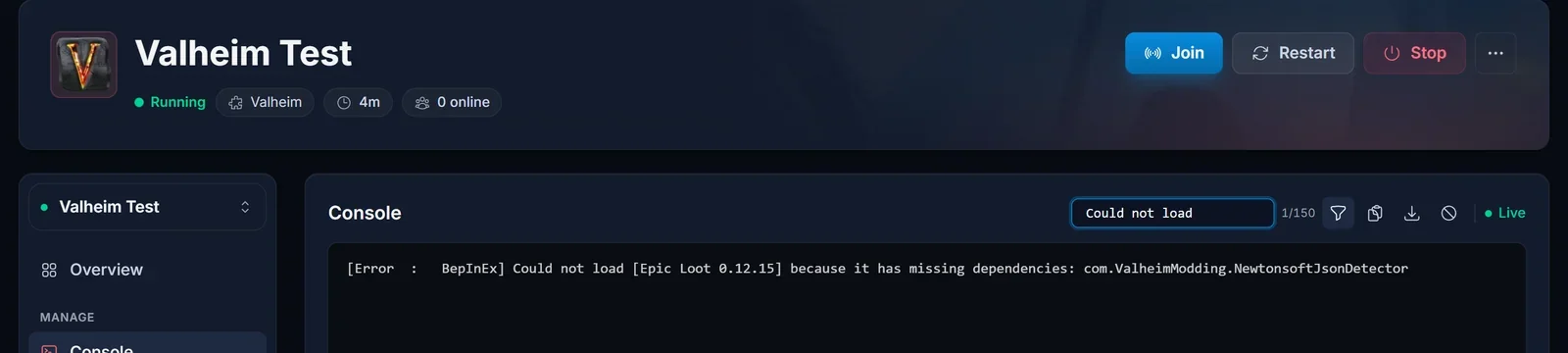
Read it selectively. A modded Valheim server prints a lot of noise while running perfectly well: warnings that scroll past on every boot, complaints from individual mods that get logged and skipped. Red text is not the signal. These three lines are:
[Error  :   BepInEx] Could not load [...] because it has missing dependencies: ...
[Error  :   BepInEx] Error loading [...] : ...
Out of memory: true
Each has its own section below. There is one useful positive line too. When BepInEx loads a plugin, it prints it by name and version:
[Info : BepInEx] Loading [MaxPlayerCount 1.2.4]
If a mod's Loading [...] line is not in the console, that mod is not running, whatever the file browser shows you.
You will not always have to read the console yourself. The panel watches for those three failures as they scroll past, and opens a dialog naming the mod or the problem it found with the matching fix attached.
My friends cannot connect after a Valheim update
Everyone played yesterday, Iron Gate published an update, and now nobody can get in. The clients updated and the server did not.
Steam updates a player's copy of the game the moment a build goes public. Your server does not follow along while it is running. Our Valheim servers have automatic updates enabled by default, and that update runs during startup, before the game process launches, so the server picks up the new build the next time it boots.
The fix is a restart. Stop the server, start it again, and watch the console. There is no separate update button because stopping and starting is the entire mechanism, covered in full in how to update your Valheim server.
Two things worth knowing: the restart right after a big patch takes longer than usual because the download happens during boot, and a server you have put on a beta branch stays there, so it updates when that branch updates rather than when the public one does.
The join code from yesterday does not work
Your friend enters the code, gets nothing, and swears it worked before. It did.
Valheim mints a brand new join code every single time the server boots. Yesterday's code is dead the moment the server restarts, including the restart you just did to apply an update. The code is not broken, it is old. This is by far the most common thing customers contact us about with Valheim.
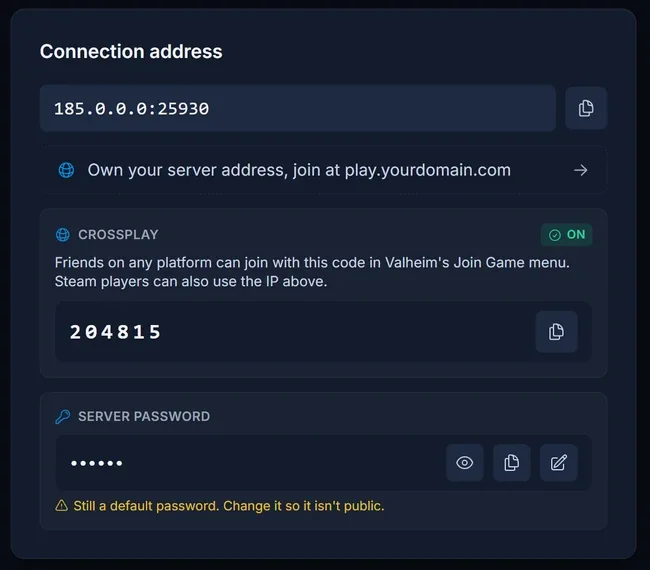
There is no way to pin a code to a server, so take the current one from the panel every time you share it. Open your server, look at the Connection address card on the Overview tab, and copy the code from there. The same card sits behind the Join button in the server header from any tab.
A few details that save you a round trip:
- Do not go by length. The code is not always the same number of digits, so one that looks too short is not necessarily wrong.
- A freshly started server prints the code a few seconds after it finishes booting. Give it a moment before deciding it never came up.
- Anyone who saved the server in their in game list saved the code, not the server. After a restart they delete that entry and add it again with the new code.
- If you switched your server to the modded setup to run BepInEx, check crossplay afterwards. The two setups do not carry the same crossplay default, and the join code is a crossplay feature.
Both ways in, the code and the direct address, are covered in how to join a Valheim server.
The server will not start at all
You press Start, the server churns for a while, and it comes back offline without ever loading a world.
The usual cause is the password. Valheim enforces rules on it and refuses to boot when they are broken:
- The password is required. A server with an empty password does not start.
- It has to be 5 to 20 characters.
- It must not appear inside the server name or inside the world name. That is the one that catches people, because it produces a configuration that looks entirely sensible and never boots:
Server name   Midgard Nights
World         Midgard
Password      Midgard
That server will not start: the password is contained in both the server name and the world name.
Two more limits while you are in there. The server name can be up to 60 characters and the world name up to 20. Correct the offending value and start the server again: the password has its own card on the Overview tab, and the server and world names are on the Startup tab. The password rules and every place it is set are in how to set or change your Valheim server password. If it still refuses, read the console from the top of the boot rather than the bottom, because the reason is printed early, before the noise.
I installed a mod and nothing happened
The mod is installed, the file is right there in the file browser, the server is Online, and in game the mod simply does not exist. No error anywhere. There are two causes, and from the outside they look identical.
The server is on the vanilla setup. Valheim runs on two different server configurations here, one plain and one with the BepInEx loader, and new servers are provisioned on the plain one. Only the BepInEx configuration starts the loader at boot. Drop a plugin into BepInEx/plugins on a vanilla server and the folder accepts it, the panel lists it, and nothing loads it. There is no error message at all, which is exactly why this one is so confusing.
You do not have to do that swap by hand. Installing a mod from the panel's Mods tab parks the mod, switches the server to the BepInEx setup, and offers the install again once the reinstall has finished. The walkthrough is in how to install BepInEx mods on your Valheim server.
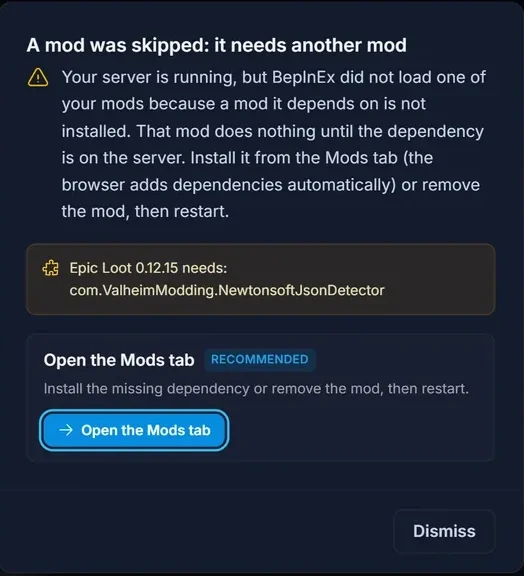
BepInEx skipped the plugin because a dependency is missing. Here the loader is running, it saw your mod, and it deliberately did not load it:
[Error : BepInEx] Could not load [Epic Loot 0.12.15] because it has missing dependencies: com.ValheimModding.NewtonsoftJsonDetector
The server boots normally and the panel shows Online, because Valheim itself never sees the plugin. Installing from Thunderstore through the panel pulls dependencies along with the mod, so in practice this turns up on hand uploaded files, or after somebody removed a mod that another mod quietly depended on. The line names exactly what is missing: install that, restart, and check for the Loading [...] line.
One more thing that looks like a broken install and is not: BepInEx writes a plugin's config file on the first boot with that plugin loaded, not when you install it. Immediately after installing there is no BepInEx/config/<Author>.<PluginName>.cfg yet, and so nothing to edit. Start the server once, then go and configure it.
My mods stopped working after a game update
The server boots, everyone can play, and one mod behaves as though it had been uninstalled. Nothing changed except a Valheim update.
This is a mod patching game code that Iron Gate has just changed. BepInEx catches the failure, skips that one plugin and carries on, so the server still comes up, minus the mod. Two lines mark it:
[Error  :   BepInEx] Error loading [<plugin>] : <message>
[Error  :   BepInEx] Could not load [<plugin>] because it is incompatible with: <list>
The first is the mod throwing while BepInEx loads it, the classic post update breakage. The second is a mod declaring itself incompatible with another mod on the server, where your only choice is which of the two to remove.
The honest fix for the first one is to wait for the mod author. Nothing you change on the server makes a mod compatible with a game build it was not written against. Remove it for now, keep playing without it, and reinstall when a compatible version is published.
Expect a wave of this after any large release. Iron Gate shipped no public test branch for the 1.0 release on 9 September 2026, so no mod author could validate against the final build before it went live and every one of them started from scratch on release day. Check the mod's Thunderstore page for a new version before you spend an evening on it.
The world shows "Not generated" or the world file is missing
You started the server, and there is no .db world file where you expected one, or the world reads as not generated.
Valheim only writes the world to disk on its first autosave, roughly 30 minutes after the server starts. Until then the world exists in memory and the file browser has nothing to show you. The Worlds tab says so in as many words, marking the world "Generating now" while the server runs and "Not generated" while it is off. Nothing is broken and there is nothing to fix.
Leave it running. Do not restart repeatedly during that first half hour trying to force the file to appear, because a restart before the first autosave is the one thing that genuinely can cost you the session. Automatic backups follow the same rhythm, running every 1800 seconds by default and keeping the last 4.
The server went offline on its own
The server was up and playable, then it stopped without anyone touching it, often with several people on and building. Look for this line in the console:
Out of memory: true
That is the daemon reporting that the container hit its memory limit and the process was killed. It matters that the line comes from the daemon rather than from the game or a mod. A modded Valheim server prints alarming warnings while running perfectly well, so almost nothing in the console proves on its own that a mod caused a crash. This line is not a complaint about memory, it is the kill itself, which is why it is the one to search for by name.
The fix is either more RAM on the plan or less running on the server. The panel detects this case automatically too and points you straight at the upgrade, so you are not left guessing whether a mod was to blame.
The server does not appear in the Steam server browser
The address looks right, but the server is not in the list, or adding it to your Steam favorites does nothing.
Valheim binds two ports: the game port, and the game port plus one. Steam finds the server on the higher one, while the game itself connects on the lower one. Mixing those up is what makes a perfectly good address look broken. So, working from the Connection address card in the panel:
- In game, use the address exactly as the card shows it.
- In Steam favorites, use the same IP address with the port number one higher.
Before you blame the address, confirm the server is reachable from outside your own network with our Valheim server status checker. And you never need to open ports on your own router for a rented server: it sits on a public IP in our datacentre with its ports already open.
Quick answers to the rest
Only 10 players can join. That cap is compiled into Valheim and there is no setting for it. Raising it takes a server side mod that the people joining do not have to install themselves: how to get more than 10 players on your Valheim server.
devcommands and spawn do nothing. Cheat commands do not work on a dedicated server. What an admin does get is kick, ban, unban, banned, save, setworldmodifier and setworldpreset, all entered with no leading slash. The full reference is at Valheim commands.
A mod has no settings in the panel. Its config file has not been written yet. Boot the server once with the mod loaded, then look again.
Valheim rejects the password when joining. Players need the server password from the connection card, not the join code, and not a DoomHosting account password. Setting a new one: how to set or change your Valheim server password.
Valheim says "Failed to connect". That one message covers several unrelated causes, from a stale join code to the crossplay login, and each has its own fix: Valheim failed to connect, how to fix it. When it is the login rather than your server, deleting the player's PlayFab account makes Valheim create a fresh one.
Console players cannot get in and the panel shows crossplay OFF. No join code exists in that state. The switch is on the Crossplay card on the Overview tab, and the trade-offs of leaving it off are in how to turn off crossplay on a Valheim server.
If none of this matches what you are seeing, open the Console tab, copy the twenty or so lines around the point where it went wrong, and send them to support with your server name. Those lines are what let us tell a real failure apart from the noise.
