


World modifiers are on the Modifiers tab of your server, in the Valheim section of the left-hand menu in the panel. Open it, set the dropdowns and toggles you want, and restart the server.
That is the short answer. The part worth reading: this one screen holds two kinds of setting, stored in two different places, and they do not behave the same way. Not knowing that is why a modifier can look like it never saved.
Open the Modifiers tab
Open your server in the DoomHosting control panel and look at the left-hand menu. Under the Valheim heading, between Mods and Player Manager, is Modifiers.
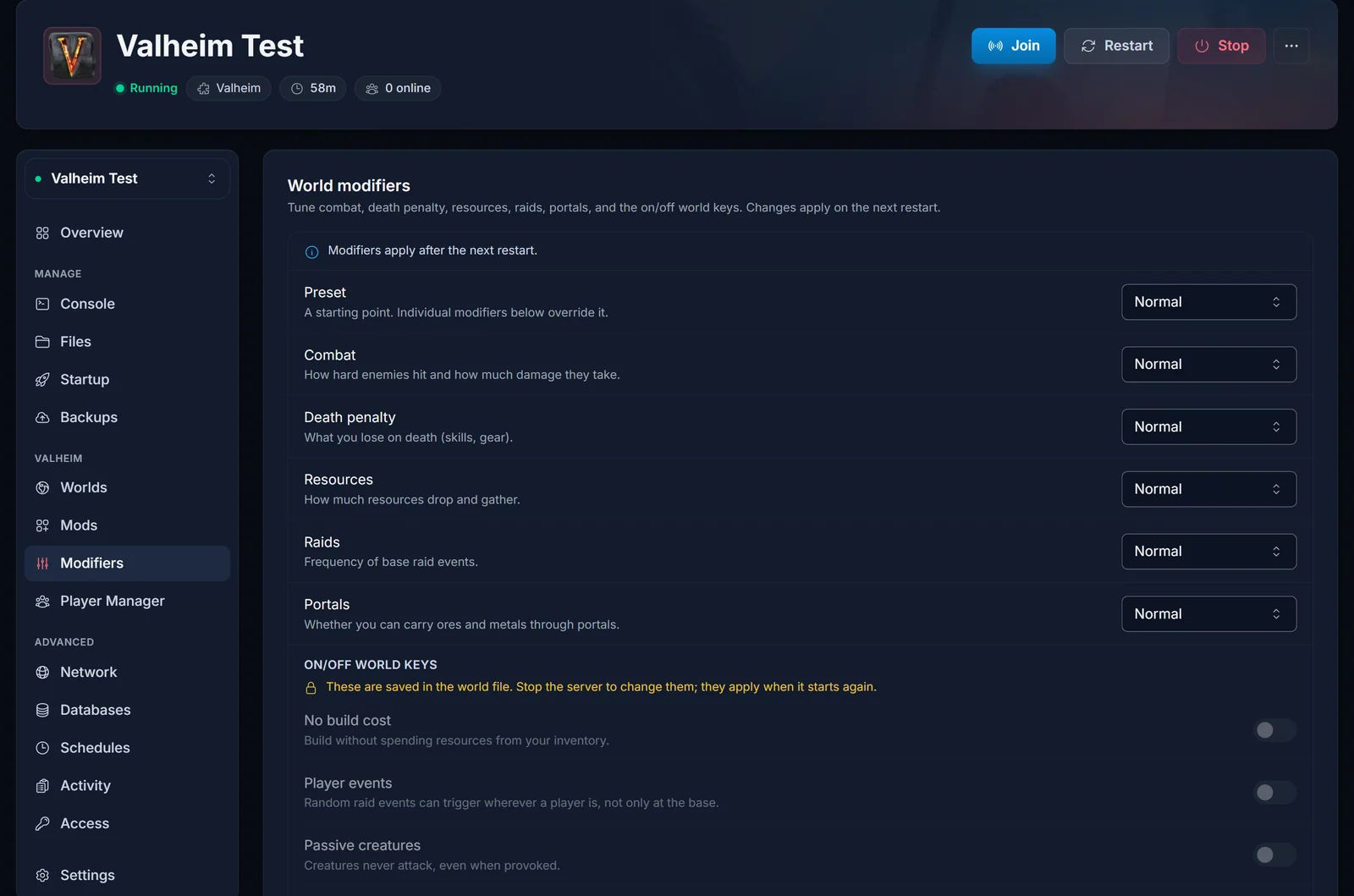
There is no save button. Every dropdown and toggle is written the moment you change it, and the bar across the top of the card confirms the save as it happens.
Two kinds of setting on one screen
The preset and the five graded modifiers at the top are server launch arguments. The server reads them fresh every time it boots. You can change them while the server is running, and they take effect on the next restart. Once you have edited one on a running server, the tab shows an amber bar reading "Changed modifiers take effect after a restart" with a Restart now button, and it is still there when you come back to the tab.
The four on/off world keys below them are not launch arguments at all. They are stored inside the world's own metadata file, in its starting global keys. That file is <World>.fwl on a pre-1.0 world and _main.<generation>.fwl2 inside the world's folder on a Valheim 1.0 one, and the panel finds the right one for you. It edits that file directly, so the server has to be stopped first. The tab states the rule in yellow: "These are saved in the world file. Stop the server to change them; they apply when it starts again." While the server is running, those toggles are locked and will not move.
The five graded modifiers and their values
Each one defaults to normal. The values below are the strings Valheim itself takes, so they stay English in the panel and in the console.
| Modifier | Values (normal is the default) |
What it changes |
|---|---|---|
combat |
normal, veryeasy, easy, hard, veryhard | How hard enemies hit and how much damage they take. |
deathpenalty |
normal, casual, veryeasy, easy, hard, hardcore | What you lose on death: skills and gear. |
resources |
normal, muchless, less, more, muchmore, most | How much resources drop and gather. The values are explained in how to change the resource drop rate. |
raids |
normal, none, muchless, less, more, muchmore | How often base raid events happen. none turns them off. |
portals |
normal, casual, hard, veryhard | Whether you can carry ores and metals through portals. |
A modifier left on normal is not written into the launch arguments at all. Normal is the default, so it is simply omitted: if the Startup tab says nothing about combat, that is correct and means combat is normal. Only the modifiers you moved off normal get written out.
The preset is a starting point, not a lock
Above the five modifiers sits a Preset dropdown with seven values:
normal casual easy hard hardcore immersive hammer
A preset sets several modifiers at once, and the individual dropdowns below override it. The tab puts it in one line: "A starting point. Individual modifiers below override it."
We are deliberately not printing a table of what each preset sets each modifier to: we have not verified that mapping value by value, and a wrong table would have you hunting a setting you never changed. For values you can be sure of, leave the preset on normal and set the five modifiers yourself.
The four on/off world keys
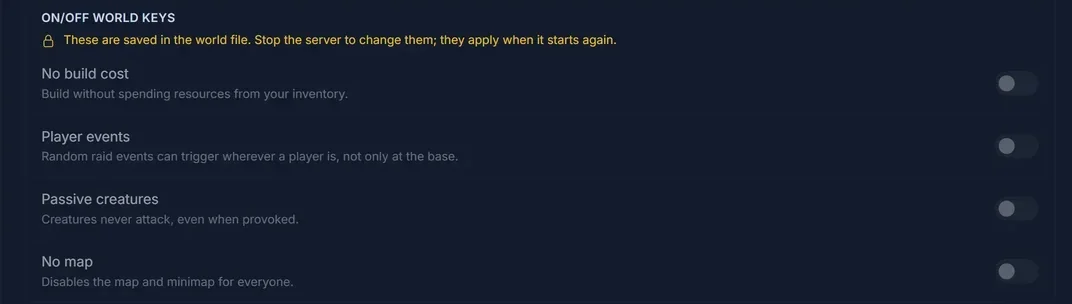
| Key | Panel label | What it does |
|---|---|---|
nobuildcost |
No build cost | Build without spending resources from your inventory. |
playerevents |
Player events | Random raid events can trigger wherever a player is, not only at the base. |
passivemobs |
Passive creatures | Creatures never attack, even when provoked. |
nomap |
No map | Disables the map and minimap for everyone. |
To change one: stop the server, wait until it reports offline, flip the toggle, start it again. The panel copies the world's metadata file to a .bak beside it in worlds_local before writing, so the original is still there if you change your mind. Valheim's own rolling backups are left alone.
Why the world keys cannot be launch arguments
Valheim has a -setkey launch argument, and it looks like the obvious way to switch these four on. It is a trap. -setkey does not write the key into the world's metadata file, and Valheim ships no -removekey to match it, so a key set that way could be turned on and never turned back off. That is why our panel edits the world file instead, and why the toggles need a stopped server.
Do not add -setkey for these four by hand. If an old configuration still carries one, the Modifiers tab strips it out the next time it saves. That is intended behaviour, not the panel losing your setting.
Which values do I actually want?
- A group that plays two evenings a week. Move
deathpenaltyto the softer end: casual, veryeasy or easy. Corpse runs and skill loss are what quietly kill a weeknight server. - Three people in a world built for ten.
resources moreormuchmore. Fewer hands means the same iron takes far longer to gather. - A building server.
raids nonestops base raid events entirely, andnobuildcostremoves the material cost. Remembernobuildcostis a world key, so stop the server for it. - Combat feels swingy. Move
combat, notdeathpenalty. Two different complaints. - Tired of sailing ore around.
portals casualis the least restrictive of the four portal values.
Change one thing, restart, and play a session before tuning further.
Editing a world file outside the panel
For a world that is not on the server yet, a local save you are about to upload for example, our Valheim World Modifier Editor opens a .fwl or a 1.0 .fwl2 in your browser, changes the modifiers and toggles and hands it back. It runs in the browser, so the save never leaves your device. Back up the world files first, and only edit while the server and the game are closed. Getting the edited world back onto the server is how to upload your Valheim world save.
The panel route and the console route
This guide is the panel route: the settings live on the server, survive restarts and apply to everyone, no admin required. The other route is the in-game console, where an admin types setworldmodifier, setworldpreset and resetworldkeys while playing. Those commands, and how to make yourself an admin, are covered in Valheim admin commands and how to become admin.
Common issues
I changed a modifier and nothing happened in game. Graded modifiers are launch arguments and the running server booted with the old ones. Restart it. The amber bar with the Restart now button is on the tab for exactly this.
A toggle will not move. The world keys are locked while the server runs, because the live process holds the world and rewrites the file itself. Stop the server, flip it, start again.
A modifier is missing from the launch arguments on the Startup tab. Check whether it is on normal. Normal is never written out, so that is correct.
I applied a preset and one modifier is not what I expected. The individual dropdowns override the preset. Whatever is picked below wins.
The world keys section has nothing to read. The keys come out of the world file, so a server that has never finished a first boot has no world to read yet. Start it once, let it generate the world, stop it, then set the keys. Getting started with your Valheim server walks through that first boot, and common Valheim server problems and fixes covers a boot that never finishes.
Not got a server yet? Our Valheim server hosting runs on Ryzen 9 hardware, and the Modifiers tab is there on every server from the first boot.
