


Valheim lag on a dedicated server usually shows up as rubberbanding and desync: you swing at a greydwarf and get pulled back a step, a door takes a second to open, building pieces pop in late, or a boat drifts sideways while everyone else sees it somewhere different. On a dedicated server that is almost never a hardware problem, and adding RAM almost never fixes it.
This guide works through the real causes in the order that fixes the most servers fastest, starting with the connection path itself.
If players are being thrown off the server completely rather than lagging while connected, that is a different problem. Start with Valheim Failed to connect: how to fix it instead.
Find your cause first. Most servers match one row:
| What you see | Most likely cause | Go to |
|---|---|---|
| Everyone lags, all over the map, and the group is Steam only | The crossplay relay | Section 1 |
| One area lags, and one player feels fine | The zone owner's connection | Section 2 |
| Smooth outdoors, terrible in the base | Instance count against the data cap | Section 3 |
| A hitch at the same rhythm all evening | The world save interval | Section 5 |
| Got worse as the group grew | Player count in one spot | Section 6 |
| Got worse after a game update | An outdated mod | Section 7 |
1. Turn crossplay off if everyone is on Steam
This is the first thing to try, and on a lot of servers it is the only thing you need.
With crossplay on, the server registers with Microsoft's PlayFab relay and every connection travels through it, including your Steam players. The relay adds latency and can route your traffic a long way around before it reaches the server. With crossplay off, Steam players connect through Steam instead and the relay is out of the path entirely.
In your server panel it is the switch on the Crossplay card on the Overview tab.
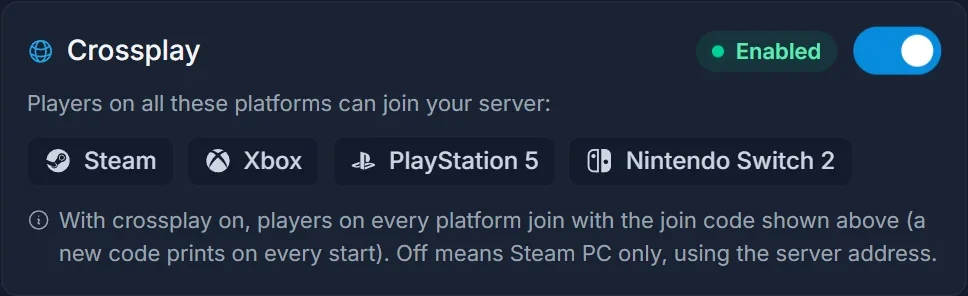
Flip it off and restart the server. The panel also sets Public server on at the same time, which it has to, because Join IP asks the server's Steam query port before it connects.
The trade is real, so read it before you flip anything:
- Steam players join with Join IP and the server address from the Overview instead of a join code.
- The join code stops existing, and an old one no longer works.
- Xbox, Game Pass, PS5 and Switch 2 players lose access to the server entirely.
If anyone in your group plays on a console, leave crossplay on and work down the rest of this list. The full procedure, including what players do afterwards, is in how to turn off crossplay on a Valheim server.
2. Work out who owns the zone
Valheim is not a fully server-authoritative game. The first player to enter an area becomes the network owner for that area, and their machine runs the physics and the AI there while the server relays the results to everyone else.
That has one very practical consequence: a single player on a weak PC or a bad connection can make an area lag for the whole group, no matter how good the server is. The giveaway is that the person causing it usually feels the least lag, because their own client is authoritative and never has to wait for anyone.
What to do:
- Ask who arrived in the area first. That is your zone owner.
- Have that player check their own side: a wired connection instead of wifi, nothing downloading in the background, and no other game or stream running.
- Try letting somebody else walk in first. If the lag follows the same person around the map, you have found it.
- If it is a mob fight that stutters, the owner of the zone the mobs are standing in is the one to look at, not whoever is fighting.
This is also why a raid on a friend's base can feel worse than the same raid on yours.
If the same player ends up owning the zone every time and cannot fix their connection, there is a server-side answer: the Serverside Simulations mod on Thunderstore moves zone simulation onto the server itself, so nobody's PC is in charge of the area. It goes on the server only, not on the players. The cost is a little extra latency for the player who would otherwise have owned the zone, and like any mod it can break on a game patch, so back up the world first and disable it after an update until the author confirms it still works.
3. The per-player data cap and oversized bases
Valheim caps the data it sends to each connected player at roughly 64 KB per second. That is plenty in the forest and nowhere near enough inside a mega base.
Everything is an instance the server has to describe: every wall, beam, torch, chest, item on the floor, tamed boar, and every piece of terrain you have dug or raised. Walk into a dense base and the server tries to push all of it down a pipe that is already full. The result is pieces appearing seconds late, doors that lag, chest contents that flicker, and the whole area feeling underwater while the rest of the map is fine.
Press F2 in game to see the instance count where you are standing. Compare a spot in the wilderness with a spot inside your base and the difference will be obvious.
Fixes, cheapest first:
- Break up one giant base into a few smaller ones. Splitting the same build across two zones halves what any single connection has to receive.
- Demolish old starter bases, half-built projects and outposts nobody uses. They still count even when nobody is there.
- Clean up the floor. Dropped item piles, ore stacks left outside and rows of old torches are all instances.
- Go easy on terraforming. Dug and raised ground is stored per edit, so a heavily sculpted hillside is expensive.
- Thin out tamed animals. A pen of forty boars is forty things the server tracks and sends.
Better Networking raises the cap
The Better Networking mod raises that per-player limit and compresses what the server sends, which is the only way to actually lift the 64 KB ceiling rather than work around it. Install it on the server and on every player's client: players without it can still connect, but the compression only works between two machines that both run it, so a player who skips it stays on the old cap.
It is a BepInEx mod, so your server needs the BepInEx loader. The panel's Mods tab handles both halves: search for it, click Install, and if the server is still on Vanilla the panel switches it to BepInEx first.
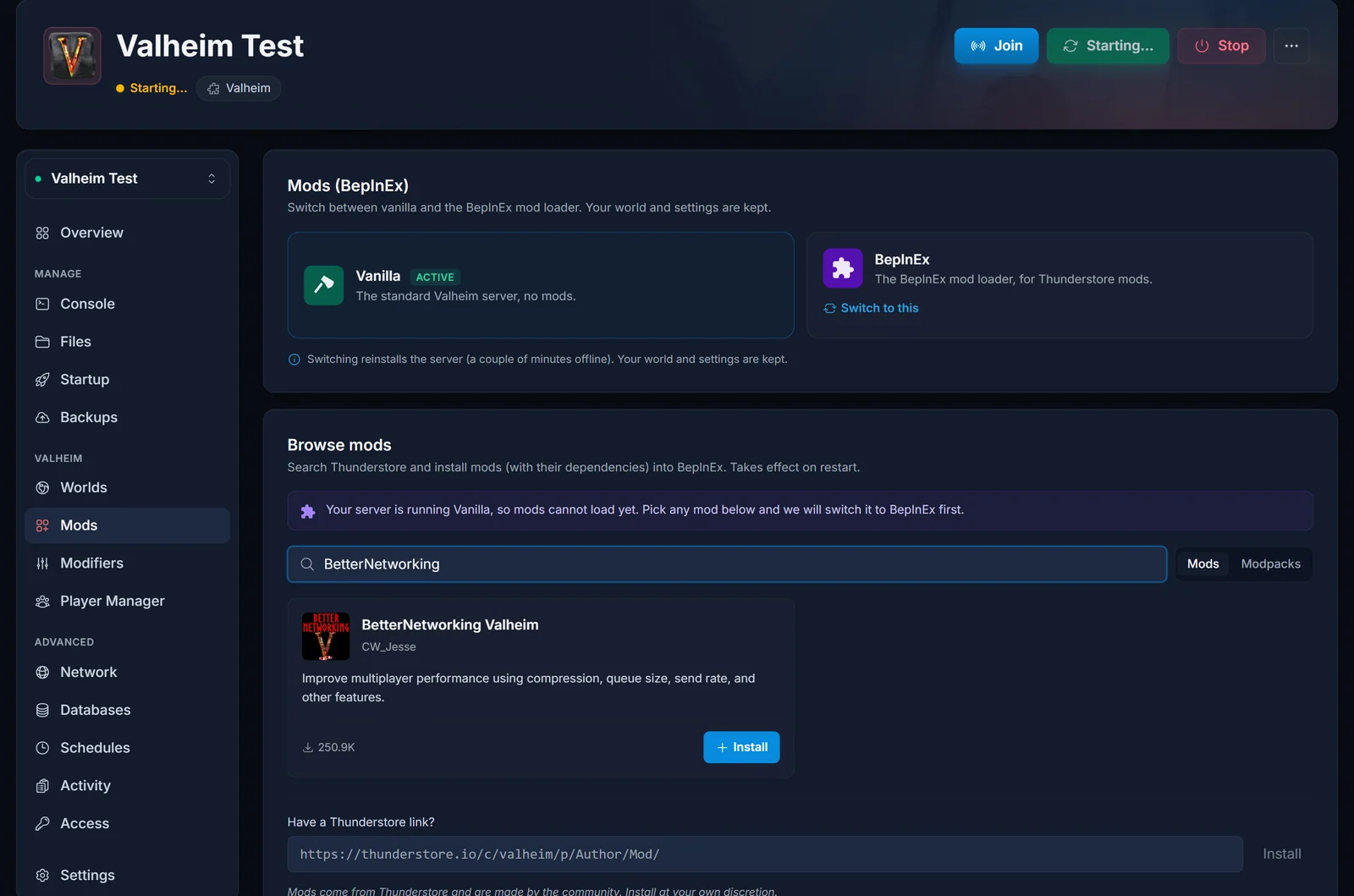
Switching loaders reinstalls the server, which means a couple of minutes offline. Your world and settings are kept. Before you commit, open the Versions tab on the mod's Thunderstore page: if the newest upload is older than the game's latest big update, read the comments for reports on the current build first. At the time of writing Better Networking has not been updated since before the Ashlands update, and a networking mod that no longer matches the game build causes more trouble than it solves.
The loader swap and the manual route are covered in how to install BepInEx mods on a Valheim server.
4. Dense biomes hurt more than open ones
The Ashlands is the heaviest biome in the game for a server: broken terrain, lava, dense particle effects and far more active enemies than any earlier biome. Every one of those enemies and terrain pieces is an instance the server keeps each nearby player updated on, so the per-player cap from section 3 fills faster there, and the server's CPU works harder on top. Hosts see it consistently; we have not measured the exact difference, so treat it as a pattern rather than a number.
You cannot configure that away. What helps is keeping the group small when you push into it: four players spread across an Ashlands fight is a very different load from ten players stacked in one spot, because the server sends every one of them their own copy.
5. The world save interval
Valheim writes the world to disk on a fixed interval, and each write is a short freeze for everyone. That is the hitch you sometimes get at the same rhythm all evening.
The interval lives in the Startup tab of your panel as Backup Interval, in seconds. The default is 1800, which is 30 minutes.
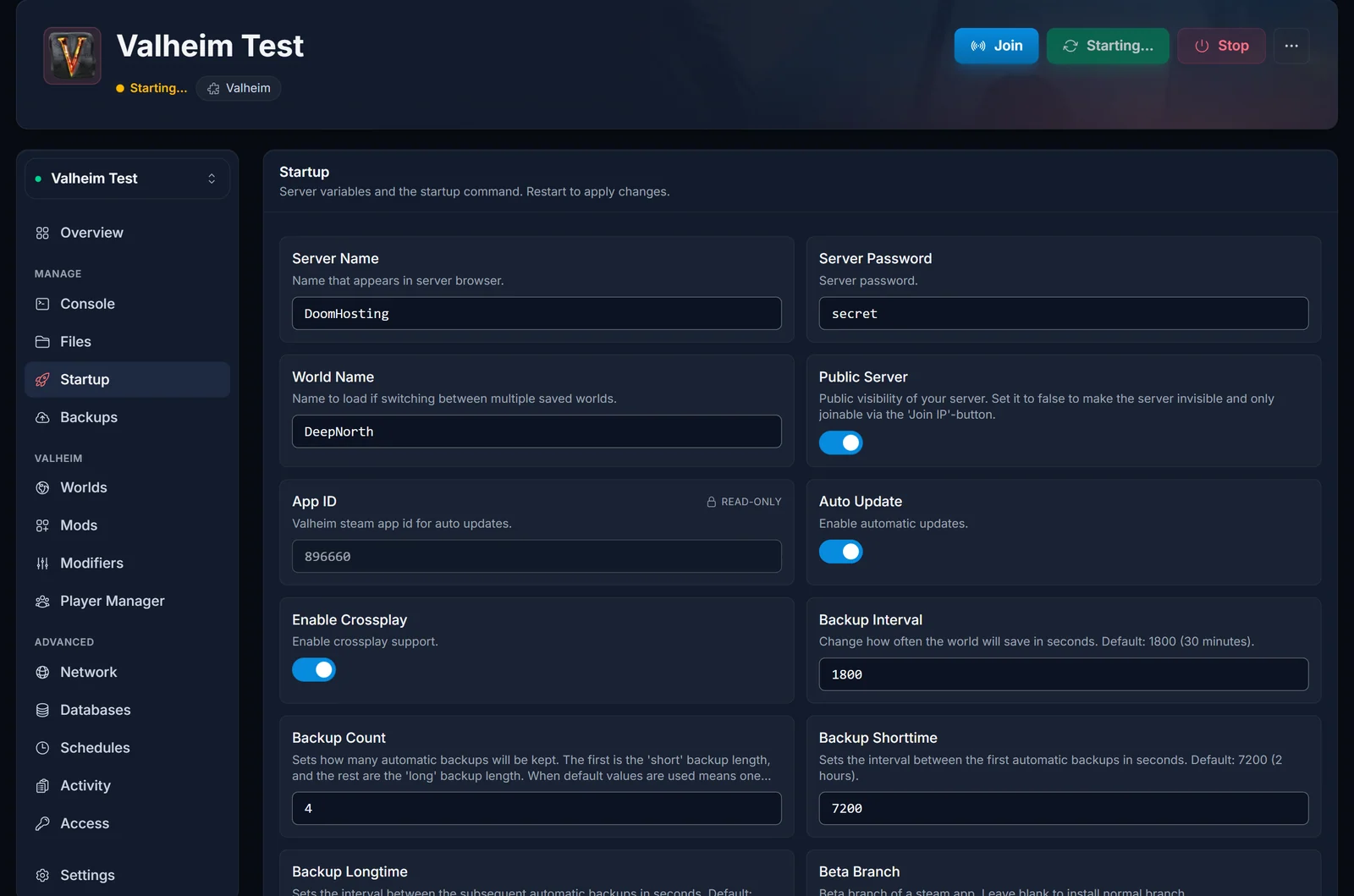
1800 is a sane number and there is no reason to change it for performance. If a previous owner dropped it to something short to be safe, that trade is real: a very short interval means a very frequent hitch. Do not go below about 900 unless you have decided you would rather feel the stutter than risk losing the last quarter of an hour of progress. Going the other way, a longer interval means a smoother evening and more to redo if the server dies.
Restart the server after changing it.
6. Player count
Ten players is the game's own default cap, and it is a default rather than a hardware limit for a reason. The cost is not linear: each player in an area needs their own stream of what everyone else is doing, so a group all standing in one base is far more expensive than the same group spread across the map.
If you have raised the cap, that is the first thing to put back when you are chasing lag. If you want the higher cap and the smooth server, keep the group spread out, and read how to get more than 10 players on a Valheim server for what the limit actually costs.
7. Mods
BepInEx mods run on the server's CPU. A handful of light ones cost nothing you will notice. A stack of content mods, anything that spawns extra creatures, and anything that runs work every tick can flatten a server on its own.
Test rather than guess. The Mods tab switches the server back to Vanilla, keeping your world and settings, so you can play one evening unmodded and compare. If vanilla is smooth, add your mods back a few at a time until the lag returns. Also check for updates: a mod built for an older game build can misbehave quietly after an update rather than failing outright.
Two mods genuinely reduce lag: Better Networking (section 3) and Serverside Simulations (section 2). Everything else sold as a performance mod is client-side graphics work and changes nothing on the server. Install steps and settings for both are in best Valheim server performance mods.
8. Server resources and location
Only now is it worth looking at the box.
Valheim's server is CPU bound and does most of its work on a single thread, so single-core speed is what matters and extra cores do very little. Adding RAM only helps if the server is actually running out of RAM, which is why "I upgraded and nothing changed" is such a common outcome.
Check both on the Overview tab of your panel. If RAM sits well under its ceiling while the server lags, more RAM is not your fix.
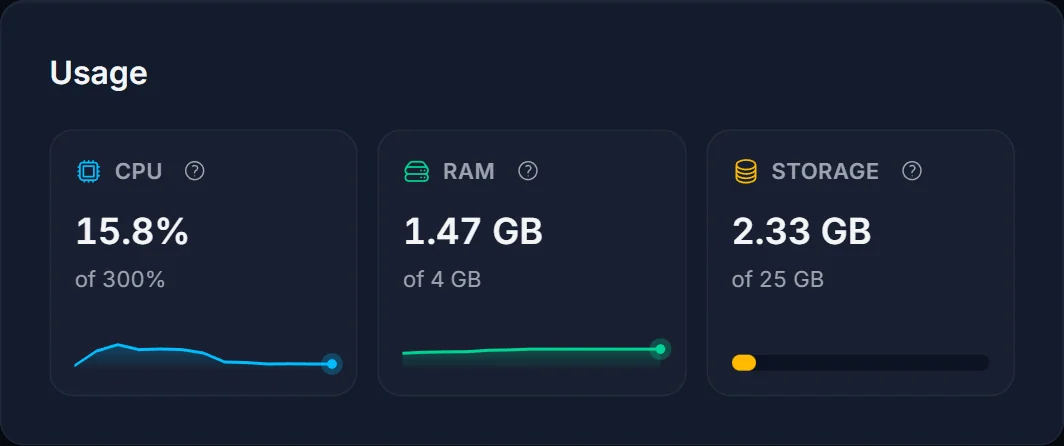
Distance matters as much as specs. Latency is a physical distance problem, so pick the location closest to where most of your group actually lives when you order or move a server. A European group on a European node will beat the same group on a faster machine across an ocean.
To measure rather than guess, run your address through our Valheim server status checker. It tells you whether the server is answering and how quickly, from outside your own network, which separates a slow server from a slow connection to it.
Common issues
Only one player lags. That is their connection, or they are the zone owner and everyone else is waiting on them. Have them try a wired connection, then have someone else enter the area first.
Everything is smooth until we reach the base. That is the instance count against the 64 KB per player cap. Press F2 in the base and compare it with open ground, then trim, split or mod (sections 3 and 4).
It got worse after a game update. Do not assume the update broke your server. Check your mods first, since an outdated mod is the usual cause of a bad first evening after a patch, then work down this list from the top.
The server stutters at a regular interval. That is the world save. Look at Backup Interval on the Startup tab.
Lag started when we grew the group. More players in one area multiply the per-player traffic. Spread out, or see section 6.
Nothing here matches. Work through common Valheim server problems and fixes, which covers the boot, connection and world problems that can look like lag from the inside.
Frequently asked questions
Will more RAM fix my Valheim lag? Almost never. Unless the Usage card shows RAM close to its ceiling, the bottleneck is the per-player data cap, a zone owner's connection, or the relay, and none of those care how much memory the server has.
Does turning crossplay off really help? For a Steam-only group, yes: it takes the PlayFab relay out of the connection path. It is not a fix for base lag or a bad client connection, which is why it is first on this list rather than the only item on it.
Do all my players need Better Networking, or just the server? Put it on all of them. Players without it can still connect, but the compression only works between two machines that both run it, so anyone who skips it stays on the old cap.
How do I know if my base is the problem? Press F2 in the base and again out in the wild. If the instance count in the base is far higher and the lag follows the same boundary, you have your answer.
Is rubberbanding the same as desync? They come from the same place. Rubberbanding is what you feel when your own position is corrected by the server, and desync is when two players see different versions of the same scene. Both mean the update stream is not keeping up.
Can I just restart the server to fix it? A restart clears the symptom for a while on a server that has been up for a long time, and it is a reasonable thing to schedule. It is not a fix for anything in this guide, so if the lag is back within the hour, keep reading from section 1.
Not got a server yet? Our Valheim server hosting runs on Ryzen 9 hardware, and the crossplay switch, the save interval, the mod loader and the CPU and RAM graphs are all on the same control panel from the first boot.
