

"Incompatible version" means the player's game and the server are running different Valheim builds. Valheim only lets a client join a server on the same network version, so the fix is to get both sides onto the same build. Usually it is the player's game that is behind, so start there.
What the error means
Every Valheim build carries a network version number. When a player connects, the server compares its number with the client's, and if they differ the connection is refused with "Incompatible version". The game does not say which side is behind.
It almost always shows up right after a patch. Steam updates players at different times, so one friend can be on the new build while another is still on the old one, and the server sits on whatever it booted with.
Fix it on the player's side first
If one player gets the error and others join fine, the problem is that player's game. Have them work through these in order and try to join after each one.
1. Restart Steam so Valheim updates. Steam does not always pull an update while it is running. Quit it fully (Steam menu, then Exit, not just closing the window), open it again and look at the Downloads page. If a Valheim update is waiting, let it finish before launching the game.
2. Check Valheim is not on a beta branch. Right-click Valheim in your Steam library, open Properties, then Betas. Beta Participation must say None. A player on the public test branch runs a newer build than any normal server, so they get the error everywhere. Set it to None and let Steam download the regular build.
3. Verify the game files. In the same Properties window, open Installed Files and click Verify integrity of game files. This fixes a half-finished update that left the game on a mixed build.
Xbox app and PC Game Pass players do not update through Steam. Open the Xbox app, go to your library, and install any pending Valheim update. On Xbox, PS5 or Switch 2, install the update from the console's own game menu. A server only accepts one network version, so every platform has to be on the same build before crossplay players can join each other.
Check the server's version
If everyone gets the error, or the server was not restarted after a patch, look at the server. A DoomHosting Valheim server updates itself every time it starts, so a restart is the update. Click Restart in the panel and give it a few minutes if a big patch is downloading.
To see the build the server is running, open the Console tab and type Valheim version into the filter above the output:
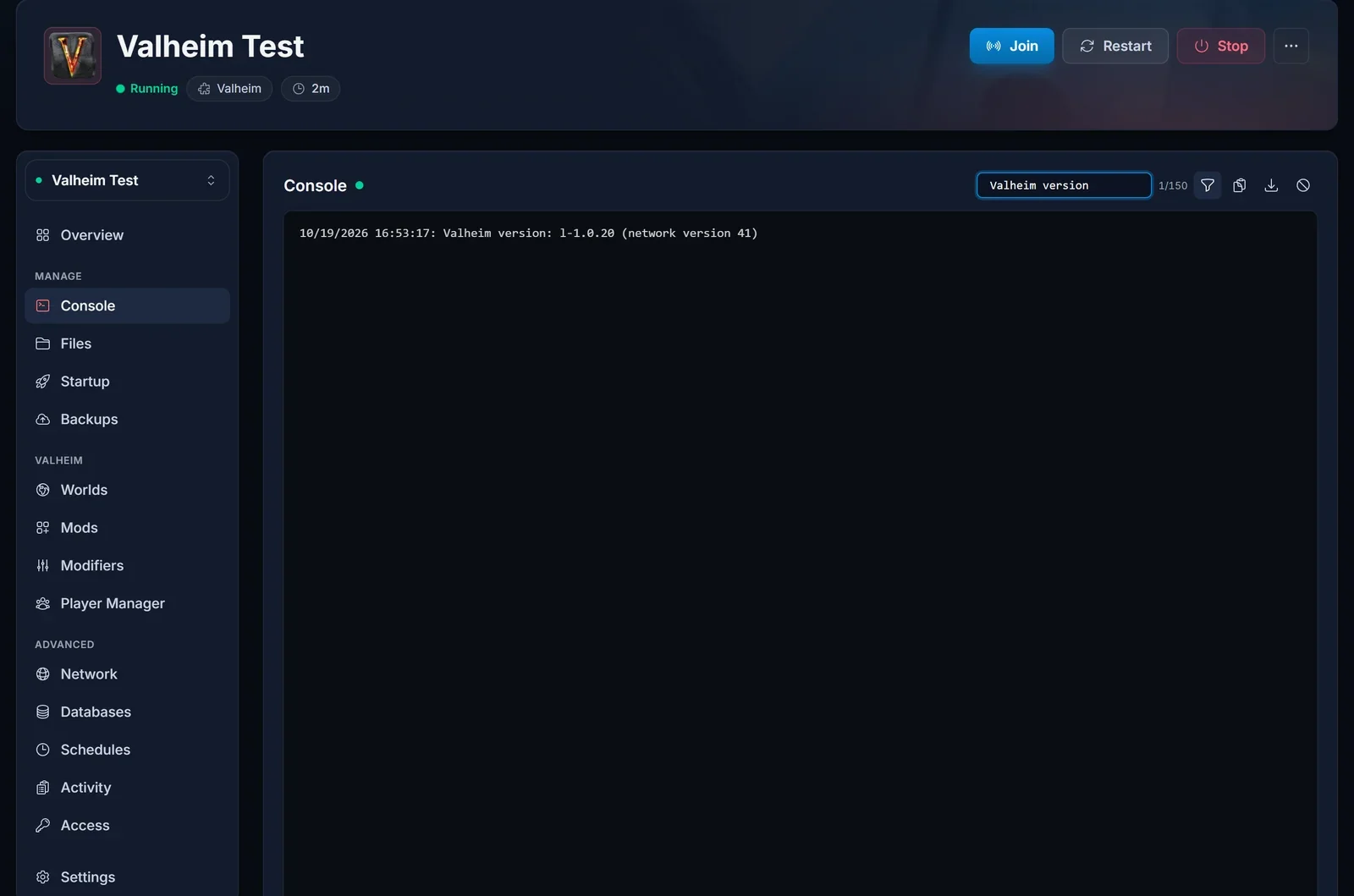
The line looks like this:
Valheim version: l-x.x.x (network version N)
The number in brackets is the one that has to match the players. If the server restarted and the line still shows an old build, check two settings in the Startup tab:
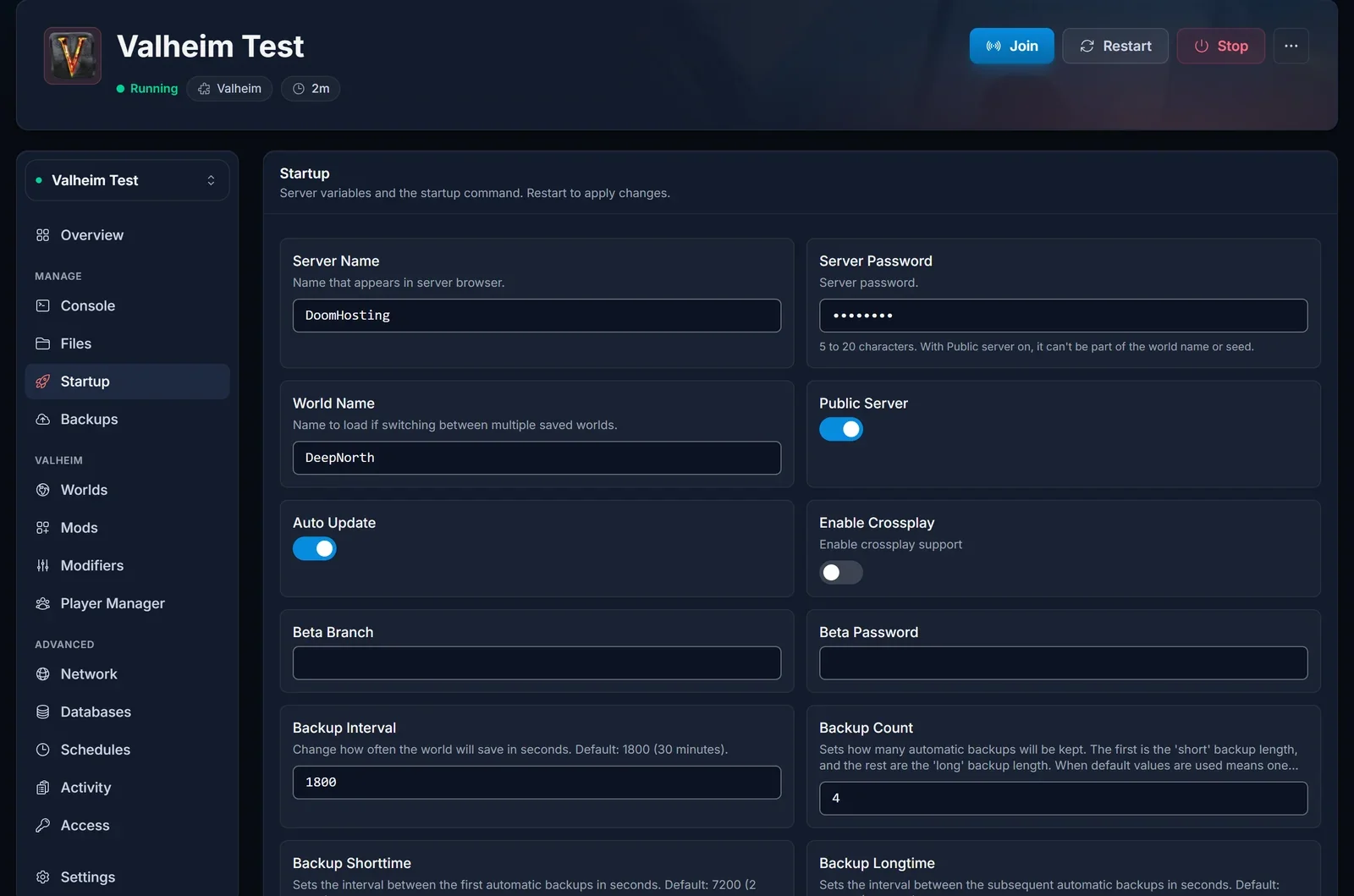
- Auto Update must be on. If it is off, the server stays on its current build forever.
- Beta Branch should be empty. A server set to a beta branch stays on it and will not match players on the normal build.
Our guide to updating your Valheim server covers restarts, the build id and backups in more detail.
Modded servers (BepInEx)
On a BepInEx server the game version can match and players can still be turned away. Many Valheim mods carry their own version check, often through Jotunn or ServerSync, and refuse a player whose copy of the mod is missing or a different version. Depending on the mod, that can show up as an incompatible version message or name the mod that did not match.
So on a modded server, every player needs the same mods at the same versions as the server. Open the Mods tab in the panel, compare the list with what the player has installed (r2modman or Thunderstore Mod Manager shows it), and update or install until they match. After a game patch, also wait for the mods themselves to update: an outdated mod on either side keeps the versions apart. Our BepInEx mods guide shows how to add, update and remove mods on the server.
If a player runs mods and your server is vanilla, have them launch Valheim without their mod manager and try again.
Common issues
Only one player gets the error. It is their game. Restart Steam, set Betas to None, verify files.
Everyone got the error after a Valheim patch. The server has not picked up the update yet. Restart it from the panel.
I restarted the server and it is still on the old build. Turn Auto Update on and clear Beta Branch in the Startup tab, then restart again.
Steam players join but Game Pass players cannot. The Xbox build may not have the patch yet, or the player has not installed it. Nothing on the server can bridge two network versions, so wait until both stores have the update.
The versions match and players still get refused. On a modded server, compare mods and mod versions. If the error is "Failed to connect" instead, see how to fix Valheim failed to connect.
Not got a server yet? Our Valheim server hosting updates on every restart, so keeping up with patches takes one click.
