

How to Make a Minecraft Server: Step-by-Step Setup Guide
The quickest way to make a Minecraft server is to rent one: pick a plan, choose your Minecraft version, start the server and share its address with your friends. With DoomHosting that takes about five minutes, and you never touch a command line. This guide walks through every step, from ordering to your first login as operator. If you would rather run a free server on your own computer, that is covered at the end.
This guide is for Minecraft Java Edition. For phones, consoles and Windows Bedrock, see our Minecraft Bedrock server hosting instead, or let Bedrock players join a Java server with GeyserMC crossplay.
What you need before you start
- Minecraft Java Edition on every player's computer.
- A server plan with enough RAM. A vanilla or Paper server for a group of friends runs well on 3 to 4 GB. Modpacks need more, often 6 GB or above. Our Minecraft RAM calculator gives you a number for your player count and mods.
- A location close to your players. The closer the server, the lower everyone's ping.
Step 1: Order your server
Go to Minecraft server hosting, choose your RAM and location, and check out. The server is set up automatically right after payment and appears in your panel.
You accept the Minecraft EULA at checkout, and the panel writes eula=true to the server for you before every start. So unlike a home server, you never have to edit eula.txt.
Step 2: Choose your server software and version
Open your server in the panel and go to the Version tab. Here you pick the software your server runs and which Minecraft version it uses. Click Browse versions on a card to see every version available for it.
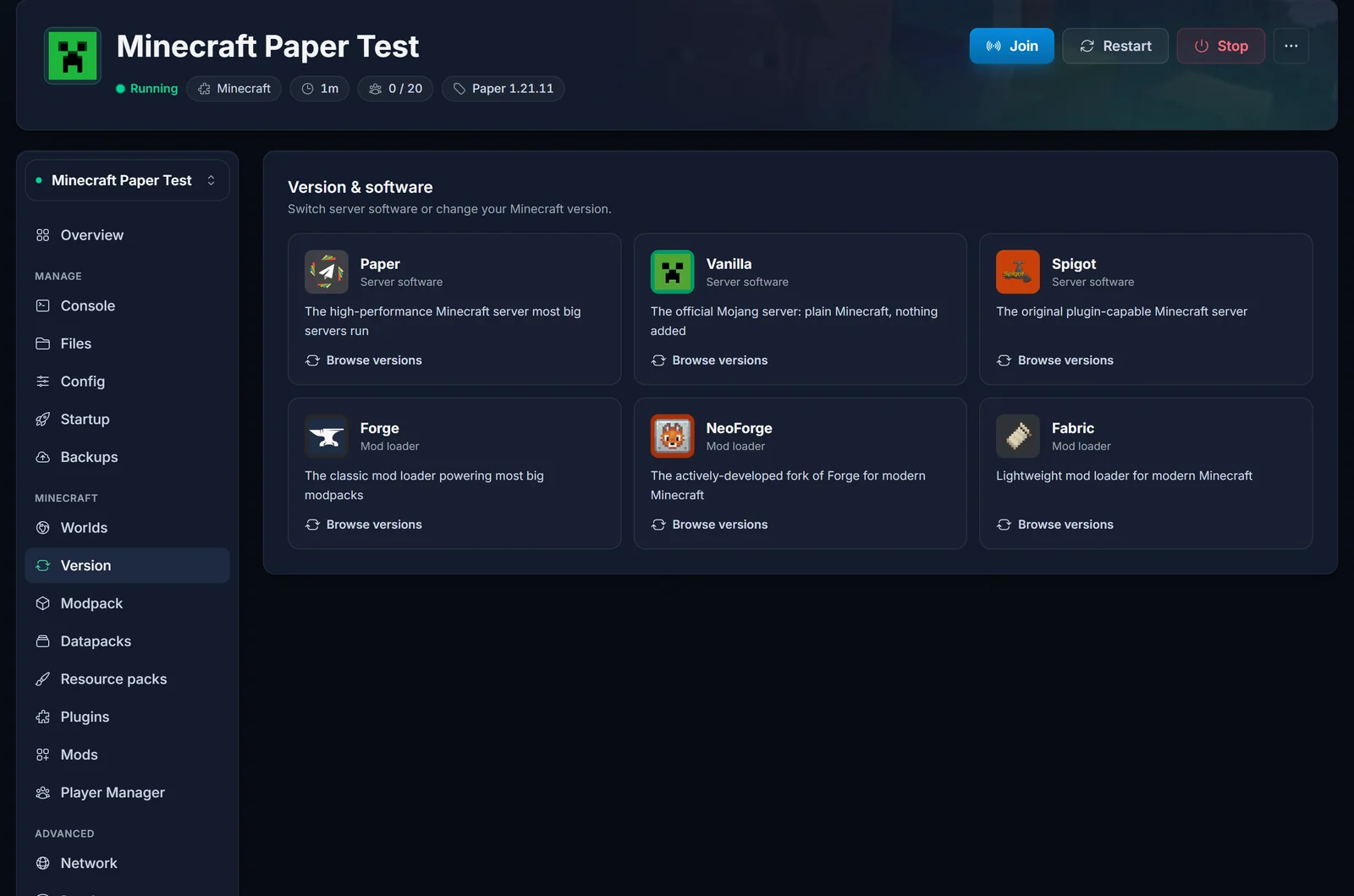
Which one to pick:
| Software | Pick it when |
|---|---|
| Vanilla | You want plain Minecraft exactly as Mojang ships it. |
| Paper | You want the best performance and plugins like EssentialsX, LuckPerms or GriefPrevention. The best default for most servers. |
| Spigot | A plugin you need only supports Spigot. Paper runs Spigot plugins too. |
| Fabric | You want lightweight mods, such as Lithium for better performance. |
| Forge / NeoForge | You want big mods or a modpack. Most older packs use Forge, newer ones often NeoForge. |
Not sure? Start with Paper. The differences are explained in Understanding Minecraft Server Types.
Match the version to your players. Everyone's Minecraft must run the same version as the server, or they are refused with "Incompatible client! Please use 1.21.11". Players can choose their version in the Minecraft Launcher under Installations.
Step 3: Set up the basics
The Config tab lets you change the most common settings without opening a file:
- Difficulty and Default game mode under Gameplay
- World seed under World, if you want a specific world (set it before the world is first created)
- Max players and Whitelist under Players
- MOTD (server list message) under Server, the text players see under your server's name in their server list. Our MOTD editor helps you add colours.
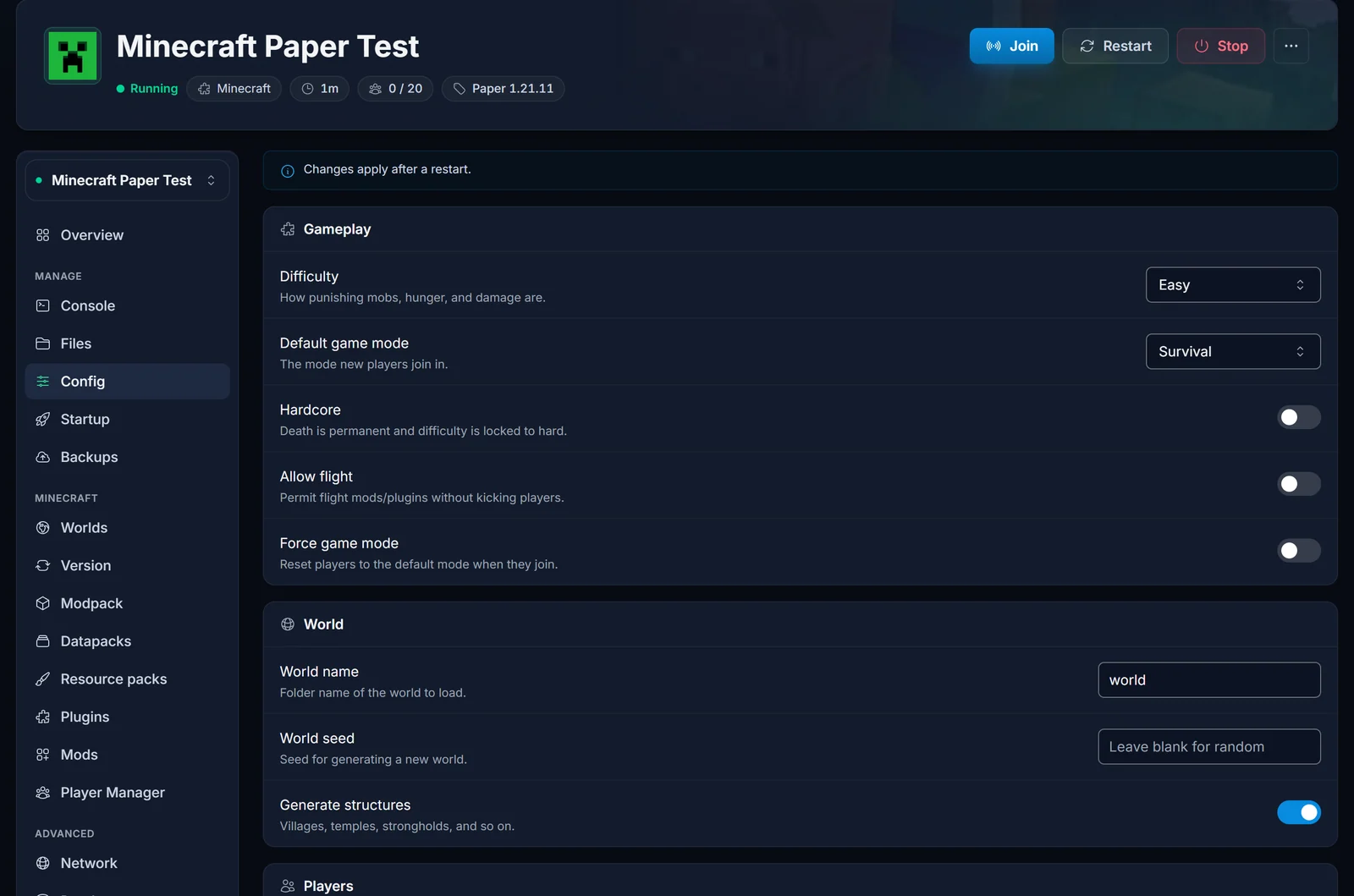
As the note at the top of the tab says, changes apply after a restart. Click Restart at the top of the page once you are done.
Step 4: Start the server and join it
A new server starts by itself once it is installed. If yours says Offline, click Start at the top of the page. The first start takes a little longer while the world generates. When the status turns to Running, the server is ready.
Your server's address is on the Overview tab under Connection address. Click the copy button next to it.
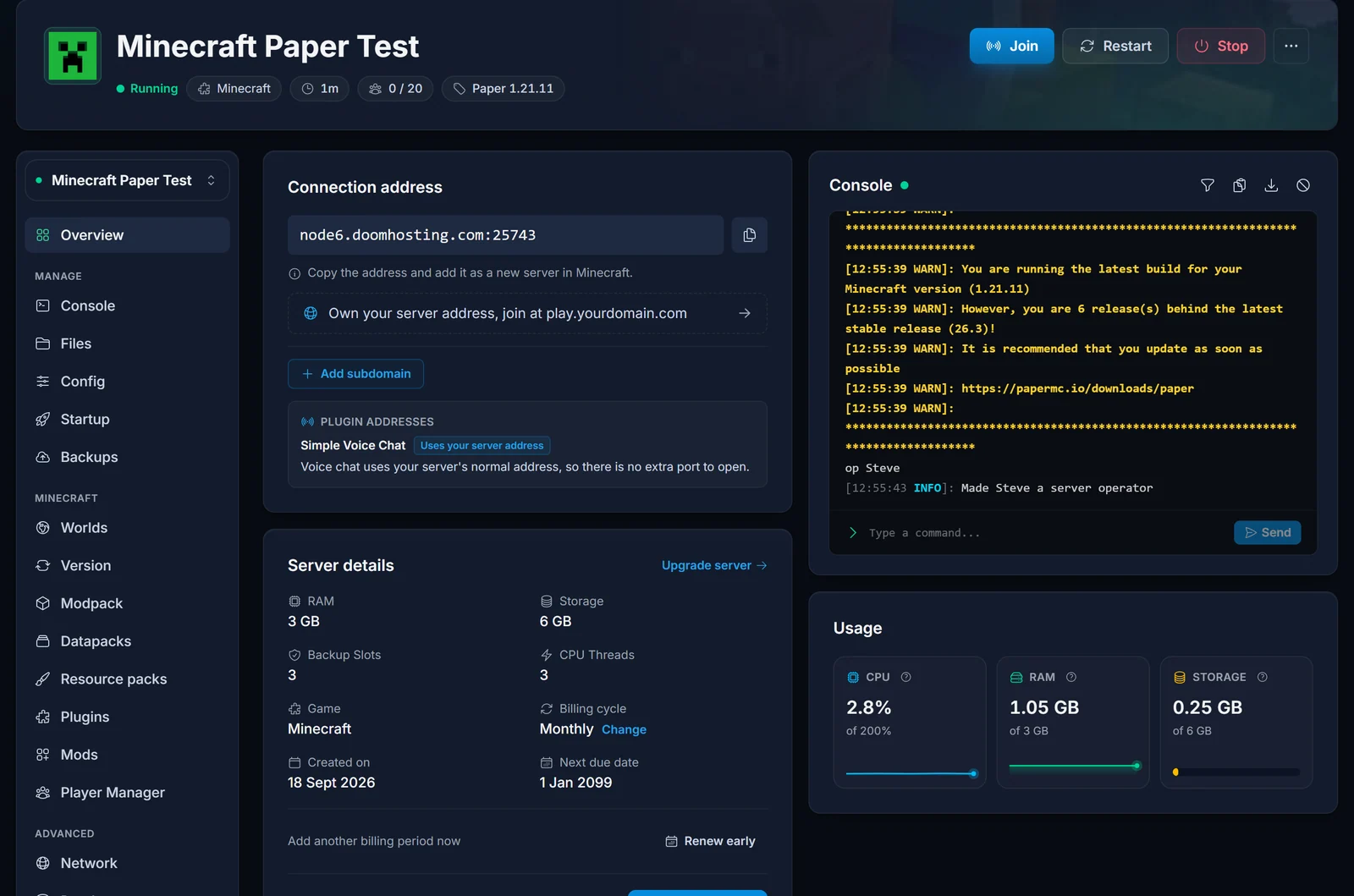
Then, in Minecraft:
- Click Multiplayer.
- Click Add Server.
- Type any Server Name and paste the address into Server Address, including the part after the colon.
- Click Done, select your server in the list and click Join Server.
Send the same address to your friends and they join the same way. Direct Connection works too, but then Minecraft does not remember the server for next time.
Want an address that is easier to share, like play.yourname.com? Click Add subdomain on the Overview tab, or connect your own domain. The difference is explained in What is a Subdomain and Dedicated IP.
Step 5: Make yourself operator
Operators can use commands like /gamemode, /time set and /tp in game. Open the Console tab and type op followed by your Minecraft username:
op YourName
The console answers Made YourName a server operator. On Java Edition you can type console commands with or without a leading slash.
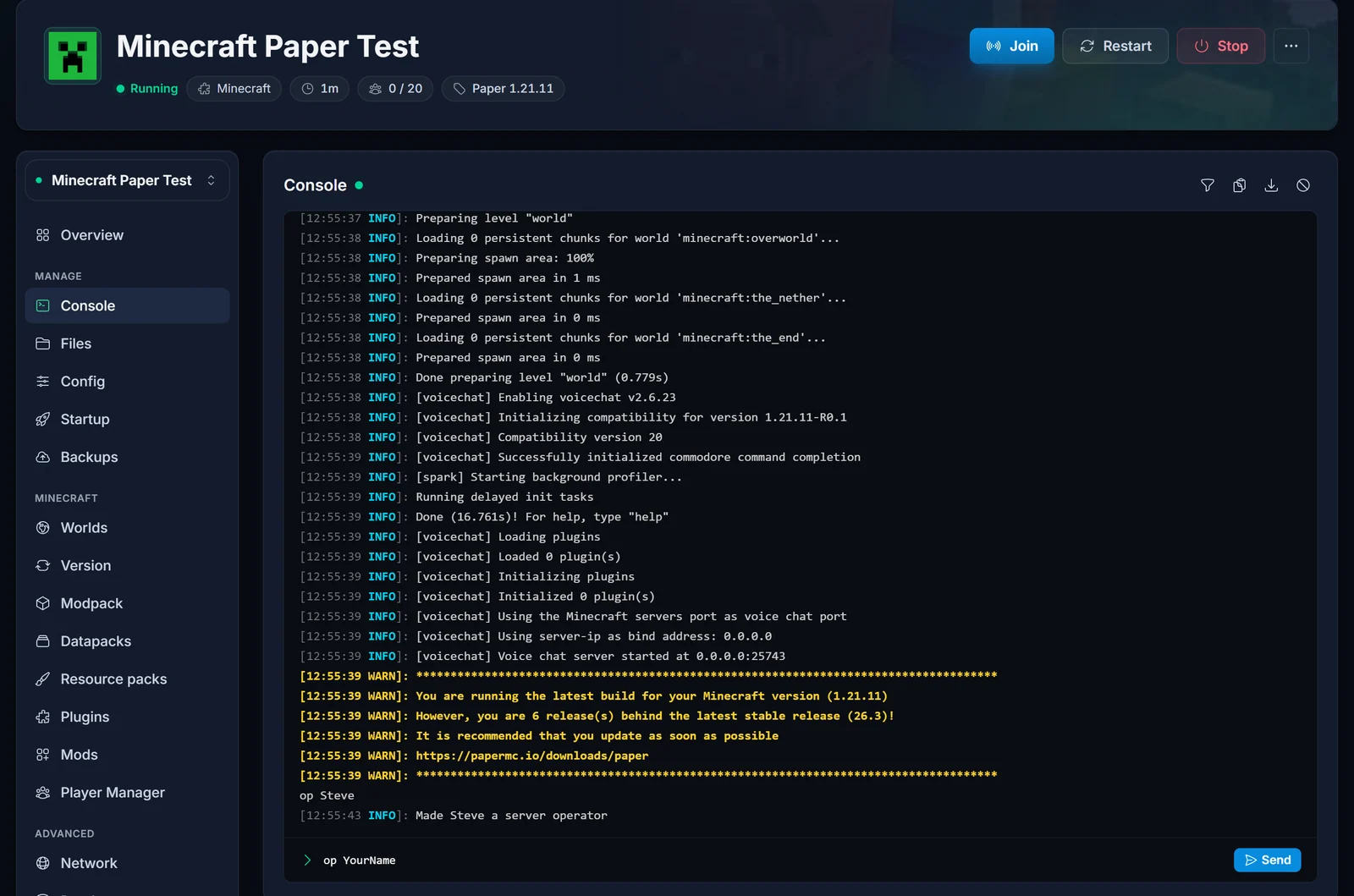
Operator levels and the ops.json file are explained in How to OP Yourself on Your Minecraft Server.
Step 6: Make it yours
Your server is up. From here, these guides cover the most common next steps:
- Keep it private: set up a whitelist so only people you add can join.
- Plugins (Paper and Spigot): install plugins on your Minecraft server.
- Mods (Fabric, Forge, NeoForge): install mods on your Minecraft server.
- Modpacks: install a modpack from the Modpack tab in a few clicks.
- Bring your single-player world: upload your own world.
- Stay safe: back up your Minecraft world before big changes, like switching versions.
How to make a Minecraft server on your own PC (free)
You can also run a server on your own computer for free. It works, but the computer has to stay on whenever people want to play, and friends outside your home can only join after you open a port on your router. In short:
- Install Java. Current Minecraft releases need Java 25. Minecraft 1.21 needs Java 21.
- Download the server (
server.jar) from the official Minecraft website and put it in an empty folder. - Start it from a terminal in that folder:
java -Xms2G -Xmx2G -jar server.jar nogui
- Accept the EULA. The first start stops right away and creates
eula.txt. Open it, changeeula=falsetoeula=true, and start the server again. More on that in How to Accept the Minecraft Server EULA. - Join it. On the same computer, use
localhostas the server address. Other players on your home network use your computer's local IP address. - Open port 25565. For friends outside your home, forward TCP port 25565 on your router to your computer, then give them your public IP address. Every router does this differently, and some internet providers block it entirely.
Keep in mind that a home server shares your PC's memory and your upload speed with everything else, and it gives every player your home IP address. A rented server avoids all of that, which is why most groups end up on one.
Common problems when joining
"Incompatible client! Please use 1.21.11"
Your Minecraft and the server run different versions. Pick the server's version in the Minecraft Launcher under Installations, or change the server's version in the Version tab.
"You are not white-listed on this server!"
The whitelist is on and your username is not on it. Add yourself with whitelist add YourName in the Console, or switch Whitelist off in the Config tab and restart. See Setting Up a Whitelist.
"Invalid session (Try restarting your game and the launcher)"
Your Minecraft login has expired. Close Minecraft and the Minecraft Launcher completely, open them again and sign in.
The server does not show up or cannot be reached
Check that the server says Running in the panel, and that you copied the full address including the port after the colon. Our Minecraft server status checker shows whether your server answers from the internet.
The server lags
Usually that means too little RAM for your mods or players, or a world that grew big. Start with How to Fix Minecraft Server Lag.
Frequently asked questions
Can I make a Minecraft server for free?
Yes, on your own computer, as shown above. You pay for it in other ways: the PC must stay on, and port forwarding takes some setup. A rented server runs around the clock without your computer.
How many players can join?
As many as Max players in the Config tab allows and your RAM can carry. To raise the limit, see How to Change Player Count.
Can I switch from Paper to Forge or change version later?
Yes, any time from the Version tab. Make a backup first: moving between versions or software can change or break an existing world.
Can my friends on phones or consoles join?
Not on plain Java Edition. Add GeyserMC to let Bedrock players join your Java server, or run a Minecraft Bedrock server instead.
Ready to start? Our Minecraft server hosting gives you every software from Vanilla to NeoForge, one-click modpacks and backups, all in the panel shown above.
