
To make players join your Minecraft Java server on a name like play.yourdomain.com without typing a port, you need an SRV record: a DNS entry that tells Minecraft which host and port sit behind the name. There are three ways to get there, and the first two need no DNS work at all.
| Your situation | Easiest route | DNS work |
|---|---|---|
| You just want a nicer address than the IP | A free subdomain like mycraft.doomhosting.com |
None |
| You bought a domain from us | Connect on the domain's page in the panel | None |
| Your domain is at another registrar (Cloudflare, Namecheap, GoDaddy, netcup...) | Add one SRV record yourself | About 5 minutes |
If you're unsure whether you even need your own domain, What is a Subdomain and Dedicated IP for Minecraft Servers explains the difference.
Why the port is the problem
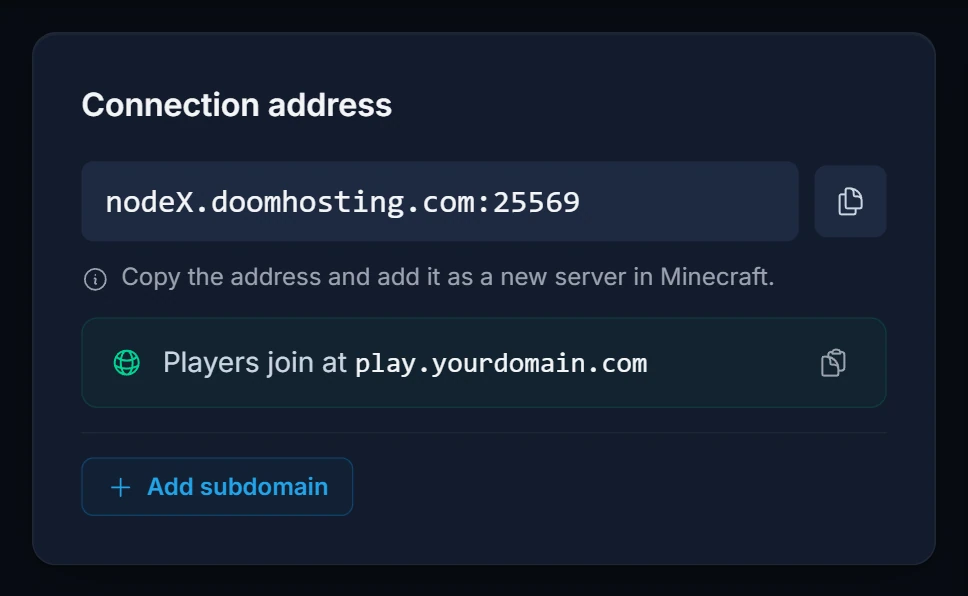
Every Minecraft server address has two parts: a host and a port. Minecraft only assumes port 25565 when you leave the port out. Most hosted servers run on a different port, so the address in your panel looks like nodeX.doomhosting.com:25569.
An ordinary A record can only point a name at an IP address, never at a port. Players would still have to type play.yourdomain.com:25569. The SRV record fixes that: Minecraft Java looks up _minecraft._tcp.play.yourdomain.com first, finds the host and port in it, and connects without the player knowing either.
Option 1: a free subdomain (no domain needed)
Every Minecraft Java server includes one free subdomain on doomhosting.com or doomhosting.se. We create the SRV record for you, so players join on the name alone.
- Open your server in the panel. You land on the Overview tab.
- In the Connection address card, click Add subdomain.
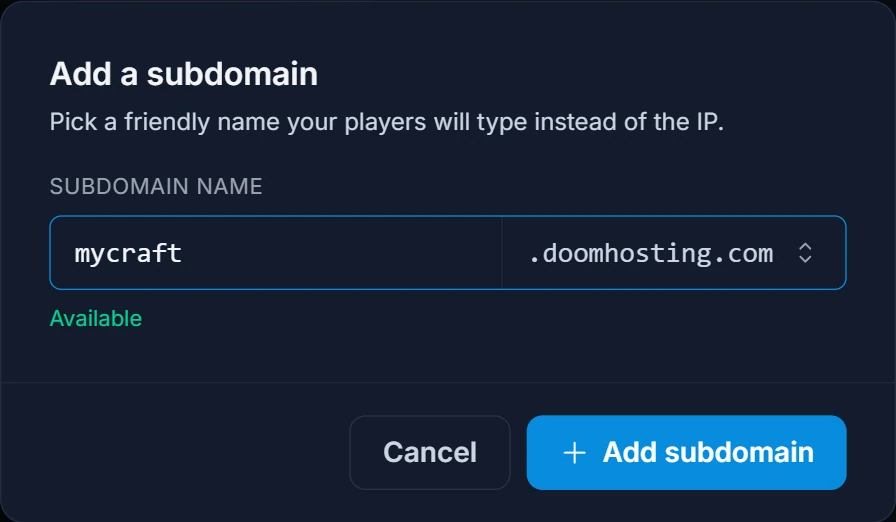
- Type the name you want (3 to 63 characters: lowercase letters, numbers and hyphens) and pick
.doomhosting.comor.doomhosting.sein the dropdown. - Wait for Available to appear under the field, then click Add subdomain.
The new address shows under Subdomain in the same card, with a copy button. Players add it in Minecraft as a new server, without a port. To swap it for a different name, delete it with the trash icon and add a new one.
Option 2: a domain bought from DoomHosting
If your domain is registered with us, the panel writes the records for you.
- Open Domain Names in the panel sidebar and click your domain.
- In Connect to a game server, leave Subdomain as
play(or type another name, or clear the field to use the bare domain). - Choose your server under Game server and click Connect.
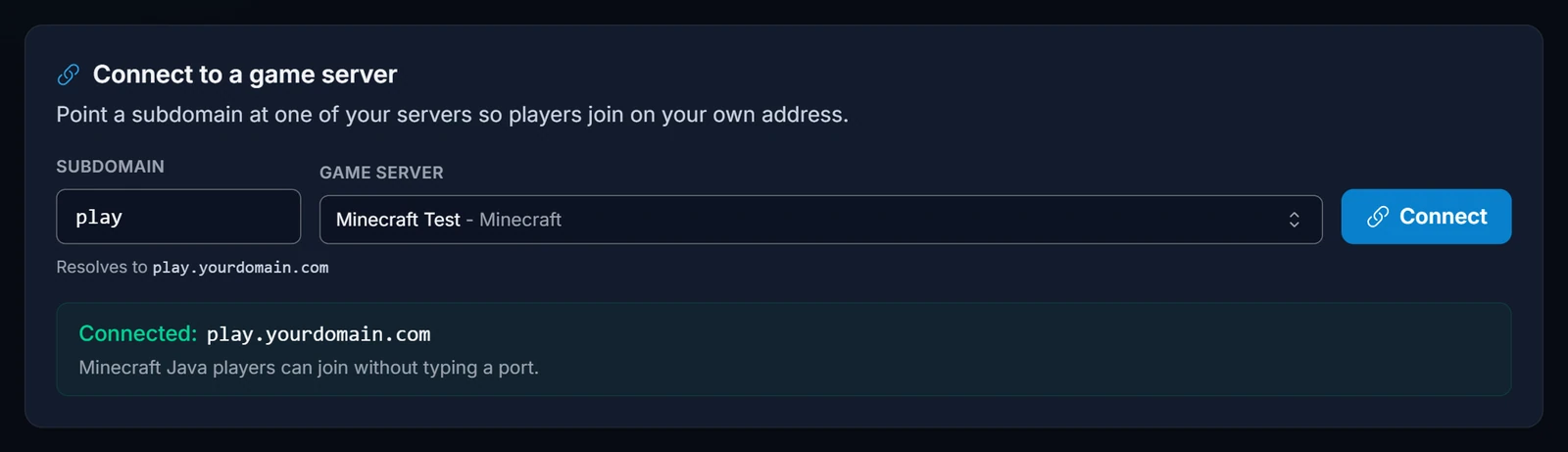
For a Minecraft Java server this creates an A record and the _minecraft._tcp SRV record together, so players join on play.yourdomain.com with no port. The server's Connection address card then shows Players join at with the new address.
If your server ever moves to another node, or you want the domain on a different server, click Connect again. It replaces the old records instead of adding duplicates.
Don't have a domain yet? You can search for one and buy it on our domains page.
Option 3: a domain from another registrar (manual SRV record)
This works with any DNS provider that supports SRV records, which is almost all of them.
Step 1: copy the host and port from the panel
Open your server's Overview tab and look at the Connection address card.
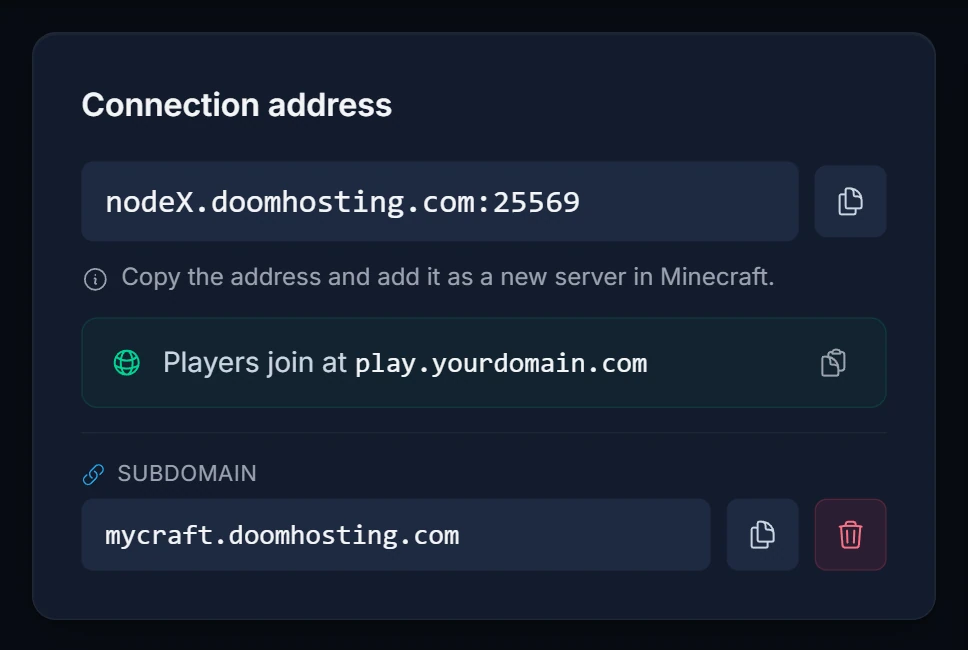
The part before the colon is the host (for example nodeX.doomhosting.com, where X is your node's number). The number after the colon is the port (here 25569). Write down both, using your own values.
Step 2: add the SRV record
In your DNS provider, add a new record with these values. The example makes players join on play.yourdomain.com:
| Field | Value |
|---|---|
| Type | SRV |
| Service | _minecraft |
| Protocol | _tcp |
| Name / Host | play (leave it empty or use @ for the bare domain) |
| Priority | 0 |
| Weight | 5 |
| Port | your server port, for example 25569 |
| Target | your node host, for example nodeX.doomhosting.com |
| TTL | Automatic, or the lowest value offered |
Some providers have no separate Service and Protocol boxes and want the whole name in one field. Then enter _minecraft._tcp.play (or _minecraft._tcp for the bare domain). Others have a single value box instead of separate Priority, Weight, Port and Target fields. Then the value is written in that order, separated by spaces:
0 5 25569 nodeX.doomhosting.com
Pointing the target straight at our node host means you don't need a separate A record for the SRV to work. The target must be a hostname: SRV records can't point at a bare IP address.
Notes for popular providers
- Cloudflare: add the record under DNS, then Records. An SRV record can't be proxied, so there's no orange cloud to worry about on it. If you also create an A record for the server, set it to DNS only (grey cloud). Cloudflare's proxy only passes web ports, so a proxied A record breaks game traffic.
- Namecheap: open Advanced DNS for the domain and add an SRV Record. Namecheap splits the name into Service (
_minecraft) and Protocol (_tcp, or_tcp.playfor a subdomain), then Priority, Weight, Port and Target. Click Save All Changes when done. - Other registrars (GoDaddy, netcup and the rest): look for the DNS or zone settings of the domain and add a record of type SRV with the values from the table.
Step 3: wait, then test
New records usually work within a few minutes, but resolvers can hold the old answer for up to an hour or two. To test, add play.yourdomain.com as a new server in Minecraft Java, with no port. If it doesn't show up yet, restart the game and try again a bit later.
Common issues
Players still have to type the port
The SRV record isn't being found. Check the name first. Most DNS panels add your domain to the name by themselves, so typing the full _minecraft._tcp.play.yourdomain.com there ends up with the domain twice. Enter _minecraft._tcp.play instead. Also make sure players type the address without a port. If an address includes a port, Minecraft skips the SRV lookup completely.
"Can't connect to server" after adding the record
Usually a wrong port or target. Compare the record with the Connection address card again: the port must match exactly and the target must be spelled exactly like the host, with no http://, no port and no typos.
It worked, then stopped after a server move
If your server moves to a different node, its host and port change. Update the target and port in the SRV record. A domain bought from us is fixed by clicking Connect again. For a free subdomain, delete it and add it again.
The address works in Java but not on Bedrock
Minecraft Bedrock doesn't look up SRV records at all. If Bedrock players join through GeyserMC crossplay, they enter the host from the Connection address card in the Server Address field and the Bedrock port in Port. Your own name only works there if it has an A record (a domain connected with Connect gets one, a free subdomain and a manual SRV record don't), and the port still has to be typed unless it's Bedrock's default 19132.
Cloudflare shows the right record but nothing connects
Check every record for the name in your zone. An old proxied A record or CNAME on the same name sends players to Cloudflare instead of your server. Set it to DNS only or delete it.
Next steps
- Running crossplay? Set it up with GeyserMC.
- See every panel feature on our game panel overview.
- New to us? Start with Minecraft server hosting.
