

Valheim can turn resource drops up or down with a world modifier called Resources. On a dedicated Valheim server it is a dropdown in your panel's Modifiers tab, with no files to edit and nothing to install. This guide shows which value to pick, how to combine it with the other modifiers, and what happens to your existing world.
Quick Answer
Open your server in the DoomHosting control panel, select Modifiers in the sidebar, and set Resources to the level you want. The panel saves as you change it, and the new rate applies the next time the server restarts.
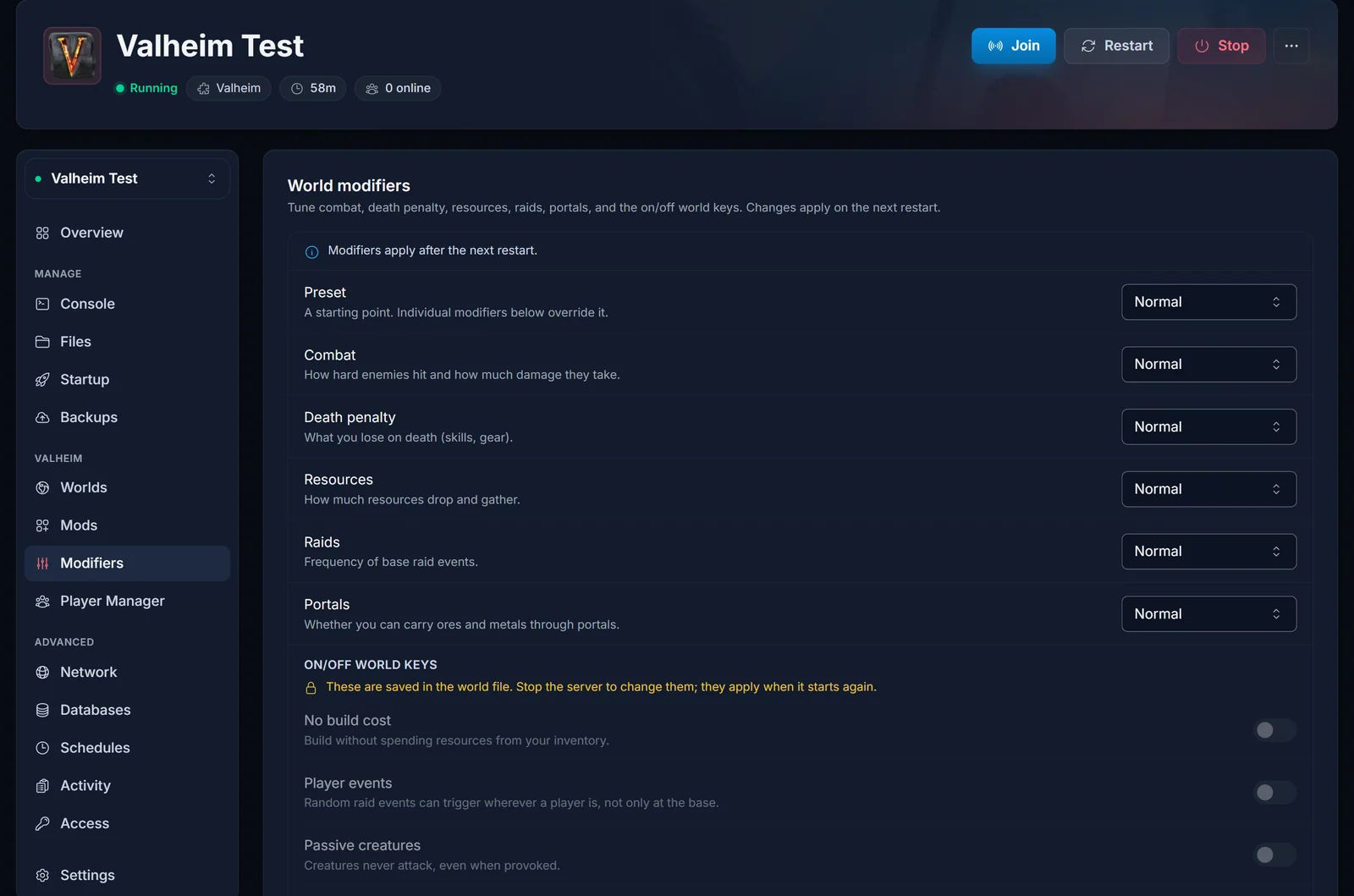
The six values, in order:
- Much less: about half the normal drops (0.5x)
- Less: reduced drops (about 0.75x)
- Normal: the default (1x)
- More: increased drops (1.5x)
- Much more: double drops (2x)
- Most: triple drops (3x)
To go back to the default, set Resources to Normal. There is no "standard" value and nothing to delete.
What Resources Actually Changes
The Resources modifier scales what you pull from kills, mining, foraging, and destructible objects: meat and hides from animals, wood from trees, stone, ore from deposits, Surtling Cores, berries, and so on. One thing to know: Valheim rounds drop counts up, so on small drops More (1.5x) can land on the same number as Much more (2x). Farming is the exception, replanted crops always return one for one no matter what this is set to.
Step by Step in the Panel
- Open your server in the panel and select Modifiers in the sidebar, under the Valheim heading.
- Open the Resources dropdown and pick your value.
- The panel saves automatically, and the bar across the top of the card confirms it. There is no save button.
- Restart the server so it boots with the new value. If it is running you get an amber bar with a Restart now button, and it stays there until you do.
Resources is a launch argument under the hood, so you can change it while the server is running. It just does not take effect until the restart.
Fallback: the Extra Arguments field
The Modifiers tab writes the same launch argument you would type yourself, so the manual route still works if you prefer it or if you are scripting something. On the Startup tab, put this in Extra Arguments:
-modifier resources more
Swap more for muchless, less, muchmore or most. Leave the argument out entirely for normal drops, since normal is the default and is never written. The field autosaves, and the server still needs a restart. Be aware that the Modifiers tab reads and rewrites this same field, so whatever you type by hand shows up there as a dropdown value.
Combining Several Modifiers
The Modifiers tab holds all five graded modifiers on one screen, so set Resources, Combat, Death penalty, Raids and Portals in one visit and restart once.
Above them is a Preset dropdown: normal, casual, easy, hard, hardcore, immersive and hammer. A preset is a starting point, and the individual dropdowns below it win. If you want a specific resource rate, set the preset first and the Resources dropdown after it.
The manual equivalent is several -modifier key value pairs in the same Extra Arguments field, with the preset first:
-preset hard -modifier resources most -modifier combat hard
The full set is combat (veryeasy, easy, hard, veryhard), deathpenalty (casual, veryeasy, easy, hard, hardcore), resources (muchless, less, more, muchmore, most), raids (none, muchless, less, more, muchmore), and portals (casual, hard, veryhard).
Valheim also has four on/off world keys: nobuildcost, playerevents, passivemobs and nomap. Those are not launch arguments and -setkey does not work for them. Valheim's -setkey never writes the key into the world file and there is no -removekey to undo it, so a key set that way could be turned on and never off. The Modifiers tab edits the world file directly instead, which is why those four toggles need the server stopped. Full detail in how to change world modifiers on your Valheim server.
New World vs Existing World
The Resources setting is a live drop multiplier, not something baked into the terrain, so it takes effect for your current world the moment the server restarts with the new value. Your buildings, characters, and map are left alone. Only the seed and terrain are fixed at world creation, the drop rate is not.
If you would rather start a fresh adventure with your modifiers chosen from the very beginning, you can create the world locally in single player with the modifiers you want and upload it. See how to upload a Valheim world save to your server.
Common Questions
Will I lose my world or buildings?
No. Changing the Resources modifier only adjusts how much you get from drops going forward. Your world, base, and characters stay exactly as they are.
Does this boost crop yields from farming?
No. Planted crops always return one for one. The modifier affects gathered and dropped resources such as kills, mining, trees, and deposits, not replanting.
Can players change this in game?
The panel setting is server side and applies to everyone, and players cannot override it from their own client. A server admin connected to the server can change it live with setworldmodifier resources more, typed with no leading slash. That is covered in Valheim admin commands and how to become admin.
How do I set drops back to normal?
Set Resources to Normal in the Modifiers tab and restart. Normal is the default and is never written into the launch arguments, so a Startup tab with no -modifier resources in it is correct, not broken.
Can I stack it with difficulty changes?
Yes. Every graded modifier is independent, so set Combat, Death penalty, Raids and Portals on the same screen and restart once.
Need Help?
If your change does not seem to apply, check that you restarted after saving: graded modifiers are only read at boot. The resolved startup command on the Startup tab shows the arguments the server actually launched with. Still stuck? Our support team is available 24/7 from your panel.
