


DayZ has no loot slider. Every spawn rate on your server is controlled by the Central Loot Economy (CLE), a set of XML files in your mission folder, and increasing loot means raising the numbers for the items you want more of. This guide shows you exactly which values to change, how to do it in the panel file editor, and how to make your changes survive game updates.
How DayZ loot spawning actually works
The Central Loot Economy tracks every spawnable item on the map. For each item class, types.xml defines a handful of numbers, and four of them matter for loot volume:
- nominal: the target number of that item the economy tries to keep in the world at once. This is the main lever.
- min: when the count in the world drops below this, the economy queues a respawn.
- restock: cooldown in seconds between respawns of that item.
0means no cooldown. - lifetime: how long a spawned item persists (in seconds) before cleanup if nobody interacts with it.
So "more loot" almost always means: raise nominal and min for the item classes you care about. The economy then tops the map up toward the new targets over time.
One important detail: loot only respawns as players interact with the world. Items count as "in the world" until they despawn or are picked up, so on an empty server you will not see piles appear instantly. Changes show up as the economy cycles.
Where the loot files live
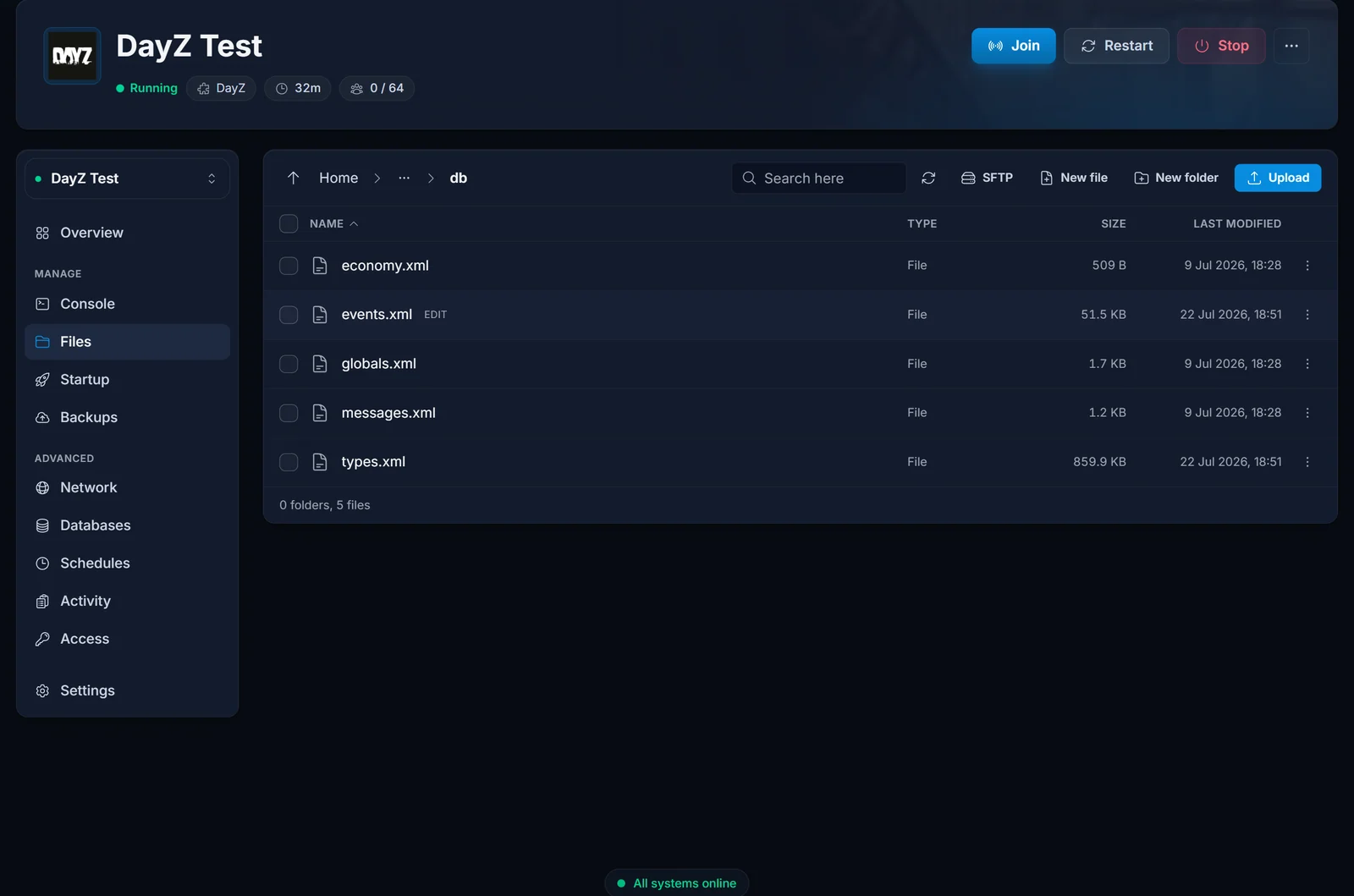
Open your server in the game panel and go to the Files tab. Everything loot-related sits in your mission folder:
mpmissions/dayzOffline.chernarusplus/
├── cfgeconomycore.xml   (economy config, registers custom files)
├── db/
│   ├── types.xml        (per-item spawn targets - the file you want)
│   ├── events.xml       (heli crashes, convoys, vehicle spawns)
│   └── globals.xml      (cleanup timers, condition ranges)
└── storage_1/           (your persistence: bases, stashes, vehicles - do not touch)
On Livonia the folder is mpmissions/dayzOffline.enoch/, and on Sakhal it is mpmissions/dayzOffline.sakhal/.
Method 1: edit types.xml directly (quick)
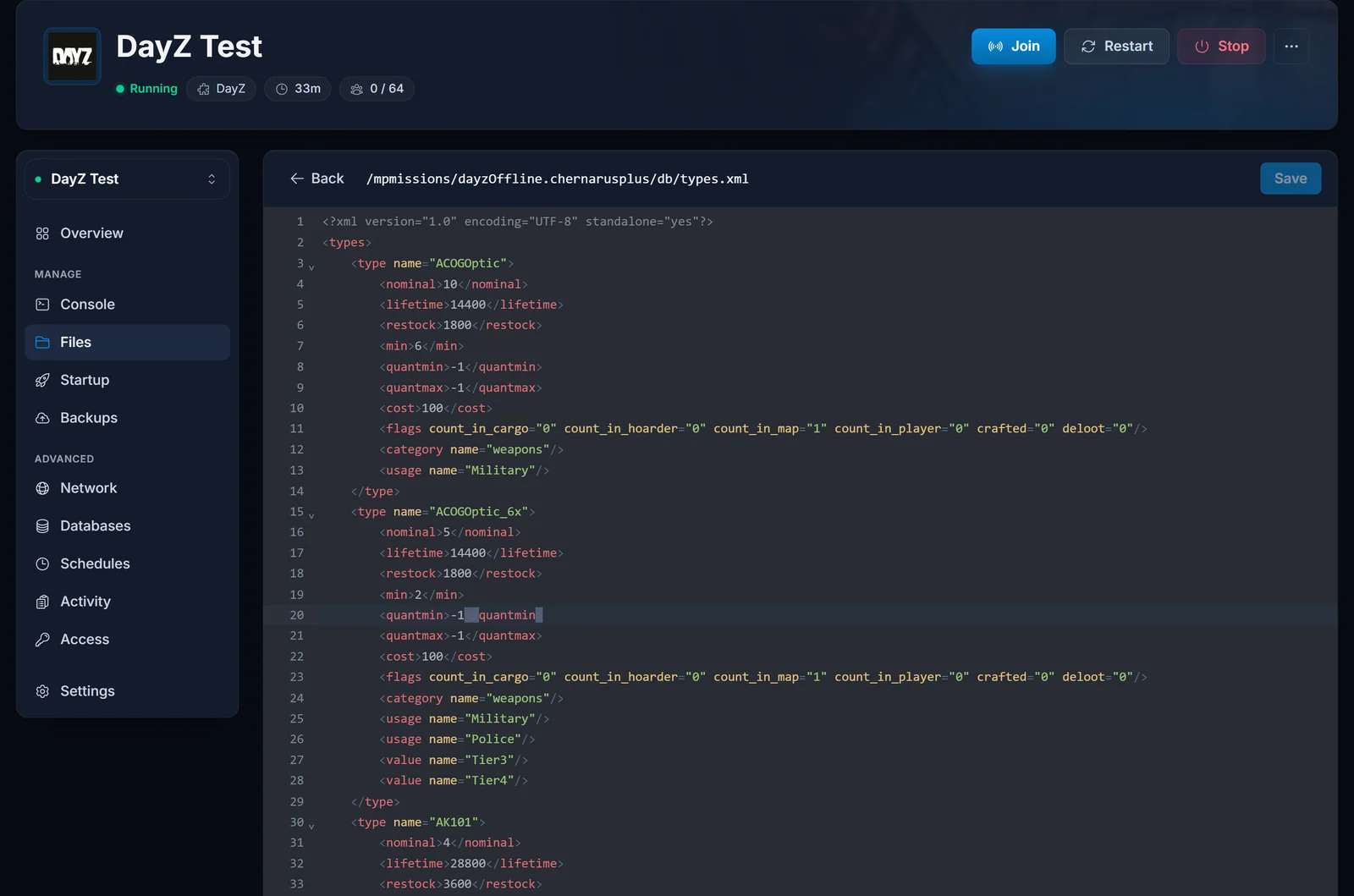
- In the Files tab, open
mpmissions/dayzOffline.chernarusplus/db/types.xml. - Search for the item class you want (Ctrl+F in the editor). For example, canned beans:
<type name="BakedBeansCan">
    <nominal>15</nominal>
    <lifetime>14400</lifetime>
    <restock>0</restock>
    <min>12</min>
    ...
</type>
- Raise
nominalandmintogether, keepingminat or belownominal. Tripling both (nominal45,min36) roughly triples how many cans exist across the map. - Save the file and restart the server. The mission files are only read at startup.
The same pattern applies to any item. A tip for weapons: many high-tier guns have a low nominal on purpose. Our vanilla types.xml keeps the M4A1 at nominal 1 with spawns restricted to contaminated areas, so if you want assault rifles in circulation, that is the kind of entry to raise.
Two rules while editing:
- Keep the XML valid. A missing closing tag can make the economy skip the file, and your changes silently do nothing. If in doubt, paste the file into an XML validator before saving.
- Download a copy of your edited file first (right-click the file, Download). You will want it again after game updates, as explained below.
Method 2: a custom loot file that survives updates (recommended)
Here is the catch with Method 1: db/types.xml ships with the game. When Bohemia releases a DayZ update, the server updates itself on the next start and the patch can replace types.xml with the new vanilla version, wiping your edits. We have watched game patches do exactly that.
DayZ has a built-in fix: the economy core can load extra files from a folder you create, and entries in your file override the vanilla ones with the same class name. Game updates never touch folders you created, so your loot tuning survives every patch.
- In the Files tab, go to
mpmissions/dayzOffline.chernarusplus/and create a new folder calledcustom. - Inside it, create a file called
types_loot.xml. Copy the complete<type>entries you want to change out ofdb/types.xml, wrap them in a<types>root tag, and raise the values:
<?xml version="1.0" encoding="UTF-8" standalone="yes"?>
<types>
    <type name="BakedBeansCan">
        <nominal>60</nominal>
        <lifetime>14400</lifetime>
        <restock>0</restock>
        <min>48</min>
        <quantmin>-1</quantmin>
        <quantmax>-1</quantmax>
        <cost>100</cost>
        <flags count_in_cargo="0" count_in_hoarder="0" count_in_map="1" count_in_player="0" crafted="0" deloot="0"/>
        <category name="food"/>
        <tag name="shelves"/>
        <usage name="Town"/>
        <usage name="Village"/>
        <value name="Tier1"/>
        <value name="Tier2"/>
    </type>
</types>
Copy the whole entry, not just the two lines you change: an override replaces the vanilla definition completely, so a stripped-down entry would lose the item's spawn locations.
- Open
cfgeconomycore.xml(in the mission folder root, next todb/) and register your folder just above the closing</economycore>tag:
	<ce folder="custom">
		<file name="types_loot.xml" type="types"/>
	</ce>
</economycore>
- Restart the server. On startup the economy loads
db/types.xmlfirst, then your custom file on top.
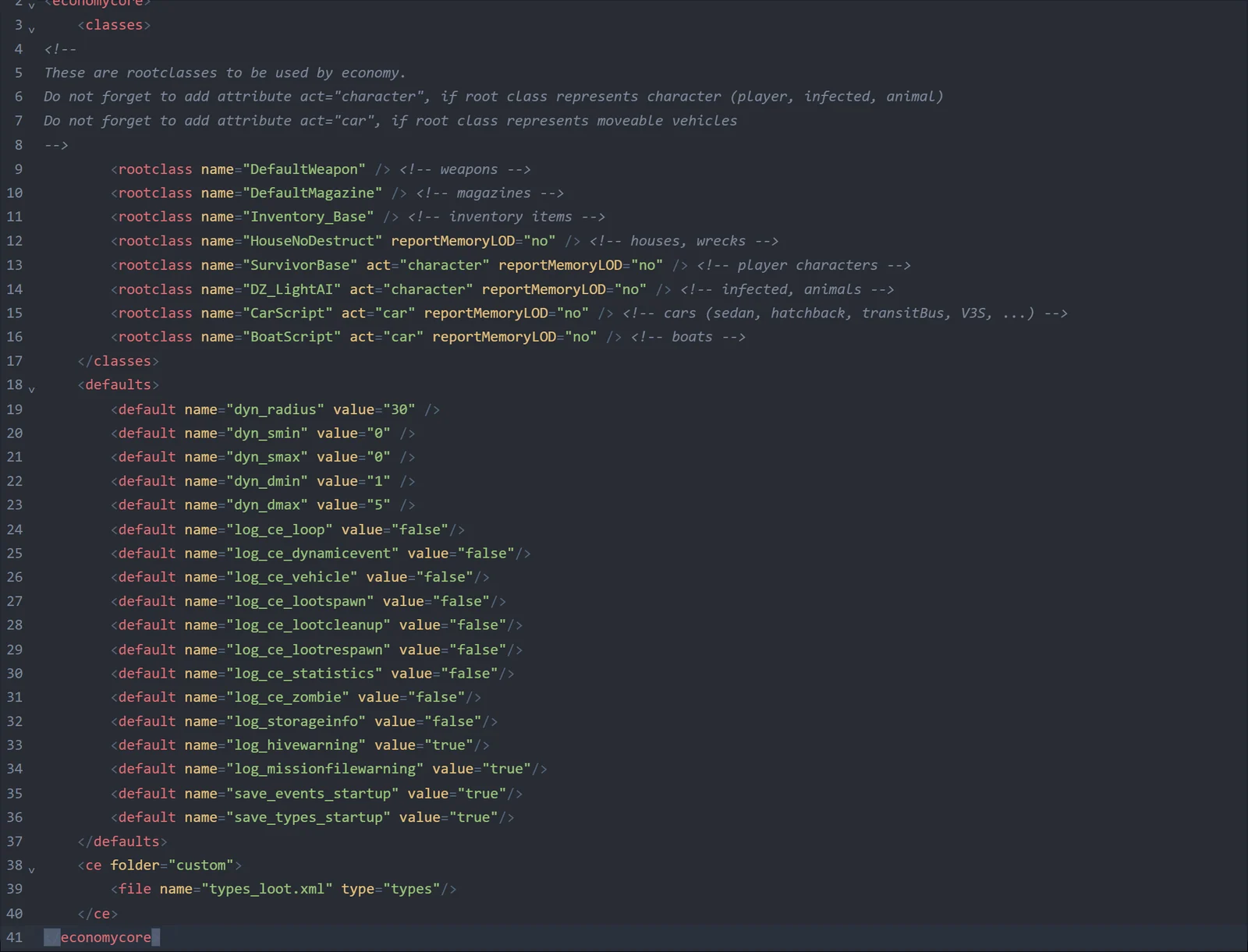
After an update you only need to check one thing: cfgeconomycore.xml itself is also a game file, so if a patch replaces it, re-add the three <ce> lines. Your custom folder and everything in it stays untouched either way. This is also why we recommend keeping every loot change in the custom file and leaving db/types.xml vanilla.
More high-tier loot: events.xml
Helicopter crashes and police cars are dynamic events, not types.xml entries. To get more of them, open db/events.xml and find the event, for example StaticHeliCrash. Events use the same nominal and min logic, so raising both spawns more simultaneous crash sites, and lowering lifetime makes them rotate to new locations faster. The loot each crash site drops is defined separately in cfgspawnabletypes.xml.
What globals.xml can and cannot do
db/globals.xml has no loot multiplier, but two entries are worth knowing:
- LootDamageMin / LootDamageMax: the condition range items spawn in. Vanilla is
0.0to0.82. Narrowing it (for example0.0to0.32) makes loot spawn in better condition, which feels like better loot without changing quantities. - CleanupLifetimeDefault: how fast dropped items on the ground get cleaned up. Raising it keeps player-dropped gear around longer.
Common issues
I raised nominal but nothing changed. Did you restart the server? Mission files are only read at startup. Also check min: if it is still at the old low value, the economy will not restock until the world count drops below it. And remember the economy converges gradually as players loot and move around, it does not flood the map on restart.
My changes disappeared after a game update. That is db/types.xml being replaced by the patch. Move your changes into a custom folder (Method 2) and they will survive the next one. If you already lost edits and have no backup, you will have to redo them, so download a copy this time.
Loot spawns but in the wrong places or not at all for one item. If you slimmed down an override entry, you may have deleted its usage or value (tier) tags, which tell the economy where on the map the item may spawn. Copy the full vanilla entry and edit only the numbers.
Will editing loot wipe my server? No. Loot config lives in db/ and your custom folder; player bases, buried stashes and vehicles live in storage_1/. As long as you do not delete storage_1/, nothing your players built is affected.
Is there a mod that just multiplies everything? Community tools exist that bulk-edit types.xml offline (you edit the file on your PC, then upload it via the Files tab or SFTP). They generate exactly the kind of file this guide covers, so Method 2 is still the right way to install the result.
FAQ
Do I need to wipe the server after changing loot? No. A restart is enough; the economy adjusts item counts on the fly.
What do quantmin and quantmax mean? The fill range for stackable or fillable items (ammo boxes, water bottles), as a percentage. -1 means the item does not use quantities. They do not affect how many of the item spawn.
Can I change loot per area? Placement is driven by each entry's usage (location categories like Military or Town) and value (map tier) tags. You can add or remove those tags in your override to widen or narrow where an item appears.
Does more loot cost more RAM? Large increases raise the number of tracked items, which adds some memory load. If you push nominal values up across the board on a busy server, keep an eye on usage in the panel and size accordingly with our DayZ RAM calculator.
Does this work the same on Livonia and Sakhal? Yes, identically. Only the mission folder name differs.
Still stuck? Our support team tunes DayZ economies daily. If you do not have a server yet, grab one on our DayZ server hosting page, and see the getting started guide for first-boot setup or how to join your server once the loot is flowing.
