

How to Join a DayZ Server
Joining your own DayZ server takes about two minutes once you know the trick: DayZ is found by its query port, not the port the game runs on. Add the query address to your Steam favorites and your server shows up in the in-game browser and the DayZ Launcher every time. This guide covers all three ways in: Steam favorites, the in-game community browser, and the launchers for modded servers.
Find your server address
Open your server in the DoomHosting panel. The Overview tab shows two addresses, and they are not interchangeable:
- The connection card at the top shows the game port. This is the port DayZ actually plays on.
- The Add to Steam favorites block right below it shows the query address. This is the one Steam, the server browsers, and the launchers use to find your server.
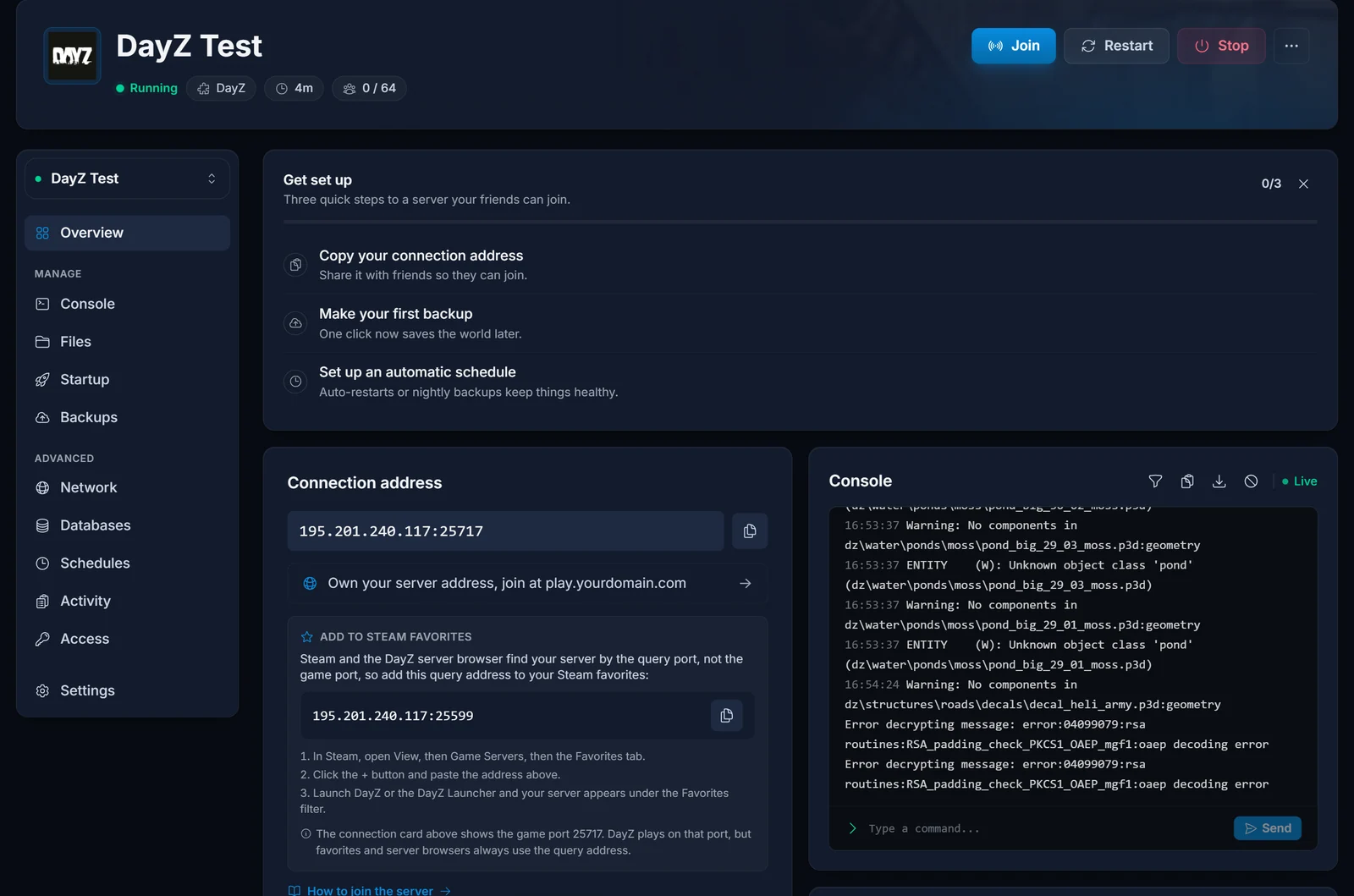
If you remember one thing from this guide: whenever a browser or launcher asks for an address, use the query address. The panel gives you a copy button for it.
Method 1: Add the server to Steam favorites (recommended)
This is the most reliable way to join, and it works for vanilla and modded servers alike:
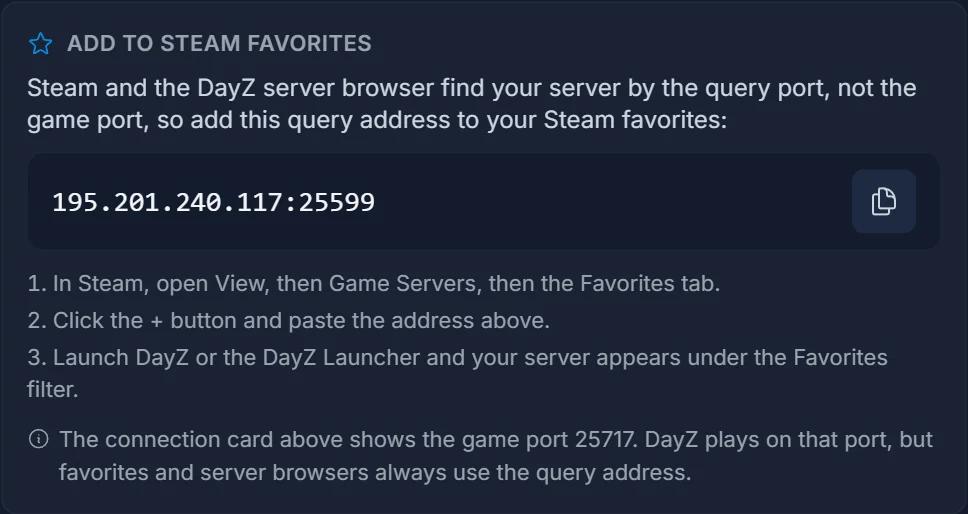
- Copy the query address from the Add to Steam favorites block in your panel.
- In Steam, open View, then Game Servers, then the Favorites tab.
- Click the + button, paste the address, and confirm. The server appears in the list with its name and player count.
- Launch DayZ. In the in-game server browser, open the Favorites filter and your server is right there. The DayZ Launcher shows it under Favorites too.
If the Steam dialog shows the server as unresponsive, double-check you pasted the query address and not the game port address: the game port never answers browser queries, so favoriting it lists the server as permanently offline.
Method 2: Find it in the in-game browser
No favorites needed for a quick vanilla join:
- Launch DayZ and click Play, then open the Community tab of the server browser.
- Type your server name into the search field. You set the name in the Server Name field on the panel's Startup tab.
- Select the server and join.
Two things to know: a freshly started or just-restarted server can take a few minutes to appear in the master list, and a modded server will not let you in from the vanilla browser until you have its mods installed. For modded servers, use a launcher instead.
Method 3: Join a modded server with a launcher
Mods are the heart of DayZ, and both launchers install a server's mod list for you:
- DayZ Launcher (opens automatically when you start DayZ from Steam): open the Servers tab, search your server name or pick it from Favorites (it syncs your Steam favorites). Select it, click Join, and the launcher downloads and enables every mod the server runs before starting the game.
- DZSA Launcher: the community favorite for heavily modded servers. Grab it from dayzsalauncher.com, search your server by name, or add the same query address you used for Steam favorites under its Favorites. It matches the server's exact mod list and versions automatically.
Give a newly modded server a few minutes after a restart: it only appears in the launchers once the mods have finished installing server-side.
Common issues
- The server does not show up in any browser: it may still be starting. DayZ loads the world before it registers with the master list, so wait for the panel console to show the startup finished, then refresh the browser. New servers can take a few extra minutes the very first time.
- Steam favorites says the server is not responding: you favorited the game port. Remove the entry and add the query address from the panel's Add to Steam favorites block instead.
- "You were kicked off the game" right after joining: usually a mod mismatch. Join through the DayZ Launcher or DZSA Launcher so your mods exactly match the server's.
- Version mismatch: your game and the server must run the same branch. If you opted into DayZ's Experimental branch on Steam, switch back to the Stable branch (or ask us to switch the server).
- The server asks for a password: the owner set one in the Server Password field on the panel's Startup tab. Leave that field empty to run a public server.
Frequently asked questions
Which port do I use to join a DayZ server?
Server browsers, Steam favorites, and launchers all use the query port. The game port is only used by the game itself once you connect. Your panel shows both, and the Add to Steam favorites block always carries the right one.
Can I join a DayZ server directly by IP?
The vanilla in-game browser has no direct connect field, so Steam favorites is the direct-IP method: add the query address once and the server is one click away forever after.
Why can my friends not see my server?
Send them the query address and have them add it to their Steam favorites, exactly like Method 1. They do not need panel access, just the address.
Do my friends need the same mods as the server?
Yes. The easiest way is joining through the DayZ Launcher or DZSA Launcher, which install the server's mod list automatically.
Set up your server next
Just getting started? The DayZ server setup guide covers deploying, serverDZ.cfg, and installing Workshop mods. Not hosting with us yet? See DayZ server hosting, or take a tour of the control panel.
