

To wipe a Rust server on DoomHosting, open the Wipe tab in your control panel, choose a map wipe or a full wipe, and confirm. A map wipe gives everyone a brand new map while keeping their learned blueprints; a full wipe clears the map and blueprints together, exactly like Rust's monthly forced wipe. This guide covers the difference, when forced wipes land, and how to roll a fresh map seed and size.
Map wipe vs full wipe: what each one deletes
Rust keeps your world and player data as files in the server's identity folder. Our Wipe tab deletes only the files that belong to the wipe type you pick, so the result matches how Rust servers wipe in the wild.
Map wipe (the usual weekly wipe): generates a new procedural map and clears everything built on the old one. Buildings, tool cupboards, stashes, loot, and inventories are gone, and player positions and death markers reset. Players keep their learned blueprints, so they can rebuild their tech tree quickly. This is the lighter wipe most community servers run every Thursday.
Full wipe (also called a BP wipe or force wipe): everything a map wipe does, plus every player's learned blueprints. Everyone starts from scratch and has to re-research components from zero. This is the monthly reset that official Facepunch servers run.
What survives both wipe types: your server settings, your installed Oxide or Carbon plugins and their data, and your backups. A wipe never touches those.
When does Rust force wipe?
Facepunch ships Rust's monthly update on the first Thursday of every month at 19:00 UTC (2 PM EST, 11 AM PST, 7 PM UK, 8 PM CET). That update changes the network protocol, so the map is force wiped for everyone and blueprints are wiped alongside it. Older clients cannot connect until the server updates to the new build, so on force-wipe Thursday you should restart your server to pull the latest Rust build and then run a full wipe.
Between forced wipes, the wipe cadence is entirely up to you. Most servers advertise a schedule, commonly a weekly map wipe every Thursday with a full wipe on the first-Thursday force wipe. You can see the upcoming dates on our Rust wipe schedule tool.
How to wipe your Rust server in the DoomHosting panel
The panel handles the whole sequence for you: it backs up first, stops the server so files are not deleted mid-save, removes the right files, sets a new seed, and starts the server so Rust regenerates the map.
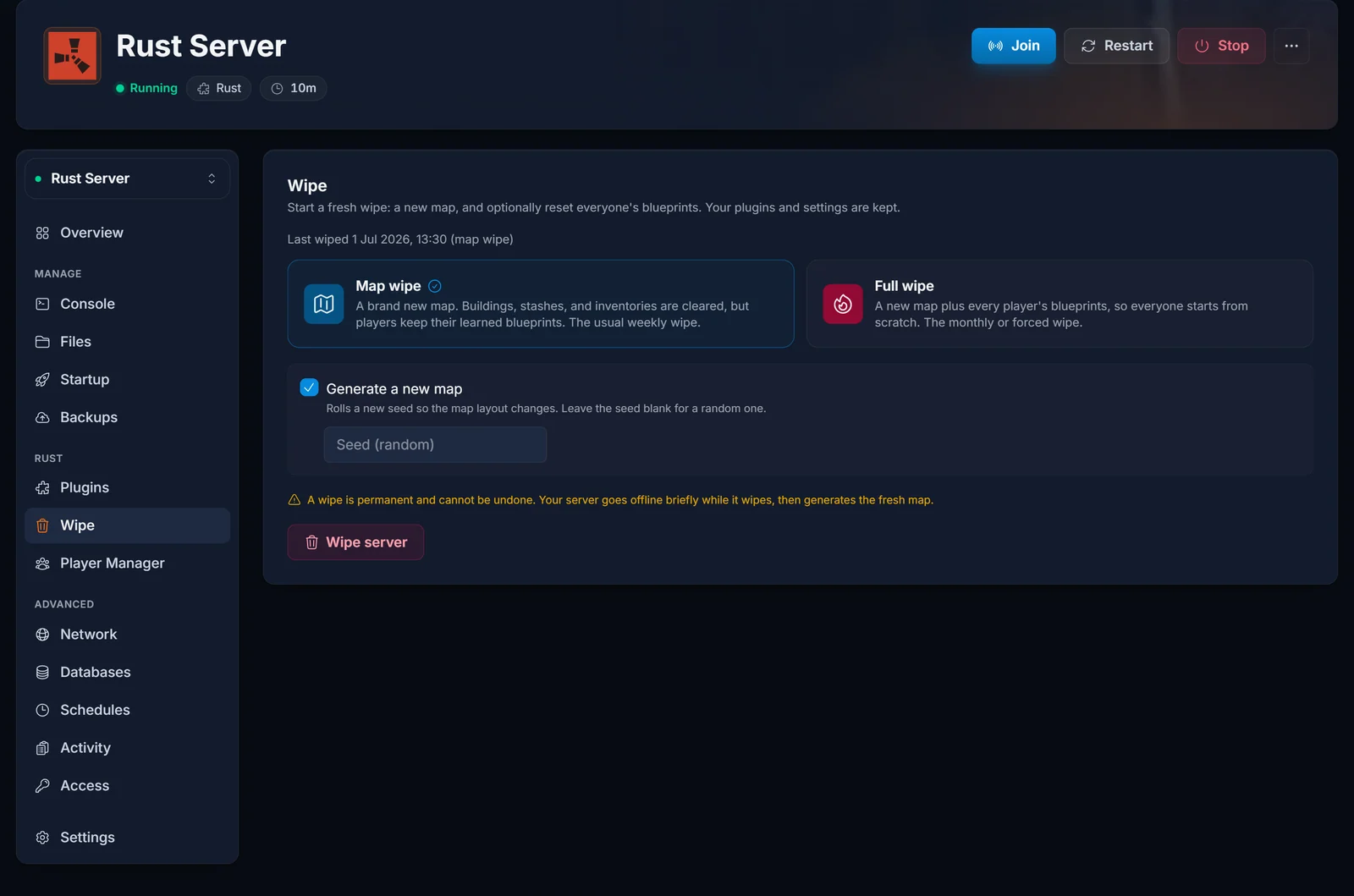
- Open your Rust server in the control panel and select the Wipe tab.
- Pick Map wipe or Full wipe. The tile describes exactly what each one clears.
- Leave Generate a new map ticked so the layout actually changes. Leave the seed field blank for a random map, or type a specific seed number to reuse a known map.
- Click Wipe server.
- In the confirmation dialog, keep Back up my server first ticked (strongly recommended, since a wipe cannot be undone), then click Wipe server to start.
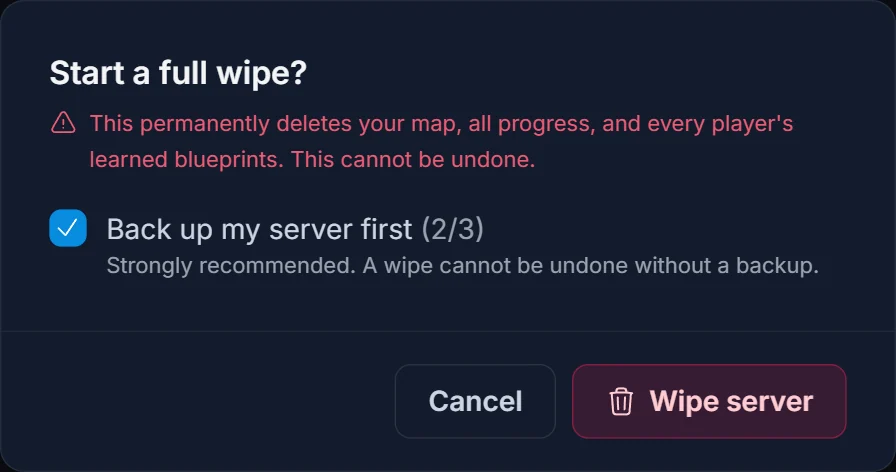
Your server goes offline for a moment, wipes, then comes back online generating the fresh map. Large maps take a few minutes to generate on first boot. The tab shows a "Last wiped" line so you can confirm it ran.
Changing the map seed and size for a fresh map
The seed decides the map layout and the size decides how big the map is. Two servers with the same seed and size get the exact same map.
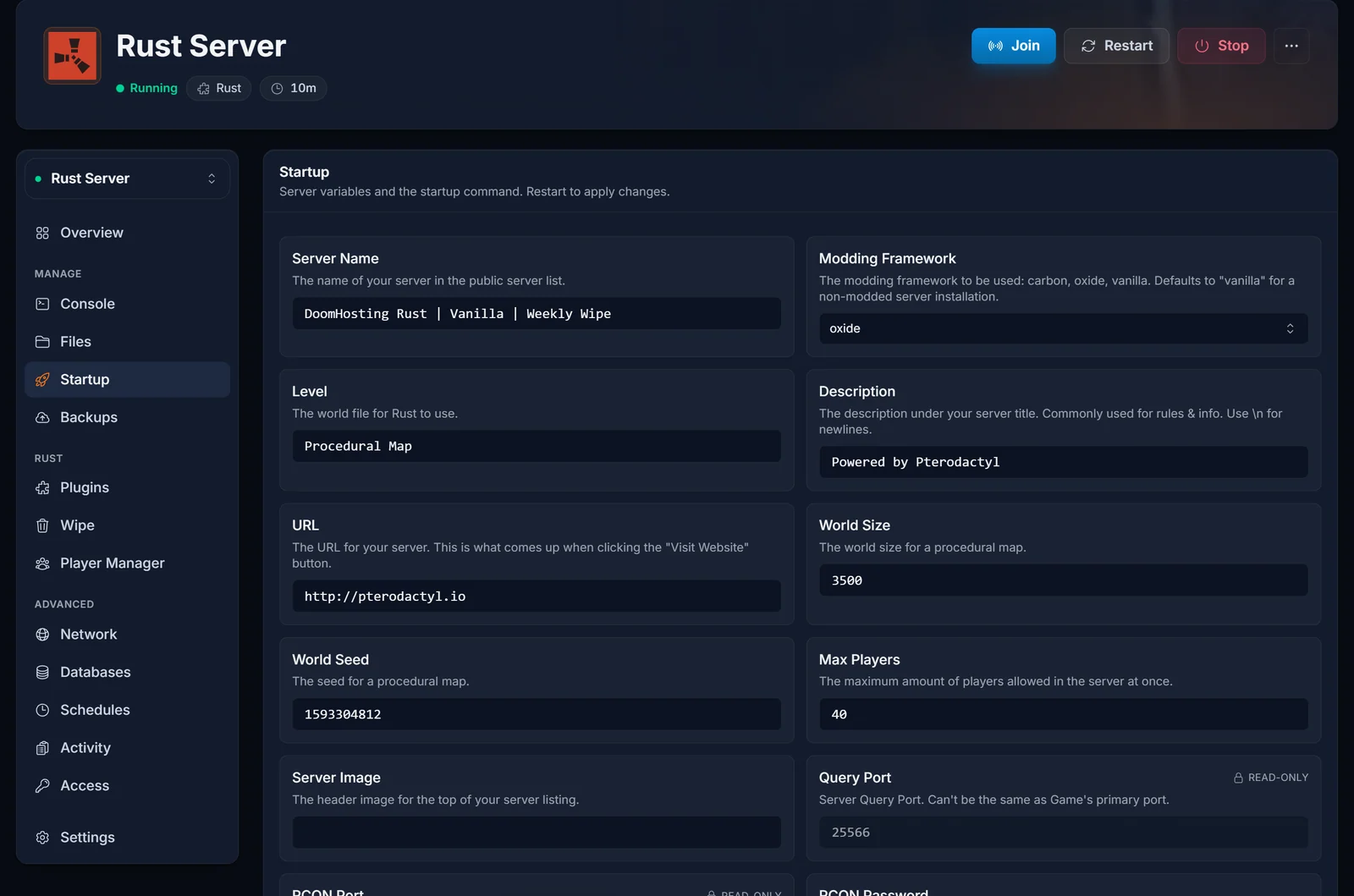
- Seed: the fastest way to change it is right on the Wipe tab. With Generate a new map ticked, leave the field blank for a random seed or enter a specific number (1 to 2147483647) to force a known map. You can also edit World Seed on the Startup tab if you want to set it without wiping.
- Size: map size is not part of the wipe flow. Open the Startup tab and change the World Size value (the default is 3000; common values run from 3000 to 4500). A larger map means more room but more RAM and a longer generation time. After changing the size, run a map wipe so Rust generates the map at the new dimensions.
Not sure how much RAM a bigger map needs? Use our Rust RAM calculator to size your server before you scale the map up.
What happens to Oxide plugins and player data
Your Oxide (uMod) or Carbon install lives in its own folders, separate from the world and player files, so a wipe never removes your plugins or their config. After a wipe your plugins load exactly as before.
Plugin data is a different story: some plugins store player balances, kits, or homes in their own data files, and those persist through a wipe unless the plugin is written to clear them on a new map. If you run an economy or progression plugin, check its documentation for a wipe or reset command so a full wipe does not leave stale balances behind. To add or manage plugins in the first place, see Installing Oxide on Your Rust Server.
Player admin and ban lists (ownerid, moderatorid, banid) are also stored outside the wiped files, so your admins and bans stay in place across any wipe. Managing those is covered in How to Add Administrators to Your Rust Server.
Common questions
Does a map wipe delete blueprints? No. A map wipe keeps every player's learned blueprints. Only a full wipe clears them.
Will a wipe delete my Oxide plugins? No. Plugins and their config live outside the world files and survive both wipe types. Some plugins keep their own player data, which you may want to reset separately.
Can I undo a wipe? No, a wipe is permanent. That is why the panel backs up first by default. If you need to roll back, restore that backup from the Backups tab.
How do I keep the same map but reset progress? Untick Generate a new map before you wipe. That keeps the current seed, so the layout stays the same while all building and inventory progress is cleared.
How often should I wipe? Vanilla-style servers usually run a weekly map wipe with a full wipe on the monthly force-wipe Thursday. Modded and progression servers often wipe less often. Pick a schedule and advertise it so players know when to expect a fresh start.
Ready to run your own server? See our Rust server hosting plans, or open the control panel to manage a server you already have.
