

Project A-Life is the NPC mod that fills Build 42 with living factions: patrols, robbers, helicopters and raids that keep moving even when nobody is looking. Installing it on a DoomHosting server takes one click in the panel's Mods tab and a restart. This guide covers that route, the manual fallback, the A-Life sandbox settings worth changing for a multiplayer server, and the problems people actually hit.
For mods in general (load order, map mods, collections), see How to Install Mods on a Project Zomboid Server (Build 42). This page is only about A-Life.
Before you start: A-Life needs Build 42.21 or newer
A-Life is a Build 42 mod. It does not run on Build 41, and the current release (1.5.1) refuses anything older than 42.21: that minimum is written into the mod's own mod.info.
New Project Zomboid servers at DoomHosting install the current stable Build 42 automatically, so a server ordered today is ready. While the server is running, the panel header shows which build it is on, next to the player count.
If your server is older:
- Still on Build 41? Follow How to Switch Your Project Zomboid Server to Build 42 first. Build 41 worlds do not carry over to Build 42.
- On an earlier Build 42 version? Open the Startup tab, set Steam Auto Update to
1and restart. The server updates itself to the newest stable build on boot.
Order a server with the ALIFE code
DoomHosting sponsors Project A-Life, and the A-Life community gets 30% off the first month with the code ALIFE.
- Open Project Zomboid server hosting and pick your RAM.
- In the cart, click Apply Discount Code, type
ALIFEand apply it. - Check out. The server is set up within a couple of minutes and installs Build 42 on its own.
Not sure how much RAM to take? A-Life simulates hundreds of NPCs on top of the normal zombie population, so do not pick the smallest plan for a busy group. How Much RAM Does a Project Zomboid Server Need? has the numbers, and the RAM calculator does the sums for you.
Start the server once
Project Zomboid only writes its config file on the first boot. Click Start on the Overview, wait for the console to print *** SERVER STARTED ****, then continue. If you skip this, the Mods tab tells you to start the server first.
Install A-Life from the Mods tab
- Open your server in the panel and click Mods in the left menu.
- Search for
Project A-Life. - Click Add on Project A-Life [ALIFE NPCS], the one by Vice with by far the most downloads.
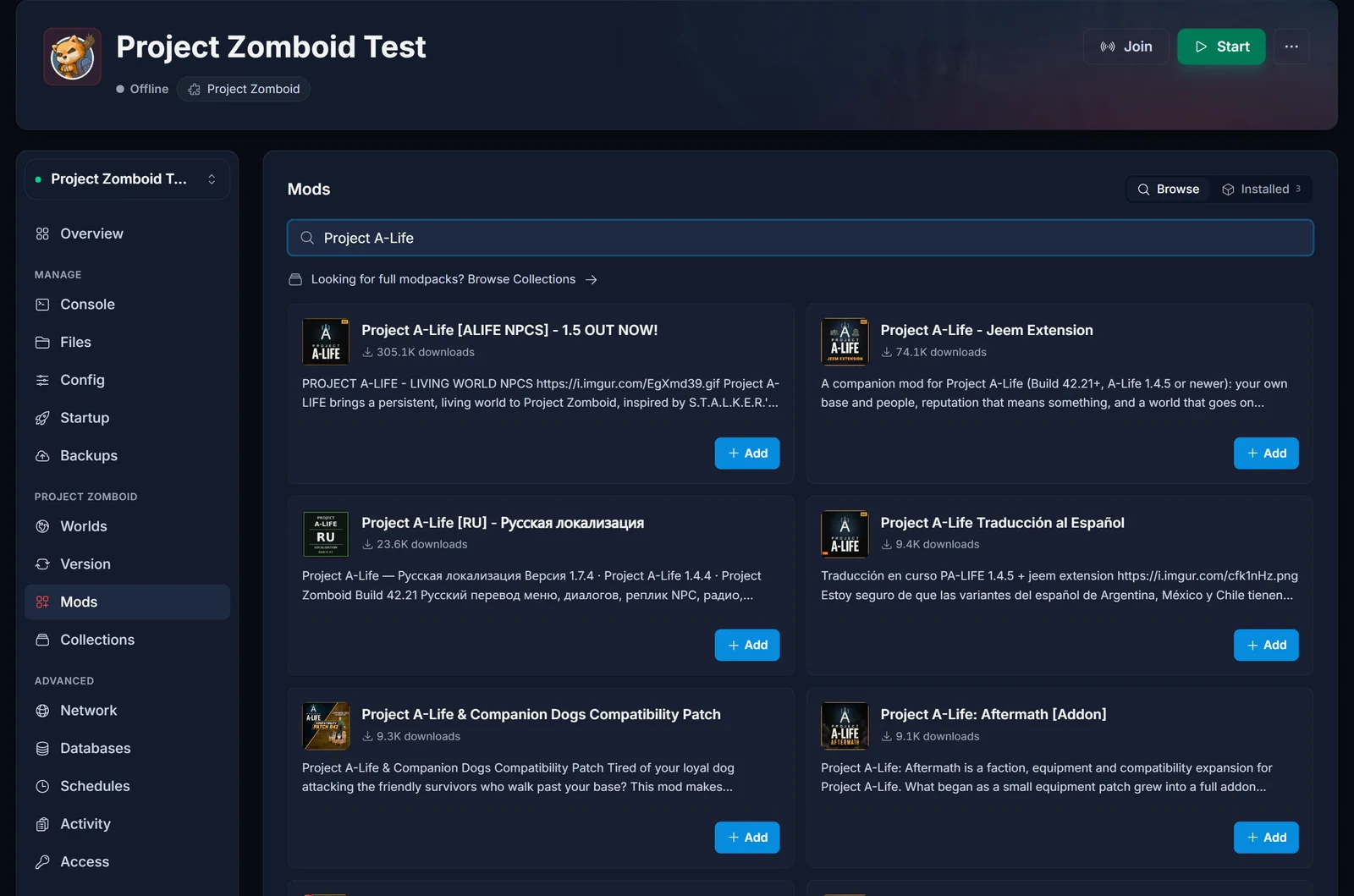
The search also returns translations, add-ons and compatibility patches built on top of A-Life (Jeem Extension, Aftermath, language packs). Those are separate Workshop items. Install the main mod first and add extras only if you want them; every one you add is downloaded by every player who joins.
- Click Restart now in the yellow banner, or restart from the header.
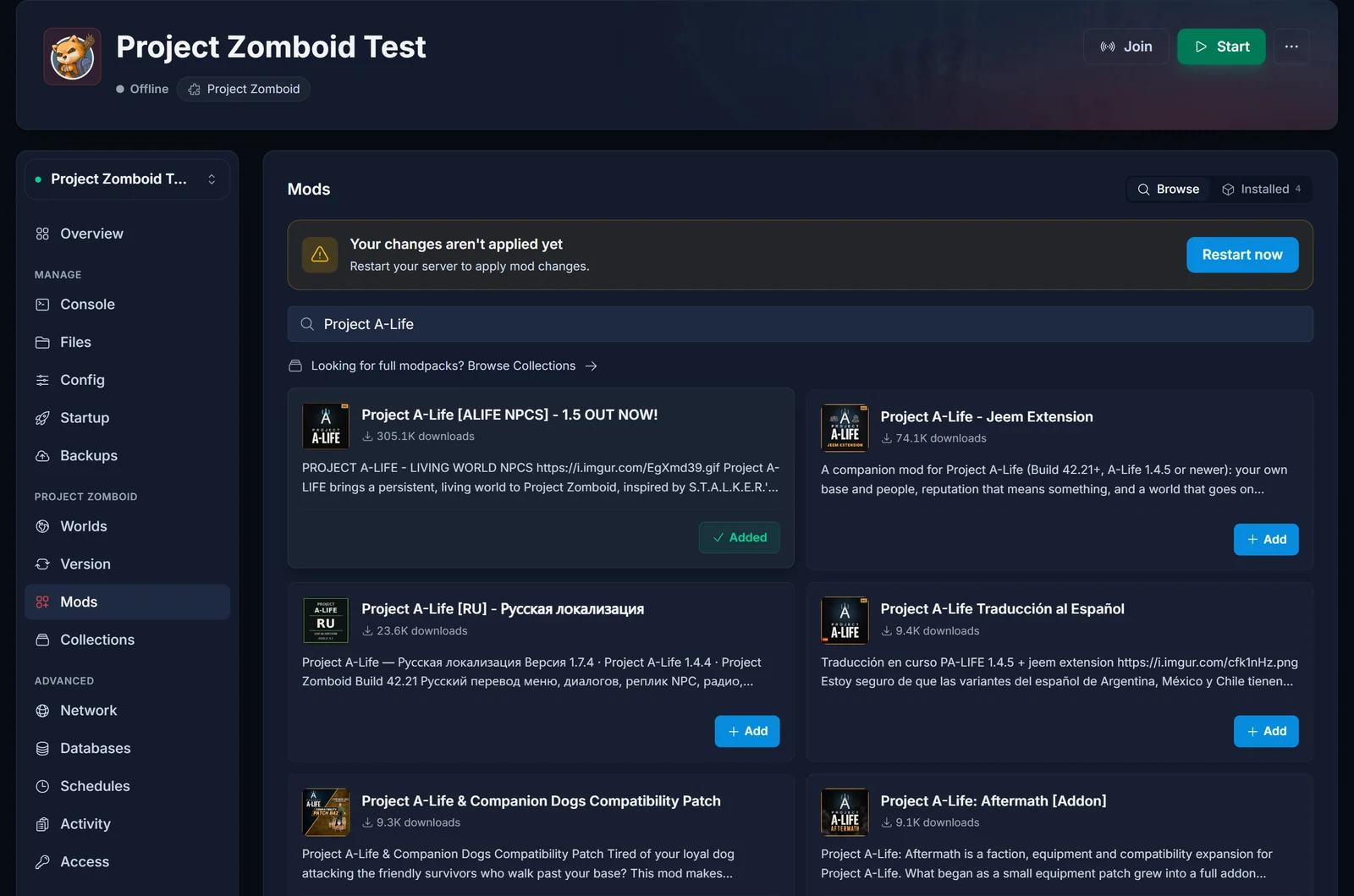
Behind the scenes the panel writes both lines Project Zomboid needs into your server config: the Workshop ID 3803984183 into WorkshopItems= and the mod ID ProjectALifeNPCs into Mods=. A-Life has no required dependencies, so nothing else gets added.
Check that A-Life loaded
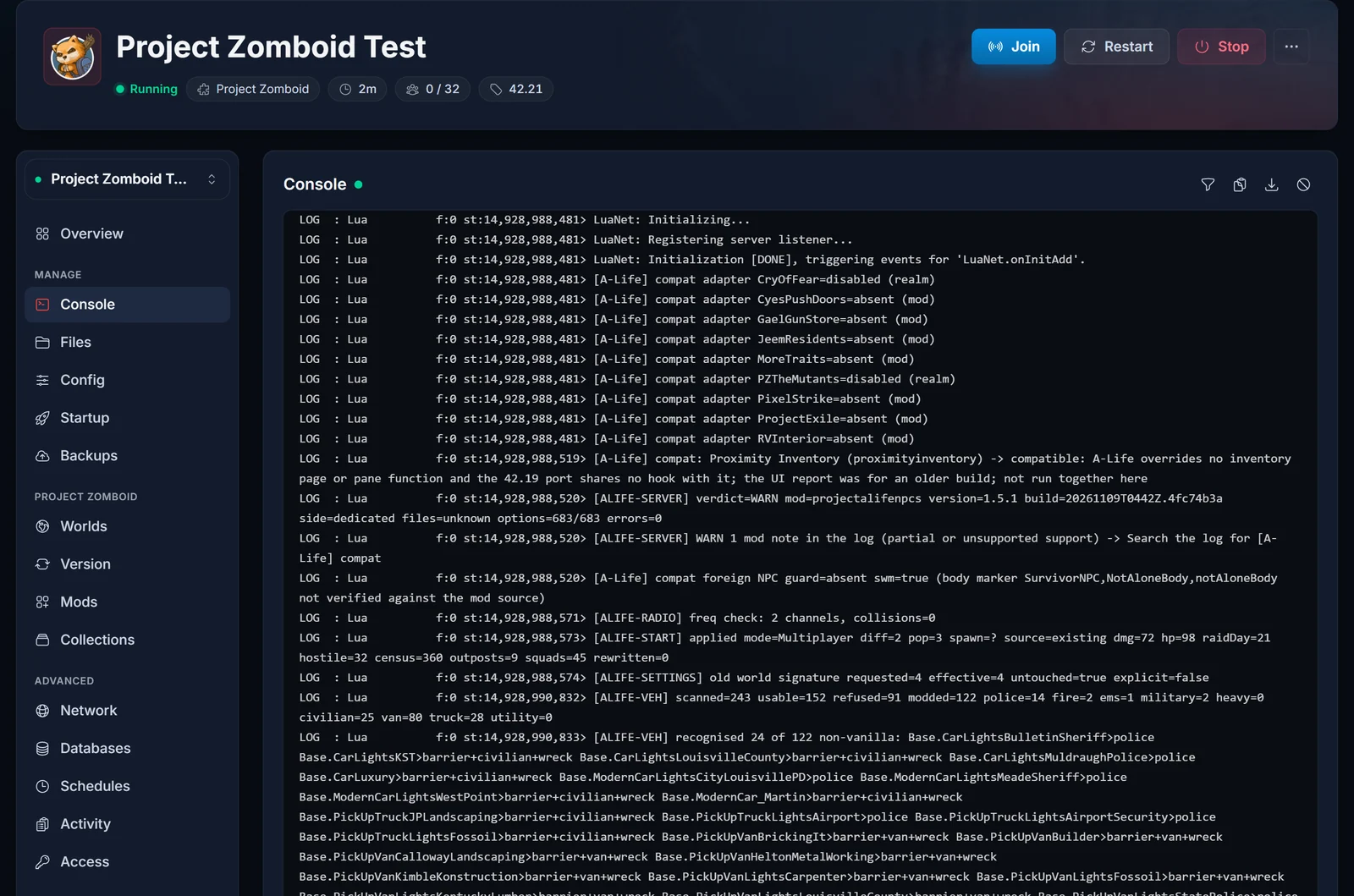
The first boot after adding it takes longer, because the server downloads A-Life (around 180 MB) from the Steam Workshop. Open the Console tab and look for these lines:
> loading ProjectALifeNPCs
*** SERVER STARTED ****
[ALIFE-SERVER] verdict=... mod=projectalifenpcs version=1.5.1 ... errors=0
loading ProjectALifeNPCs means the game picked the mod up. The [ALIFE-SERVER] line is A-Life's own self-check: errors=0 is what you want. A verdict=WARN with zero errors usually just means A-Life spotted another mod and wrote a compatibility note; search the console for [A-Life] compat to read it.
Manual install (if you prefer editing the file)
The Mods tab does exactly this for you, but you can also do it by hand:
- Stop the server.
- In Files, open
/.cache/Server/Pterodactyl.ini. The file is named after your Server Name startup setting, so it is<your name>.iniif you changed it. - Add the Workshop ID to
WorkshopItems=and the mod ID toMods=, separated from existing entries with semicolons:
WorkshopItems=3803984183
Mods=ProjectALifeNPCs
With other mods already installed it looks like this:
WorkshopItems=2847184718;3803984183
Mods=ProximityInventory;ProjectALifeNPCs
- Save and start the server.
Both lines are required. A Workshop ID without the mod ID downloads A-Life but never loads it, which is the classic "the mod is installed but nothing happens" report.
Tune A-Life's sandbox settings
A-Life adds well over 600 sandbox settings. On a dedicated server they live in the world's sandbox file, not in a menu: after the first boot with A-Life, /.cache/Server/Pterodactyl_SandboxVars.lua contains a block that starts with ALife = {.
To change a value:
- Stop the server.
- Open the SandboxVars file in Files and search for
ALife = {. - Change the number, save, and start the server.
We tested this on our own Build 42.21 server with an existing world: changing Preset_Population from 3 to 2 while stopped took effect on the next boot, and A-Life's [ALIFE-START] console line showed fewer squads and outposts.
The settings most groups want to look at first:
| Setting | Values | What it does |
|---|---|---|
Preset_Population |
1 Low, 2 Medium, 3 High (default), 4 Very high | How many NPCs, groups and outposts the world holds. Very high is heavy on the server. |
Preset_Difficulty |
1 Easy, 2 Normal (default), 3 Hard, 4 Hardcore | How hard NPCs fight and how often raids come. |
Rate_Encounters |
1 Low to 5 Abundant, default 2 | Chance of a random group showing up near players. |
Rate_Survivors |
1 Low to 5 Abundant, default 2 | How often friendly and neutral factions appear compared with hostile ones. |
Raid_Enabled |
true / false |
Automatic raids on player bases, with a radio warning first. |
Raid_MinDay |
0 to 365, default 21 | The earliest in-game day a raid can happen. |
Safehouse_Attacks |
true / false |
Lets factions that hate you attack your base. |
Heli_Frequency |
1 Low, 2 Normal (default), 3 High, 4 Off | How often A-Life helicopters fly over. |
World_Mode |
1 Full (default), 2 Local only | Full simulates squads across the whole map. Local only keeps groups near players and is lighter on the server. |
The two presets only change settings that are still at their default value, so set the presets first and fine-tune individual values after. For the rest of the sandbox file (zombie population, loot, day length), see Project Zomboid Sandbox Settings Explained.
One NPC mod per world
The A-Life team recommends one NPC mod per save, and we agree. NPC mods build their survivors on top of zombie bodies, so two of them fight over the same zombies and you get broken NPCs or crashes. If your server already runs Bandits or another NPC mod, remove it in the Mods tab before adding A-Life.
You can add A-Life to an existing world, and you can remove it again later (leftover NPCs turn back into zombies). Take a backup on the Backups tab first either way: How to Back Up and Restore Your Project Zomboid Server.
How players join an A-Life server
Players do not need to install anything by hand. When they connect, Project Zomboid compares their mods with the server's and subscribes them to A-Life automatically. The first join takes a little longer while the mod downloads, and some players need to restart the game once afterwards.
Everyone also needs the same game version as the server, so players on an old or beta Build 42 branch should switch back to the default branch in Steam. Connection steps are in How to Join a Project Zomboid Server.
Common issues
A-Life is in the Mods tab but nothing happens in game. Check the console for loading ProjectALifeNPCs. If it is missing, open the server .ini and make sure ProjectALifeNPCs is in Mods=, not just the number in WorkshopItems=.
The server boots but A-Life does not load on an older server. Your build is below 42.21. Set Steam Auto Update to 1 on the Startup tab and restart.
"Start or restart your server once" in the Mods tab. The config file does not exist yet. Start the server, wait for SERVER STARTED, then add the mod.
Players get kicked when joining. Their mod list or game version does not match the server's. Restarting the game after the automatic subscribe fixes most cases.
The server feels laggy with many players. Lower Preset_Population or switch World_Mode to Local only before adding RAM.
Bug in A-Life itself. The A-Life team runs support on their Discord. Attach console.txt, which you can download from the Files tab under /.cache/server-console.txt.
New to Project Zomboid servers in general? Start with Getting Started with Your Project Zomboid Server.
