

Rust server tags are the labels players filter by in the server browser: weekly, vanilla, modded, PvE and so on. On a DoomHosting server you set them in the Config tab under Server browser, type your tags, and restart. This guide has the complete tag list, the rules that decide whether your tags actually work, and the reasons tags silently fail to show up.
What server tags actually do
Tags are how players narrow tens of thousands of servers down to the handful they want. Someone looking for a fresh weekly vanilla server ticks those filters, and only servers carrying those tags come back. A server with no tags is invisible to every filtered search, and only turns up for players scrolling the unfiltered list or searching your exact name.
Up to four tags are displayed next to your server in the browser at a time, so they double as a one-line description of what your server is. Tags change no gameplay behaviour at all. They are purely how your server advertises itself, which is why they matter more for a new server than almost any other setting.
The full Rust server tag list
These are the values Facepunch accepts. Write them exactly as shown, lowercase where they are lowercase.
Wipe schedule (at most one)
| Value | Shows as |
|---|---|
weekly |
Weekly |
biweekly |
Biweekly |
monthly |
Monthly |
Difficulty (at most one)
| Value | Shows as |
|---|---|
vanilla |
Vanilla |
hardcore |
Hardcore |
softcore |
Softcore |
Server type
| Value | Shows as |
|---|---|
pve |
PvE |
roleplay |
Roleplay |
creative |
Creative |
minigame |
Minigame |
training |
Combat Training |
battlefield |
Battlefield |
broyale |
Battle Royale |
builds |
Build Server |
tut |
Tutorial |
premium |
Premium |
modded |
Modded |
oxide |
Oxide |
carbon |
Carbon |
Region (at most one)
| Value | Shows as |
|---|---|
NA |
North America |
SA |
South America |
EU |
Europe |
WA |
West Asia |
EA |
East Asia |
OC |
Oceania |
AF |
Africa |
Region tags are two-letter uppercase codes, and they are not detected from where your server is hosted. If you want the Europe filter to find your EU server, you have to set EU yourself. We tested this against a live server: the region tag appears in what the server broadcasts only when it is explicitly set, and disappears the moment it is removed.
Only one tag per group
Wipe schedule, difficulty and region are mutually exclusive groups. A server cannot wipe both weekly and monthly, and it cannot be both vanilla and softcore. Setting two tags from one group does not produce an error. It quietly breaks filtered searches for your server, which is the worst kind of failure because everything still looks correct to you.
So weekly,vanilla,EU is right, and weekly,monthly,vanilla is not. The Config tab checks this when you save and refuses the change, so you cannot ship this mistake by accident.
Tags that are applied for you
Some tags are set by the server itself. Do not spend your tag slots on them.
oxideandmoddedare added automatically when the server runs Oxide. We confirmed this on a live Oxide server whose tags were set to onlyweekly,vanilla,EU: it advertised Oxide and Modded on top of those, with nothing extra configured. Carbon behaves the same way withcarbon.pveis applied by the PvE mode setting, not by typing it into your tags. Turn on PvE mode in the Config tab and the tag follows.
So if you run Oxide or Carbon, spend your tags on wipe schedule, difficulty and region instead.
How to set your tags (Config tab)
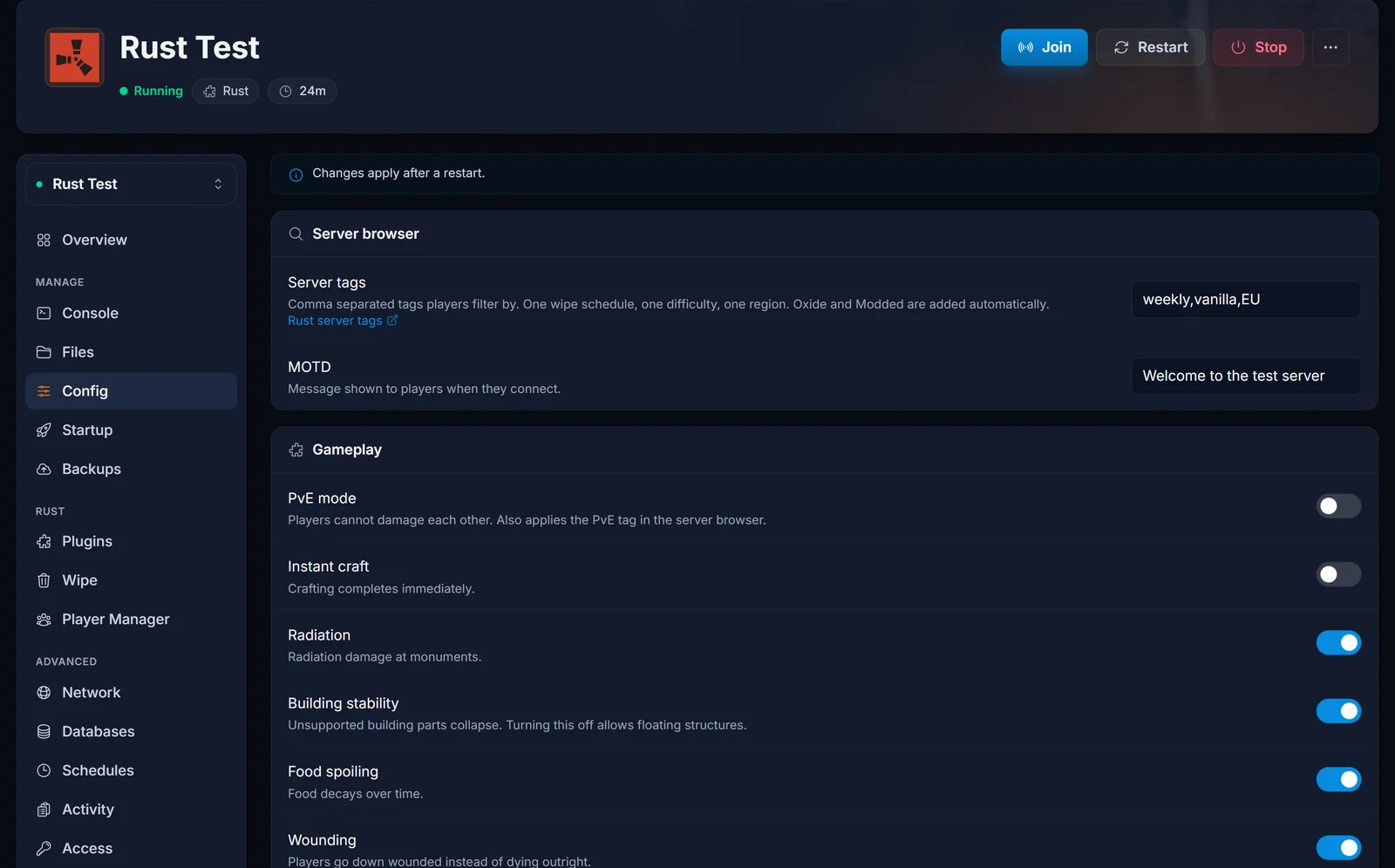
- Open your Rust server in the control panel and select the Config tab.
- Under Server browser, type your tags into Server tags, comma separated with no spaces:
weekly,vanilla,EU
- The field saves by itself. If you enter two tags from the same group, or a tag that is not real, the save is rejected and nothing is written.
- Restart the server from the Console tab. Tags are read at startup, so a running server keeps its old ones.
The same tab holds the other settings people usually change at the same time: PvE mode, decay and upkeep, instant craft, combat multipliers and item despawn.
Setting tags with a startup argument instead
You can also pass tags on the command line, on the Startup tab under Additional Arguments:
+server.tags "weekly,vanilla,EU"
Note the leading + and the quotes. On the command line every convar needs the +; inside a config file it must not have one. That is the single most common thing people get wrong when copying a line between the two.
This works, but the Config tab is the better place: it validates what you type, and it does not fight with anything else. Use the startup argument only if you are scripting your setup or already keep other convars there.
If you set tags in both places, the startup argument wins
This catches people out, and most guides have it backwards.
Rust applies its saved settings first, then server.cfg, then the +convar arguments from the startup command. So a tag set in Additional Arguments overrides the Config tab. We tested it in both directions: with monthly,roleplay in the config file and weekly,vanilla,EU in Additional Arguments, the server advertised weekly and vanilla. Clearing the startup argument and restarting made the same server advertise monthly and roleplay.
Because that failure is invisible, the panel checks for it. If a setting on the Config tab is also being passed as a startup argument, the tab shows a warning naming the affected setting instead of letting you save a value that can never take effect.
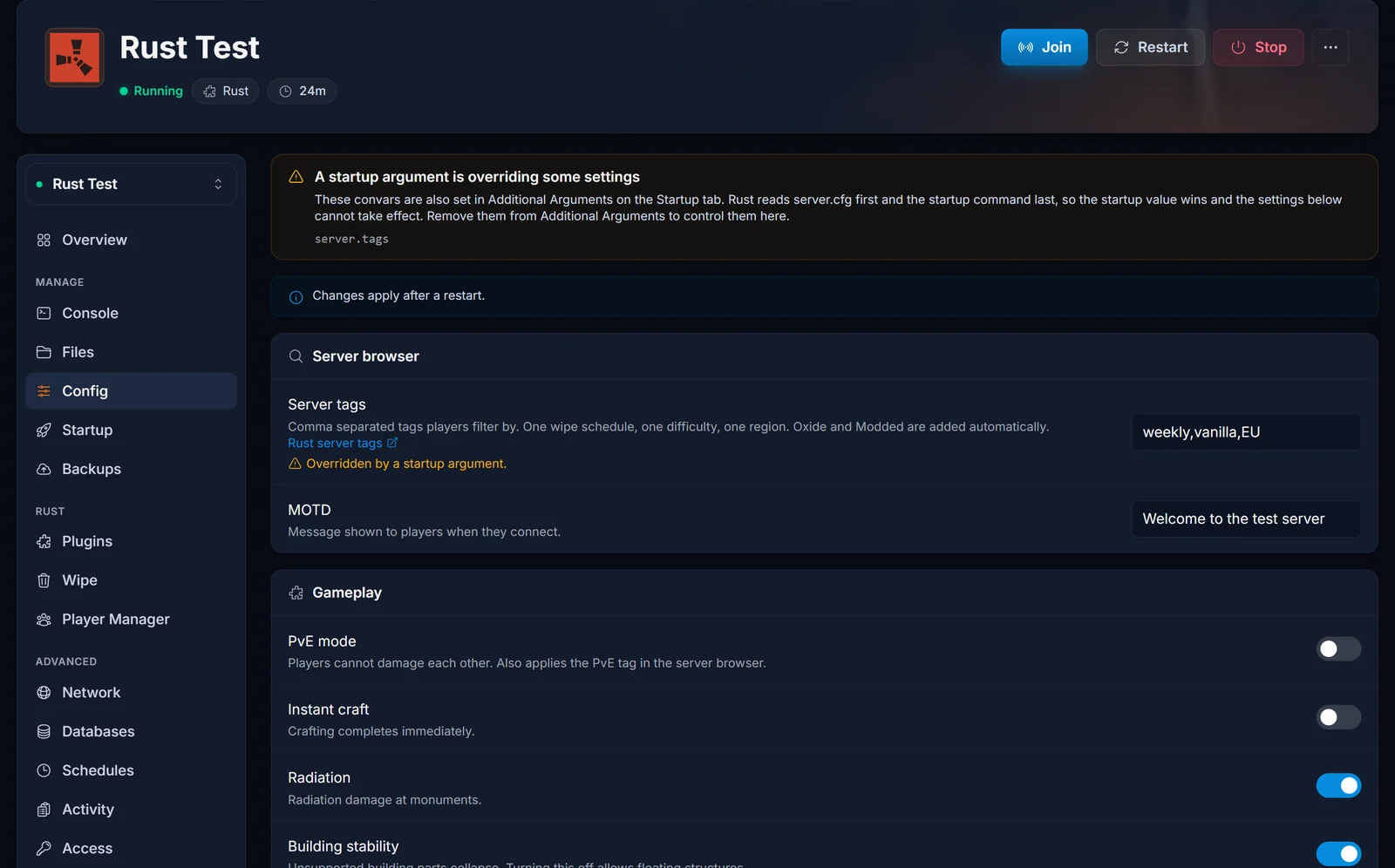
If you see it, open the Startup tab, remove that convar from Additional Arguments, and manage the setting from the Config tab.
Editing server.cfg by hand
If you prefer to manage a lot of convars in one file, Rust reads server.cfg at startup. Two things to know before you go looking for it:
Your server does not have one yet. A fresh Rust install ships bans.cfg, users.cfg and serverauto.cfg, but no server.cfg. The Config tab creates it the first time you save a setting. If you have never used that tab, the file simply will not be there.
To edit it directly, scroll to the bottom of the Config tab and use the link that opens the file manager in that folder, or open the Files tab and go to server then rust then cfg. Tags go on their own line with no +:
server.tags "weekly,vanilla,EU"
Save and restart. Anything you write here is picked up by the Config tab too, since they are the same file.
Why your tags are not showing up
Work down this list in order.
You did not restart. Tags are read at startup. Saving alone changes nothing on a running server.
A startup argument is overriding you. See above. The Config tab warns about this, so check for the amber banner.
You used two tags from the same group. weekly,monthly or vanilla,hardcore breaks filtered searches. One per group.
A typo or the wrong case. Values must match exactly. Region codes are uppercase (EU, not eu), everything else is lowercase. Rust silently drops anything it does not recognise. The Config tab catches this for you; a hand-edited file does not.
Spaces after the commas. Use weekly,vanilla,EU, not weekly, vanilla, EU.
Your server is not reachable at all. If it never appears with or without filters, that is a connectivity problem, not a tag problem. Check it with our Rust server status checker.
One thing that looks like a bug and is not: if you inspect your server with an external query tool, tags come back compressed. weekly shows as ^w, vanilla as ^v, Oxide and Modded together as ^o^z. Region codes stay readable. That is normal, and the server browser expands them back into proper labels.
Choosing tags that actually get you players
Tags are a discovery tool, so pick what players filter on rather than what describes you most precisely.
The wipe schedule tag is the highest value one you can set, because wipe cadence is the first thing most players filter by. Set it and honour it: a server tagged weekly that wipes whenever the owner feels like it loses players fast. Our Rust wipe schedule tool shows the upcoming forced wipe dates, and How to Wipe a Rust Server covers running the wipe itself.
A difficulty tag tells players what they are walking into. Only use vanilla if you genuinely run vanilla rates. Players who filter for it notice within minutes and leave.
A region tag is cheap and easy to forget. Set it to match where your server is actually hosted so latency-conscious players can find you.
Beyond that, only tag what is true. Tag stuffing buys a burst of players who leave almost immediately, which hurts retention more than a smaller, honest listing ever would.
Common questions
How many tags can I use? More than four will work for filtering, but only four are displayed next to your server in the browser. The extras are not wasted, they just do not all show.
Do I need the modded tag if I run Oxide? No. Oxide adds oxide and modded for you. Use your tags for wipe schedule, difficulty and region.
Where is server.cfg? At server/rust/cfg/server.cfg in the Files tab. It does not exist until the Config tab creates it or you create it yourself.
Do tags change gameplay? No. Tags are purely advertising. The one indirect exception is PvE mode, which changes gameplay and applies the PvE tag as a side effect.
Why does my tag show as ^w? That is the compressed form servers broadcast. The browser turns it back into Weekly. Nothing is wrong.
Can I change tags without restarting? Not in a way that sticks. You can set the convar live over RCON, but it reverts on the next restart unless it is also saved in the Config tab or Additional Arguments.
Does a wipe reset my tags? No. Tags live in your server configuration, not the world files, so they survive both map wipes and full wipes.
Running Oxide alongside your tags? See Installing Oxide on Your Rust Server. If you do not have a server yet, take a look at our Rust server hosting plans.
