
Farming Simulator 25 has no "connect by IP" box. Players open Multiplayer inside the game and pick your server out of the list by name, so the two things everyone needs are the exact server name and the game password, if you set one. This guide shows where both live in your DoomHosting panel, how to get a savegame running so the server is actually listed, the click path in the game, and the one setting that most often makes a healthy server invisible.
What has to be true before anyone can join
Three things, in this order:
- The server is running. A first boot downloads and installs about 23 GB from the GIANTS portal, so give a brand new server 20 to 40 minutes before you expect it in any list.
- A savegame is loaded and running in the FS25 web panel. An idle server with no savegame is not joinable and is not advertised.
- Your players know the server name, the game password if you set one, and are looking at the same language filter as the server. That last one is covered in Common Issues, and it catches more people than everything else combined.
Find the server name and password in your panel
Open your server in the DoomHosting panel and go to the Startup tab. Everything a player needs is there:
- Server name: the exact text shown in the in-game server list. This is what your friends search for.
- Game join password: leave it empty for an open server, or set one and share it. Players are prompted for it as they join.
- In-game admin password: not for joining. It is what you type in game to authenticate as admin once you are on the server.
- Language: the language the server advertises itself under, and the most common reason a perfectly healthy server is missing from the list. Match it to your players.
- Max players: up to 16.
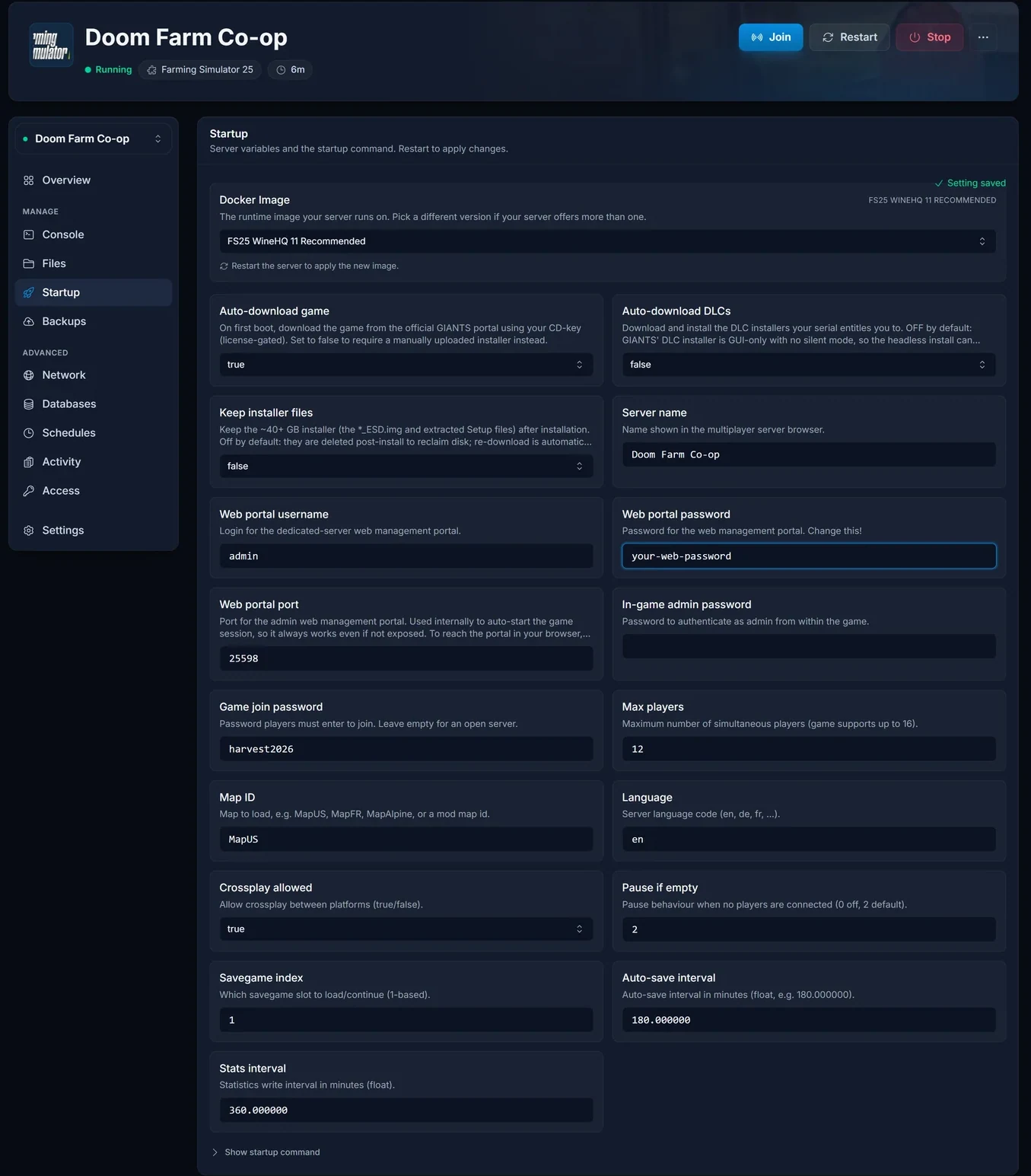
Save your changes and restart the server from the Console tab. These values are read at boot, so an edit without a restart changes nothing.
Start a savegame in the FS25 web panel
Farming Simulator ships its own browser-based admin portal, and that is where the farm itself is run: pick the map, create or continue a savegame, switch mods on and off, and press start. Until a savegame is running, there is nothing for players to join.
On your server's Overview, find the Web admin panel card. It shows the address plus the username and password, all copyable, with a reveal button for the password.
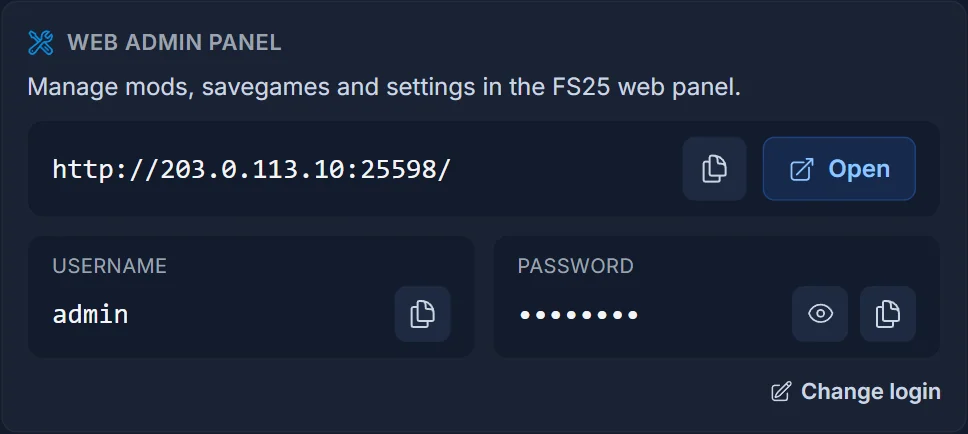
The Open button only arms once the portal is actually answering. Farming Simulator runs under Wine here, so the portal comes up a few minutes after the server flips to Running, and longer on a first boot. If the button reads Starting, wait rather than refreshing.
Click Open and log in with the username and password from the card. The portal has four pages across the top, HOME, SAVEGAMES, MODS and LOG FILES, and a status indicator that reads OFFLINE until a game session is actually running.
HOME is a single Configuration form: Game Name, Administrator Password, Game Password, Savegame Slot, Map, Start Money, Start Loan, Economic Difficulty, Slots, Game Language and a Crossplay allowed checkbox, with Save and Start buttons underneath. Pick an empty savegame slot plus a map for a new farm, or an existing slot to carry on, press Save, then press Start. The status flips to ONLINE, the server starts advertising itself, and players can find it.
Join from inside Farming Simulator 25
With a savegame running, every player does this:
- Launch Farming Simulator 25 and choose Multiplayer from the main menu.
- Open the server list. Dedicated servers appear here alongside player-hosted games.
- Type part of the server name into the search field. Searching is far quicker than scrolling, and the list is long.
- Select your server and join.
- Enter the game password if you set one.
- Pick an existing farm to join, or create a new one, and you are in.
There is no field anywhere in the FS25 client for typing a server address. The IP and port shown on your panel Overview are for the web admin panel and for your own reference, not for pasting into the game. If someone asks you for the IP to connect, give them the server name instead.
Console friends and crossplay
Your Overview has a Crossplay card, and crossplay is on by default. With it on, players on PC, Mac, PlayStation 5 and Xbox Series X|S can all join the same farm. Console players use exactly the same route: Multiplayer, then find the server by name.
One rule decides whether crossplay keeps working: only mods installed from the official ModHub are allowed. Upload a mod through FTP or the Files tab and enable it, and crossplay switches off for that session until the mod is removed. If a console friend can no longer see or join a server that used to work, an externally uploaded mod is the first thing to check.
Common issues
The server is not in the list, and the language is why. Farming Simulator's server list is language aware, so a server advertising one language does not turn up for players browsing in another. We hit exactly this on our own test server: it was set to Swedish and stayed invisible until the language was switched to English. The setting lives in two places, and they are not equal. The Language field on the Startup tab in your DoomHosting panel is the one that wins, because it is written into the server config on every boot and overwrites whatever the web panel had. The Game Language dropdown on the FS25 web panel's home page changes the running session, but a restart resets it to the Startup value. So set Language on the Startup tab to the language your group actually plays in, restart, and confirm the web panel then shows the same language. After that, have your players check that the language filter in the in-game server list is not narrowed to something else.
The server is brand new and nothing is showing. It is almost certainly still installing. Watch the Console tab for the download and install progress, and wait until the setup notice clears. This happens once, on the first boot only.
The server is Running but not listed. Open the web panel and confirm a savegame is actually started. A server sitting at the web panel with no savegame running does not advertise itself.
Wrong password. The game asks for the Game join password, not the in-game admin password. Those are two separate fields on the Startup tab and it is an easy mix-up. Copy the value straight from the panel, and remember a change only takes effect after a restart.
The name your players search does not match. Search matches the server name exactly as it is set, spaces and capitalisation included. Have someone search for a short distinctive fragment rather than the whole name.
A console player cannot join. Check the Crossplay card is on and that no manually uploaded mod is enabled. ModHub mods are fine, uploaded ones are not.
Version mismatch. Everyone needs the same game version as the server. A player on a different patch, or on a platform still waiting on an update, will not be able to join. Update the client, and restart the server so it picks up its own update.
The server is full. Farming Simulator 25 supports up to 16 players. Raise Max players on the Startup tab and restart if you have run out of slots.
Where to go next
Setting the server up from scratch is covered in How to Set Up Your Farming Simulator 25 Dedicated Server, and adding ModHub content everyone downloads automatically on join is covered in How to Install Mods on Your Farming Simulator 25 Server. If you do not have a server yet, see the plans on the Farming Simulator 25 server hosting page, size it with the Farming Simulator 25 RAM calculator, and take a look at what the game control panel does.
