


To change settings on an ARK: Survival Ascended server, stop the server first, change the setting in the Config tab or in GameUserSettings.ini, then start it again. ARK only reads its config files when it boots, and it writes its own copy back over them when it shuts down. An edit made while the server is running is never loaded, and the next stop erases it.
That one rule explains most "my settings don't work" cases. The rest come from putting a setting in the wrong file or the wrong section, both covered below.
Quick answer
| You want to change | Where |
|---|---|
| Rates, taming, difficulty, limits, transfers, PvP and PvE rules | Config tab, server stopped |
| A setting the Config tab does not list | GameUserSettings.ini in the Files tab, server stopped |
| Breeding, spoiling, crop growth, players per tribe | Game.ini, not GameUserSettings.ini |
| Server name, passwords, map, max players | Startup tab |
The easy way: the Config tab
- Stop the server and wait until it shows Offline.
- Open the Config tab.
- Change what you need. The panel saves each change by itself.
- Start the server.

While the server is running the tab is locked and tells you to stop it first. That lock is there for the reason above: a value saved while ARK is running would be overwritten when it shuts down.
The Config tab also puts each setting in the correct file for you, which matters more than it sounds. See the next two sections.
Where the config files are
ARK: Survival Ascended servers run the Windows version of the game, so the folder is WindowsServer even though the machine is Linux:
/ShooterGame/Saved/Config/WindowsServer/GameUserSettings.ini
/ShooterGame/Saved/Config/WindowsServer/Game.ini
Guides written for ARK: Survival Evolved point at LinuxServer. That folder does not exist on an Ascended server, and a file you create there is ignored.
Edit GameUserSettings.ini by hand
- Stop the server.
- Open the Files tab and go to
/ShooterGame/Saved/Config/WindowsServer/. - Open
GameUserSettings.ini. - Add or change your lines under the
[ServerSettings]header, oneKey=Valueper line. - Click Save, then start the server.
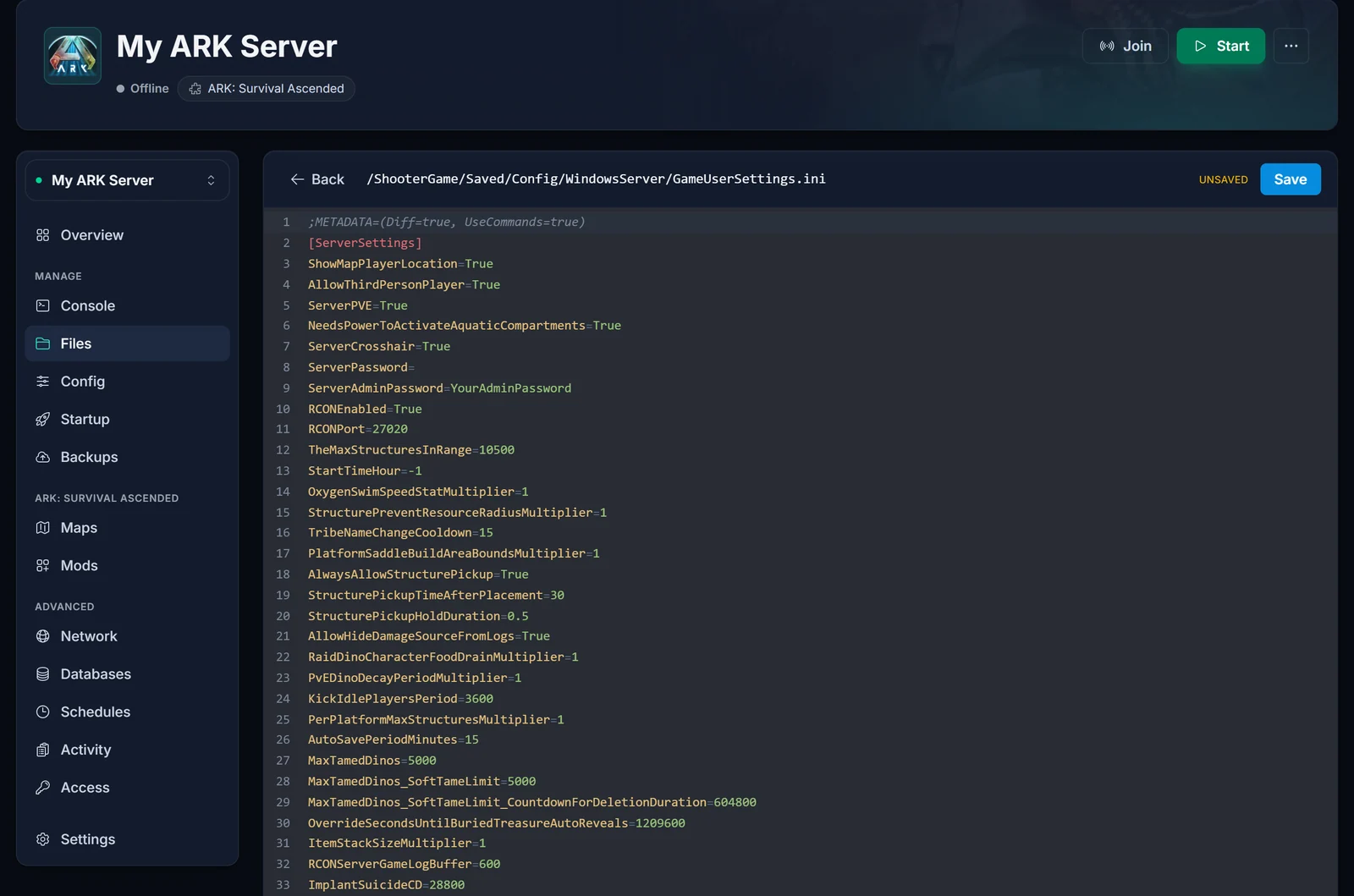
For example, to change how many tames and items a player can hold in an obelisk upload:
[ServerSettings]
MaxTributeDinos=40
MaxTributeItems=100
The file has many sections, and most of them belong to mods. A server setting pasted at the bottom of the file lands in whatever section happens to be last, and ARK ignores it there. Keep server settings directly under [ServerSettings].
GameUserSettings.ini or Game.ini?
ARK splits its settings across two files, and a setting in the wrong one is silently ignored. There is no error in the console. It just has no effect.
GameUserSettings.ini, under[ServerSettings]: XP, harvest and taming rates, difficulty, day and night speed, structure and tame limits, PvE and PvP rules, cross-server transfers.Game.ini, under[/Script/ShooterGame.ShooterGameMode]: mating, egg hatch and baby mature speed, imprinting, spoiling and decomposition times, crop growth, max players in a tribe, per-level stat multipliers.
If Game.ini is missing, create it in the same folder with that header as its first line. For stats per level, the stat index list and breeding keys, see how to change stats per level in ARK.
Settings that live in the Startup tab
The server name, join password, admin password, map, max players and mod list are set in the Startup tab. Change them there, not in the file. The panel writes Max Players and Server Admin Password into GameUserSettings.ini every time the server starts, so a MaxPlayers value typed into the file goes back to the Startup value on the next boot. The rest are part of the launch command, which ARK reads last, so it wins over anything in the file. Editing SessionName in GameUserSettings.ini does nothing.
Common issues
I changed the file and nothing happened The server was running when you saved. ARK has not read the file since it booted, and it will overwrite your edit when it stops. Stop the server, make the change again, then start it.
My lines disappeared after a restart Same cause. On shutdown ARK writes the settings it has in memory back to the file, so lines added while it was running are replaced. Lines under a section ARK does not know are kept, which is why mod settings survive.
My max players keeps resetting after a restart The player limit comes from Max Players on the Startup tab, which the panel writes into the file on every start. Change it there and restart.
The setting is in the file but still has no effect
Check that it sits under [ServerSettings] and not under a mod's section further down, and that it belongs in GameUserSettings.ini at all. Breeding and spoiling settings go in Game.ini.
It works on my own PC or another host but not here
The settings themselves are the same everywhere. Compare the folder (WindowsServer), the section header, and whether the server was stopped when you edited.
I broke the file and the server will not start
If you have a backup, restore it from the Backups tab. Otherwise delete GameUserSettings.ini while the server is stopped. ARK writes a fresh one on the next start, and the Startup tab still holds your name, passwords and map.
Adding mods as well? See how to install mods on your ARK: Survival Ascended server. For joining, see how to connect to your ARK: Survival Ascended server. Everything here runs from the DoomHosting game panel. Need a server first? Have a look at ARK: Survival Ascended server hosting.
