

Switching maps on an ARK: Survival Ascended server takes three clicks: go to the Maps tab, pick a map and confirm with Switch and restart. We restart the server for you, it boots into the new map, and the world you leave behind stays saved for later. Below you will find every map you can pick, what the RAM and DLC badges mean, how to load a mod map and why your old base is safe.
How to Change the Map in the Panel
The left-hand menu of your server has a section for the game itself, and in it you find Maps. Each official map is a card with a preview, and the one that is running now carries a Current label.
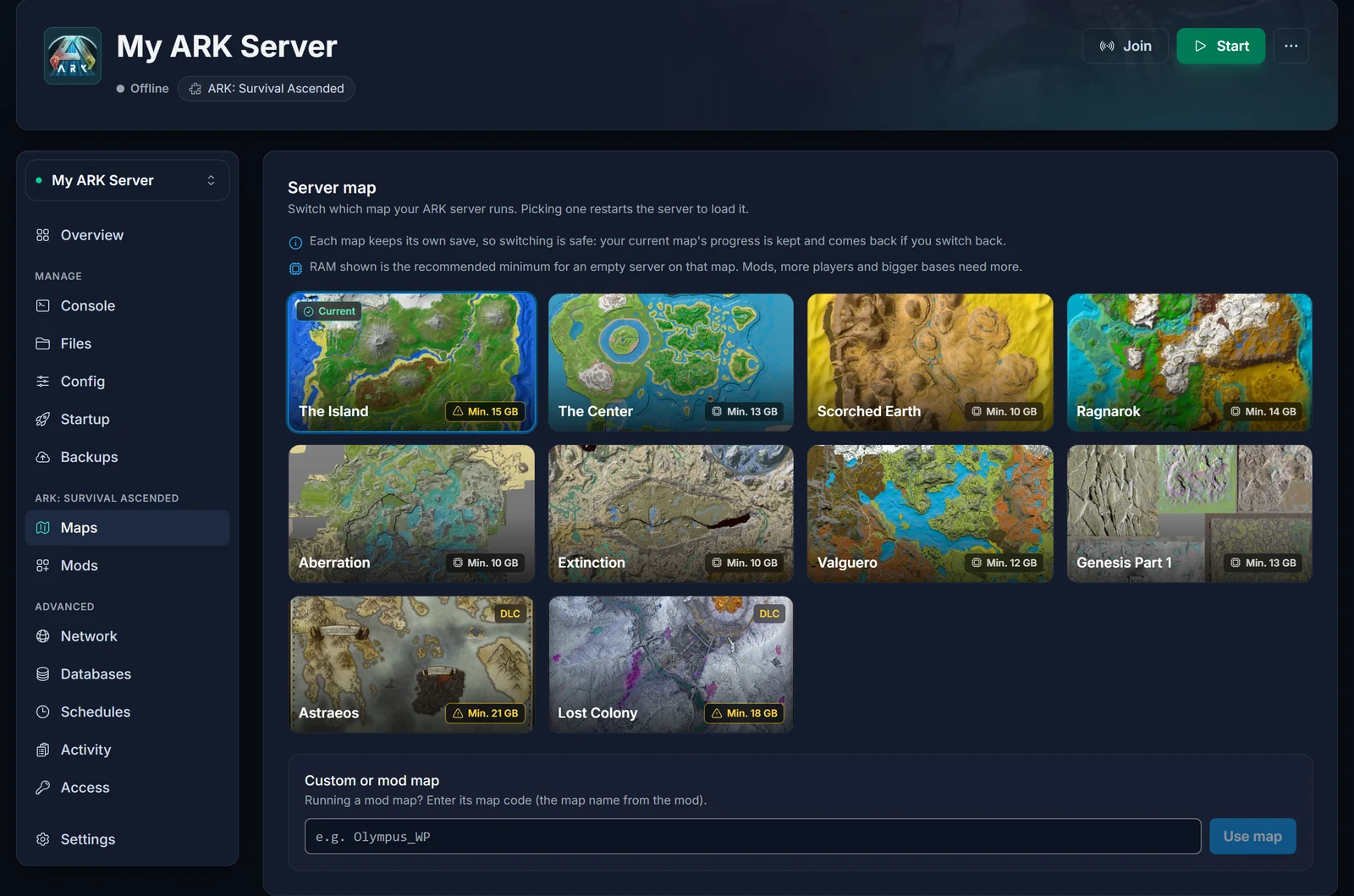
- Open Maps on your server in the panel.
- Click the card of the map you want.
- A dialog asks you to confirm. Press Switch and restart.
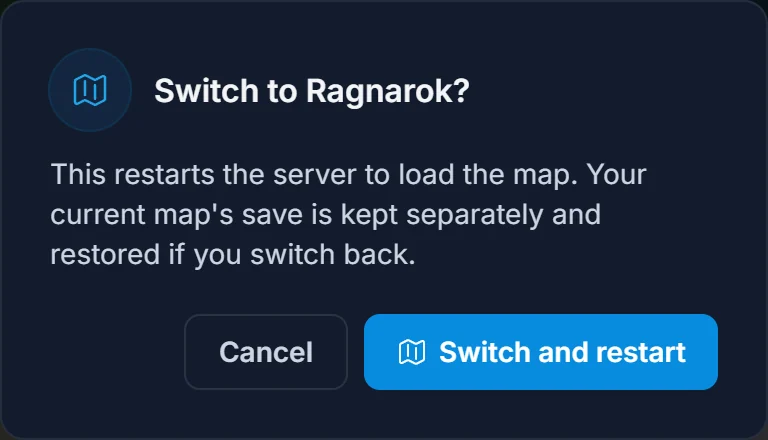
That is it: the setting is changed and the restart is sent in one go. Give a map you have never played on some extra time, because the server has to generate it before anyone can join, and on the bigger maps that is a matter of minutes. The Console tab shows when it is done.
Which ARK: Survival Ascended Maps Can I Run?
Ten official maps are in the list today:
- Free: The Island, The Center, Scorched Earth, Ragnarok, Aberration, Extinction, Valguero and Genesis Part 1.
- Paid DLC: Astraeos and Lost Colony.
A map that Studio Wildcard has not brought to Survival Ascended yet is not in the list, and we add new ones as they come out.
RAM and DLC badges on the map cards
- Min. GB is the RAM we recommend as a floor for that map with nobody online, based on our own boot tests. When your plan is under it, the badge turns amber and the dialog warns you before anything changes. Going below it risks a map that never finishes loading. Plan extra memory for mods, a full server and large bases; a RAM upgrade is available from the panel whenever you need it.
- DLC means players pay for the map. The server itself needs nothing, but anyone who wants to join must own that DLC.
How to Run a Mod Map
Maps made by the community come from CurseForge as mods. Getting one running is a two-part job:
- Add the map mod in the Mods tab first. Our ARK: Survival Ascended mods guide walks you through it.
- Back in Maps, scroll to the Custom or mod map box at the bottom, enter the map code and press Use map. The mod's own page names the code, and it nearly always ends in
_WP.
You get the same confirmation and automatic restart as with an official map.
Does Switching Maps Delete My Progress?
No. Each map has a save of its own, so picking a new one never touches the world you had before. Structures, dinos and survivors on that map wait on the disk and are all there when you return to it. Survivors do not travel with you, though: on a map nobody has played yet, every player creates a new character.
Want to be extra careful? Make a backup in the Backups tab first.
Changing the Map With the Server Map Setting
Under Startup there is a field called Server Map. It holds the exact same value the Maps tab writes, so editing it by hand works too. You then need the precise code, such as Ragnarok_WP, and you have to restart on your own. One wrong letter and the server has no map to load, so the Maps tab is the safer choice.
Map Change Not Working?
- Server stuck or crashing after the switch: compare your RAM with the badge on the map. Either upgrade or go for a lighter map. For a mod map, double-check the code and the
_WPat the end. - Players kicked on a DLC map: they do not own the DLC. Everyone can join the free maps.
- Server missing from the list right after switching: it is still generating the map. Wait for the Console to go quiet and look again.
- "Our base is gone": you are on another map now. Switch back and it is all still there.
Common Questions
Can I change the map without losing my world?
Yes. The world you switch away from is kept as it is and loads again when you pick that map later.
Does the server need to be offline first?
No. The Maps tab handles the restart itself.
Can one server run two maps at once?
No, one server runs one map. For several maps in parallel, rent a server per map.
How do players find the server after a map change?
Nothing changes for them: they look for the server by its name as before. If that name is still the default, read how to change your ARK: Survival Ascended server name.
Where are rates and difficulty?
Those are in GameUserSettings.ini, covered in how to edit GameUserSettings.ini on your ARK: Survival Ascended server.
Still Stuck?
Our support team can look at the map and memory of your server and tell you what is going on. Thinking about a server of your own first? Compare our ARK: Survival Ascended server hosting plans or take a look at the game panel.
