

ARK: Survival Ascended dropped the Steam Workshop. Its mods live on CurseForge instead, and your server pulls them down itself from a list of mod IDs. The Mods tab in the panel keeps that list for you, so installing a mod is a search, a click and a restart. Here is the whole flow, including what your players have to do on their side and the one thing that costs them money.
What you need
An ARK: Survival Ascended server with us and access to the control panel. Nothing else. There is no SteamCMD step, no FTP upload and no CurseForge app to run: the server fetches every mod itself on its next start, straight from CurseForge.
Settle one thing before you start. ASA mods are not ARK: Survival Evolved mods, and the two catalogues do not overlap. A mod built for the old game will not show up in the search here and will not load on this server, so ignore any guide that tells you to subscribe to something on the Steam Workshop. Everything for Ascended comes from curseforge.com/ark-survival-ascended, and the panel searches that catalogue directly.
Open the Mods tab
Open your server in the panel and click Mods in the server's own sidebar, under the ARK: Survival Ascended heading. On a narrow screen that sidebar collapses into the section dropdown at the top of the page, and Mods is in the same list.
The tab has two views, switched with the toggle in the top right. Browse searches CurseForge for something to add. Installed shows what is already on your server's list, with a Remove button on each one. The number next to Installed is how many mods your server is currently set to load.

Find and add a mod
Type part of the mod's name into the search box. Results are ranked by name first, so a mod actually called what you typed sits above one that only mentions the word somewhere in its description, and download counts break the ties. Each card shows the mod's icon, its total downloads and a one-line summary, and the title links to its CurseForge page if you want to read the full description first. Click Add on the one you want.
Already know exactly which mod you want? Paste its CurseForge link or its Project ID straight into the search box. The panel spots the number and offers to add that ID directly, which is quicker than hunting for it in a result list. The Project ID is the number in the right-hand column of any mod page on CurseForge, and it is the same number your server uses.
Nothing is downloaded at this point. Adding a mod writes its ID into your server's mod list, and that list is only read when the server starts.
Restart to apply
As soon as your list changes, the Mods tab shows a "Your changes aren't applied yet" banner with a Restart now button. Click it. Adding a mod and forgetting this step is far and away the most common reason a mod appears to do nothing.
On that start ARK reads the list, downloads each mod from CurseForge and unpacks it before the world loads. You can watch the whole thing on the Console tab:
LogCFCore: Request to Install mod 'Awesome Spyglass!' (modId=947033, fileId=6950581)
LogCFCore: Successfully installed mod 'Awesome Spyglass!' (modId=947033, fileId=6950581)
LogCFCore: Mod valid: Awesome Spyglass! (947033)
UShooterEngine::LoadGameMods with 2 mods
Those four lines are what a healthy install looks like: requested, installed, validated, loaded. The first start after adding a mod is slower than usual because of the download, and a heavy content mod can add minutes to it. Later starts only fetch what has changed since, so they are back to normal speed. A mod that the author has updated is picked up the same way, on the next restart, with no action from you.
Manage your installed mods
Switch to Installed for the full list. Each mod has a Remove button, and Remove all clears the list in one go if you want to take the server back to vanilla. Removing needs a restart to take effect, exactly like adding.
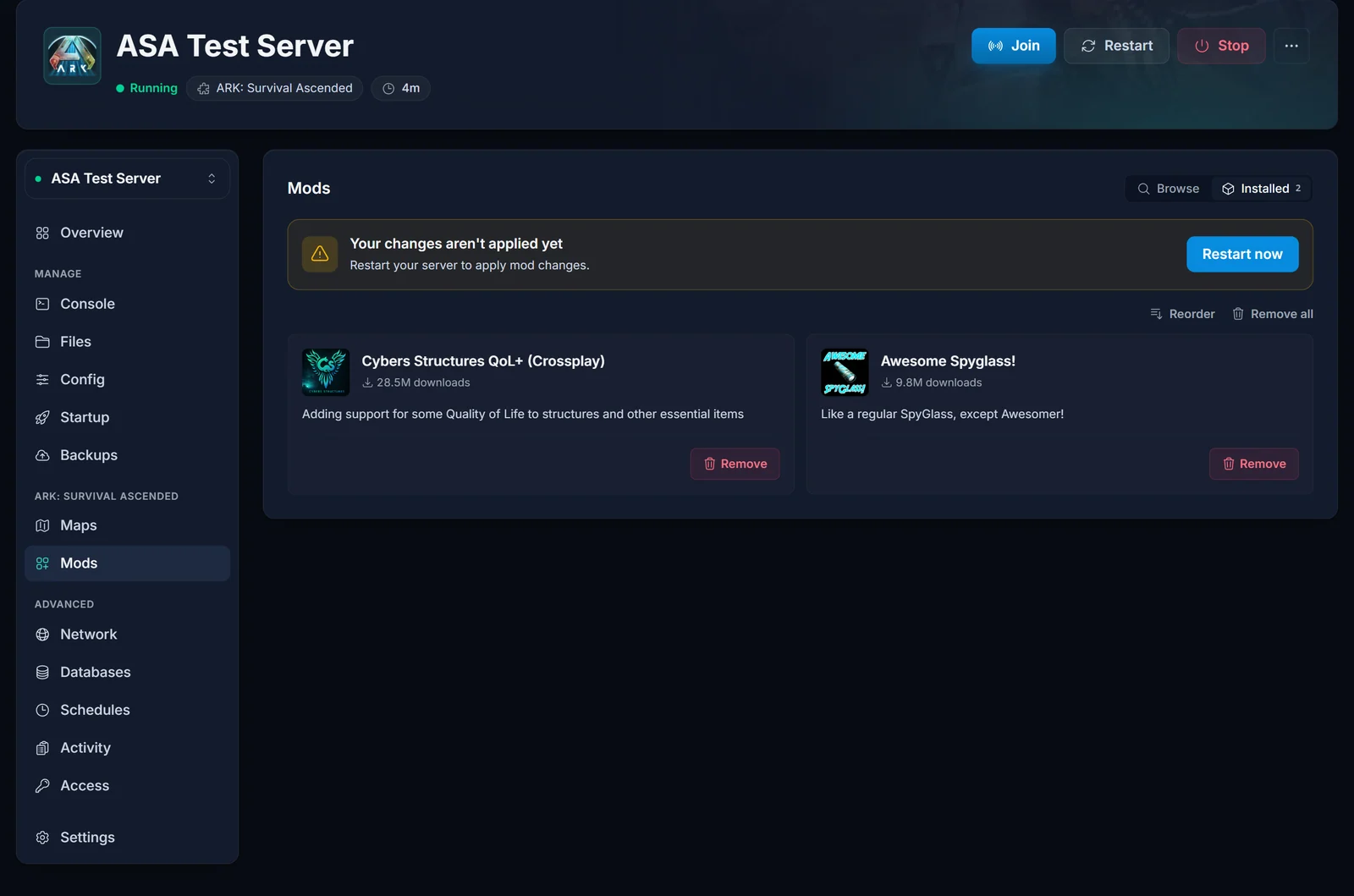
New mods go on the end of the list, and ARK reads that list in order. The first entry becomes the base game data and everything after it is merged in on top, which the console spells out:
LoadGameMods Using mod asset Package /CybersStructures/PrimalGameData_CybersStructures as PrimalGameDataOverride.
LoadGameMods Merging mod asset Package /AwesomeSpyglass/PrimalGameData_BP_AwesomeSpyglass with PrimalGameDataOverride.
So a total conversion or a big overhaul belongs at the front of the list, and anything that only tweaks a few items can sit behind it. To change the order, open the Installed view and click Reorder above the list, move each mod with the up and down controls, then save. The mod at the top loads first. Saving the order is a change like any other, so restart to apply it.
If you ever want to see the raw list, it is the MOD IDs field on the Startup tab: the same comma-separated Project IDs, which the Mods tab reads straight back. That field caps at 512 characters, which works out at roughly 70 mods.
What your players have to do
Almost nothing, and this is the real improvement over ARK: Survival Evolved. When a player joins your server, ARK shows them a window listing every mod the server runs and installs the ones they are missing as soon as they click Join. No subscribing, no manual downloads, no matching file versions by hand, and nothing to install if they already have the mod from another server.
Two things are still worth telling them. Their first join after you add a large mod takes a while, because they are downloading it too and it lands before the loading screen does. And give them a heads-up before you restart to apply a change, so nobody is mid-taming when the server goes down and nobody is surprised by the install prompt on the way back in.
Premium mods cost your players money
CurseForge sells premium mods for Ascended, in tiers from roughly $2 to $15, and ARK is the only game on CurseForge that has them at all. Ownership is per account, not per server, so a player who has bought one can use it anywhere. The catch is the other direction: if you put a premium mod on your server, every player who wants to join has to own it too.
That is worth saying up front in your Discord or your server description. The alternative is a player hitting a purchase prompt at the door with no idea why, which usually ends with them going to a different server. Free mods have no gate of any kind, and a mod's CurseForge page tells you which sort you are looking at before you add it.
Common issues
The mod is on my list but nothing changed in game. Mod changes apply on restart, not when you click Add. Go back to the Mods tab, look for the unapplied-changes banner, and restart.
I cannot find a mod in the search. The search only covers ARK: Survival Ascended mods on CurseForge. If the mod you want is an ARK: Survival Evolved mod, it will never appear and it will not run here. If it is an Ascended mod that search is simply not surfacing, open its CurseForge page and paste the Project ID into the search box to add it by ID.
The server takes far longer to start than it used to. It is downloading your mods. Open the Console tab and you will see each one requested, installed and validated before the world loads. This is expected on the first start after a change and on the first start after a mod author pushes an update.
The server starts and then crashes after I add a mod. Remove the mod you added last, restart, and see if the server comes back. A mod built against an older game version is the usual cause, and it is most common in the days right after an ARK patch. If you added several at once, add them back one at a time so you know which one is at fault.
One mod never reaches "Mod valid" in the console. Its download failed, or that mod has no dedicated server build. Remove it, restart so your server is healthy again, and check the mod's CurseForge page for a note about server support before trying it again.
My players are asked to buy something before they can join. There is a premium mod on your list. Either accept that everyone needs to own it, or swap it for a free alternative.
I cannot add any more mods. The MOD IDs field holds 512 characters, which is around 70 Project IDs. Remove something you are not using.
Next steps: how to connect to your ARK: Survival Ascended server covers getting yourself and your players in, and our pick of the best ARK: Survival Ascended mods is a decent place to start a list. For plans and specs, see ARK: Survival Ascended server hosting.
