


Stats per level in ARK: Survival Ascended are set in Game.ini with the PerLevelStatsMultiplier keys: one set for players, one for tamed dinos. Stop the server, add the keys under [/Script/ShooterGame.ShooterGameMode], save and start it again. This guide covers every stat index, the breeding keys that live in the same file, and how to wipe wild dinos so spawn changes and new creature mods actually appear.
Quick answer
| You want to | Do this |
|---|---|
| Change how much a player gains per level point | PerLevelStatsMultiplier_Player[index]=value in Game.ini |
| Change how much a tamed dino gains per level point | PerLevelStatsMultiplier_DinoTamed[index]=value in Game.ini |
| Faster mating, hatching, maturing, imprinting | The breeding keys below, also in Game.ini |
| XP, harvest and taming rates | GameUserSettings.ini, not Game.ini (see how to edit GameUserSettings.ini) |
| Make new spawns or modded creatures show up | Run DestroyWildDinos as admin |
Stop the server before you edit
ARK keeps its settings in memory while it runs and writes them back over its ini files when it shuts down. Anything you save while the server is running is never read, and the next stop erases it. So the order is always: stop the server, wait for Offline, edit, save, start.
The Config tab enforces this. It locks itself while the server is running and unlocks once it is offline.
The easy way: the Config tab
On ARK: Survival Ascended the Config tab has a Leveling & stats section. It covers the per-level multipliers people change most (player health, stamina, oxygen, food, water, weight, melee damage, movement speed, fortitude and crafting speed, plus tamed dino health, stamina, food, weight, melee damage and movement speed) and the two speed leveling switches. It writes them to Game.ini under the right header for you.

For anything the tab does not list (the tamed _Add and _Affinity keys, wild dino stats, or a stat index that is not shown), edit Game.ini by hand.
Where Game.ini is
ARK: Survival Ascended runs the Windows build of the server, so the folder is WindowsServer:
/ShooterGame/Saved/Config/WindowsServer/Game.ini
A new server often has no Game.ini at all, or an empty one. That is normal: ARK only writes keys that differ from its defaults. Create the file in that folder if it is missing.
Edit Game.ini by hand
- Stop the server and wait until it shows Offline.
- Open the Files tab and go to
/ShooterGame/Saved/Config/WindowsServer/. - Open
Game.ini, or create it with New file if it is not there. - Make sure the first section header is exactly
[/Script/ShooterGame.ShooterGameMode]. Add it if the file is empty. - Put one
Key=Valueper line under that header. - Click Save, then start the server.
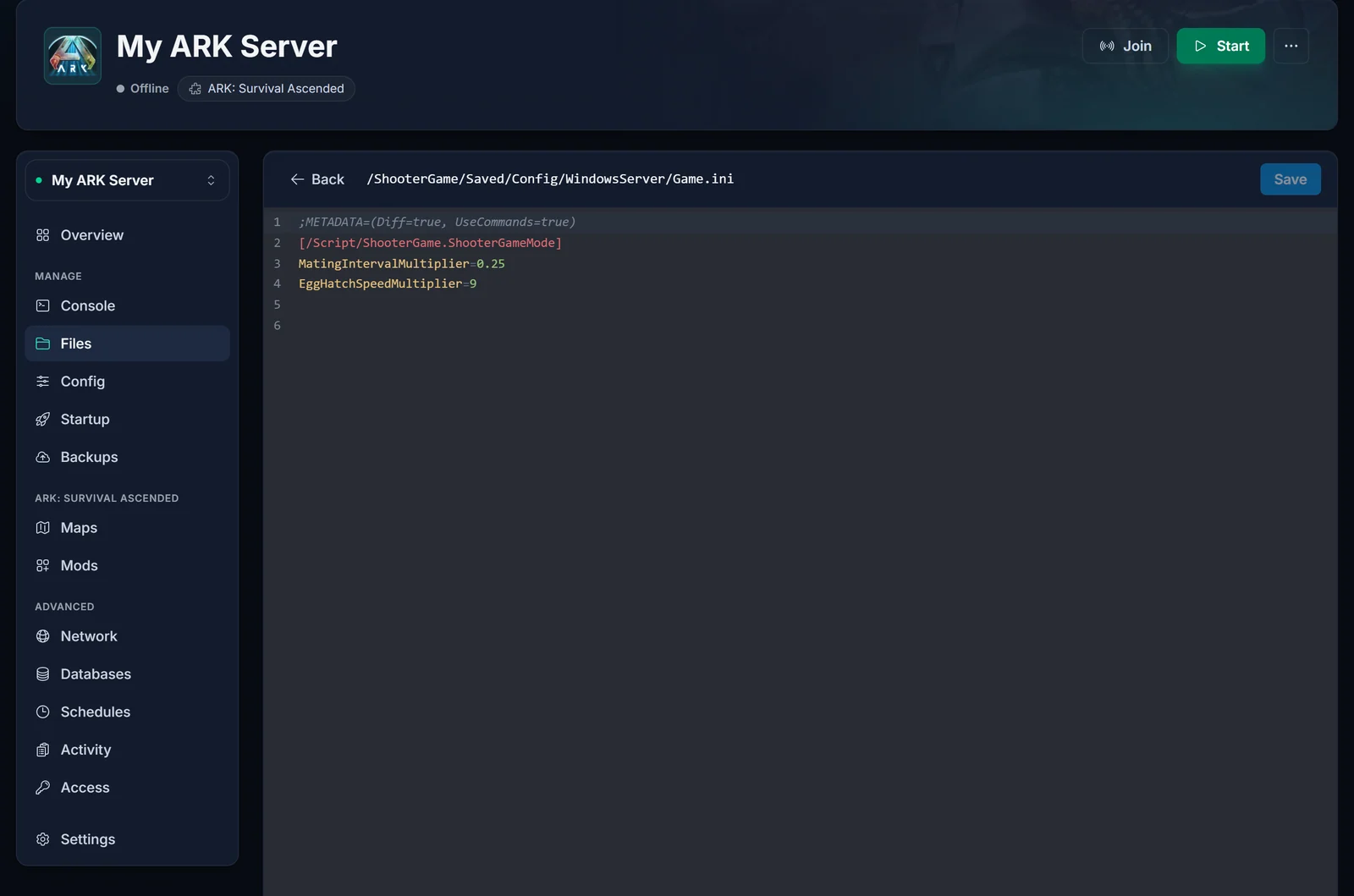
A finished file looks like this:
[/Script/ShooterGame.ShooterGameMode]
PerLevelStatsMultiplier_Player[7]=2.0
PerLevelStatsMultiplier_DinoTamed[0]=0.4
PerLevelStatsMultiplier_DinoTamed[8]=0.3
MatingIntervalMultiplier=0.5
EggHatchSpeedMultiplier=5
BabyMatureSpeedMultiplier=5
If ARK added a ;METADATA=... line at the top, leave it where it is.
Stat index table
Every PerLevelStatsMultiplier key takes a number in square brackets. That number picks the stat:
| Index | Stat |
|---|---|
| 0 | Health |
| 1 | Stamina (Charge Capacity on some creatures) |
| 2 | Torpidity |
| 3 | Oxygen (Charge Regeneration on some creatures) |
| 4 | Food |
| 5 | Water |
| 6 | Temperature |
| 7 | Weight |
| 8 | Melee Damage (Charge Emission Range on some creatures) |
| 9 | Movement Speed |
| 10 | Fortitude |
| 11 | Crafting Speed |
Players can put points into most of these. Dinos use a smaller set (health, stamina, oxygen, food, weight, melee damage, movement speed). Torpidity and temperature cannot be leveled.
Stats per level for players
PerLevelStatsMultiplier_Player[index] scales what a player gets for each point spent in that stat. 1.0 is the default, 2.0 doubles it.
[/Script/ShooterGame.ShooterGameMode]
PerLevelStatsMultiplier_Player[0]=2.0
PerLevelStatsMultiplier_Player[1]=2.0
PerLevelStatsMultiplier_Player[7]=3.0
PerLevelStatsMultiplier_Player[8]=1.5
That gives players double health and stamina per point, triple carry weight and 50% more melee damage per point. Set each index you want to change on its own line. Indexes you leave out stay at the default.
Movement speed is special on Ascended: players and non-flying tames cannot level it at all unless bAllowSpeedLeveling=True is set. Tamed flyers also need bAllowFlyerSpeedLeveling=True, on top of bAllowSpeedLeveling.
Stats per level for tamed dinos
Tamed dinos have three keys per stat, and they do different jobs:
| Key | What it scales |
|---|---|
PerLevelStatsMultiplier_DinoTamed[index] |
The stat gained for each level-up point you spend after taming |
PerLevelStatsMultiplier_DinoTamed_Add[index] |
The bonus added to a creature the moment it is tamed |
PerLevelStatsMultiplier_DinoTamed_Affinity[index] |
The bonus that scales with taming effectiveness (affinity) |
PerLevelStatsMultiplier_DinoWild[index] |
Wild creature stats per level (not tames) |
Watch the defaults here. For health (index 0) and melee damage (index 8), ARK's own default values for tames are well below 1: the ARK wiki lists 0.2 and 0.17 for DinoTamed, and 0.14 (_Add) and 0.44 (_Affinity) for both stats. So writing PerLevelStatsMultiplier_DinoTamed[0]=1.0 is not "default", it is roughly five times the normal health per point. Start from the default and multiply from there:
[/Script/ShooterGame.ShooterGameMode]
PerLevelStatsMultiplier_DinoTamed[0]=0.4
PerLevelStatsMultiplier_DinoTamed[8]=0.34
PerLevelStatsMultiplier_DinoTamed[7]=2.0
That doubles tamed health, melee damage and weight per point.
Do not use 0 to switch a stat off. A value of 0 falls back to 1.0. Use 0.01 if you want a stat to gain almost nothing.
Breeding and rate keys in Game.ini
These breeding settings also belong in Game.ini under the same header. Each one is a multiplier with 1.0 as the default.
| Key | Effect |
|---|---|
MatingIntervalMultiplier |
Cooldown between matings. Lower means they can breed again sooner. |
MatingSpeedMultiplier |
How fast mating completes once it starts. Higher is faster. |
EggHatchSpeedMultiplier |
How fast fertilized eggs hatch. Higher is faster. |
BabyMatureSpeedMultiplier |
How fast babies grow up. Higher is faster. |
BabyCuddleIntervalMultiplier |
Time between imprint cuddles (8 hours at 1.0). Lower means more cuddles. |
BabyImprintAmountMultiplier |
Imprint percent gained per cuddle. |
LayEggIntervalMultiplier |
Time between unfertilized eggs. Higher means fewer eggs. |
A popular "faster breeding" setup:
[/Script/ShooterGame.ShooterGameMode]
MatingIntervalMultiplier=0.25
EggHatchSpeedMultiplier=10
BabyMatureSpeedMultiplier=10
BabyCuddleIntervalMultiplier=0.1
When you raise maturation a lot, lower BabyCuddleIntervalMultiplier with it, or babies grow up before they ask for enough cuddles to reach 100% imprint.
The everyday rates (XP, harvesting, taming speed, difficulty) are not Game.ini keys. They go in GameUserSettings.ini or the Config tab, which our GameUserSettings.ini guide covers.
Make spawn changes and new creature mods show up
ARK does not swap out the creatures that already roam the map. After you change spawn or wild dino settings, or install a mod that adds creatures, the old population stays until it dies off. That is why modded dinos can be missing after 20 minutes of exploring. The fix is to remove the wild creatures so the map respawns them with your new rules.
Warning: use
DestroyWildDinosand nothing else. It removes wild creatures only and leaves tames alone. Commands likeDestroyAll,DestroyAllEnemiesandDestroyTribeDinosalso delete tamed creatures, and there is no undo. Make a backup in the Backups tab first so you can roll back if something goes wrong.
- Start the server and join it.
- Find your admin password: it is the Server Admin Password field on the Startup tab.

- In game, press Tab to open the console and log in as admin:
enablecheats YourAdminPassword
- Wipe the wild creatures:
admincheat DestroyWildDinos
You can also run it from the panel's Console tab without being in the game. That console talks to the server over RCON, so type the command on its own, without enablecheats or admincheat:
DestroyWildDinos
The map refills over the next few minutes as new creatures spawn in, this time using your current settings and mods.
Still no modded dinos after that? Check the mod is actually loaded (see how to install mods on your ARK: Survival Ascended server) and read the mod's page: some creature mods only spawn on certain maps or biomes, or need their own spawn settings.
New to admin commands? Our guide to becoming admin on an ARK server explains enablecheats, the admincheat prefix and permanent admin. It is written for Evolved, and the commands are the same on Ascended.
If you deleted your tames by mistake
If someone ran DestroyAll or another command that removed tamed creatures, stop playing on the server so it does not save over the damage, then restore a backup:
- Open the Backups tab.
- Pick a backup from before the command was run.
- Choose Restore and confirm.
Restoring puts the server's files back to that backup, so anything built or tamed after it is lost too. If there is no backup from before the wipe, contact support from your panel as soon as possible.
ARK: Survival Evolved
Game.ini works the same way on ARK: Survival Evolved: same header, same keys, same stat indexes, and the same rule to stop the server before editing. Only the folder differs, because Evolved runs the Linux build:
/ShooterGame/Saved/Config/LinuxServer/Game.ini
A new Evolved server ships an empty Game.ini there. Add the [/Script/ShooterGame.ShooterGameMode] header as the first line, then your keys. The Config tab on Evolved has no Leveling & stats section, so per-level multipliers are always edited in the file. bAllowSpeedLeveling and bAllowFlyerSpeedLeveling are Ascended settings, so leave them out on Evolved. On Evolved the admin password field on the Startup tab is called Admin Password.
Common issues
My Game.ini changes are gone after a restart The server was running when you saved. ARK wrote its in-memory settings back over the file when it stopped. Stop it first, edit again, then start.
The setting is in the file but does nothing
Check that it sits under [/Script/ShooterGame.ShooterGameMode] and not under another header, that the key is spelled exactly right (including the brackets: [0], not (0)), and that it is in Game.ini and not GameUserSettings.ini.
I set a stat to 0 and it went up instead
0 means "use the default of 1.0". Use 0.01 for almost no gain.
My tamed dinos are suddenly much stronger per level
You probably set a tamed health or melee damage multiplier to 1.0. ARK's defaults for those are far lower (0.2 and 0.17), so 1.0 is several times stronger. Use the defaults as the starting point.
Modded or newly enabled creatures still do not spawn
Run DestroyWildDinos once after the change, then give the map a few minutes to refill. If they still do not appear, check that the mod loads and whether it spawns on your map.
Want to change the rest of your server settings? See how to edit GameUserSettings.ini. Everything above runs from the DoomHosting game panel, and if you do not have a server yet, take a look at ARK: Survival Ascended server hosting.
