Mojang shipped Minecraft Bedrock Edition 26.20 on May 5, 2026. Unlike most minor Bedrock drops, this one rewires the social and Realms layer in ways every server operator will feel. Realms Hub replaces Realms Stories with a brand-new Admin role and an activity log. The Party System lets up to 15 players auto-join worlds and Realms together. Closed Captions finally land as a real setting. Offline multiplayer (broken since version 1.20.10) works again. And Bedrock Dedicated Server 1.26.20.4 / 1.26.20.5 is out the same day on protocol 975.
Release Date
Bedrock Edition 26.20 went live on Tuesday, May 5, 2026 across all platforms: Windows, mobile, console, and Bedrock Dedicated Server. The patch is a minor (1.26.20) release on the live channel, with experimental Chaos Cubed content available for testers. Bedrock Dedicated Server 1.26.20.4 dropped at launch and 1.26.20.5 followed shortly after with stability fixes.
Realms Hub: A New Admin Role for Multi-Owner Worlds
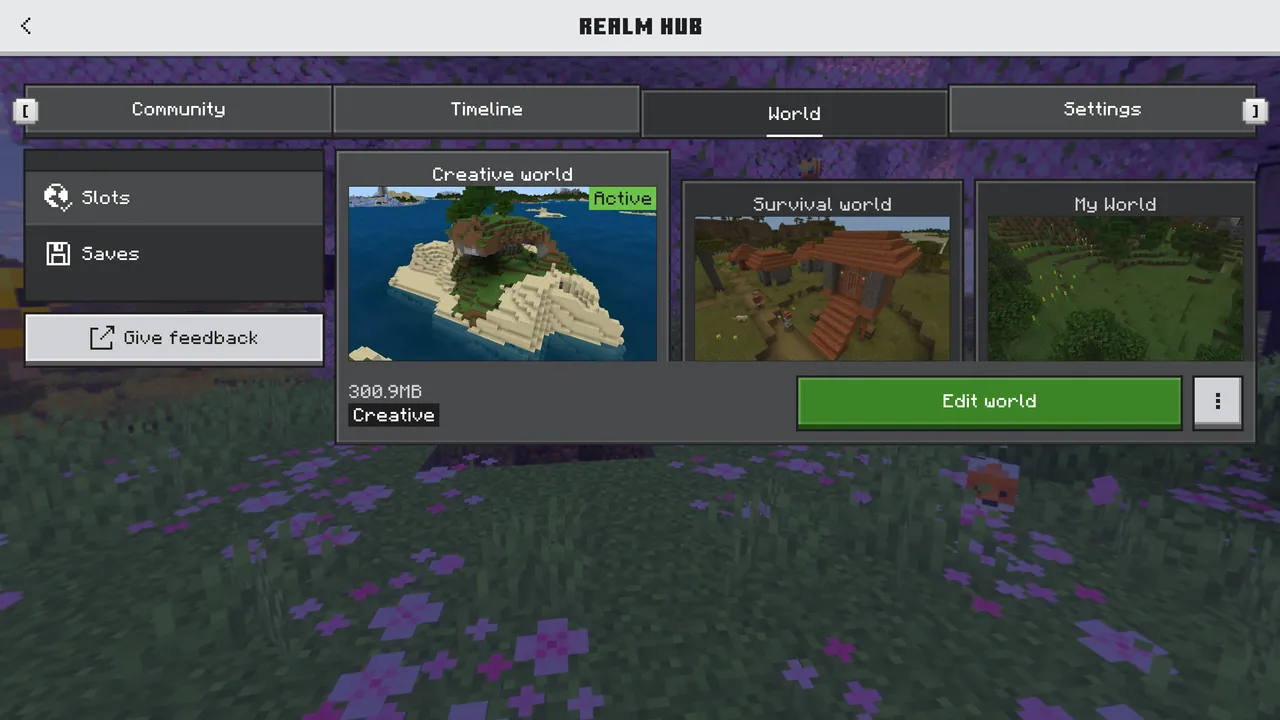
Realms Hub is the headline change for anyone running a community server. It replaces the old Realms Stories screen with a single consolidated UI covering world management, members, story moderation, and settings. All of it is reachable from the Realms Play screen.
The most important change for operators is the new Admin role. Previously a Realm had one owner and a flat list of members. Now the owner can promote trusted players to Admin with granular permissions:
- World management: load slots, swap saves, edit world settings without owner intervention.
- Member control: invite, kick, and ban without handing over the keys to the kingdom.
- Settings: change Realm name, default game mode, and player permissions.
- Story moderation: review the social feed and remove rule-breaking posts.
Admin actions are written to a new activity log that the owner can review at any time. If you have ever run a Realm with a co-mod and worried about giving them owner-level access, this is the change you have been waiting for.
Party System: 15-Player Groups That Follow You Across Worlds
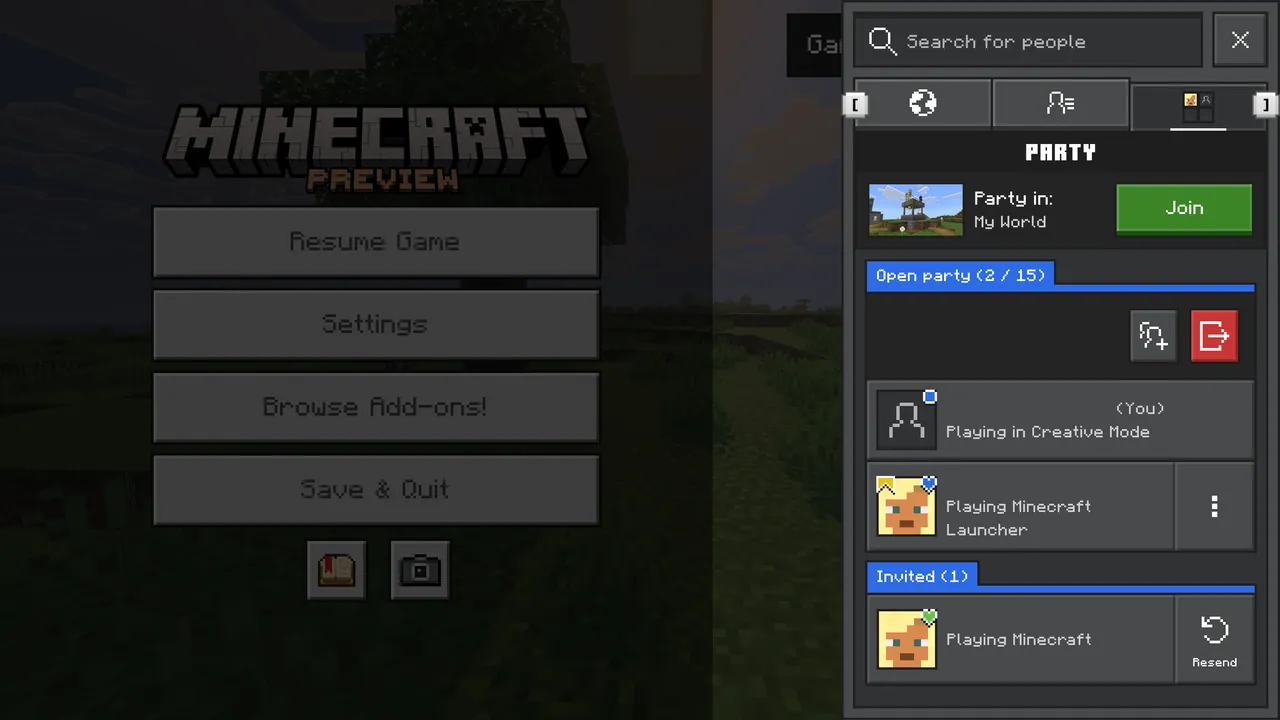
The Party System is the second big social addition. A leader can spin up a party of up to 15 members and choose between two privacy modes:
- Invited only: closed, for friend groups and guilds.
- Open: anyone with the party code can join.
Members automatically follow the leader between worlds and Realms (provided they are members of the destination Realm). A dedicated party text chat lives in the social drawer, separate from world chat, so coordinating a raid or a build session no longer pollutes the in-world chat log. Leaders can also promote other members to lead, useful when the original host has to drop offline mid-session.
For server-hosted communities this is a quiet but huge quality-of-life win: players who used to coordinate joins through Discord or screenshots can now jump straight from a party invite into your dedicated server.
Closed Captions Finally Land in Bedrock
Closed Captions have lived in the config files for years but never had a proper UI. 26.20 fixes that. The new accessibility setting lets players:
- Position captions in the top-right or bottom-right corner.
- Adjust duration between 1 and 4 seconds before fade-out.
- Filter sounds: hide player-caused effects, hide ambient and weather sounds, or show everything.
This matches the level of control Java has had for ages and unlocks Bedrock for a chunk of players who simply could not enjoy it before. If your community has any deaf or hard-of-hearing members, point them at the new Audio settings tab today.
Offline Multiplayer Is Working Again
Quietly the most consequential bug fix in the patch: offline multiplayer has been broken since version 1.20.10 in mid-2023. LAN sessions and certain console split-screen flows would refuse to connect for players without an active sign-in. 26.20 fixes the underlying authentication trigger and brings local multiplayer back from the dead.
For classroom servers, LAN parties, and any setup that does not assume every player has an internet connection, this is a quiet but enormous win. There is also a related platform subscription check for online multiplayer that you may need to confirm is satisfied on each platform, especially Switch and PlayStation.
What's New for Bedrock Dedicated Server Operators
The Bedrock Dedicated Server ships at 1.26.20.4 / 1.26.20.5 on protocol 975. Two beta additions to the @minecraft/server-admin module are worth flagging if you write management scripts:
DedicatedServerUtils.reloadScriptingConfig(): reload scripting configuration files from disk without restarting the server.DedicatedServerUtils.reloadPermissions(): reloadpermissions.jsonwithout a restart.
If you have built any kind of admin panel on top of the scripting API, these two functions remove the last reason to bounce the server for a config change. Sign-in speed has also been improved by triggering authentication earlier in the boot sequence: players hit the world list a beat sooner.
Chaos Cubed Parity Drops Into Bedrock (Experimental)
The Chaos Cubed content that arrived on Java in the 26.2 snapshot cycle is now testable on Bedrock behind the experimental toggle. That means Sulfur Caves, the new sulfur and cinnabar block families, and the Sulfur Cube mob. Alongside Closed Captions for everyone, this gets Bedrock back in lockstep with Java ahead of the full 26.30 release.
If you are running a Bedrock Dedicated Server and want to let your community preview it, flip on the Chaos Cubed experiment in the world settings, and warn your players that experimental worlds cannot be reverted to vanilla.
What This Means for Your Server
- Update during low traffic. Push 1.26.20.4 (or .5) on a quiet weekday morning: clients update automatically and a server still on 1.26.10 will lock everyone out until you bump it.
- Audit your Admin promotions. The new Admin role is a fresh attack surface. Promote trusted players only and keep the activity log tab pinned for the first few weeks.
- Back up before enabling Chaos Cubed. Experimental features mark the world permanently. Spin up a copy of your save before flipping the toggle.
- Re-test your scripting addons. The two new
reloadScriptingConfig/reloadPermissionsfunctions are in beta. Addons that hook into config reloads may behave differently. - Expect a small player spike. Closed Captions and the offline multiplayer fix bring back players who had churned out. Capacity planning should account for it.
Final Verdict
26.20 is a server-operator's update wearing a casual-player's clothes. The Realms Hub Admin role and the activity log alone justify the upgrade for any community Realm, and the offline multiplayer fix retires a two-year-old issue. Combine that with a clean Party System and proper closed captions, and Bedrock catches up with Java on two fronts that have annoyed players for years. Worth updating the server today.
Host Your Minecraft Bedrock Server with DoomHosting
Running a Minecraft Bedrock community server takes more than a router port: you want instant updates, automated backups, and a control panel that does not fight you. DoomHosting's Minecraft Bedrock servers ship on Pterodactyl with one-click 1.26.20.5, full FTP access, DDoS protection, and 24/7 support starting from $5/month.
Whether you are migrating an existing Realm into a dedicated box or spinning up a fresh server for the new Party System rollout, DoomHosting has you covered, and the offline multiplayer fix means LAN parties just work again too.
Update, promote your new Admins, and let the activity log do the rest.