

Minecraft Bedrock Allowlist: Fix "You're Not Invited to Play on This Server"
If Minecraft says "You're not invited to play on this server." when you try to join your Bedrock server, the server's allowlist is switched on and your gamertag is not on it. Recent Bedrock Dedicated Server versions ship with the allowlist turned on and an empty list, so a brand new server turns away everyone, including the person who rented it. You can fix it in under a minute: either switch the allowlist off, or add yourself and your friends to it.
This guide is for Minecraft Bedrock Edition servers. On Java Edition the same feature is called the whitelist and works differently, see Setting Up a Whitelist on Your Minecraft Server.
What the allowlist does
The allowlist (Bedrock's name for a whitelist) is a list of gamertags that are allowed to join. When it is on, the server checks every player who connects against allowlist.json and disconnects anyone who is not on it with the "not invited" message. When it is off, anyone who has your server address can join.
Two settings control it, and it helps to know both:
allow-listinserver.properties: whether the allowlist is on when the server starts.allowlist.json: the list of players who are allowed in.
Fix 1: turn the allowlist off
Pick this if you want anyone with the address to be able to join, which is what most friend groups want.
- Open your server in the DoomHosting game panel and go to the Config tab.
- Under Players, switch Allow list off.
- Restart the server so it reads the new setting.
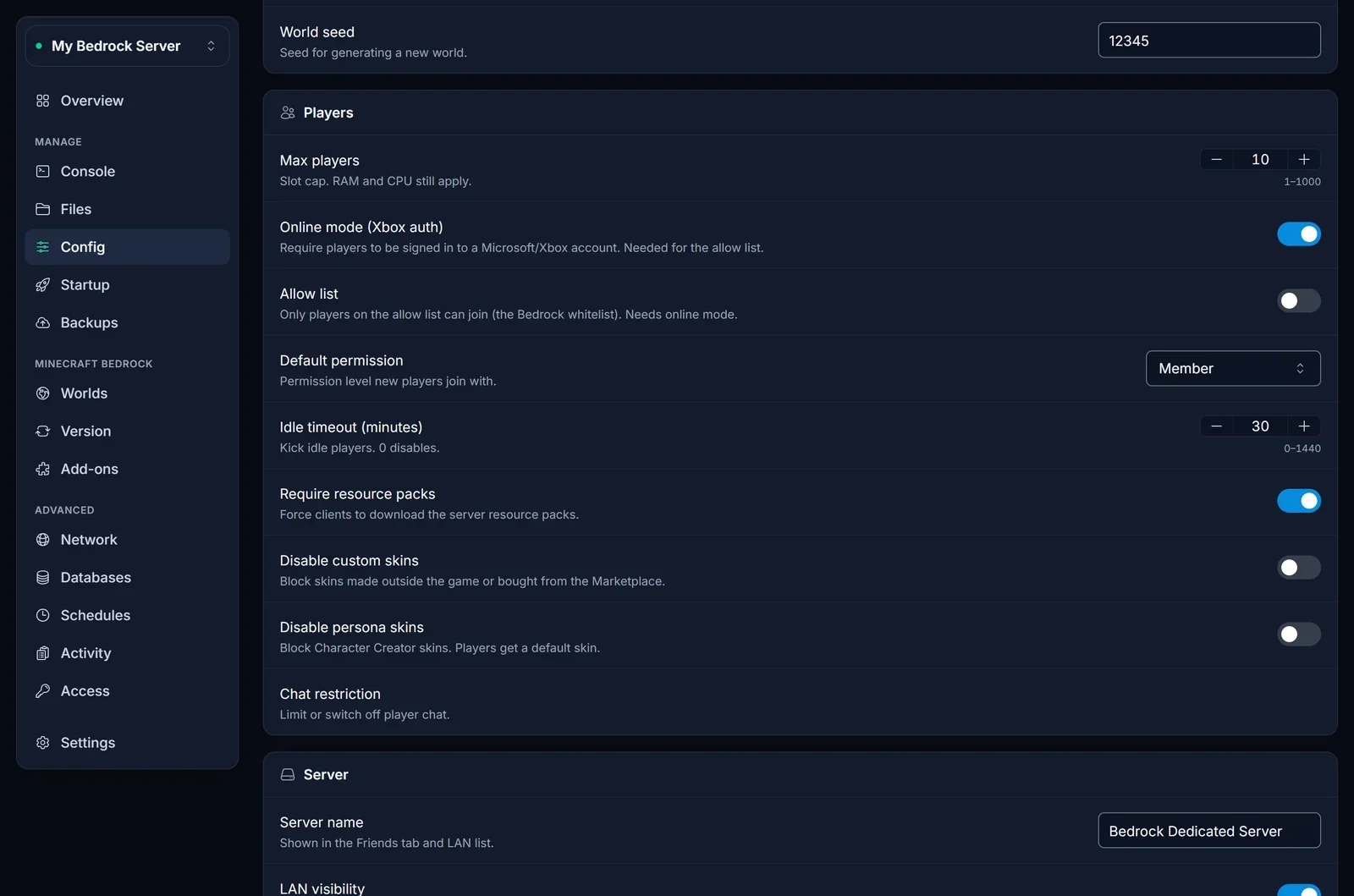
If you cannot restart right now, type allowlist off in the Console tab. It takes effect immediately, but it only lasts until the next restart. The setting in the Config tab is what the server uses every time it starts, so change it there as well.
Fix 2: add players to the allowlist
Pick this if you want a private server where only people you add can join.
- Open the Console tab of your server.
- Add each player by their Xbox gamertag:
allowlist add Steve
- The console answers
Added Steve to the allowlist. The player can join right away, no restart needed.
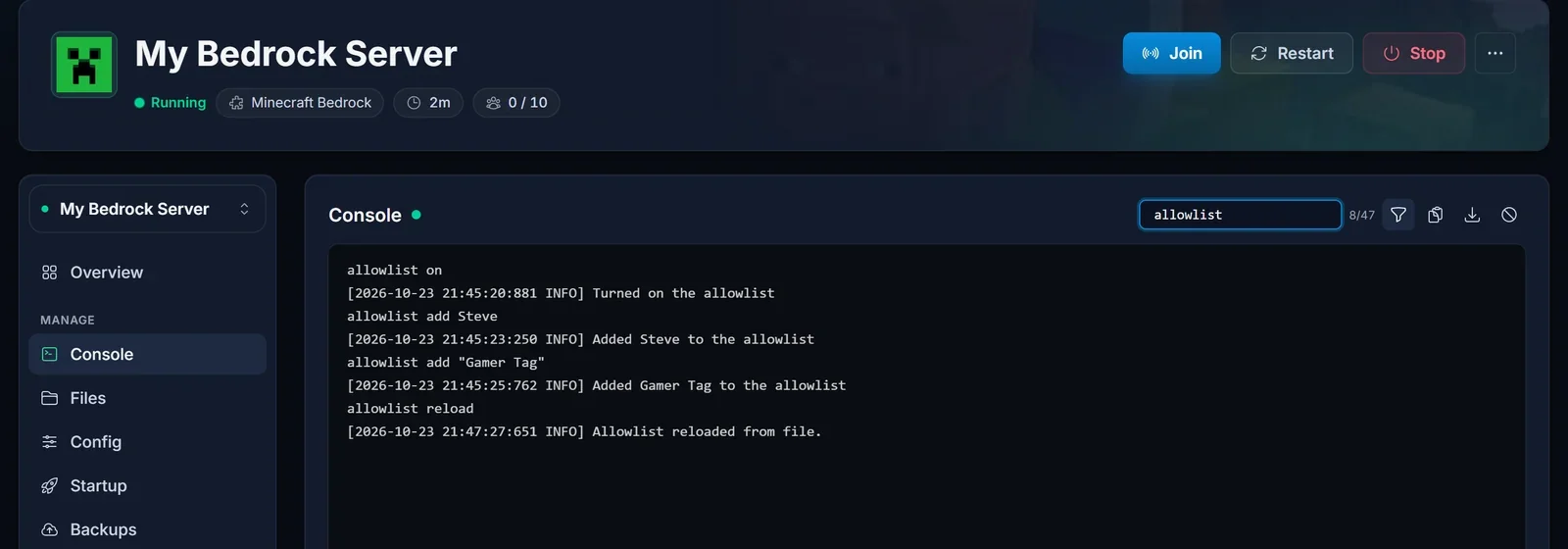
Two rules that save a lot of frustration:
- No slash. Server console commands are typed without a leading
/. Typeallowlist add Steve, not/allowlist add Steve. - Quote gamertags with spaces.
allowlist add "Gamer Tag"works. Without the quotes the server reads the name as two words and refuses the command.
Keep Allow list switched on in the Config tab, so the list is still active after a restart. Players you add are saved to allowlist.json straight away and survive restarts.
All allowlist commands
| Command | What it does |
|---|---|
allowlist add <gamertag> |
Adds a player to the allowlist |
allowlist remove <gamertag> |
Removes a player from the allowlist |
allowlist list |
Shows everyone on the allowlist |
allowlist on |
Turns the allowlist on until the next restart |
allowlist off |
Turns the allowlist off until the next restart |
allowlist reload |
Reloads allowlist.json after you edited the file by hand |
The old whitelist command still works as an alias, so whitelist add Steve does the same as allowlist add Steve.
Edit allowlist.json directly
You can also manage the list as a file. Open the Files tab and click allowlist.json in the server's root folder:
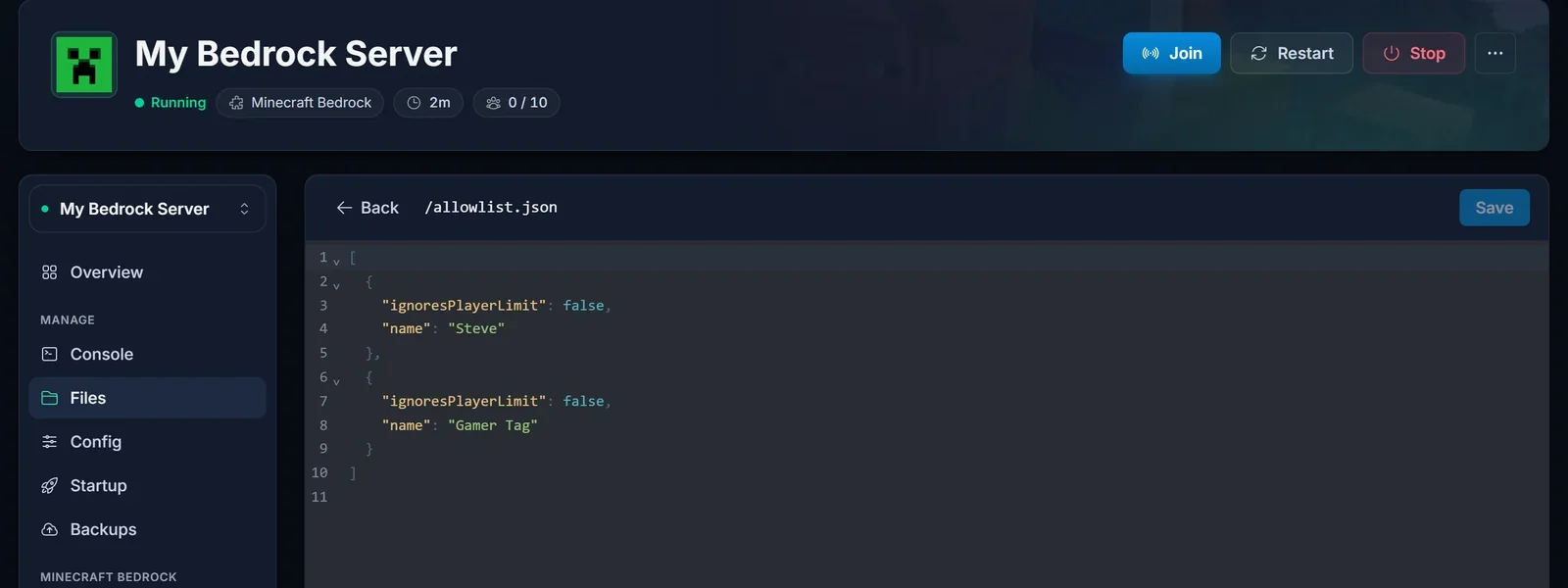
Each player is one entry:
[
  {
    "ignoresPlayerLimit": false,
    "name": "Steve"
  },
  {
    "ignoresPlayerLimit": true,
    "name": "Gamer Tag"
  }
]
nameis the player's gamertag.ignoresPlayerLimit: truelets that player join even when the server is full.- After a player has joined once, the server may add their
xuid(their permanent Xbox account ID) to the entry. Leave it in place.
Save the file, then type allowlist reload in the Console so the running server picks up your changes. A missing comma or quote breaks the whole file, so check the brackets before you save.
Common allowlist errors and what they mean
"You're not invited to play on this server."
The allowlist is on and the gamertag that tried to join is not on it. Use Fix 1 or Fix 2 above. If you just added the player and they still get this message, check the spelling of the gamertag, including spaces, and make sure they are signed in to the Xbox account with that gamertag.
Syntax error: Unexpected "Tag": at "add Gamer >>Tag<<"
The gamertag contains a space and was typed without quotes. Run it again as allowlist add "Gamer Tag".
Could not add Steve to the allowlist
That player is already on the list. Type allowlist list to see who is on it.
"Using an allowlist without online authentication can be dangerous and is not allowed."
The allowlist only works when Online mode (Xbox auth) is on, because it identifies players by their Xbox account. Switch Online mode on in the Config tab and restart.
"You need to authenticate to Microsoft services."
The player is not signed in to a Microsoft account in Minecraft. This is not an allowlist problem: they need to sign in on their device and try again.
"This Microsoft account does not have permission to join multiplayer games."
Also not the allowlist. The player's Xbox privacy or family settings block multiplayer. The account owner (or a parent, for a child account) has to allow multiplayer in the Xbox settings.
I turned the allowlist off, but players are still not invited after a restart
You probably used the allowlist off command, which only lasts until the server restarts. Switch Allow list off in the Config tab, which writes allow-list=false to server.properties, then restart.
Frequently asked questions
Is the allowlist the same as the whitelist?
Yes. Minecraft renamed the whitelist to allowlist on Bedrock. The file is allowlist.json, the setting is allow-list and the command is allowlist, but whitelist still works as an alias.
Why does a new Bedrock server lock me out?
Recent Bedrock Dedicated Server versions start with the allowlist switched on and nobody on it. That is safe for public servers, but it means the owner has to add themselves or turn the allowlist off before anyone can join.
Do I need to restart after adding a player?
No. allowlist add works on the running server right away. You only need a restart after changing the Allow list switch in the Config tab.
Can console and phone players be on the allowlist?
Yes. Every Bedrock player has an Xbox gamertag, whether they play on Xbox, PlayStation, Switch, phone or Windows. Add them by that gamertag. If console players cannot reach your server at all, see How to Join a Minecraft Bedrock Server on Switch, Xbox and PS.
How do I make someone an operator as well?
The allowlist only decides who can join. Admin powers are a separate list, see How to OP Yourself on Your Minecraft Bedrock Server.
Running a Bedrock world with friends? Our Minecraft Bedrock server hosting has the allowlist, console and file editor built into the panel, so all of the above takes a few clicks.
