


How to Show Coordinates on Your Minecraft Bedrock Server
To show coordinates on a Minecraft Bedrock server, type gamerule showcoordinates true in your server's Console tab. Every player then sees Position: x, y, z in the top left corner of their screen. It works right away, no restart needed, and the setting stays on after the server restarts.
This guide is for Minecraft Bedrock Edition. On Java Edition there is no game rule for this: players press F3 to see their coordinates.
Turn on coordinates from the Console
This is the quickest way, and it works even when you are not online yourself.
- Open your server in the DoomHosting game panel and go to the Console tab.
- Type this command and press Enter:
gamerule showcoordinates true
- The console answers
Game rule showcoordinates has been updated to true.
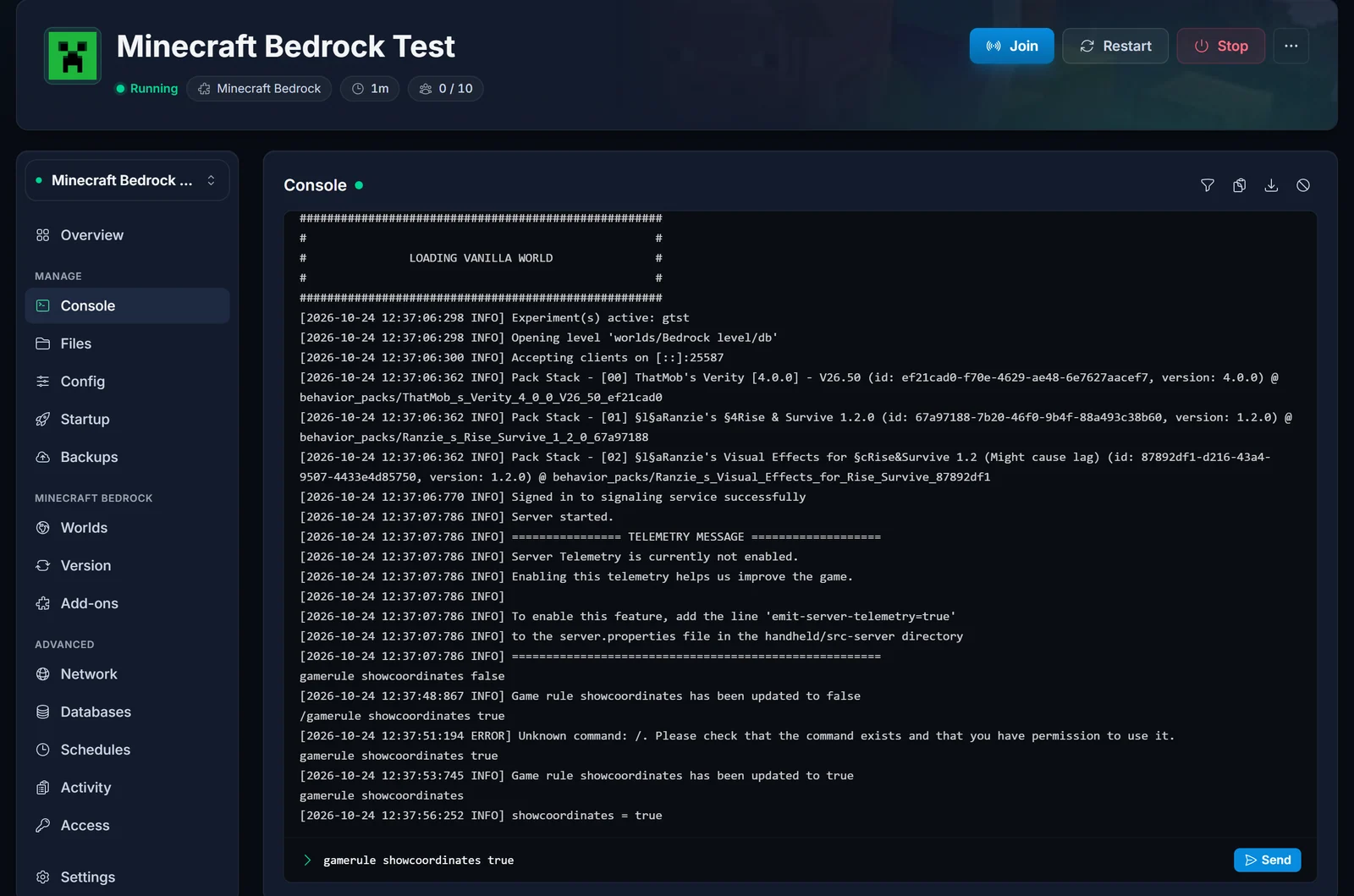
Leave out the slash. Server console commands are typed without a leading /. If you type /gamerule showcoordinates true in the console, the server answers Unknown command: /. You can see that mistake in the screenshot above, right before the working command.
Turn on coordinates in game
You can also run the command from the chat while you play. Two things have to be in place first:
- You are an operator. If you are not, follow How to OP Yourself on Your Minecraft Bedrock Server.
- Cheats are allowed. Open the Config tab, switch on Allow cheats under Gameplay, and restart the server.
Then open the chat and type the command, this time with a slash:
/gamerule showcoordinates true
The Console method does not need either of these, which is why we recommend it.
Check or turn off coordinates
To see whether coordinates are on, type the rule name without a value:
gamerule showcoordinates
The console answers showcoordinates = true or showcoordinates = false.
To hide the coordinates again:
gamerule showcoordinates false
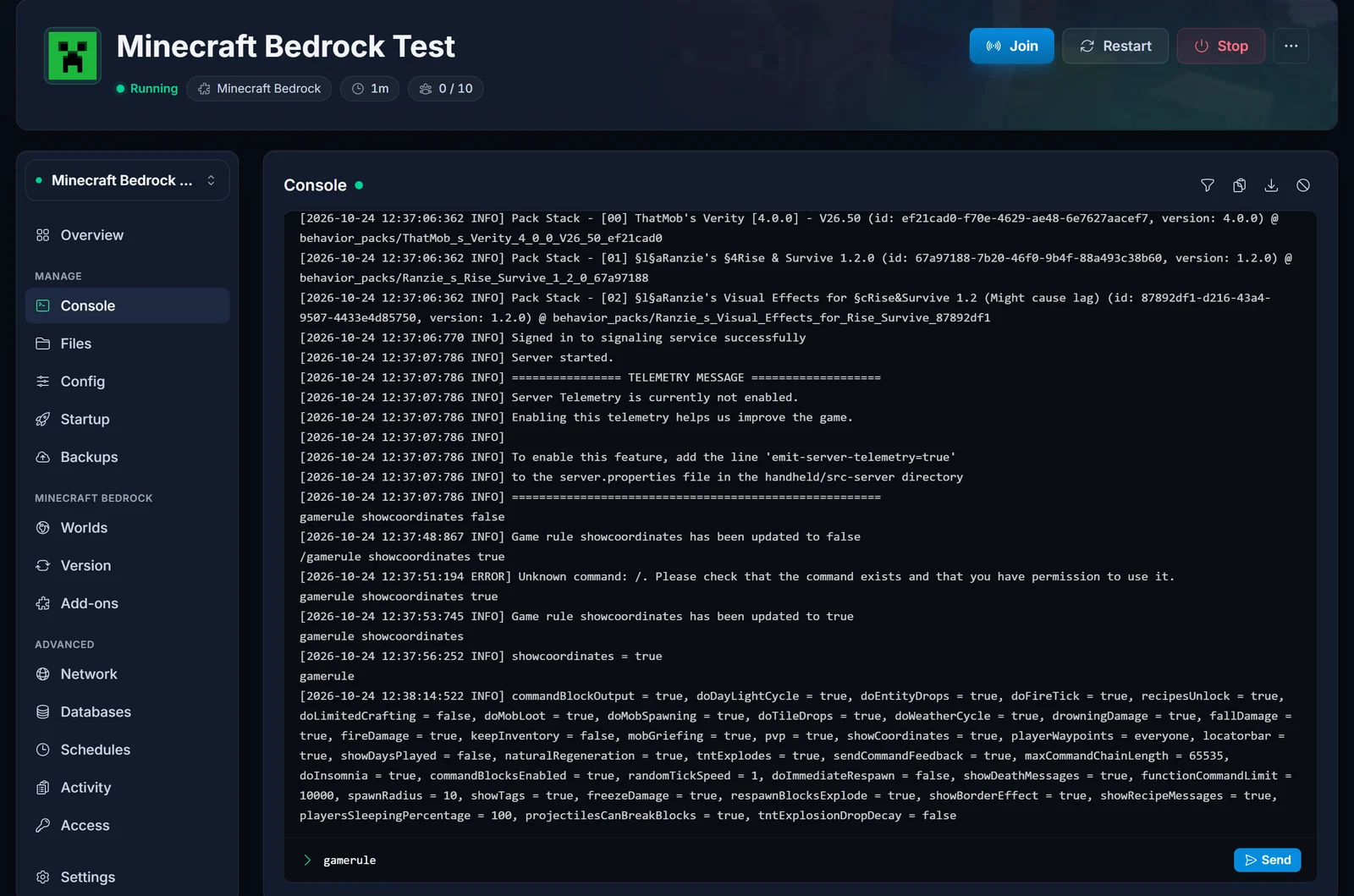
Type gamerule on its own to list every game rule on the server with its current value. Coordinates show up in that list as showCoordinates.
Show days played as well
Bedrock has a second display rule that goes well with coordinates. It shows every player how many in-game days have passed:
gamerule showdaysplayed true
What about the Show Coordinates switch in world settings?
When you create a world on your own device, Minecraft has a Show Coordinates switch under World Options. That switch sets the very same showcoordinates game rule, but it only reaches worlds you host yourself. On a dedicated server, the game rule is what counts.
If you upload a world to your Bedrock server that had Show Coordinates switched on, the setting comes with it, because the game rule is saved inside the world.
Common errors
Unknown command: /. Please check that the command exists and that you have permission to use it.
You typed a slash in the Console. Run the command again without it: gamerule showcoordinates true.
Syntax error: Unexpected "showcoordinate": at "/gamerule >>showcoordinate<< true"
The rule name is misspelled. It is showcoordinates, with an s at the end.
Syntax error: Unexpected "yes": at "ordinates >>yes<<"
This rule only accepts true or false. Anything else, like yes, is rejected.
"Cheats aren't enabled in this world."
You ran /gamerule from the in-game chat while Allow cheats is off. Use the Console tab instead, or switch on Allow cheats in the Config tab and restart the server.
Frequently asked questions
Do phone and console players see the coordinates too?
Yes. The game rule applies to the whole world, so every player sees coordinates on any device: Windows, phone, Xbox, PlayStation and Switch.
Can I show coordinates for only some players?
No. showcoordinates is a world-wide game rule: it is either on for everyone or off for everyone.
Do I need to restart the server?
No. The rule takes effect as soon as the console confirms it, and it is saved with the world, so it stays on after a restart.
Can I see the world seed the same way?
The seed has its own guide: How to Find Your Minecraft Bedrock Server Seed.
Running a Bedrock world with friends? Our Minecraft Bedrock server hosting has the console, config editor and world uploads built into the panel, so changes like this take seconds.
