

How to Set Up a Whitelist on a Project Zomboid Server
A Project Zomboid whitelist is an account list. You create a username and password for each player, and anyone without an account is refused at the login screen. Two things do the whole job: turn off Open to new players, then run adduser once per player.
Everything here was checked on a live Build 42 server. That matters, because several commands other guides still recommend have been removed and now answer Unknown command.
Step 1: turn off "Open to new players"
Open your server in the game control panel, pick Config in the section list, and switch Open to new players off in the Server browser card. Save, then restart the server.
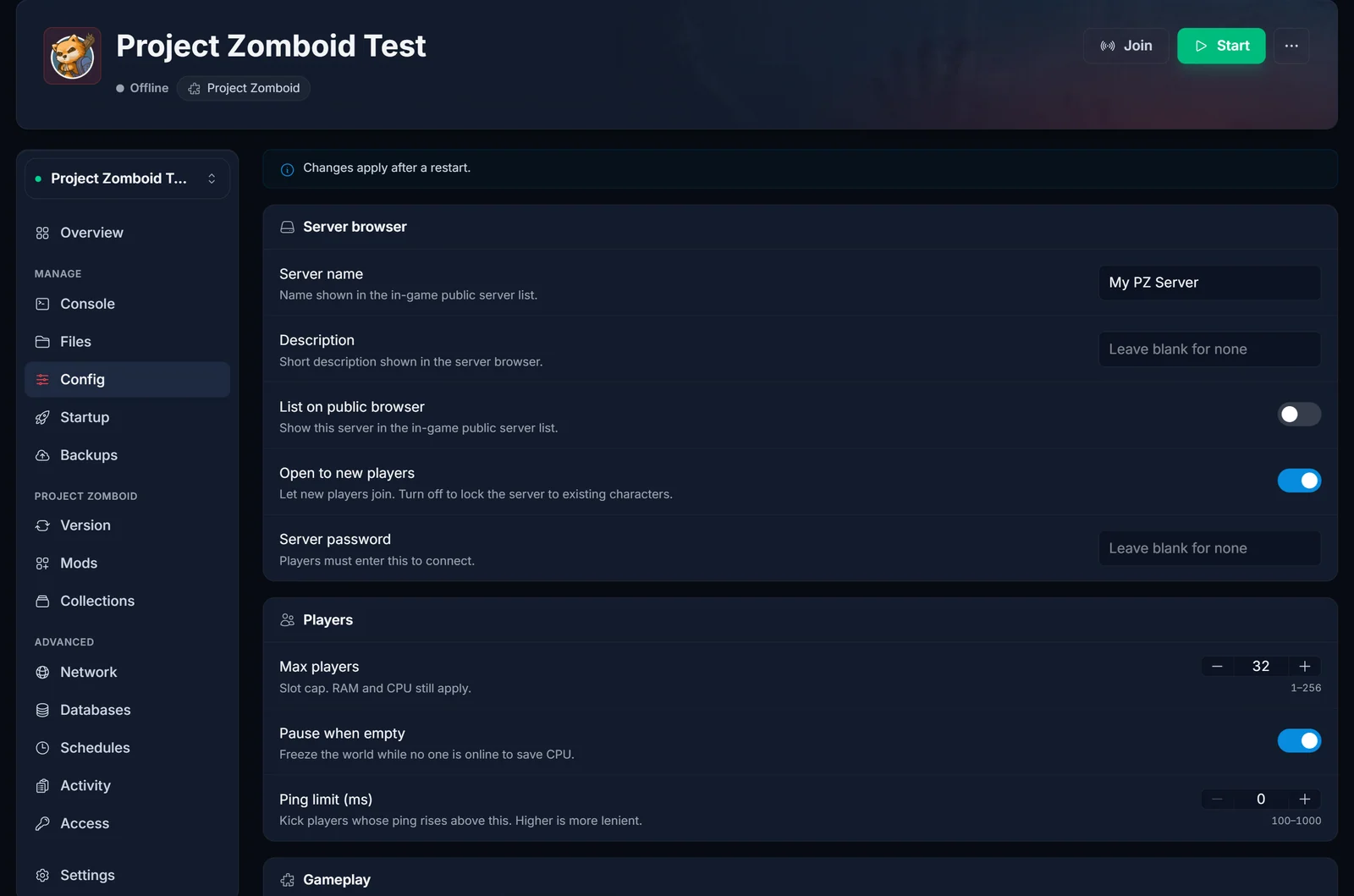
That switch is the whole whitelist mechanism. The config file describes it in the game's own words: clients may join without already having an account, and when it is off, administrators must create the username and password combinations themselves.
The banner at the top of the tab is not decoration. The server reads its config once at boot, so the switch changes nothing for players until you restart.
Turning List on public browser off at the same time is optional. It keeps the server out of the in-game public list, which makes sense when nobody can join it anyway.
Step 2: create an account for each player
Open the Console tab and run one line per player:
adduser "Alice" "changeme123"
The server answers:
User Alice created with password
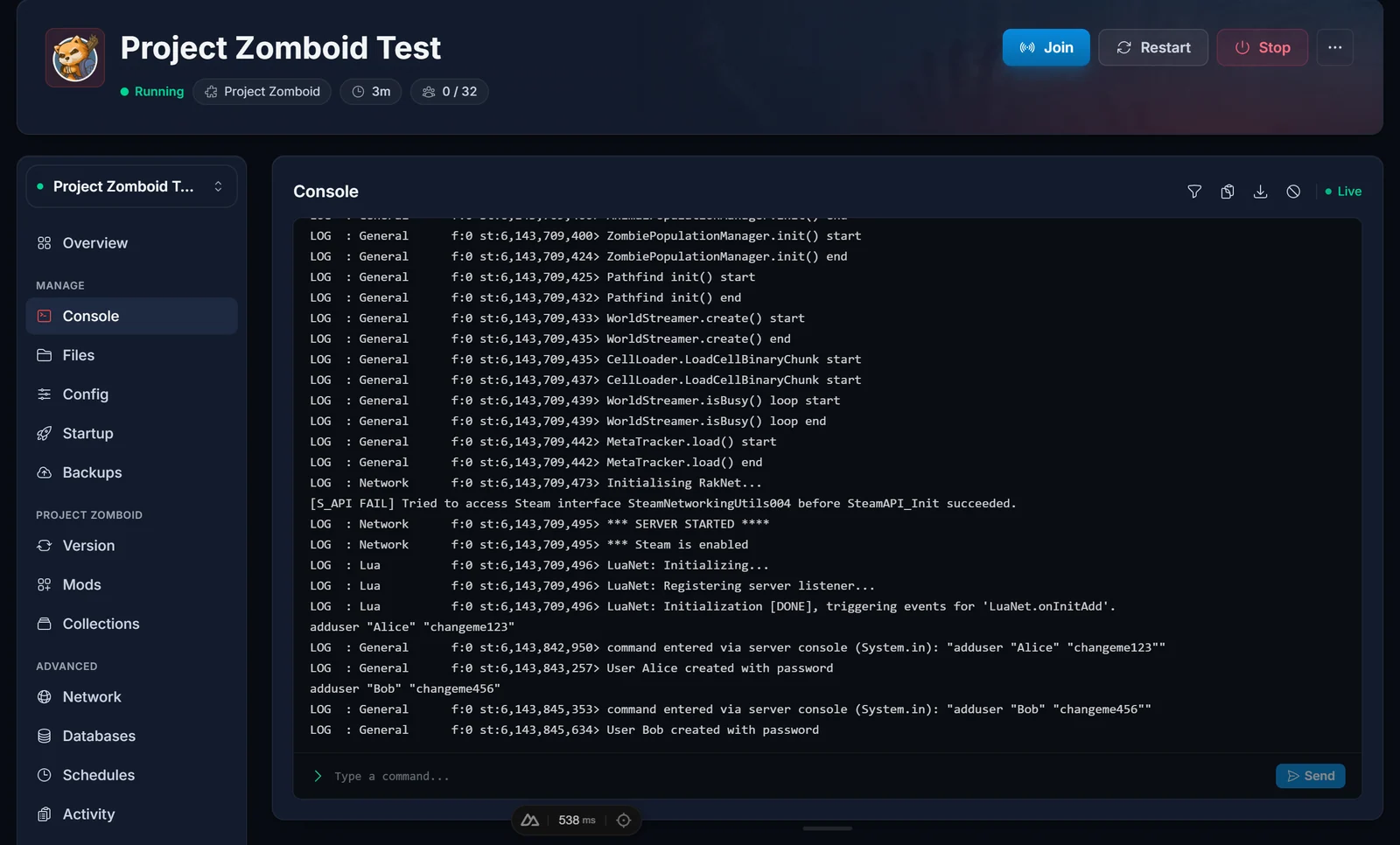
Four things worth knowing:
- The name is whatever the player types in the game's login box. It is not their Steam name and does not have to match it.
- Keep the quotes around both values. A name or password with a space in it fails without them.
- The password sits in the console log in plain text, so treat it as disposable.
- Running
adduserfor a name that already exists answersA user with this name already exists. Nothing is broken, that player already has an account.
The quickest way to whitelist a group of friends
With Open to new players off, nobody can create an account. That is the point of it, and it is also why the order matters:
- Leave the switch on.
- Have everyone join once. Each player picks their own username and password at the login box, and the server stores the account.
- Switch it off and restart.
Everyone who joined keeps their account, and nobody new can make one. This is the replacement for addalltowhitelist, which older guides recommend for exactly this job and which Build 42 no longer has.
You already have an admin account
Do not create one for yourself. Your server starts with an admin account built from the ADMIN_USER and ADMIN_PASSWORD variables on the Startup tab, and it is in the whitelist from the first boot with full admin rights.
Both ship as admin. Change ADMIN_PASSWORD on the Startup tab and restart: the server applies it at boot and prints admin password changed via -adminpassword option in the console. Do this before you let anyone in, whitelist or not, because that account can spawn items, teleport and ban.
Removing someone
removeuserfromwhitelist "Alice"
The server answers User Alice removed from white list. To keep the account but take away their powers, set the level instead:
setaccesslevel "Alice" "user"
The valid levels are exactly: banned, user, priority, observer, gm, moderator, admin.
To reset a forgotten password, use setpassword "Alice" "newpassword". The console prints the new hash back, which is how you know it took.
Commands from other guides that Build 42 rejects
| Command | What the server answers |
|---|---|
addusertowhitelist "Alice" |
Unknown command |
addalltowhitelist |
Unknown command |
changepwd "old" "new" |
Unknown command |
setaccesslevel "Alice" "none" |
Access Level '' unknown |
removeadmin "Alice" |
Access Level '' unknown |
So: adduser adds, removeuserfromwhitelist removes, and setaccesslevel "Alice" "user" is how you demote an admin.
Where the whitelist is stored
In a SQLite database next to your config files, at /home/container/.cache/db/Pterodactyl.db. The file is named after your SERVER_NAME startup variable, the same rule the config files follow.
The whitelist table holds one row per account: username, password as a bcrypt hash, lastConnection, steamid and role. That last one is a number pointing at the role table: 1 banned, 2 user, 3 priority, 4 observer, 5 gm, 6 moderator, 7 admin. Steam-ID bans live in separate tables, bannedid and bannedip.
You can open the file with DB Browser for SQLite while the server is stopped, which helps for bulk work. Passwords are hashes, so there is nothing readable in there, and the console commands are safer for day to day changes.
Common problems
Players still get in after I turned the switch off. The config is read at boot. Restart the server.
My change did not stick.
Project Zomboid only reads config files named after the SERVER_NAME startup variable, and it rewrites them at every boot. If you edited a file by hand, check its name first. Full explanation in How to Change Your Project Zomboid Server Settings.
A player is refused even though I added them. Names are exact. Check for a typo or a trailing space, and remember the account name is not the Steam name.
I cannot get in myself.
Log in with ADMIN_USER and ADMIN_PASSWORD from the Startup tab, not with your Steam name.
FAQ
Does the whitelist use Steam IDs? No. Accounts are a username and a password. Steam IDs are only used by the separate ban list.
Is a server password the same thing? No. A server password is one shared secret: anyone who has it gets in, and it spreads. A whitelist is per player, so you can revoke one person without disturbing anyone else. The two work together fine.
How many accounts can one player create?
MaxAccountsPerUser in the config controls that, and 0 means unlimited. It only applies while new players can still create accounts.
Do I have to restart for every new player?
No. adduser takes effect immediately. Only the Open to new players switch needs a restart.
Not hosting with us yet? Our Project Zomboid server hosting puts the Config tab, the console and one-click backups in the same place.
