
There are two ways to have admin on a Project Zomboid server, and picking the right one saves you a lot of time.
- Log in as the built-in
adminaccount. Your server already has one, and its username and password are sitting in your control panel. Nothing to type, no console. This is the fast route, and it is what you want if you have just bought a server or locked yourself out. - Promote your own player with
grantadmin. Better for day-to-day play, because you keep your own character and your own name. It needs one console command.
This guide covers both, then the commands you'll actually use day-to-day.
Log in with the built-in admin account
Open your server in the control panel. The Admin username and Admin password sit right under the connection address, each with a copy button.
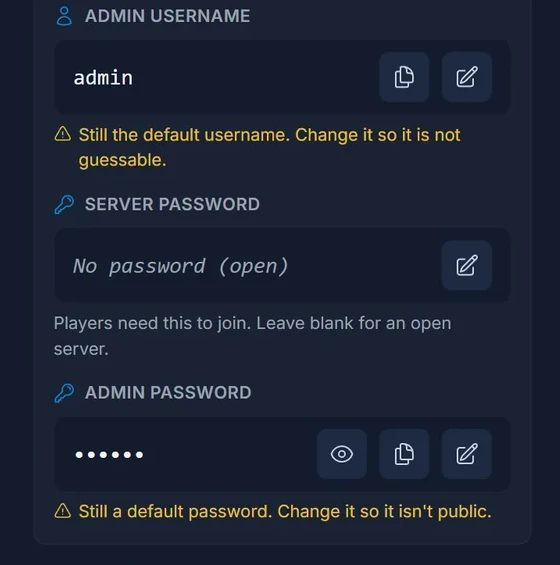
Then connect to the server and enter those two values in the game's own username and password fields, instead of your usual player name. You join as the admin account with full access, no console needed.
Change both before you invite anyone. A new server ships with the username admin and a default password, which is a well-known pair, and the panel flags them in amber until you change them. Click the pencil next to each, enter your own values, and restart the server.
That amber warning is not decoration: admin has total control over your world, and the account name is the first thing anyone tries.
Change the admin password (do it in the panel, not the console)
This is the trap that catches people. Project Zomboid has a changepwd console command, and on a self-hosted server it works. On your server it does not stick.
Your Admin password is applied from your server's startup settings on every boot. You can see it in the console log each time the server starts:
admin password changed via -adminpassword option.
So a password you set with changepwd survives until the next restart, then silently reverts to whatever the panel says. Every guide that tells you to use changepwd is written for a self-hosted server.
Change it in the panel instead: edit Admin password on the Overview (or on the Startup tab, same value), then restart. That sticks, because the panel is the source of truth.
The same goes for Server password, the one players need to join. It lives in your server config, and the panel writes it for you.
Promote your own player with grantadmin
Prefer to play as your own character with admin rights? Use the console.
- Open your server and click the Console tab.
- Wait for the line
*** SERVER STARTED ****to appear.
You'll see startup logs first. Don't type until the server is fully started. Early commands get dropped.
Then type this in the console (no / prefix needed when typing in the console, since slashes are only for in-game chat):
grantadmin YourSteamUsername
Replace YourSteamUsername with your in-game player name (case-sensitive). You should see:
User YourSteamUsername has been added as admin.
If the user doesn't exist yet, you need to log in to the server at least once. The system creates an account record on first login.
Unlike the admin password above, grantadmin writes to the server database and does survive a restart.
Verify in-game
Connect to the server and type /help in chat. If you see the full admin command list (50+ commands), you're admin. If you only see basic player commands (8–10 commands), the grant didn't take.
Access levels (not just "admin")
Project Zomboid supports five access tiers via setaccesslevel:
| Level | Power |
|---|---|
admin |
Full control, every command |
moderator |
Kick, ban, teleport, message |
overseer |
Read-only inspection of player stats |
gm |
Spawn items, teleport, no ban authority |
observer |
Spectate only, no interaction |
Set them with:
setaccesslevel "PlayerName" "moderator"
The 10 commands you'll actually use
Out of 50+ commands, these are the ones you'll reach for weekly:
| Command | Use case |
|---|---|
/players |
List who's online |
/teleport "Player" |
Teleport to a player |
/teleportto x,y,z |
Teleport to coordinates |
/kickuser "Player" -r "reason" |
Kick with a reason |
/banuser "Player" -r "reason" -ip -s |
Ban + IP-ban + Steam-ban |
/unbanuser "Player" |
Reverse a ban |
/servermsg "Restart in 5 minutes" |
Broadcast to everyone |
/save |
Force-save the world |
/quit |
Save and shut down cleanly |
/additem "Player" "Base.Hammer" |
Spawn an item |
For the full command reference, see our Project Zomboid Server Commands Guide.
Console vs in-game chat: the syntax difference
| Source | Prefix | Example |
|---|---|---|
| Server console | none | grantadmin YourName |
| In-game chat | / |
/grantadmin YourName |
Both work identically: the only difference is the slash. New admins often paste console syntax into chat and wonder why nothing happens.
Where admin permissions are stored
Admin status lives in a SQLite database on your server:
/home/container/.cache/db/<ServerName>.db
The filename tracks your server's internal name, so on a default server it is Pterodactyl.db. You can inspect it with any SQLite browser if you need to bulk-edit. The whitelist table holds username to access level. Modify the accesslevel column directly to promote or demote outside of the console.
The admin account's password is the exception: it is re-applied from your startup settings on every boot, so editing it here achieves nothing.
Common problems
"User does not exist"
The player has never logged in. Have them connect once first, then re-run grantadmin.
"Permission denied" running commands as admin
You used in-game chat without the /. Slash is required in chat.
Lost admin password You do not need the database for this. Open your server's Overview, click the pencil next to Admin password, set a new one, and restart. The startup settings are re-applied on boot, so the new password is live as soon as the server comes back up.
The admin password keeps reverting
You changed it with changepwd in the console. Change it on the Overview or the Startup tab instead: see the section above.
Console keeps saying "Type 'help' for commands"
The server hasn't finished starting. Wait for SERVER STARTED before typing.
FAQ
Can multiple players be admin at once?
Yes, there's no limit. Run grantadmin for each.
Is there an admin GUI? Project Zomboid has no admin GUI. Everything happens through console commands or by editing the SQLite database directly.
Can I demote myself by accident?
Yes, /removeadmin "YourName" strips your own admin. If you do this and have no other admin accounts, log back in as the admin account using the username and password on your Overview. That account is your way back in, which is why it is worth keeping the password somewhere safe.
What's the difference between admin and the special admin user account?
admin is a built-in account that always has admin privileges, and its credentials come from your server's startup settings rather than from a player logging in. Regular admin status is granted with grantadmin to a normal player account. Use the built-in account for recovery and first setup, and your own player for everyday play.
Do I need the server password and the admin password?
They do different jobs. Server password is what every player types to get in, and it is blank by default so anyone with the address can join. Admin password is only for the admin account. Both are on the Overview.
