
ASKA has no "connect to IP" box. Your server registers with a relay network and players pick it out of the in-game server list by name, so the three things everyone needs are the server name, the password if you set one, and the right region selected in the browser. This guide shows where all of it lives in your DoomHosting panel, the exact click path inside ASKA, and the handful of things that make a healthy server invisible.
What has to be true before anyone can join
- The server is running. ASKA's dedicated server runs under Wine and downloads the game files from Steam on its first boot, so give a brand new server a few minutes before you expect it in any list. The Console tab shows the install progress.
- The GSLT is valid. An ASKA server authenticates with the relay network through a Steam Game Server Login Token. With a missing, mistyped or expired token the process keeps running and the panel can even show it as Online, but it never registers, so nobody can find it. Setting the token is covered in How to Set Up Your ASKA Server.
- Your players know the exact server name and the password, and they have picked the region your server is registered in. Region is the one that catches the most people, and it has its own section below.
Find the server name, password and region in your panel
Open your server in the DoomHosting panel and go to the Startup tab. Everything a player needs is on it:
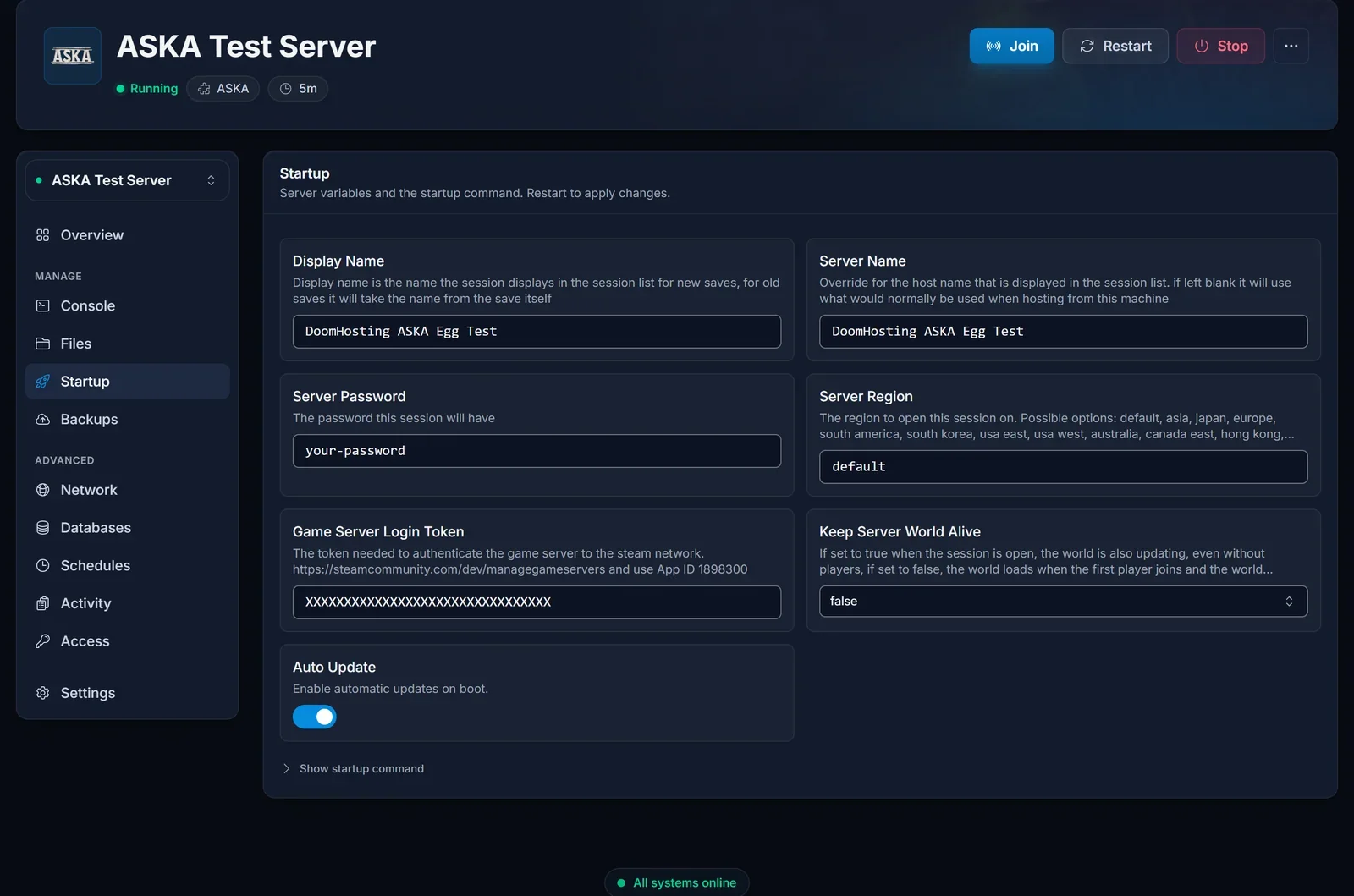
- Display Name: the session name shown in the in-game list. This is what your friends look for. It applies to a new save; an existing save keeps the name it was created with, so renaming a world that already has a save changes nothing in the list.
- Server Name: the host name that appears next to the session. Give both a distinctive value so the server is easy to spot.
- Server Password: leave it empty for an open server, or set one (up to 20 characters) and share it. Players are prompted for it as they join.
- Server Region: where the session is opened on the relay network.
defaultpicks the region with the best ping from the server, which for our European servers is Europe. Setting it explicitly (for exampleeuropeorusa east) makes life easier, because your players then know exactly which region to select in the browser. - Keep Server World Alive: not a join setting, but worth knowing. With
truethe world keeps running, villagers keep working and time passes even when nobody is online. Withfalsethe world pauses when the last player leaves and loads again when the first player joins.
These values are read at boot. After any change, restart the server from the Console tab, or the old values stay in effect.
What the IP on your Overview is for
The Overview tab and the Join button in the server header both show your server's address, exactly like every other game in the panel:
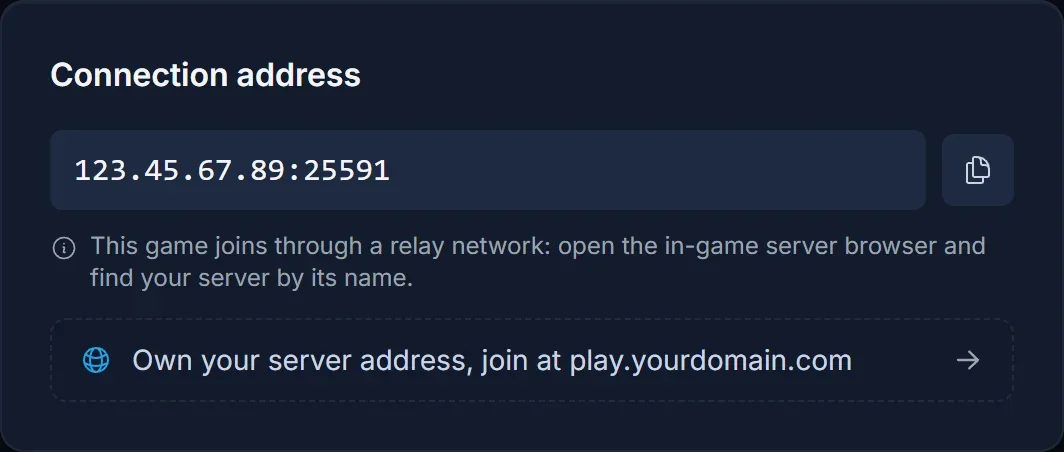
The address is real, and the note under it is the important part: ASKA joins through a relay, so there is no field anywhere in the game where you type it. It is there for your own reference (tools, support tickets, telling servers apart). If someone asks you for the IP so they can connect, give them the Display Name and the region instead.
Join from inside ASKA
With the server running, every player does this:
- Launch ASKA and choose Multiplayer from the main menu.
- Click Join. This opens the server list.
- Set the region selector in the bottom-right corner of the list to the region your server is registered in (see the section above). A server in another region is simply not shown.
- Find your server by its Display Name. Give the list a moment to populate after switching region.
- Select it and click Join.
- Enter the server password if one is set, pick or create your character, and you are in.
There is no direct connect, no Steam favorites trick and no port forwarding involved. The relay handles all of that, which is also why the address on your Overview is never typed into the game.
Pick the right region
This is the single most common reason a perfectly healthy ASKA server is "not in the list". The server browser only shows sessions from the region selected in its bottom-right corner, and the server only exists in one region: the one from Server Region on the Startup tab, or the nearest one when that is left at default.
So the rule for a group is simple: the owner sets an explicit region on the Startup tab and restarts, tells everyone which one it is, and everyone selects that same region in the browser. Players far away from the server get a slightly higher ping, but a player selecting their own local region sees an empty list.
Playing together on a dedicated server
ASKA supports up to 4 players in one settlement. On a dedicated server the world does not depend on anyone's PC being on, so your tribe can drop in whenever they want, and with Keep Server World Alive enabled the villagers keep working between sessions. Your progress lives in the save on the server, so everyone joins the same settlement, not a copy.
Common issues
The server is not in the list, and the region is why. Check the region selector in the bottom-right corner of ASKA's server browser against the Server Region on your Startup tab. If the server is on default, try the region nearest the server first. Switch regions and wait a moment for the list to refresh.
The server is brand new and nothing is showing. It is almost certainly still installing, or it has only just finished and has not registered yet. Watch the Console tab until the install notice clears, then give it a couple of minutes. This happens once, on the first boot.
The panel says Online but nobody can find it. This is the GSLT. A bad or expired token does not crash the server, it just fails authentication with the relay, so the process keeps running while the session is never published. Check that the token was created for App ID 1898300, that it was pasted without spaces, and that it still exists on the Steam page. Steam also expires tokens that go unused for a long time. Fix it under STEAM_GSLT on the Startup tab and restart, see the setup guide.
The name your players search does not match. The list shows the Display Name, not the host name, and an existing save keeps the name it was created with. If you renamed the server after the first save, the old name is still what shows. Have your players look for a distinctive part of the name instead of the whole thing.
Wrong password. The game asks for the Server Password from the Startup tab, not your DoomHosting account password. Copy it straight from the panel, and remember a change only takes effect after a restart.
Version mismatch. Everyone needs the same game version as the server. If ASKA just updated, a player who has not patched yet cannot join. Restarting your DoomHosting server pulls the latest server build automatically (Auto Update is on by default).
The server is full. ASKA caps a settlement at 4 players. There is no setting to raise it.
Frequently asked questions
Can I join an ASKA server by IP address? No. ASKA has no direct connect. Find the server by name in the in-game list.
Do I need to forward any ports? No. The server is hosted with us, and ASKA's relay connection needs no client-side port setup anyway.
Can I add the server to my Steam favorites? There is no point: ASKA's in-game browser does not read Steam's favorites list. Use the region selector and the Display Name.
Do I need to keep the game open for friends to play? No. A dedicated server runs on its own. If you want the world to keep running while everyone is offline, set Keep Server World Alive to true.
How many people can join at once? Four, which is ASKA's built-in limit.
Where to go next
Creating the Steam token and starting the server for the first time is covered in How to Set Up Your ASKA Server. If you do not have a server yet, see the plans on the ASKA server hosting page, size it with the ASKA RAM calculator, and take a look at what the game control panel does.
