


How to connect a database to your FiveM server
Every roleplay framework worth running on FiveM stores its data in MySQL: characters, jobs, vehicles, inventories, bank balances. Your DoomHosting FiveM server includes a MySQL database slot you create yourself in the panel's Databases tab, and connecting it takes one line in server.cfg. This guide covers creating the database, building the connection string oxmysql expects, adding it to the config, and importing an ESX or QBCore schema.
What you need
- A FiveM server on DoomHosting that already boots. If it does not start yet, set the license key first: how to get a FiveM license key.
- oxmysql, the resource every modern framework uses to talk to MySQL. ESX and QBCore both ship with it.
- A MySQL client on your PC if you plan to import a framework schema. HeidiSQL (Windows) and DBeaver (all platforms) are both free.
Create the database in the panel
- Open your game servers and click your FiveM server.
- In the section nav, under Advanced, open Databases.
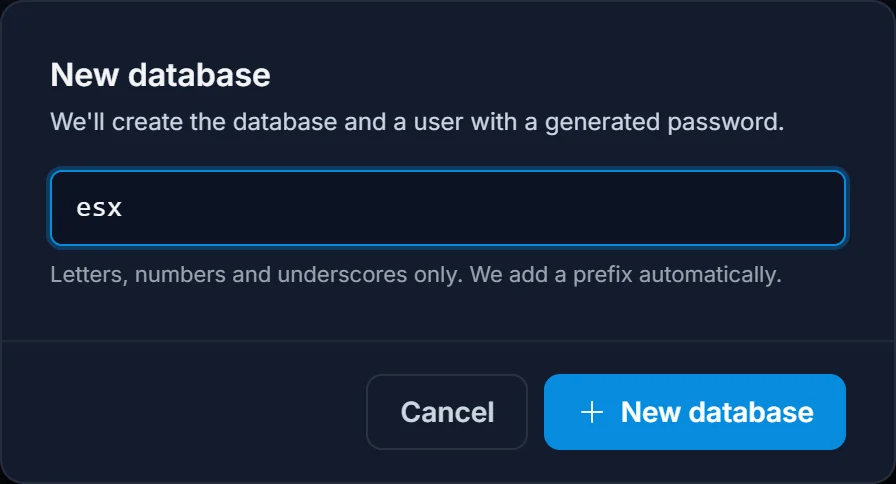
- Click New database, type a short name (letters, numbers and underscores only), and confirm.
We create the database and a matching user with a generated password. The name gets a prefix automatically, so a database you call esx ends up as something like s1708_esx, and the user looks like u1708_esxdemo.
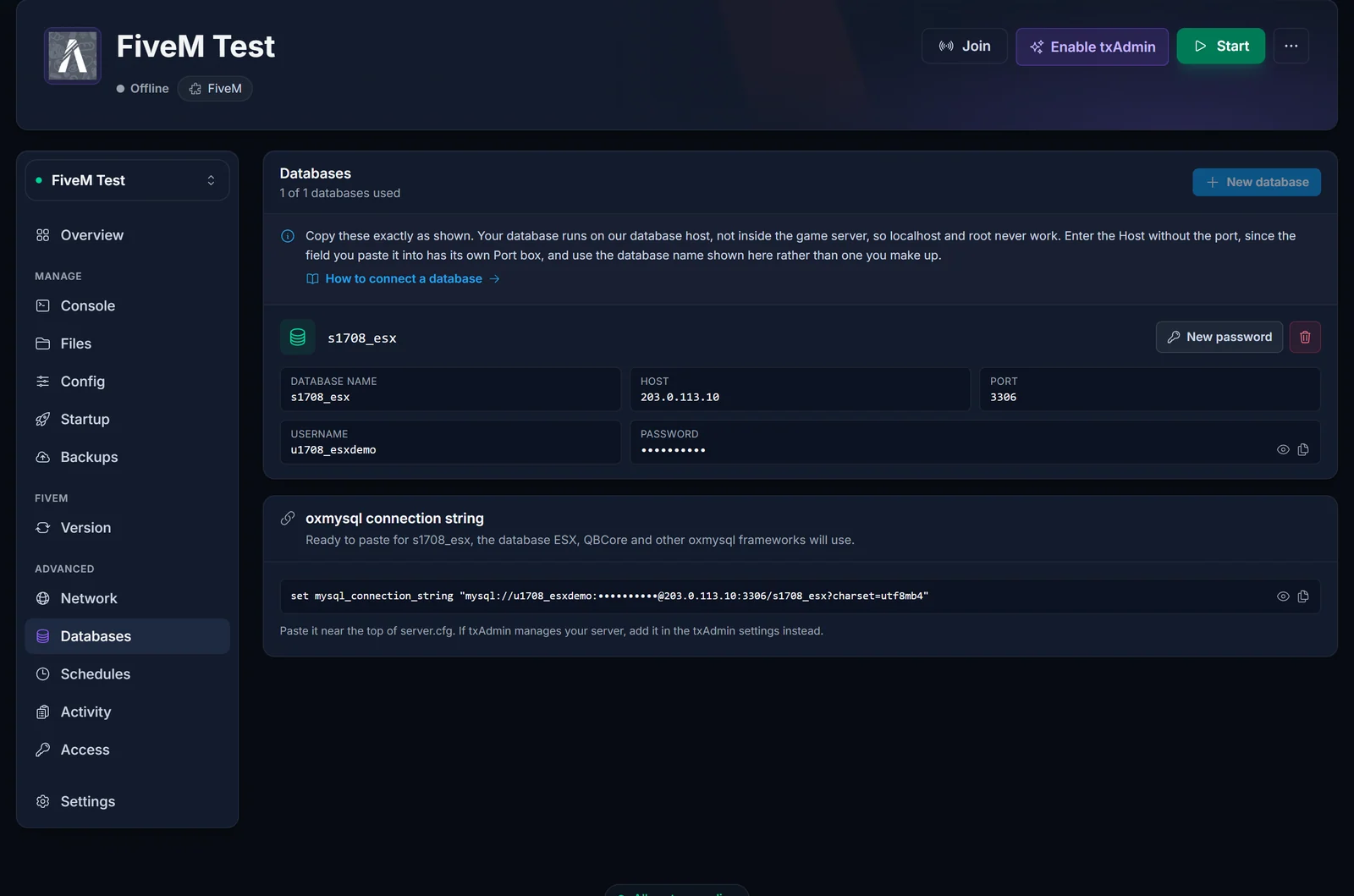
The row shows five credential buttons: Database name, Host, Port, Username and Password, the last of these hidden until you click the eye icon. Click any of them to copy that value. Two buttons sit on the right: New password rotates the password (anything still using the old one stops working immediately), and the trash icon deletes the database and all of its data permanently.
The card header counts your slots, for example 1 of 1 databases used. One slot covers a normal ESX or QBCore setup, since a framework and all of its resources share a single database. Contact support if your build genuinely needs a second one.
What goes in each field
txAdmin's setup step, HeidiSQL, DBeaver and most framework installers ask for the same five values, each in its own box. The Databases tab shows them as five separate copy buttons in that same order, so copy each one into the box with the matching name.
| The box in the tool | What to paste | Which button it comes from |
|---|---|---|
| Host, Server, or Hostname / IP | 203.0.113.10 |
Host, the address on its own with no port after it |
| Port | 3306 |
Port |
| Username, or User | u1708_esxdemo |
Username |
| Password | the generated password | Password, after clicking the eye icon |
| Database, or Database name | s1708_esx |
Database name |
Three of those get typed from memory instead of copied, and all three fail:
localhostis never the host. Your database runs on our database host, not inside the game server's container, solocalhostpoints the framework at a machine with no MySQL on it. Use the address from the Host button.rootis never the username. You get your own user, nameduplus your server number. A shared database host has no root login to hand out, sorootis refused whatever password you pair it with.- The database name is the one we created, not one you pick. It carries a prefix,
s1708_esx, and an installer that proposes a name of its own is proposing a database that does not exist yet. Copy the Database name button.
If a tool has no separate Port box and only one address field, that single field is the one place the port belongs: 203.0.113.10:3306, address and port together.
Get your connection string
You do not have to assemble this by hand. On a FiveM server the Databases tab prints the finished line for your first database underneath the list, with a copy button and an eye icon to reveal the password in it. Copy that and go straight to the next section.
If you would rather build it yourself, oxmysql reads one convar, mysql_connection_string, and accepts two formats:
set mysql_connection_string "mysql://u1708_esxdemo:[email protected]:3306/s1708_esx"
set mysql_connection_string "user=u1708_esxdemo;password=YourPassword;host=203.0.113.10;port=3306;database=s1708_esx"
Every value comes from its own button on the Databases tab: user= from Username, password= from Password, host= from Host, port= from Port and database= from Database name. Nothing needs splitting or editing on the way in.
Use the second format. Passwords we generate mix letters and digits with symbols from the set ! @ = . + ^, and oxmysql documents ; , / ? : @ & = + $ # as reserved inside a connection string. A password containing @, = or + breaks the mysql:// URI silently: the parser reads part of your password as the hostname and the connection fails with credentials that are perfectly valid. The user=...;password=... form has no such parsing trap.
Add it to server.cfg
- Open the Files tab and click
server.cfgto edit it in the browser. - Put the connection string above every resource line, then start oxmysql before your framework:
set mysql_connection_string "user=u1708_esxdemo;password=YourPassword;host=203.0.113.10;port=3306;database=s1708_esx"

ensure oxmysql
ensure es_extended
- Save the file, then restart the server from the top of the panel. Convars are read once at boot, so an edit does nothing until the server restarts.
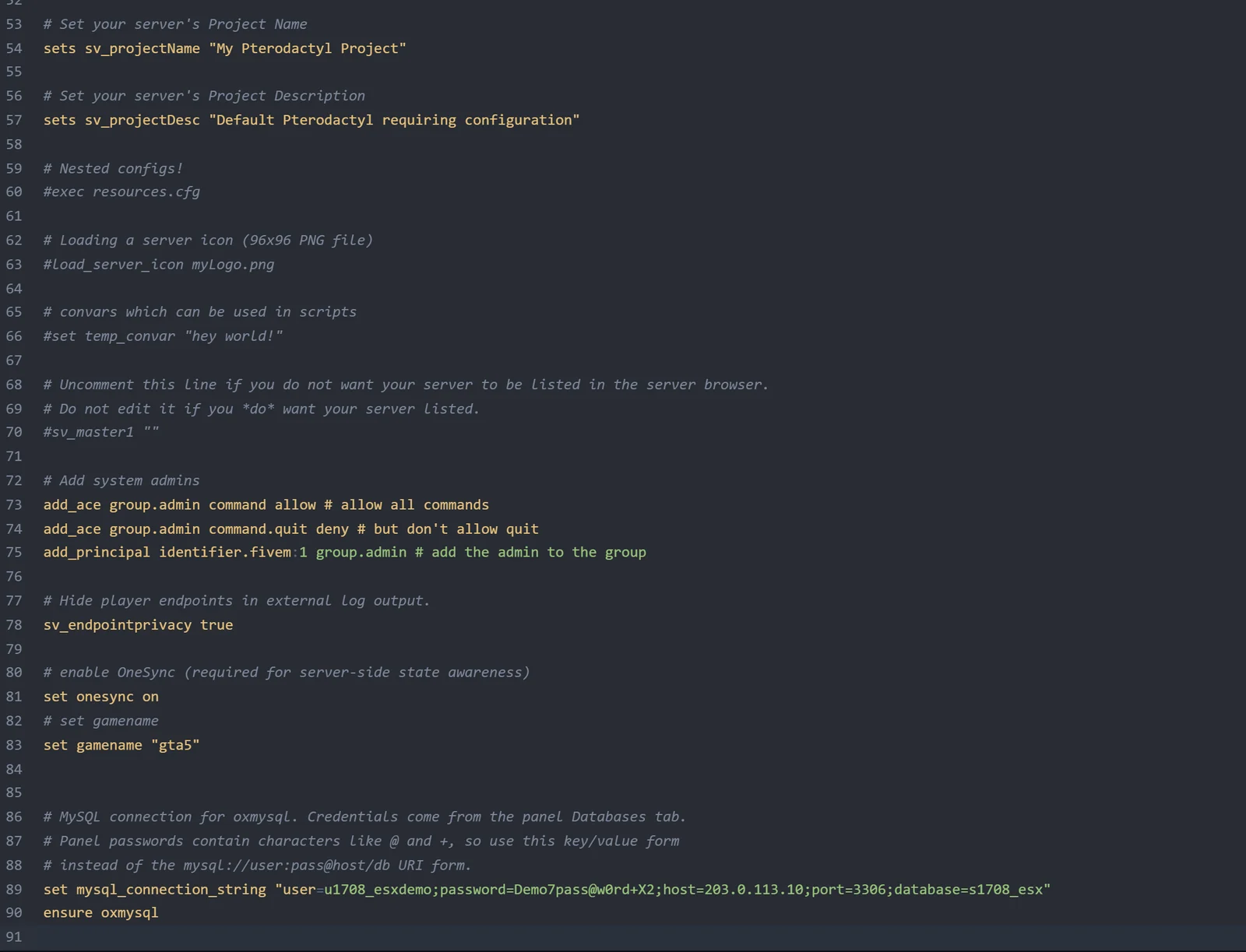
Two things to leave alone. Our startup rewrites the endpoint_add_tcp and endpoint_add_udp lines to your allocated port on every boot, so there is no point editing them. And treat server.cfg as a secret file: it now holds your database password next to your license key, so never paste it into a Discord support channel without blanking both.
If you turned on txAdmin from the Enable txAdmin chip on Overview, FXServer no longer runs /home/container/server.cfg directly. txAdmin owns the boot and runs the server from its own data folder, /home/container/txData, so edit the server.cfg inside the deployment folder there, or use the CFG editor built into txAdmin itself. You reach the web panel with Open txAdmin on Overview.
Install oxmysql
Check resources first. ESX and QBCore recipes almost always include oxmysql already, and a second copy causes a resource name conflict rather than a faster server.
If it is missing, download the latest release from the oxmysql repository, unzip it, and upload the oxmysql folder into your resources directory from the Files tab. Then add ensure oxmysql above your framework resources as shown above. If your build still carries mysql-async or ghmattimysql, delete them: oxmysql provides their exports, and running both at once produces duplicate query handlers.
The oxmysql documentation covers the extras, including set mysql_debug true to print every query to the console and set mysql_slow_query_warning 150 to flag slow ones.
ESX and QBCore notes
Both frameworks query through oxmysql, so a single connection string serves the framework and every resource on top of it. What neither does for you is create its tables. You import those yourself:
- Install HeidiSQL or DBeaver on your PC.
- Create a new MySQL or MariaDB connection with the Host address and its port, plus the Username and Password from the Databases tab. The user we create is allowed to connect from any address, so a client on your home connection works without extra setup.
- Select your database, open the framework's
.sqlfile, and run it.
For ESX, that is the es_extended SQL file plus whatever each addon ships. See the ESX documentation. For QBCore, import the qb-core dump first, then the per resource files, as described in the QBCore documentation. Import the schema before the first boot with the framework enabled, otherwise the console fills with missing table errors on startup.
One thing worth knowing about backups: panel backups archive your server files, not the MySQL database. Export a .sql dump from your client before a big framework update or a wipe.
Common issues
Failed to connect or access denied on boot. Nine times out of ten the string still says localhost. There is no MySQL server inside your game container, so the host has to be the address from the Databases tab.
Access denied for user root. There is no root login on the database host. Copy the Username button, which gives you u followed by your server number.
The port ended up in the field twice. A tool with its own Port box wants the address alone in the host field. Paste 203.0.113.10:3306 in there and the port sits on both, and nothing resolves.
Unknown database. The name in the config is not the one we created. txAdmin and framework installers both propose a database name of their own, and that database does not exist. Copy the Database name button instead.
Credentials are correct but authentication keeps failing. The password contains @, = or + and you are using the mysql:// format. Switch to the user=...;password=...;host=... form. Clicking New password may also hand you a cleaner password, but the second format is the reliable fix.
Resources start before the convar is set. oxmysql connects when it starts, so the set mysql_connection_string line has to sit above ensure oxmysql. Use set, not sets or setr: those publish the value to every connecting player.
Nothing changed after editing the config. Restart the server. A live server never rereads server.cfg.
Unknown table or column errors. The connection works and the schema was never imported, or it was imported into the wrong database. Confirm in HeidiSQL that the tables exist inside your prefixed database, not in a second one you created by hand.
You edited server.cfg but txAdmin is enabled. txAdmin runs its own copy under /home/container/txData. Edit that one, or the file you changed is simply never read.
The Databases tab says databases are not available. Your server has no database slot. Contact support and we will look at the service.
Next steps
Your framework now has a home for its data. If you are still setting the server up, the license key guide is here: how to get a FiveM license key. Full plan details, hardware and pricing live on the FiveM server hosting page.
