


You rename an ARK: Survival Ascended server in the Startup tab of the DoomHosting panel: overwrite the Server Name field, press Enter, then restart. The new name is what shows up in the in-game list, which makes it the first thing to fix when players say they cannot find your server.
Why Can't I Find My ARK Server?
Fresh servers all launch as DoomHosting.com Server. Type that into the in-game search and you get a page of identical entries with no way to tell which one is yours. A name of your own solves that, so set it before you share the server with friends.
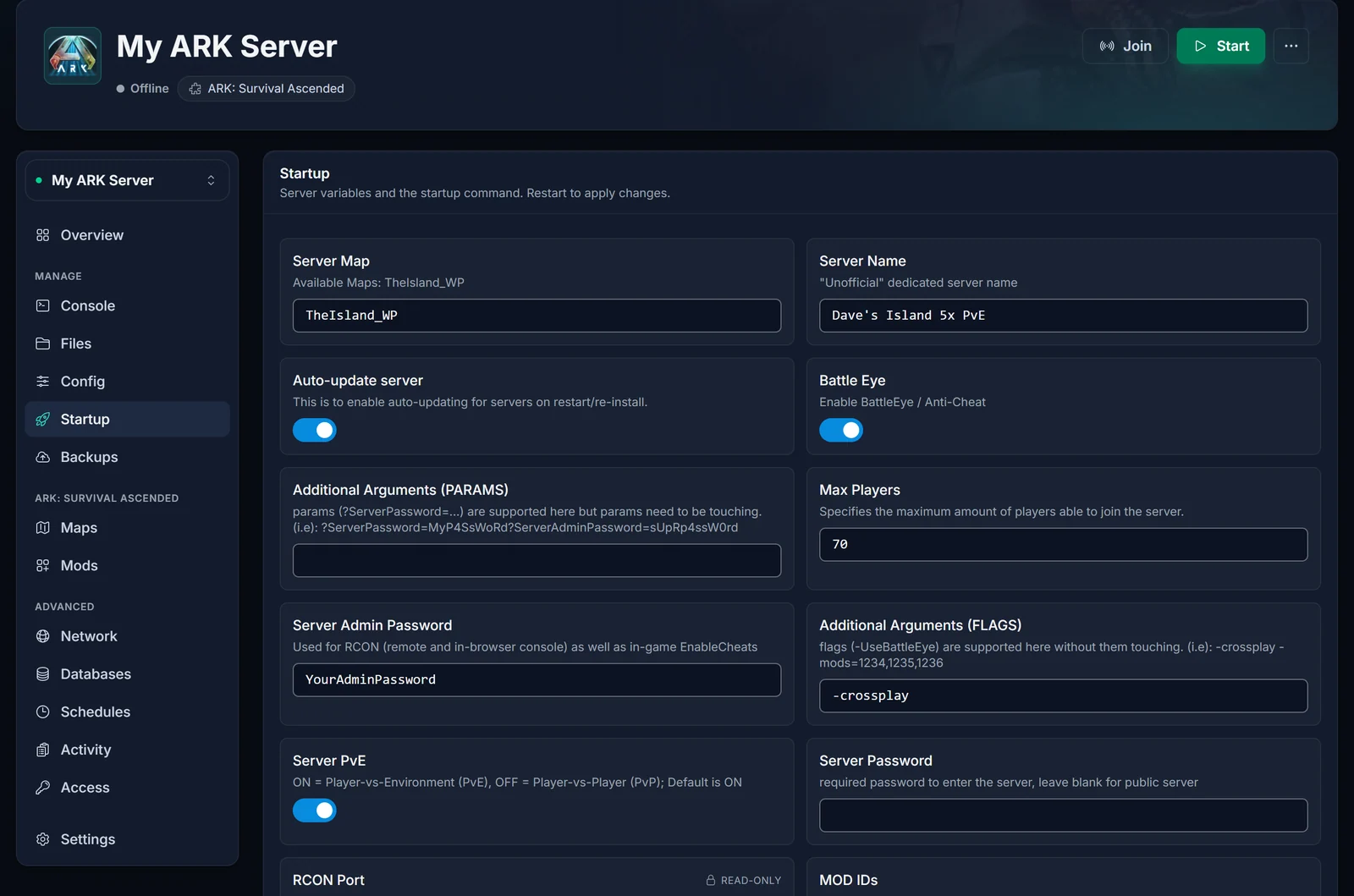
How to Rename Your Server in the Panel
- In the panel, open your server and pick Startup from the menu.
- Server Name is the field in the top right corner, beside Server Map.
- Overwrite the current text with the name you want and hit Enter, or simply click somewhere else. A brief Setting saved message tells you it worked. You will not find a save button, because none is needed.
- Restart the server with the button at the top. ARK only picks up the name while booting, so the list keeps the old one until then.
Tips for a Server Name Players Can Find
- One of a kind wins.
Dave's Island 5x PvEis a single hit. Generic words such asARKorPvEreturn thousands. - Lead with the word people will type. The search looks for text anywhere in the name, and most players enter a single word, so give them a distinctive one up front.
- Leave out
?and". Your name goes into the server's launch line, where the question mark splits settings and the quote marks enclose the name. Using either can chop the name off or break the options that follow. - Use the panel field, not GameUserSettings.ini. The server starts with the Startup value, so editing
SessionNamein the ini does nothing for the list.
How to Find Your Server In-Game
After the restart, check that the new name works:
- Start ARK: Survival Ascended and open Join Game.
- Choose the Unofficial filter and tick Show Player Servers. Without that box, servers rented from a host are left out of the results entirely.
- Protected the server with a password? Then Show Password Protected Servers has to be ticked as well.
- Enter one striking word of the name in the search, select your server and join.
For direct connect on PC and the details for console players, read how to connect to your ARK: Survival Ascended server.
ARK Server Not Showing in the Server List?
- Show Player Servers is unticked. Nine times out of ten this is it. Tick it and keep the filter on Unofficial.
- The list still has the old name. No restart has happened since the change. Restart and try again.
- It has not finished starting. An ASA server only joins the list once its map is fully loaded, and big maps need a few minutes. Watch the Console until it calms down.
- The field went back to the old value. The change was not stored. Press Enter in the field, wait for Setting saved, then restart.
- The search finds nothing. Use a single unusual word from the name, not the full name.
Common Questions
Do I have to stop the server to rename it?
No. Edit the field while it runs and restart afterwards so the new name is used.
Are spaces and capital letters allowed?
Yes, both work fine. Only ? and " cause trouble.
Will a new name wipe my world?
No. The name is just the label in the list. Bases, tames and characters are not affected.
Where are the other server settings?
Everything the server starts with, such as the password and max players, sits in the same Startup tab. Picking a different world is done in the Maps tab, explained in how to change the map on your ARK: Survival Ascended server.
Still Can't Find It?
Send our support team a message from your panel and we will check the name and status of your server with you. New here? Have a look at our ARK: Survival Ascended server hosting plans and the game panel you get with them.
