

If your ARK: Survival Evolved server says its storage is full and you can't see why, look in ShooterGame/Binaries/Linux for files named core or core.<number> (core.54, core.55 and so on). They are crash dumps, often several GB each, and you can delete them. Your server never reads them.
What the core files are
When the ARK server process crashes on Linux, it can write a copy of its memory to disk before it exits. That copy is the core dump. ARK runs from ShooterGame/Binaries/Linux, so that is where the file lands.
A core dump is roughly as large as the memory the server was using when it crashed. A heavily modded server uses a lot of memory, so its dumps are big. One recent case: an ARK server with 23 mods left an 18 GB core file every time it crashed. Six crashes later the dumps had filled the disk, even though the world itself was a fraction of that size.
The files are only useful to a developer debugging the game engine. ARK doesn't load them on start, doesn't need them for your world, and nothing breaks when they are gone.
Check your storage use
Open your server in the game panel. The Storage card on the Overview page shows how much disk your server uses out of what your plan includes. Restarting the server doesn't change this number. Only deleting files does.
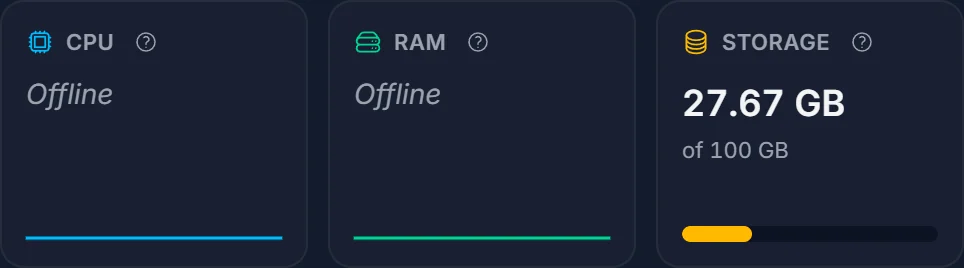
Backups you take from the Backups tab are stored separately and use your backup slots, not this number. Everything inside your server's folders counts, though, crash dumps included.
Delete the crash dumps in the File Manager
- Open the Files tab.
- Go to
ShooterGame>Binaries>Linux. - Look at the Size column. A file called
coreorcore.followed by a number, several GB in size, is a crash dump. Click the Size header twice to sort the biggest files first (folders always stay at the top of the list). - Click the three dots at the end of the row and choose Delete, then confirm. To remove several at once, tick their checkboxes and use Delete selected.
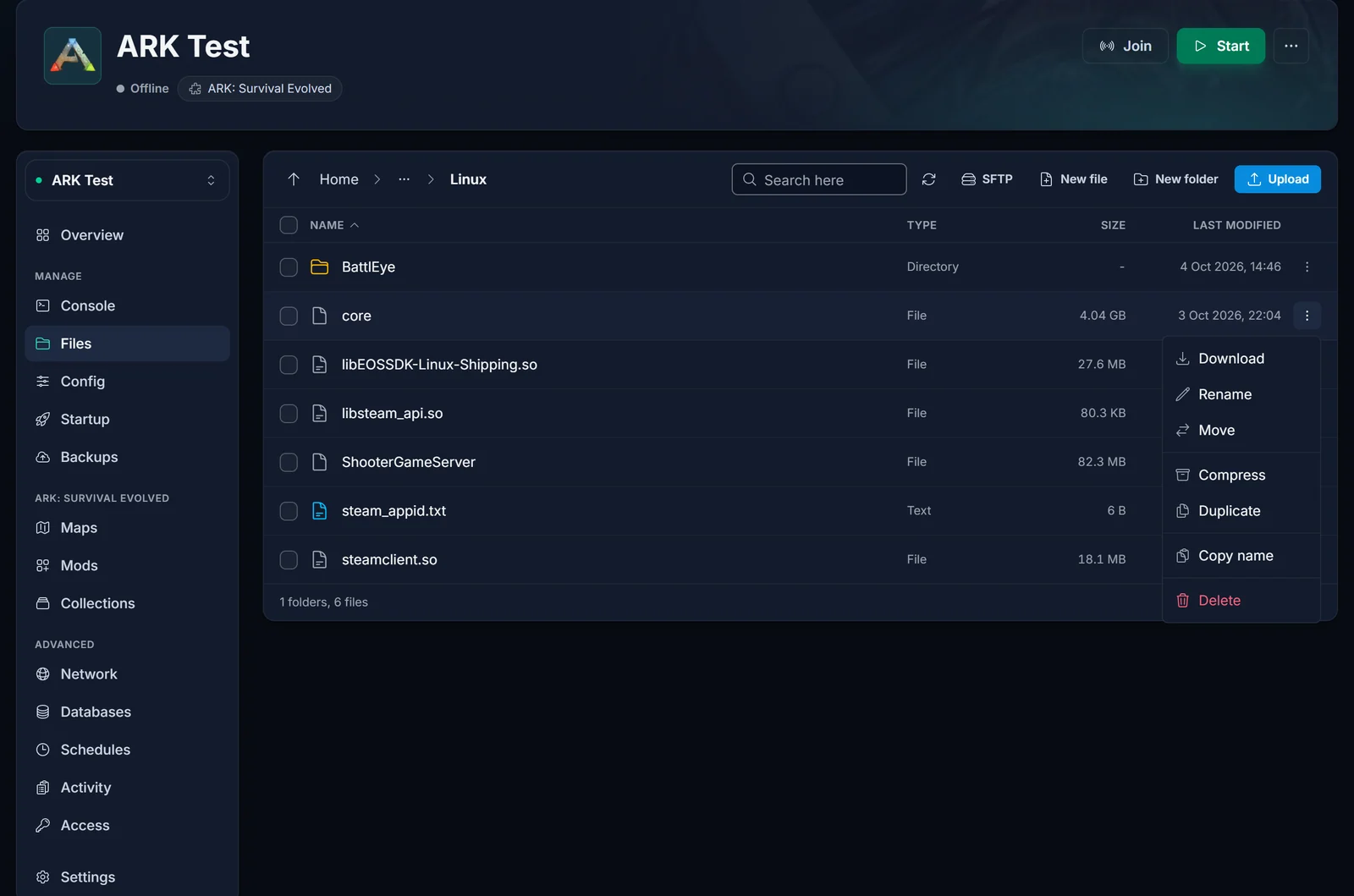
You can do this whether the server is running or stopped. Leave the other files in this folder alone: ShooterGameServer, the .so libraries, steam_appid.txt and the BattlEye folder are the server itself.
The Size column is hidden on narrow phone screens. Turn your phone sideways or use a computer if you can't see it.
Deleting is permanent. That is fine here, because a crash dump holds nothing you need.
Using SFTP instead
If you prefer a desktop client, connect with WinSCP or FileZilla and open the same ShooterGame/Binaries/Linux folder. Our SFTP guide shows how to get your login details and connect. An SFTP client is also handy for finding big folders: the panel's File Manager shows the size of files but not of whole folders, while WinSCP can calculate a folder's total size from its Properties dialog.
Other places that can take up space
Core dumps are the usual surprise, but these folders can grow too:
ShooterGame/Saved/SavedArks: your world. Next to each map save (for exampleTheIsland.ark) ARK keeps timestamped copies likeTheIsland_17.07.2026_02.34.11.ark, plusAntiCorruptionBackup.bakandNewLaunchBackup.bakfiles. The timestamped copies are ARK's own rolling backups and can pile up on a big map. You can delete old ones, but never delete the main.arkfile or the.arkprofileand.arktribefiles, because those are your live world, players and tribes.ShooterGame/Content/Mods: Workshop mods download here as a folder named after the mod's ID, plus a matching.modfile. When you take a mod off your mod list, its files stay behind. You can delete the folder and.modfile of a mod you no longer run. Leave the folders with map names (such asRagnarokorCrystalIsles): those are official maps. If you delete a mod that is still on your list, it simply downloads again on the next start.ShooterGame/Saved/Logs: plain text logs. These stay small, usually a few KB each, so clearing them won't win back much.
Stop them from coming back
A core dump only appears when the server crashes, so a server that keeps filling up with them is crashing regularly. On modded servers that often comes down to a mod conflict or an outdated mod after a game update. If your server crashes more than once in a while, open a support ticket and we'll look at the crash with you.
Common questions
Did my storage really fill up, or is the number wrong? The number is real. It is the size of every file in your server's folders. Crash dumps are large and sit in a folder most people never open, which is why the usage can look much higher than your world.
Will deleting the core files affect my world or my players?
No. Your world lives in ShooterGame/Saved/SavedArks. The core files are separate and the server never reads them.
Do I need to stop the server first? No. You can delete crash dumps while it is running.
Does this happen on ARK: Survival Ascended too?
This guide is for ARK: Survival Evolved, which runs the native Linux server. We haven't seen these core files on Survival Ascended servers, which run the Windows build of the game.
My server won't start because the storage is full. What now? Delete the crash dumps in the File Manager first; that works while the server is offline. Once usage is below your plan's limit, start the server again. If your world and mods genuinely need more room, you can upgrade the storage on your ARK: Survival Evolved server from the panel.
