
To run your ARK: Survival Evolved server on a Steam beta branch such as preaquatica (the game as it was before the Aquatica expansion), type the branch name into the Beta Branch field on the Startup tab, then reinstall the server. Your own game must run the same branch in Steam, or you will not be able to join. Here is the full walkthrough.
What beta branches are
Steam lets developers publish alternative versions of a game as named "beta branches". For ARK, Wildcard uses them to offer older or preview builds. preaquatica is the branch that keeps the server on the last version before the Aquatica expansion, which is useful if your mods have not been updated yet or your tribe wants to finish a playthrough on the version it started on. Leaving the Beta Branch field empty means the server runs the normal, latest version.
Step 1: take a backup first
Open the Backups tab and create a fresh backup before touching anything. Moving to an older branch is a version downgrade: a world that has already been saved on the newer version may not load correctly on the older one. With a backup you can always return to exactly where you were.
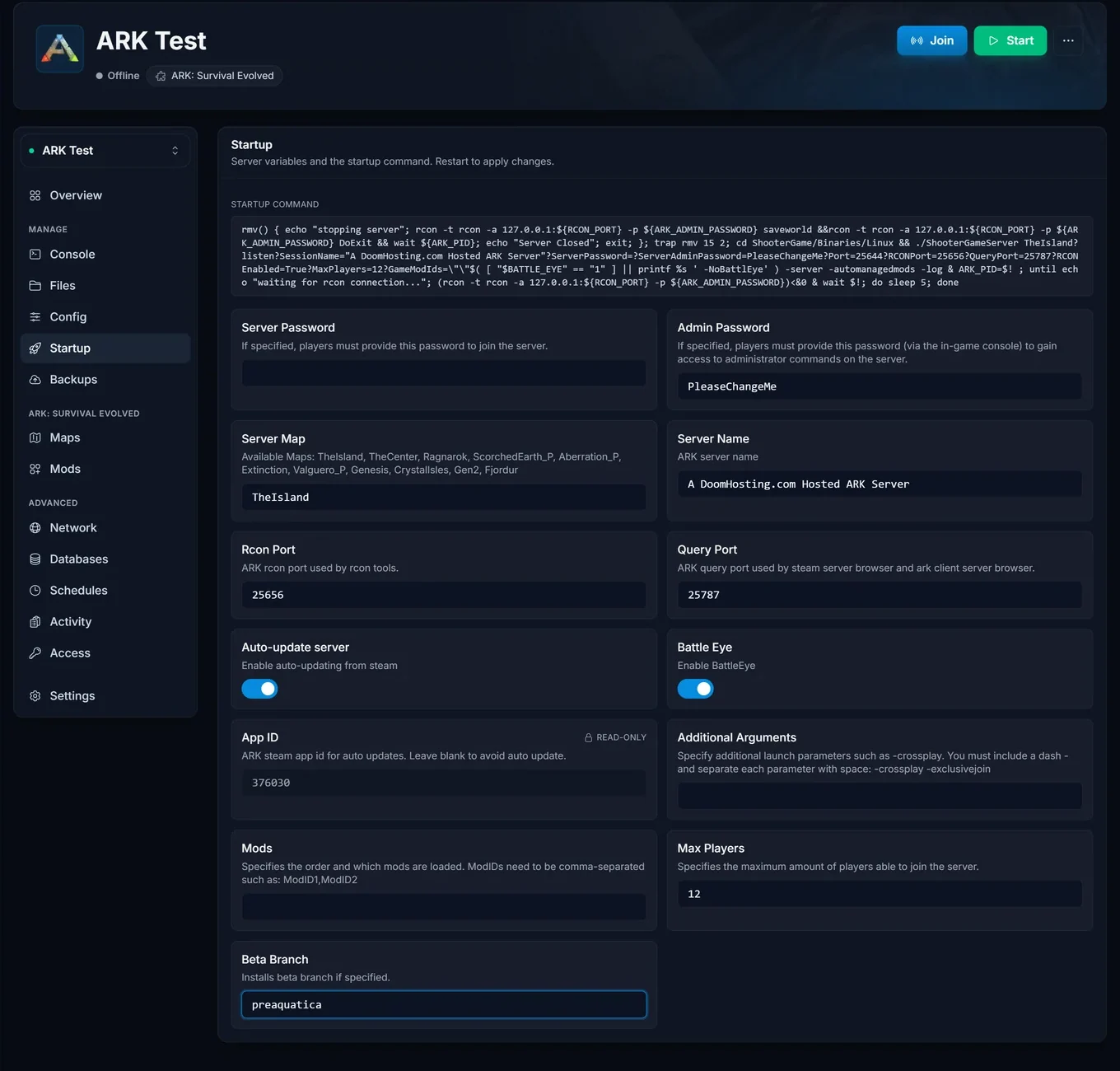
Step 2: set the Beta Branch field
Go to the Startup tab and find the Beta Branch field at the bottom of the variable list. Type the branch name, for example preaquatica, exactly as Steam spells it (lowercase, no spaces). The value saves automatically:
Step 3: reinstall the server
The branch only takes effect when the server files are downloaded again. Go to Settings and click Reinstall server:
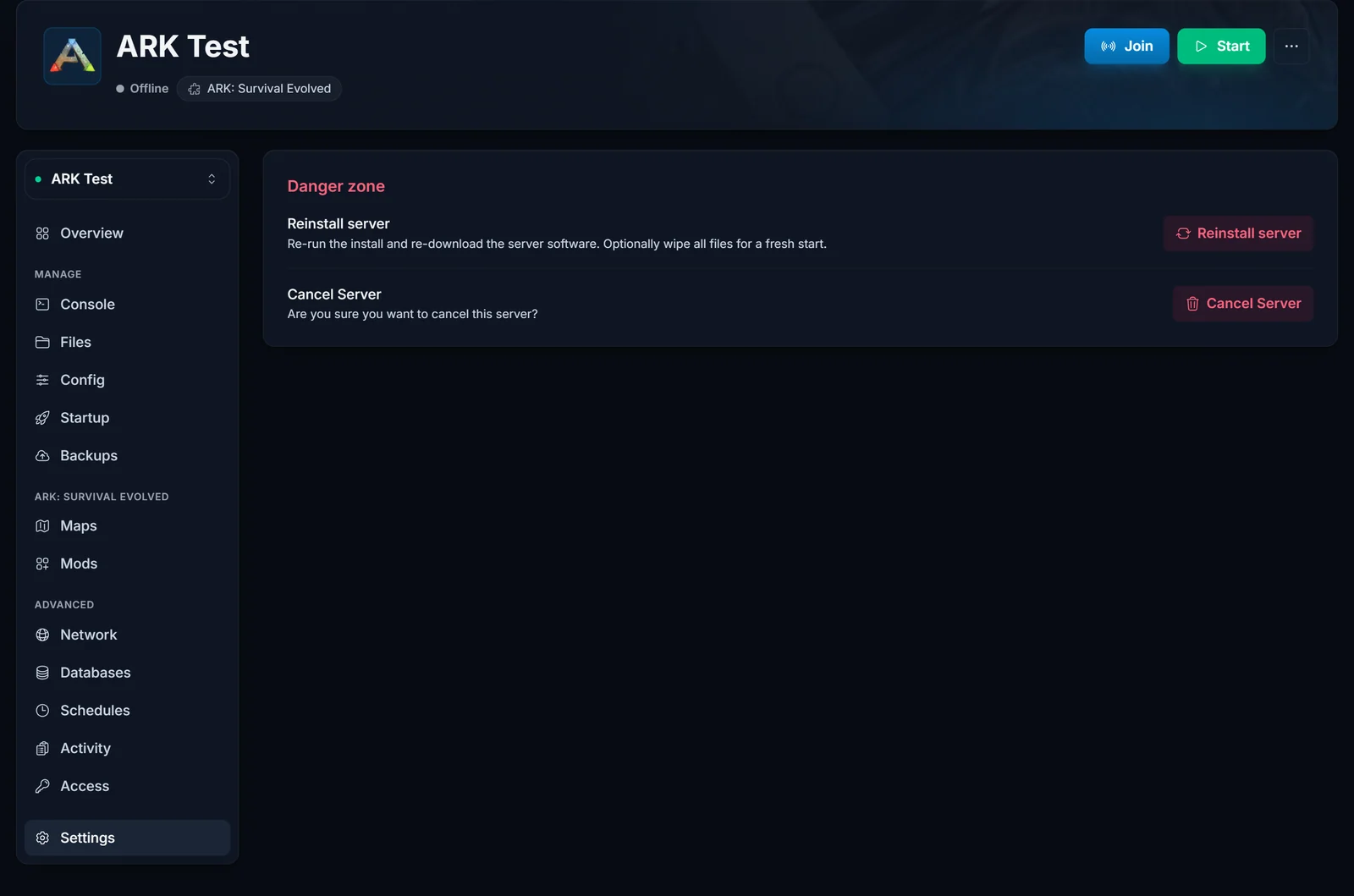
Keep your files during the reinstall (do not choose the wipe option): your world, tribes, and configs stay in place while SteamCMD downloads the branch build. When the reinstall finishes, start the server. It is now running the beta branch.
Step 4: switch your own game to the same branch
A server on preaquatica only accepts clients on preaquatica. Every player needs to switch their own game in Steam:
- Open your Steam Library and right-click ARK: Survival Evolved.
- Choose Properties, then open the Betas tab.
- In the Beta Participation dropdown, select
preaquatica. - Wait for Steam to download the update, then join the server as usual.
Anyone still on the default branch will get a version mismatch and cannot connect until they switch too.
Switching back to the normal version
Do the same trip in reverse: clear the Beta Branch field on the Startup tab (leave it empty), run Reinstall server from Settings again, and have every player set their Steam beta participation back to None. If your world spent time on an older branch, the newer version will load and upgrade it on the first start.
Common issues
The server does not show up or refuses the connection. Your game and the server are on different branches. Check the Betas tab in Steam and make sure it matches the server exactly.
The world will not load after switching to the older branch. The save was written by the newer version and is not backward-compatible. Restore the backup from step 1, or return to the default branch where the save loads normally.
Mods fail to load on the beta branch. Workshop mods update against the current game version. A mod that has already updated for the newest version may not work on an older branch, so test with mods disabled first if the server will not boot.
Running a modded tribe and thinking about hardware? See our ARK server hosting page for what is included with every server.
