

To get your SCP: Secret Laboratory server into the public in-game server list, it has to be verified by Northwood Studios, the game's developer. You fill in three config lines, write a short Pastebin page, run !verify static in the console and sign Northwood's Community Server Guidelines when the link appears.
Why your SCP SL server is not in the server list yet
The in-game server browser only lists servers that Northwood has verified, and a new server starts out unverified. DoomHosting is not one of the hosts Northwood verifies automatically, so you apply yourself, exactly as you would for a self-hosted server. Verification is Northwood's decision, not ours, and we cannot speed it up. Until it is done, your server works normally and players join with Direct Connect.
Is verification right for your server?
Northwood built the verified list for public community servers that stay online. Before you apply, know what you are signing up for:
- The server must stay reachable. A verified server that is offline for more than 14 days in a row loses its verification.
- You must answer emails from Northwood within 72 hours, or the server is removed from the list until you do.
- Verified servers may not run more than 60 player slots.
- Your server has to follow the Community Server Guidelines (https://scpslgame.com/CSG.pdf) for as long as it is listed.
For a server that only your friends use, you do not need any of this. Direct Connect is enough.
Northwood's guide also lists a minimum machine of two physical cores, 4 GB of memory and 20 GB of storage. Our servers run on Ryzen 9 hardware with far more disk space than the game needs, so the number to check is memory: choose at least 4 GB.
Step 1: fill in the config
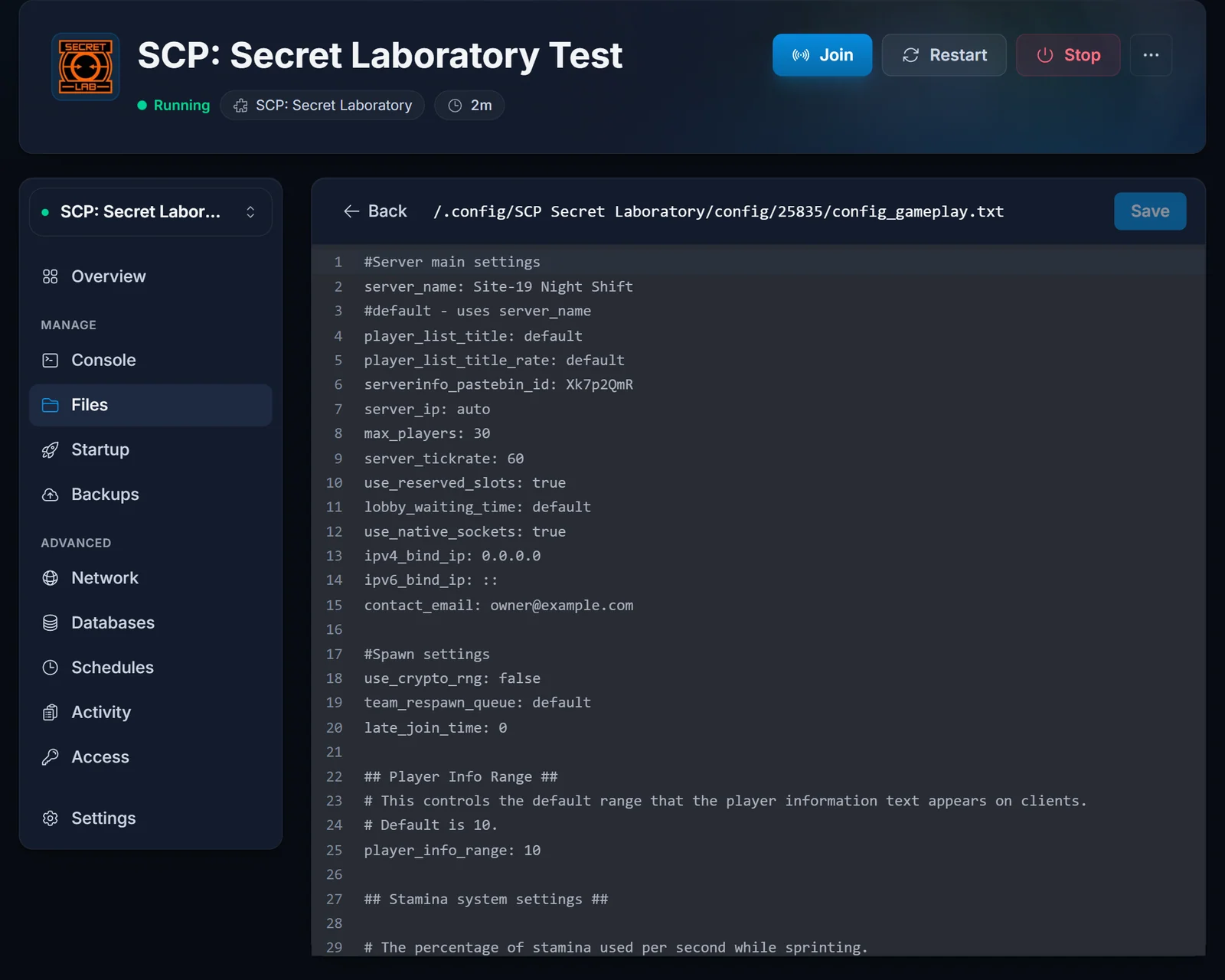
Open config_gameplay.txt in .config/SCP Secret Laboratory/config/<port>/, where <port> is your server's port. The getting started guide shows how to find it. Set these lines:
server_name: Your Community Name
serverinfo_pastebin_id: AbCd1234
contact_email: [email protected]
max_players: 30
server_ip: auto
server_name: your server's name. Do not advertise products or services in it.serverinfo_pastebin_id: the ID of your Pastebin page (step 2). The file ships with Northwood's example ID, which will not pass.contact_email: this line is not in the file by default, so add it yourself. Use an address you read: it is the one Northwood writes to, and the one you must send from if you ever email them.max_players: 60 or lower.server_ip: leave it onauto. If verification fails later, set it to the IP shown on your control panel's Overview instead.
Every line needs a space after the colon. Save and restart the server.
Step 2: write your server info on Pastebin
Players see this page from the pause menu in your server. Northwood requires it to contain:
- Your server rules, in English unless the server is clearly meant for another language or region. If you have no rules, say so.
- A way for players to contact your staff, such as a Discord invite or an email address. Your staff must reply to messages there within 14 days.
Create the paste on pastebin.com, set its expiration to Never so your server info cannot disappear, and copy the ID from the end of the paste's address (the part after pastebin.com/). An account is worth having, because it lets you edit the paste later.
After the restart, join your server with Direct Connect and open the server info from the pause menu to check it shows correctly.
Step 3: run the verification command
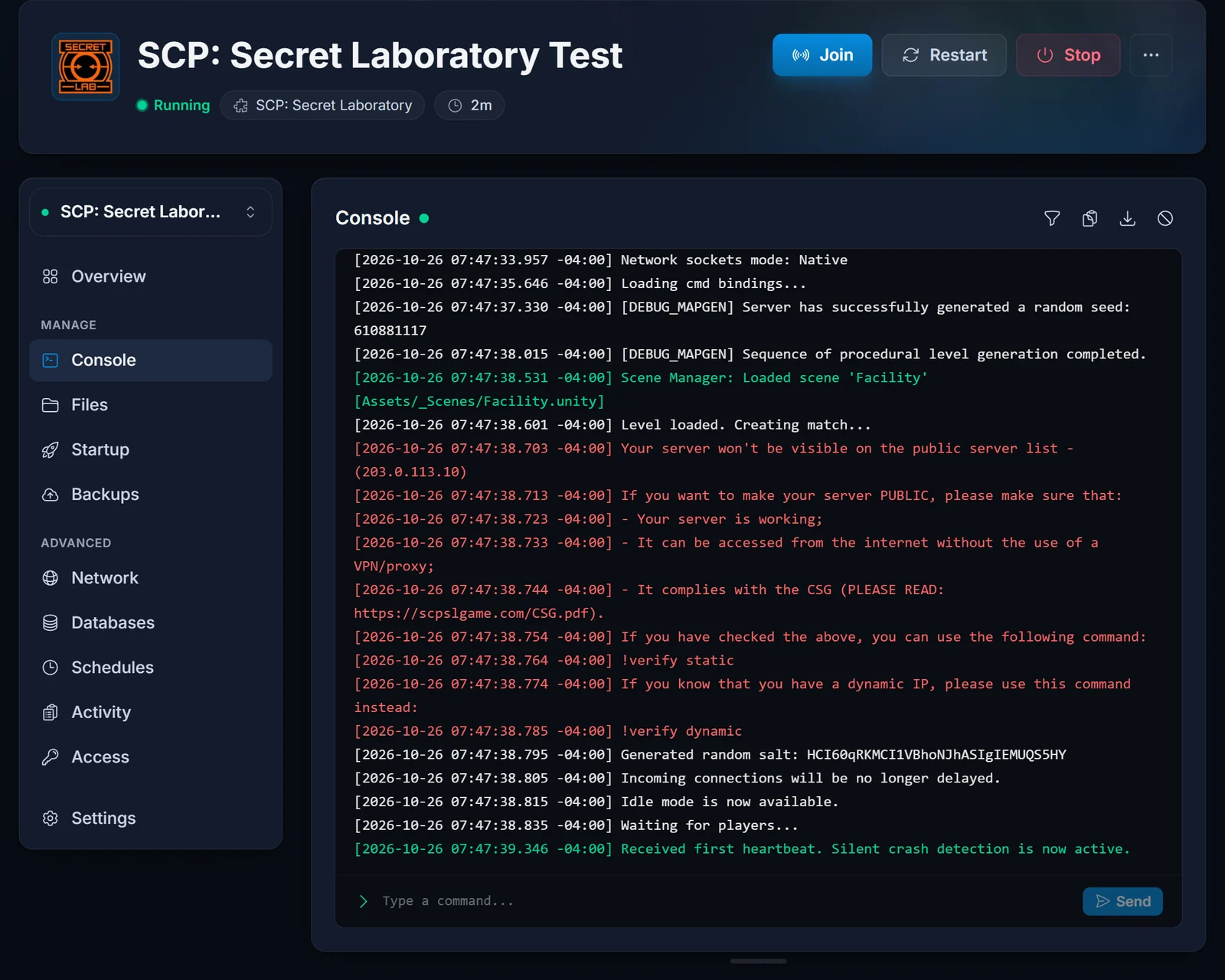
With the server running and the console showing Waiting for players.., type this in the Console tab of your control panel:
!verify static
Use static: our server IP addresses do not change. Northwood's central servers then try to connect to your server and check the configuration.
Step 4: sign the Community Server Guidelines
When Northwood approves the server, LocalAdmin prints a link in the console. Open it and sign the Community Server Guidelines. Once that is done, your server appears in the public list.
If you were told you are verified but no link shows up, restart the server. If it still does not appear, contact Northwood's technical support through the official SCP: Secret Laboratory Discord.
If the command fails: email Northwood
When !verify static reports an error you cannot fix, Northwood's Safety & Compliance team handles requests by email at [email protected]. Send it from the same address as your contact_email line, give it a plain subject such as Server verification 203.0.113.10:25600, write in clear English without attachments, and include:
- Your server's public IPv4 address (from the Overview in the control panel).
- That the IP is static.
- Your server's port.
Expect an answer in about 3 to 7 business days. Do not send the same request twice: a second email puts you at the back of the queue. Keep the server online the whole time: Northwood says the process can take up to a week, and it has to reach your server to approve it.
Running plugins on a verified server
The Community Server Guidelines count any plugin as a modification. If you run one, your server must report itself as modded to Northwood. If your plugins do not change gameplay or the interface, such as admin tools or timed broadcasts, you can additionally set the transparently modded flag:
transparently_modded_server: true
Common issues
"Specified port is not registered". Northwood's central servers believe this IP address is already registered. Our servers share IP addresses between ports, so another server on the same address may have been verified first. Email Safety & Compliance as described above, include the exact error, your IP and your port, and let our support know too so we can confirm the details for you.
"Your IP address is already verified!" but the server is not listed. The server's verification key file is missing or unreadable. Ask Safety & Compliance for a token reset by email, giving your IP, port, that the IP is static, and the error.
"Verification passcode is not correct". The key was invalidated, usually after a long time offline. Ask Safety & Compliance for a token reset.
The server was moved to another location. A new location means a new IP address, and verification belongs to the old one. Email Safety & Compliance with the subject [IP Change] and your old and new IP.
Verification was denied or could not connect. The most common reason is that Northwood could not reach the server. Check that it is running and showing Waiting for players.., that the IP and port you sent match the Overview exactly, that server_ip is auto or your server's public IP, and that ipv4_bind_ip is still 0.0.0.0 and ipv6_bind_ip is still ::. If the request was denied for another reason, Northwood's reply email lists what to fix.
How players reach your server before and after verification is covered in how to join an SCP: Secret Laboratory server. Plans and hardware are on the SCP: Secret Laboratory server hosting page.
