

The admin password unlocks administrator access on your Palworld dedicated server: server commands and RCON for remote management. On a DoomHosting server you set it from the panel in seconds, right on the Overview tab. This guide shows you how, and why you should never leave it on the shipped default.
Set your admin password
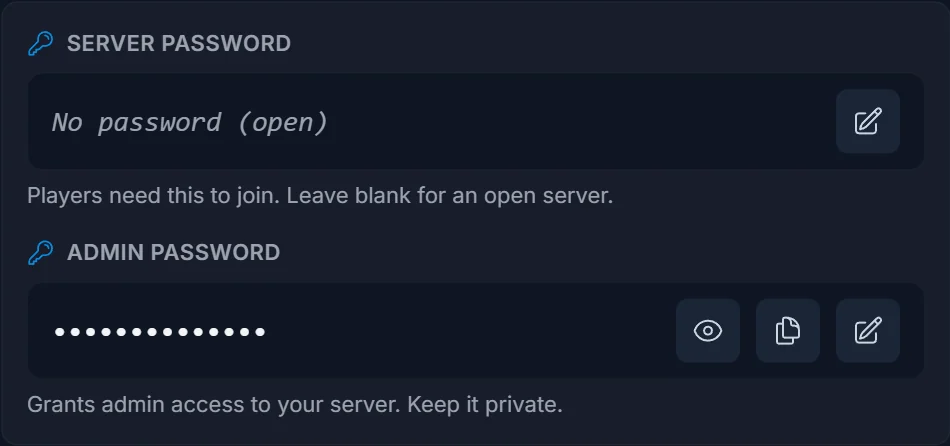
- Open your server in the panel. You start on the Overview tab.
- Under Connection address, find the Admin password row in the Server + Admin passwords card.
- Click the pencil (Change), type a strong password, and click the check to save.
- Click Restart now when prompted. The admin password applies after the server restarts.
If the panel shows an amber "still a default password" warning, your server is on a shipped default that anyone could guess. Change it right away.
What the admin password unlocks
The admin password is how Palworld verifies that you're allowed to run privileged actions. It's separate from the join (server) password your players use. With it you can:
- Run admin commands from the in-game console.
- Connect over RCON for remote administration.
- Manage your world without handing control to regular players.
Keep it private. Anyone who has the admin password effectively controls your server.
Tips
- Make it long and unique. Avoid "admin", "changeme", or "password": the panel flags known defaults for exactly this reason.
- It's separate from the Server (join) password. Both live in the same Overview card.
- Restart after changing it, or the old value stays active.
Frequently asked questions
Where do I set the Palworld admin password? On the Overview tab of your panel, in the Server + Admin passwords card. Click the pencil on the Admin password row.
What's the difference between the server password and the admin password? The server (join) password lets players connect. The admin password grants administrative control: commands, RCON, and management. You set both in the same card.
Do I need to restart after changing it? Yes. Palworld reads the admin password at startup, so click Restart to apply the new one.
What is the admin password used for in Palworld? It authenticates admin actions and RCON. Check your server's startup settings for the RCON port if you connect a remote admin tool.
Need a server first? Rent a Palworld server and manage admin access, saves, and settings from one panel. New to the panel? See what it does on the game server control panel page.
