


There are two ways into a Don't Starve Together server, and which one you need depends on whether the server shows up in the list. The normal route is to search for the server's name in Browse Games. If it does not appear, you connect straight to its IP address with a console command, because Don't Starve Together has no direct-connect field in its menus.
Get your server address
Open your server in your control panel. The Overview page shows the connect address as an IP and a port, with a button to copy it.
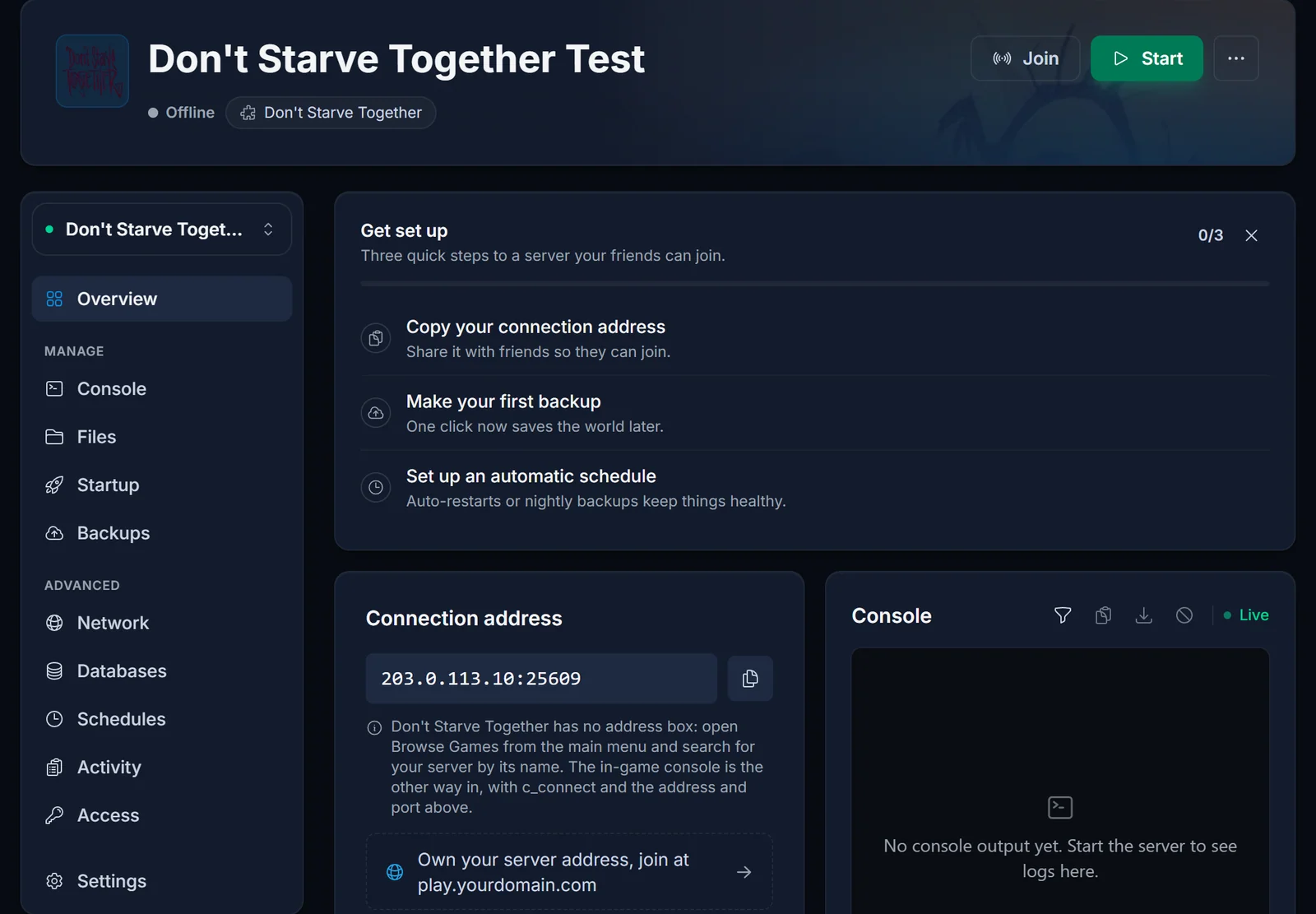
Write down both halves. The address is IP:PORT, and the port matters: the command in the second method needs them as two separate values.
Method 1: find it in Browse Games
This is how most people join, and it is the only method that needs no setup.
- Start Don't Starve Together and click Play, then Browse Games.
- Type the server's name into the search box.
- Click your server in the list, then click Join.
- Pick a character and you are in.
If the server has a password, the game asks for it after you click Join.
The name is the whole trick here. A server still using the default name is buried under everyone else's servers with the same name, so if you are the owner, rename it first. Search is not case sensitive, but it does match on the text in the name, so tell your friends exactly what to type.
Method 2: connect straight to the IP
Use this when the server does not show up in the browser, which is common on a brand new server or when someone is on a restricted network.
First, turn the console on. It is off by default in the game client:
- From the main menu open Options, then Settings.
- Set Enable Console to enabled.
- Go back to the main menu.
Then connect. Press the tilde key to open the console and type:
c_connect("203.0.113.10", 10999)
Replace the address and the port with your own. Note that the IP is in quotes and the port is not. If the server has a password, pass it as a third value:
c_connect("203.0.113.10", 10999, "yourpassword")
Press Enter. The game connects and takes you to character select.
Getting into the caves
You do not join the caves separately. Walk into a sinkhole on the surface and the server hands you over to the Caves shard on its own, which takes a few seconds of loading. If the handover fails you land back at character select instead, and that is a server-side problem rather than something you can fix from the client.
Common issues
My friends cannot find the server in the list. Almost always the name. Rename the server to something distinctive and tell people the exact spelling. The Getting Started guide covers where to change it.
The server is not in the list at all, even by name. A server whose cluster token is missing or expired never registers itself in the browser, so no amount of searching will find it. It does not stop either: the panel still shows it as running while its console repeats Account Failed (6). Only the owner can fix that, by putting a valid token in.
c_connect does nothing when I press Enter. The console is not enabled, or you are typing into the chat window rather than the console. Enable the console in Settings and reopen it with the tilde key from the main menu.
It says the connection failed. Check the port. People commonly copy the IP and assume the default port, but your server's port is whatever the panel shows, and the two have to match.
I get kicked back to character select at a sinkhole. The Caves shard is not accepting the handover. Ask the server owner to restart the server and check the console output.
Every Don't Starve Together server from us shows its address on the Overview page of the game control panel, so you always have both halves to hand.
