

Bedrock players can join your Java server through GeyserMC, walk around and build, but nothing they type shows up in chat. The console prints Chat disabled due to missing profile public key every time one of them joins. The fix is one line in server.properties: set enforce-secure-profile to false and restart the server.
Why Bedrock players can't chat
Java Edition signs every chat message. Each player's client attaches a signature made with a key that belongs to their Microsoft account, and the server can check it. The enforce-secure-profile setting in server.properties decides what happens to players who cannot sign: when it is true, which is the default, their chat is switched off.
Bedrock players reach your server through Geyser and Floodgate, and they never get a Java profile key. So with the default setting they can play, but they cannot send a single message. You will see this in the Console tab right after a Bedrock player joins:
Failed to update secure chat state for .PlayerName: 'Chat disabled due to missing profile public key. Please try reconnecting.'
The message says to reconnect, but reconnecting does not help. The player gets the same result every time, because the key is missing, not broken.
The same thing happens to Java players on a server running with online-mode=false: without a real login they have no profile key either, so their chat is blocked in the same way.
How to turn off enforce-secure-profile
- Open your server in the control panel and go to the Files tab.
- Click
server.propertiesto open it in the editor. - Find the line
enforce-secure-profile=trueand change it toenforce-secure-profile=false.
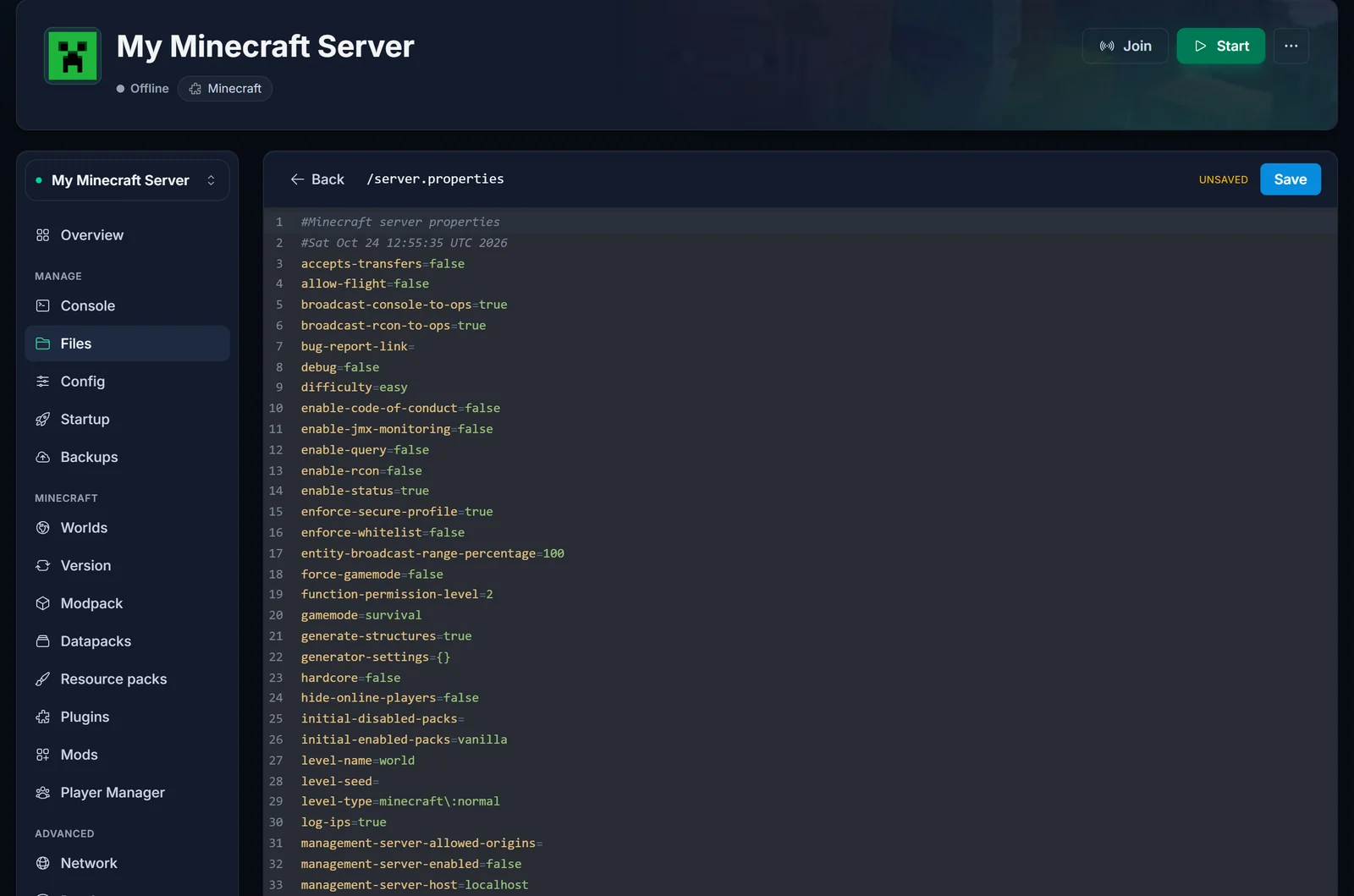
- Click Save.
- Restart the server. The setting is only read at startup, so saving the file on its own changes nothing.
Once the server is back up, Bedrock players can chat straight away. They do not need to change anything on their side.
What changes for Java players
Very little. Java players keep chatting exactly as before, and everyone shares the same chat.
The difference is that the server no longer requires signed messages. When a Java player joins, their game shows a small notice saying chat messages can't be verified. That is expected on any server with this setting turned off, and it does not stop them from chatting. It also means messages on your server cannot be reported to Microsoft through the in-game chat reporting, so moderation is up to you and your staff.
Still can't chat?
You saved the file but did not restart. Check the top of the Console after a restart: the server reads server.properties once, when it starts.
A plugin is blocking chat. Chat formatting, anti-spam or moderation plugins can mute players on their own. Look in the Console for a message from the plugin when the Bedrock player tries to talk, and check the plugin's config.
Bedrock players can't join at all. That is a different problem, usually the address or port they typed, or Geyser being out of date. Our GeyserMC crossplay guide covers setup and the connection checks.
Frequently asked questions
Is it safe to turn enforce-secure-profile off? Yes. It only controls whether chat messages must carry a signature. It has nothing to do with who can join your server: the whitelist, bans and online-mode all keep working as before.
Do I need a plugin for this? No. The setting is built into the server, and changing it in server.properties is all it takes.
Will this fix chat for players on offline-mode servers too? Yes. Players without a Microsoft login have no profile key, just like Bedrock players, so the same change lets them chat.
Do I have to do this again after an update? No. The setting stays in server.properties when you update or change the server version.
Every Minecraft server we host lets you edit server.properties straight from the Files tab, with no FTP client needed.
