Minecraft Bedrock 26.60 came out on October 27, 2026, and with it the old way of joining a server is gone. Bedrock now connects players over NetherNet only. RakNet, the connection Bedrock servers used for years, no longer works for players on the current version. If you run a Bedrock server, or a Java server with GeyserMC crossplay, here is what changed and what it means for you.
What NetherNet is
NetherNet is Mojang's WebRTC-based connection for Bedrock, the same technology behind joining a friend's world. Instead of sending everything over one UDP port, a NetherNet join happens in two steps:
- A handshake on the game port. The game first talks to your server on its normal address and port, over TCP, to agree on how to connect.
- Gameplay on separate UDP ports. The actual game traffic then runs over its own ports, and every player online at the same time uses one of them.
That second step is the big change for anyone hosting a server. Under RakNet one open port was enough. Under NetherNet a server needs a port for every player who is online at once.
What changes for server owners
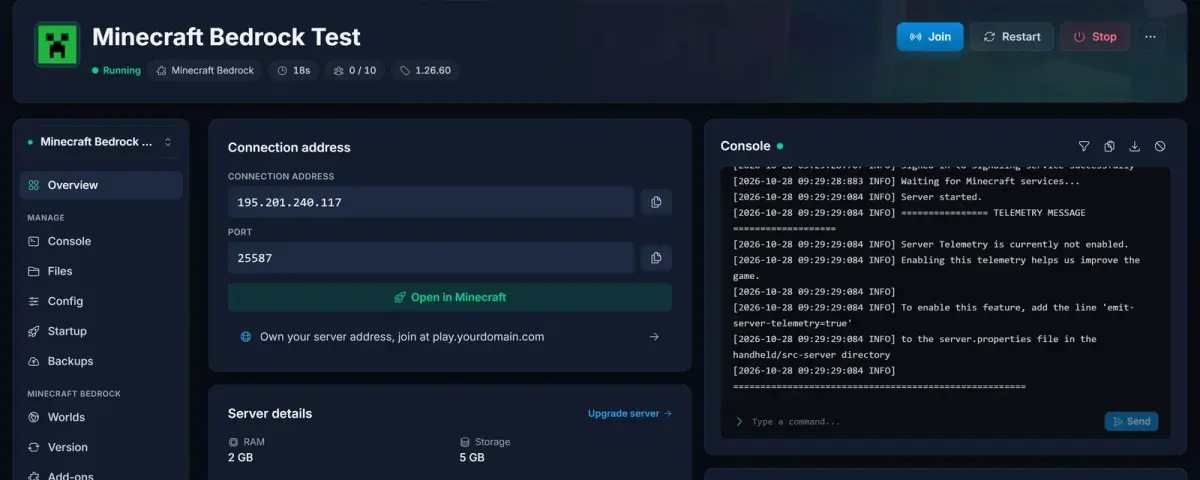
- Old setups stop working. A server that still runs on RakNet starts normally, but players on 26.60 get a connection error. The console prints a "TRANSPORT TYPE ERROR" block right after
Server started.when that's the case. - The server and the app must be on the same version. Bedrock only lets a player join a server that runs the same version as their app. Once a player's app has updated to 26.60, they can't join a server that still runs 1.26.52 or older, so update the server to 1.26.60 as well.
- A fresh 1.26.60 server has its allowlist switched on. Mojang's new server download ships with
allow-list=trueand an empty allowlist, so nobody can join a brand-new server until you add players or turn the allowlist off. Typingallowlist offin the console does it without a restart. - Saved server entries can get stuck. An entry players saved before the update can keep trying the old connection. Deleting it and adding the server again fixes that.
- Use the IP address. A server-list entry saved with a hostname instead of an IP may sit on "Locating server" and never show its status, even though joining works. The IP shows the status normally.
What we did on DoomHosting
Every Bedrock server we host was switched to NetherNet before and on release day. Each server got a block of extra ports, one per player slot, and old server builds were updated with worlds and settings kept. New servers come with NetherNet set up from the first start, and changing max-players in the panel adjusts the ports by itself. The panel also shows your server's IP address on the Overview tab, which is the address to give your players.
If your server was offline during the switch, it picks up the change the next time it starts.
Java servers with GeyserMC crossplay
GeyserMC supports NetherNet too, but only on a port of its own: it can't share the Java port anymore. We moved every Java server with crossplay onto its own Bedrock port and turned NetherNet on, using the latest Geyser build. Your Java address doesn't change. Bedrock players who saved your server before the move need to add it again with the new port, which the Overview tab shows.
Players can't join?
Our help article walks through every case, from the transport error to "Locating server": Minecraft Bedrock NetherNet: Fix "Can't Join" on Your Server.
Looking for a server that's ready for 26.60? Our Minecraft Bedrock server hosting plans run NetherNet from the first start.