

Want to see further on your Minecraft server without making it lag? Keep the server's view distance around 10 and let players install a distance mod like Distant Horizons or Bobby on their own game. The far terrain is then drawn by each player's PC, so the server does no extra work. This guide explains why a high server view distance hurts, which setting to pick in the panel, and how to set up both mods.
View distance vs simulation distance
Two settings in server.properties decide how much of the world your server handles around each player:
- View distance is how many chunks the server loads and sends to each player. It caps what players can see: a player with their own render distance at 32 still only sees as far as the server sends.
- Simulation distance is how far the world keeps running around each player: mobs, farms, crops and redstone. This is the expensive one for the CPU.
Both are counted in chunks (16 by 16 blocks) in every direction from the player.
Why a high view distance lags your server
The cost grows much faster than the number. A view distance of d means the server loads a square of (2d + 1) x (2d + 1) chunks around every player:
| View distance | Chunks per player |
|---|---|
| 8 | 289 |
| 10 | 441 |
| 16 | 1,089 |
| 32 | 4,225 |
So 32 is not "three times 10", it is almost ten times the chunks, for every player online. The server has to load, generate, store and send all of them, and Minecraft does most of its world work on a single main thread. That is why a high view distance shows up as the same complaints every time: chunks that never finish loading, players timing out, and hits landing late.
Simulation distance works the same way, except every chunk in it is also ticking mobs and redstone, so it costs even more per chunk.
Pick a render distance in the panel
You set both values on the Config tab under Render distance. Pick one of three presets:
- Performance (8 view, 6 simulation): best with many players online.
- Balanced (10 view, 8 simulation): the recommended setting, smooth on most servers.
- Far (16 view, 10 simulation): for small groups who want a longer view.
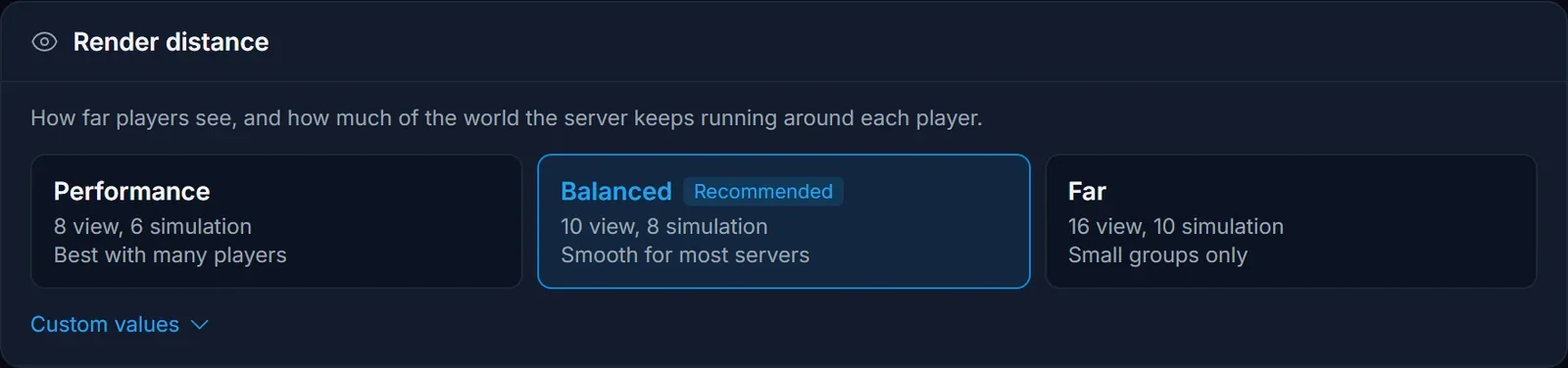
Open Custom values to type your own numbers. When you raise a value above the recommended setting, the panel asks you to confirm first and shows how much more of the world each player would load.
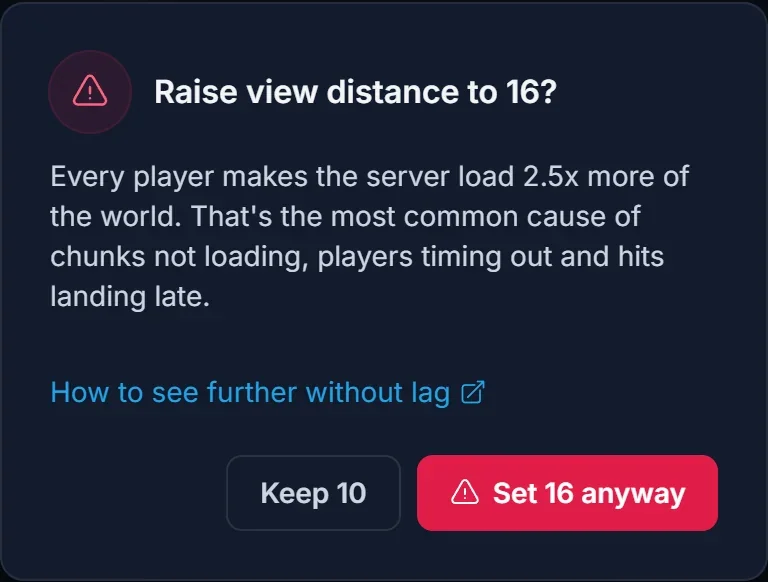
Restart the server for the change to take effect. The panel keeps both values within what your server can run smoothly, and if server.properties is edited by hand with a higher value, it is lowered the next time you start the server from the panel.
See further with Distant Horizons
Distant Horizons is a client-side mod that draws distant terrain as simplified "level of detail" (LOD) chunks. Close terrain stays full detail; far terrain is drawn by the player's own graphics card. It works on servers that do not have the mod installed, which is exactly what you want: the server keeps its normal view distance and does no extra work.
- Install Distant Horizons in your own game with a launcher like the Modrinth App, Prism Launcher or CurseForge. It is available for Fabric, Forge and NeoForge: Distant Horizons on Modrinth.
- Join the server as normal.
- Open the Distant Horizons settings in game and set its render distance. Start moderate: very high values cost a lot of RAM and GPU on your own PC.
The far terrain fills in as you explore, because the mod builds it from chunks the server has already sent you. Areas you have visited stay visible from far away on later sessions.
Distant Horizons also has an optional server-side part that makes the server generate and send far terrain to every player. Skip it: that is the same server load you were trying to avoid.
See further with Bobby
Bobby is a smaller client-side Fabric mod with a different trick. It saves every chunk the server sends you, and keeps showing those chunks after they fall outside the server's view distance. Terrain you have already explored stays on screen far beyond the server's limit.
- Install Bobby in your Fabric game: Bobby on Modrinth.
- Join the server and play. Each area you visit is cached on your PC and stays visible from a distance.
Bobby only shows terrain you have seen before, so new areas still appear at the server's normal distance the first time.
Common issues
I set view distance to 32 but players still see less
Players never see further than the server's view distance, and the panel keeps it within what your server runs smoothly. Use Distant Horizons or Bobby to see further: they are the way to get a long view without lag.
Players see a fog wall close by
Check the player's own Render Distance in Options > Video Settings. The game shows the lower of the player's setting and the server's view distance, so a low client setting cuts the view short too.
The server still lags at view distance 10
Then view distance is not the main cause. Lower simulation distance first (the Performance preset), then work through How to Fix Minecraft Server Lag: pregenerating the world and cutting back big mob farms usually make the biggest difference.
Will lowering view distance delete anything?
No. View and simulation distance only change how much of the world is loaded around players. Your builds, farms and chunks stay exactly as they are.
Looking for a server that stays smooth? See Minecraft server hosting at DoomHosting.
