
Terraria runs on a fixed day/night clock, but as the server owner you can jump the time to dawn, noon, dusk, or midnight whenever you want, straight from your control panel. The exact command depends on which loader your server runs, so this guide covers both the standard/tModLoader commands and the TShock commands, plus how to tell which one you have.
How long is a day in Terraria?
A full day/night cycle in Terraria lasts 24 real-world minutes: 15 minutes of daytime and 9 minutes of night. Daytime begins at 4:30 AM (dawn) and night begins at 7:30 PM (dusk) in-game. One in-game hour passes every real minute, so the clock never stops on its own. That fixed pace is why players ask how to skip ahead: to start a build in daylight, trigger a night event, or reset after a Blood Moon.
Which loader is my server running?
DoomHosting Terraria servers can run one of two loaders, and you can switch between them anytime from the Mods tab in your server panel:
- tModLoader: the standard Terraria server plus mod support. Uses the built-in time commands (
dawn,noon,dusk,midnight). - TShock: a server build with a full admin command system. Uses
timecommands instead.
Open the Mods tab to see which one is active. Then use the matching set of commands below. (Switching loaders reinstalls the server and starts a fresh world, so back up first if you want to keep your current one.)
Change the time from the Console
Both methods use the same place: your server's Console tab.
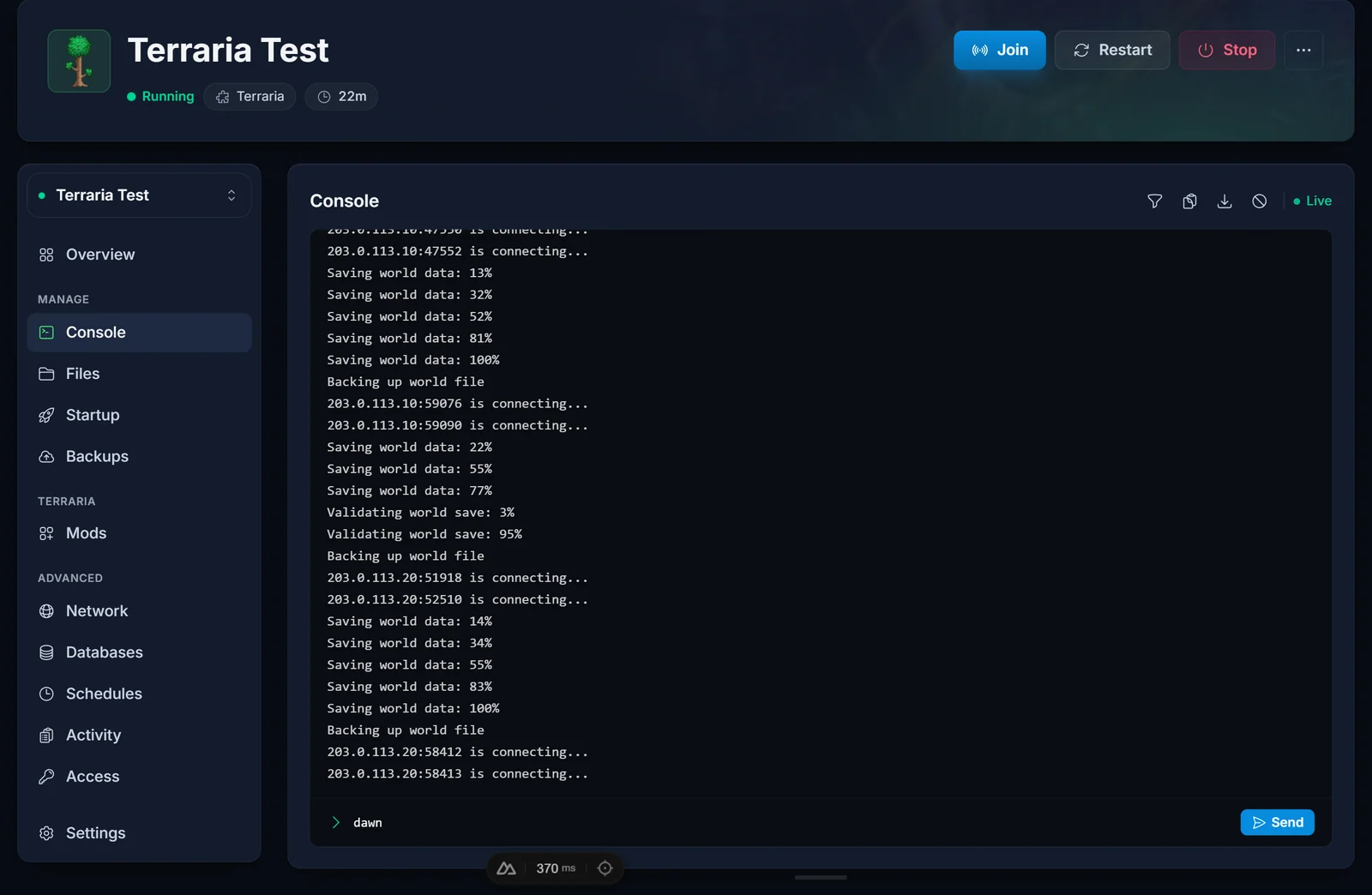
- Open your server in the panel and select the Console tab.
- Type the command for your loader and press Enter. The change applies instantly for everyone connected.
tModLoader (and the standard server)
Type the command on its own, with no slash:
| Command | Effect |
|---|---|
dawn |
Sets the time to 4:30 AM (start of day) |
noon |
Sets the time to 12:00 PM (midday) |
dusk |
Sets the time to 7:30 PM (start of night) |
midnight |
Sets the time to 12:00 AM |
TShock
TShock uses the time command with an argument:
| Command | Effect |
|---|---|
time day |
Sets the time to 4:30 AM (start of day) |
time noon |
Sets the time to 12:00 PM (midday) |
time night |
Sets the time to 7:30 PM (start of night) |
time midnight |
Sets the time to 12:00 AM |
time 6:00 |
Jumps to any specific time, in 24-hour hh:mm format |
In the Console you type it without a slash (time day). If you run it from in-game chat instead, add a slash (/time day) and make sure you are logged in as an admin, since the command needs the tshock.world.time permission that the superadmin group has by default.
Can you make the days or nights longer?
The commands above jump the clock to a moment, they do not change how fast it runs. On both loaders the cycle length is fixed at 24 minutes and cannot be stretched or shortened by a command. If you want to actually slow down, speed up, or freeze time, you have two options:
- A tModLoader mod. Switch to the tModLoader loader (Mods tab) and install a time-control mod from the Steam Workshop browser built into that tab. Several mods let you set a custom day length or freeze the clock.
- A Journey Mode world. Journey Mode adds an in-game Power Menu with a time slider that can freeze the clock or run it from 1x up to 24x speed. This works in multiplayer, but only on a Journey Mode world, so you would create or upload one for your server and grant Journey Powers to the players who should control it.
Common issues
- "Invalid command" or nothing happens: you are probably using the wrong set for your loader. If
dawndoes nothing, you are on TShock, so usetime day. Iftime daydoes nothing, you are on tModLoader, so usedawn. The Mods tab confirms which loader is active. - You typed a slash in the Console: the server Console does not need a leading slash. Use
dawnortime day, not/dawn. Keep the slash only for TShock commands typed in in-game chat. - The clock keeps moving after you set it: that is expected. These commands set the moment, they do not stop the clock. To pause it, use a tModLoader time mod or a Journey Mode world (see above).
- "You do not have permission" in-game on TShock: log in to an admin account first. The
tshock.world.timepermission belongs to the superadmin group.
Frequently asked questions
How long is a full day in Terraria? 24 real-world minutes: 15 minutes of day and 9 minutes of night.
Can I make the nights shorter or the days longer? Not with a console command, since the cycle length is fixed on both loaders. You can jump straight to day whenever night drags on. To change the actual speed, use a tModLoader time mod or a Journey Mode world.
Will setting the time skip a Blood Moon or other night event?
Moving the time to dawn (or time day on TShock) ends the current night and any event tied to it. Setting it back to dusk or night starts a fresh, normal night.
Do players need to be online for the command to work? No. The command changes the running world, so it takes effect as long as the server is up. Anyone who connects afterward sees the new time.
Need more room for a bigger world or more players? See our Terraria server hosting plans, size your instance with the Terraria RAM calculator, or explore everything you can manage from the game control panel.
