


Your The Isle server is running Evrima and is ready the moment the install finishes. This guide covers the five things every new owner does first: name the server, set the player count, make yourself admin, choose which species are playable, and tune growth and AI.
Everything that is not on the Startup tab lives in one file, Game.ini, which you edit through the Files tab or over FTP.
Before you start: everyone needs the Evrima branch
The Isle ships two branches and they cannot see each other. Your server runs Evrima, so you and every player need the Evrima client:
- Right-click The Isle in your Steam library and open Properties.
- Go to Betas.
- Pick evrima from the branch list and let Steam update the game.
A player still on Legacy will never find your server, no matter what you change on the server side. The full walkthrough: how to join a The Isle server.
Name your server and set the player count
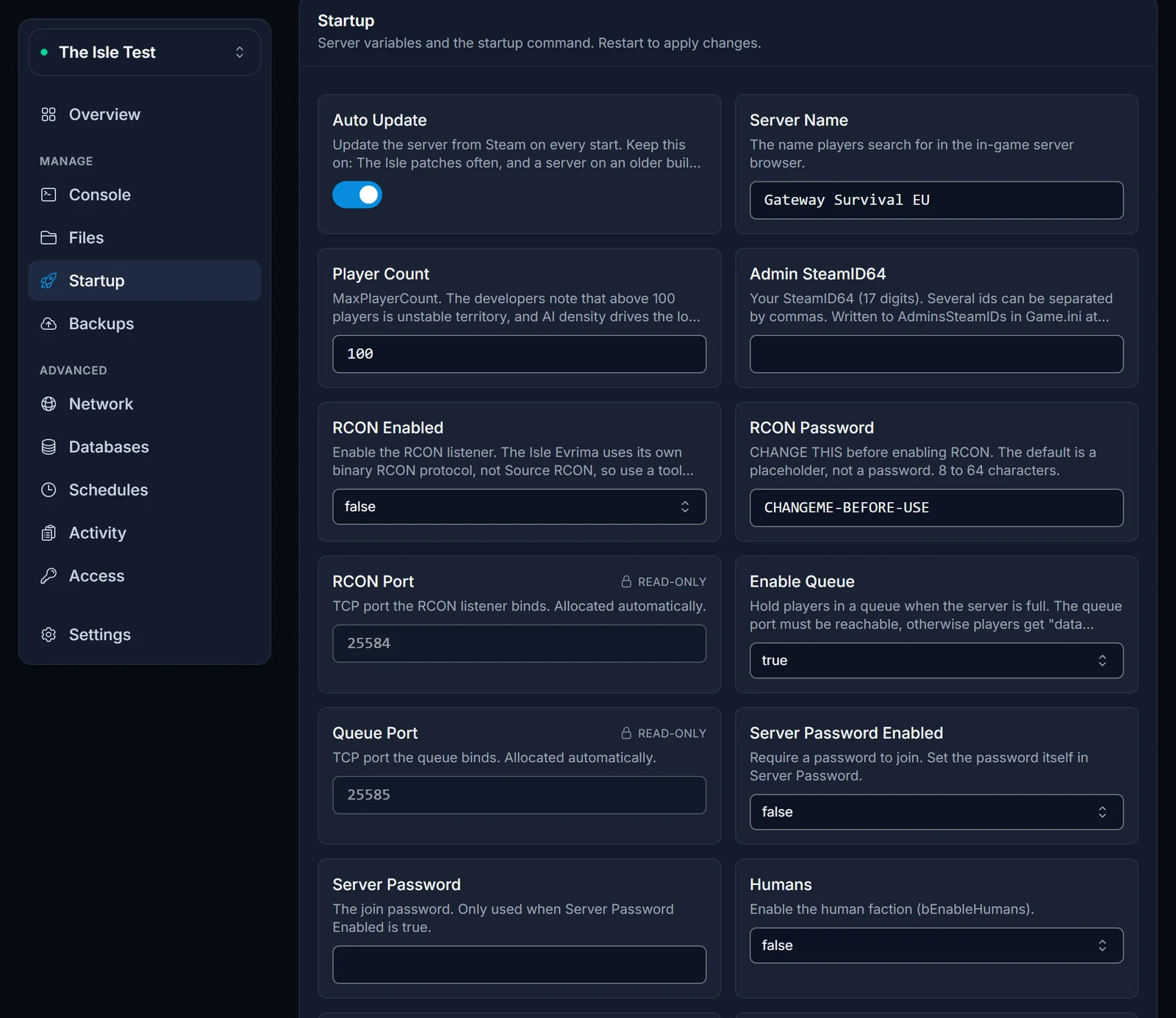
Open the Startup tab in your control panel. These settings are managed there rather than in the file, because the server writes them into Game.ini every time it boots:
- Server Name: what players see in the in-game browser. Make it searchable, because that is how they find you.
- Player Count: this becomes
MaxPlayerCount. Start lower than you think. The load on an Isle server comes mostly from AI, not from players, so a well-tuned 50-slot server usually plays better than a stretched 150-slot one. - Humans: turns the human faction on or off.
- Enable Queue: keeps a waiting line when the server is full. The queue uses a second port, which your panel has already allocated for you.
Save, then restart the server for the changes to apply. Give it a moment: on our own test server the panel went from Start to running in about 40 seconds.
Which settings live where
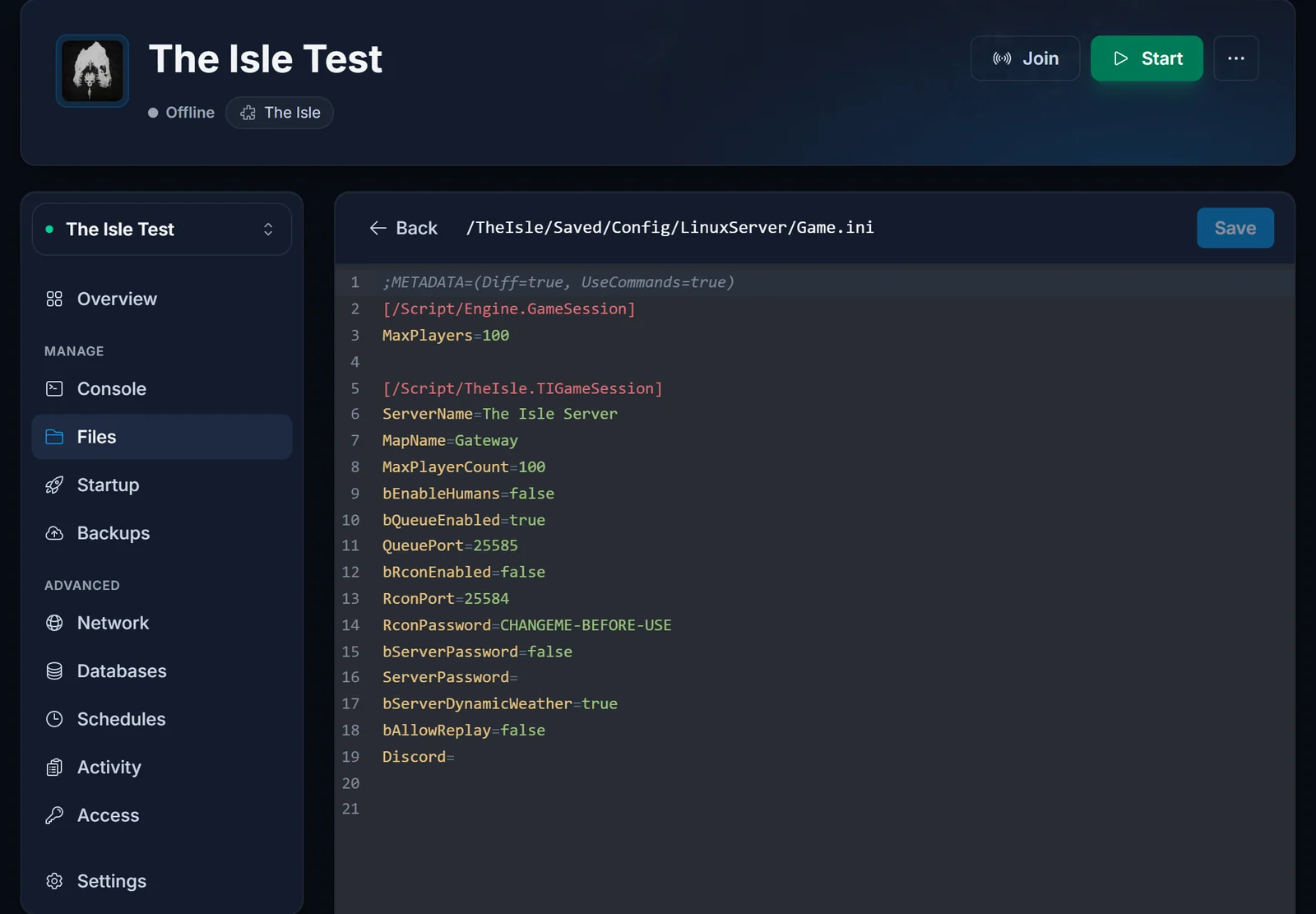
This trips up almost every new owner, so it is worth being blunt about it. The settings on the Startup tab above are rewritten into Game.ini at every boot. If you edit those particular lines in the file instead, your edit is gone the next time the server starts.
Everything else in Game.ini is yours and is never touched. That includes growth, AI, migrations, mutations, diets, day and night length, the whitelist and the playable species.
The admin list belongs to the Startup tab as well, which surprises people: the Admin SteamID64 field there is written into AdminsSteamIDs in Game.ini on every boot.
Rule of thumb: if you can see the setting on the Startup tab, change it there. If you cannot, change it in the file.
Make yourself admin
Admins go in the Admin SteamID64 field on the Startup tab, not in the file. Put your 17-digit SteamID64 in it, and separate several ids with commas:
76561198000000001,76561198000000002
The id is the SteamID64, not the profile name. Save the field and restart the server: the server writes the value into AdminsSteamIDs in Game.ini as it boots. That is also why editing AdminsSteamIDs in the file by hand does not stick, it is overwritten on the next start.
Once you are on the list you get the in-game admin panel, which is where day-to-day moderation happens.
Choose which dinosaurs are playable
AllowedClasses sits in the same section and decides the roster on your server:
[/Script/TheIsle.TIGameStateBase]
AllowedClasses=Tenontosaurus
AllowedClasses=Ceratosaurus
The behaviour is all or nothing. Leave the block out entirely and every species the build ships is playable. Add even one line and only the species you listed are playable. That means every time Evrima adds a new dinosaur, you have to add it to your list yourself, or nobody on your server can play it. If you want to run a roster, keep a note of that.
Tune growth, AI and migrations
These all live in the first section, [/Script/TheIsle.TIGameSession], and this is where a server gets its personality:
GrowthMultiplier=1
ServerDayLengthMinutes=45
ServerNightLengthMinutes=20
bSpawnAI=true
AIDensity=1
AISpawnInterval=40
bEnableMutations=true
bEnableDiets=true
bEnableMigration=true
bEnableMassMigration=true
CorpseDecayMultiplier=1
- GrowthMultiplier is the single setting players will ask about. Raising it shortens the hours between hatching and adulthood. Very high values are known to behave badly, so move it in small steps and see how it plays.
- AIDensity controls how much AI prey the world holds. It is also the setting with the biggest effect on how much memory and CPU your server uses. If the server feels heavy, lower this before you buy more RAM.
- CorpseDecayMultiplier below 1 makes corpses vanish faster, which keeps a busy server cleaner.
Stop the server before editing, then start it again. Editing while it runs does not work: the server holds the config in memory and writes its own version back over yours.
Set a password or a whitelist
A server password is the quick option: turn it on from the Startup tab and set the password there. Players are prompted for it when they connect, and the browser shows a lock next to your server.
A whitelist is the stricter option. Set bServerWhitelist=true in [/Script/TheIsle.TIGameSession], then list the SteamID64s in the other section:
[/Script/TheIsle.TIGameStateBase]
WhitelistIDs=76561198000000003
VIPs=76561198000000004
VIPs is separate: those players skip the queue when the server is full, but they do not get admin rights.
Change the RCON password before you enable RCON
RCON is the remote console that external admin tools talk to. Your server ships with it disabled, and with a placeholder password rather than a blank one. The panel shows that password under the connection address on the Overview and flags it as a shipped default, which is your reminder to change it.
Do that before you ever switch RCON on from the Startup tab. Once the port is open, that password is the only thing standing between your server and anyone who finds it, and the placeholder is the same on every server that has not been changed.
Common issues
The server does not appear in the browser. Give it a few minutes after a start, then check the obvious one first: is the player on the Evrima branch? See how to join a The Isle server for the rest of the checklist.
My Game.ini changes keep disappearing. You edited one of the settings that the Startup tab owns. Change it on the Startup tab instead, and see the section above for which is which.
Players get an error about acquiring data when they connect. This is usually the queue. If the queue is enabled, its port has to be reachable. Your panel allocates it automatically, so if this shows up, open a ticket and we will check the allocation.
Nobody can play the dinosaur they want. Check AllowedClasses. If that block exists at all, anything not listed in it is disabled, including species added in recent patches.
The server feels laggy with plenty of RAM free. Lower AIDensity, then MaxPlayerCount. The Isle leans hard on a single CPU thread for AI and the main tick, so adding memory does not fix a tick-rate problem.
Need a server to try this on? See The Isle server hosting.
