

Your Medal of Honor: Allied Assault server installs and starts on its own after you order it. It runs the native Linux dedicated server with the community 1.12 Reborn Patch, so all you need to do is give it a name, pick the first map and decide whether it's public or password-protected. Everything else lives in one file, main/server.cfg.
First start: how to tell your server is ready
Right after you order, the panel shows the server installing while it unpacks the game files (about 3.2 GB). When the install finishes, the server starts by itself and the status in the header turns to Running.
Open the Console tab to watch the boot. A healthy start prints MoH:AA 1.12 Reborn Patch followed by Server Initialization Complete. The server is light: it idles at around 100 MB of RAM, so even the smallest plan has room for a full server.
The Startup tab: name, players, first map and passwords
The settings you change most often are on the Startup tab. Each field saves on its own and applies at the next restart.
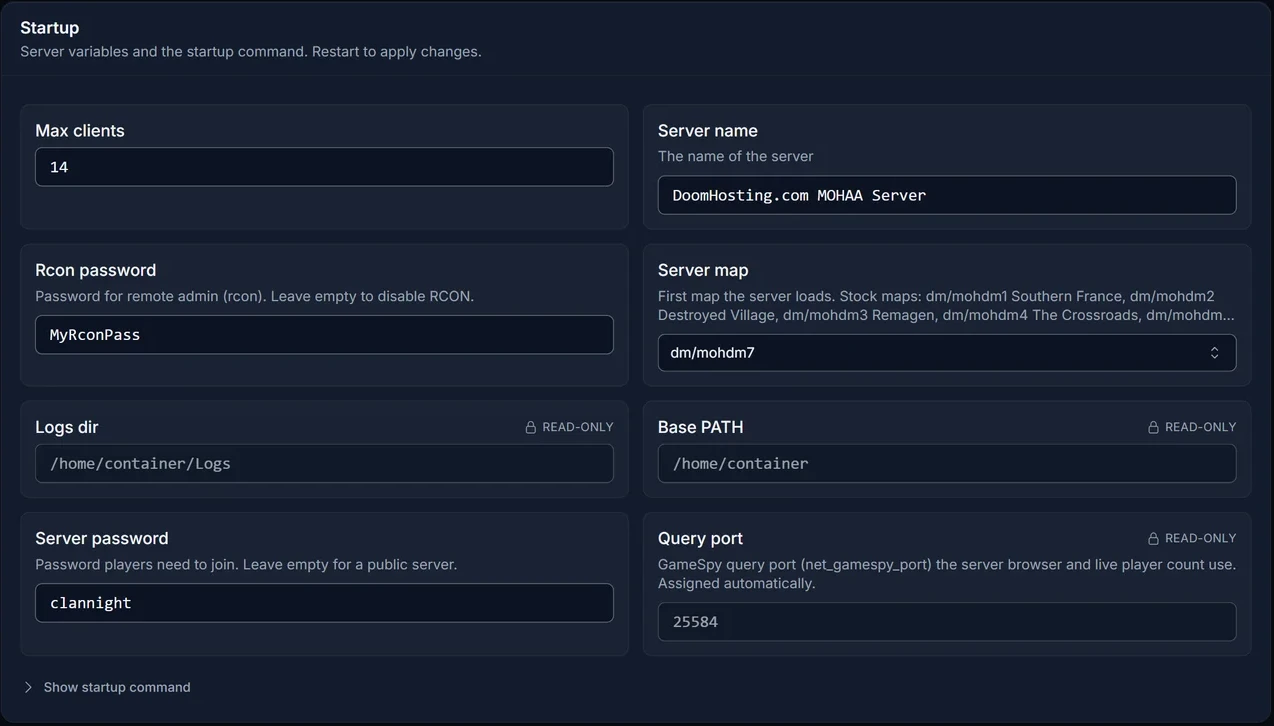
- Server name: the name players see. The default is
DoomHosting.com MOHAA Server, so change it to something your group recognises. - Max clients: how many players can be on at once, from 1 to 64. The default is 14.
- Server map: the map the server loads first. The dropdown lists the 11 stock maps:
| Map | Name |
|---|---|
dm/mohdm1 |
Southern France |
dm/mohdm2 |
Destroyed Village |
dm/mohdm3 |
Remagen |
dm/mohdm4 |
The Crossroads |
dm/mohdm5 |
Snowy Park |
dm/mohdm6 |
Stalingrad |
dm/mohdm7 |
Algiers |
obj/obj_team1 |
The Hunt |
obj/obj_team2 |
V2 Rocket Facility |
obj/obj_team3 |
Omaha Beach |
obj/obj_team4 |
The Bridge |
- Server password: leave it empty for a public server. Fill it in and players have to enter the password before they can connect.
- Rcon password: leave it empty and remote admin (RCON) stays off. Set one to run admin commands from inside the game, see below.
- Query port is assigned automatically and shown read-only. The panel uses it for the live player count on your Overview.
Change these five in the Startup tab, not in the file. On every start the server rewrites sv_hostname, sv_maxClients, rconPassword, g_password and the Map line in main/server.cfg with the Startup values, so a hand edit to those lines is gone after the next restart.
Edit server.cfg for game type, rotation and rules
Everything else is set in main/server.cfg. Open the Files tab, go into the main folder and click server.cfg. Edit, click Save, then restart the server. You can also edit it over FTP.
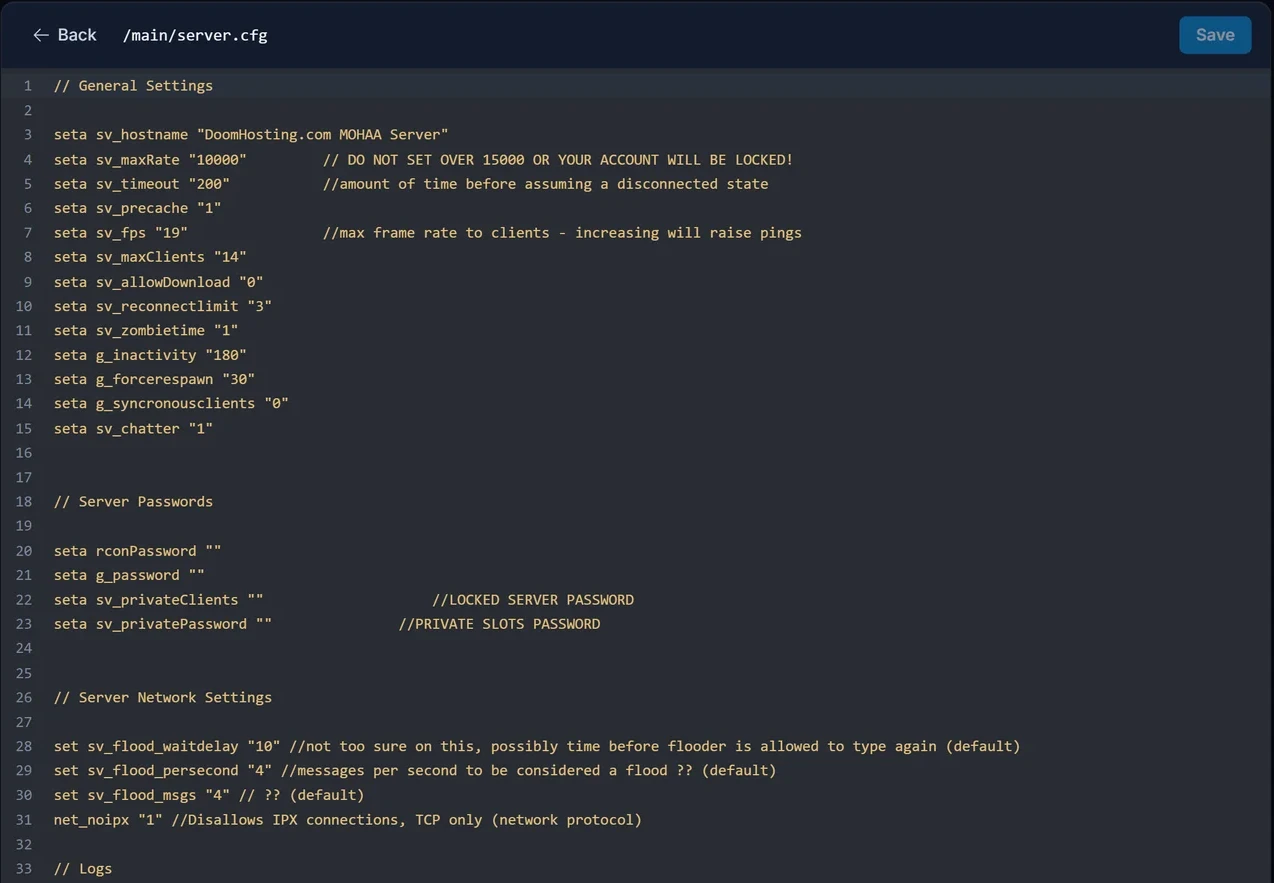
The lines most owners change:
seta g_gametype "3"
seta timelimit "10"
seta fraglimit "0"
seta g_teamdamage "0"
seta sv_maplist "obj/obj_team2 dm/mohdm7 dm/mohdm1 dm/mohdm3 dm/mohdm2 dm/mohdm6"
- g_gametype picks the mode:
1Deathmatch (free for all),2Team match,3Objective,4Round-based. - timelimit is the minutes per map, fraglimit the kills that end a map (
0means no limit). - g_teamdamage turns friendly fire on with
1and off with0. - sv_maplist is the map rotation. List the maps separated by spaces, in the order you want them played.
Add custom maps
Custom maps come as .pk3 files.
- Stop the server.
- Upload the
.pk3into themainfolder, through the Files tab or FTP. - Add the map's name to
sv_maplistinserver.cfg. Use the map's path inside themapsfolder of the.pk3, without the.bspending, written the same way as the stock maps (for exampledm/mymap). - Start the server.
Downloads are off by default (seta sv_allowDownload "0"), so the server does not send maps to players. Everyone who joins needs the same .pk3 in their own main folder before they connect, otherwise they can't load the map.
Use RCON to run admin commands in-game
Once the Rcon password is set on the Startup tab and the server has restarted, an admin can run server commands from the in-game console:
rconpassword yourrconpassword
rcon map dm/mohdm6
rcon kick PlayerName
The first line logs you in for the session. rcon map switches to a map straight away and rcon kick removes a player by name. Keep the RCON password to yourself: anyone who has it controls the server.
Common problems
I changed the server name or password in server.cfg and it reverted. Those lines are rewritten on every start. Change them on the Startup tab instead.
A server.cfg change does nothing. The file is only read at start. Click Save in the editor, then restart the server.
Players get kicked or can't load a custom map. They don't have the map's .pk3. Send them the same file to put in their own main folder.
RCON commands don't work. RCON is off while the Rcon password is empty. Set it, restart the server, and type it exactly as saved, including upper and lower case.
FAQ
How many players can join a Medal of Honor: Allied Assault server?
Up to 64. Set it with Max clients on the Startup tab.
Which game version do players need?
Patch 1.11 or newer. The GOG version works.
How do I make my server private?
Set a Server password on the Startup tab and restart. Leave it empty and anyone with the address can join.
Where to go next
- How to join a Medal of Honor: Allied Assault server, to share the steps with your players
Every panel step above is part of our game server control panel, included with every Medal of Honor: Allied Assault server hosting plan.
