


Steam Workshop mods install straight from the Mods tab on your Conan Exiles server. You pick the mods, the server downloads them on the next restart, and the order of your list is the order they load in. Here is the whole flow, including the two things that catch people out: Enhanced versus Legacy mods, and getting your players onto the same list.
What you need
A Conan Exiles server with us and access to the control panel. Nothing else. The server fetches Workshop content itself, so there is no Steam client, no SteamCMD and no FTP in any of this.
Settle one thing before you start. Conan Exiles has two branches, Enhanced and Legacy, and their mods are not interchangeable. Our servers run Enhanced, so pick the Enhanced build of every mod you want. Most authors publish both and say which is which in the title or the first line of the description. A Legacy mod on an Enhanced server installs cleanly and then does nothing at all, which is a frustrating hour if you do not know to look for it.
Open the Mods tab
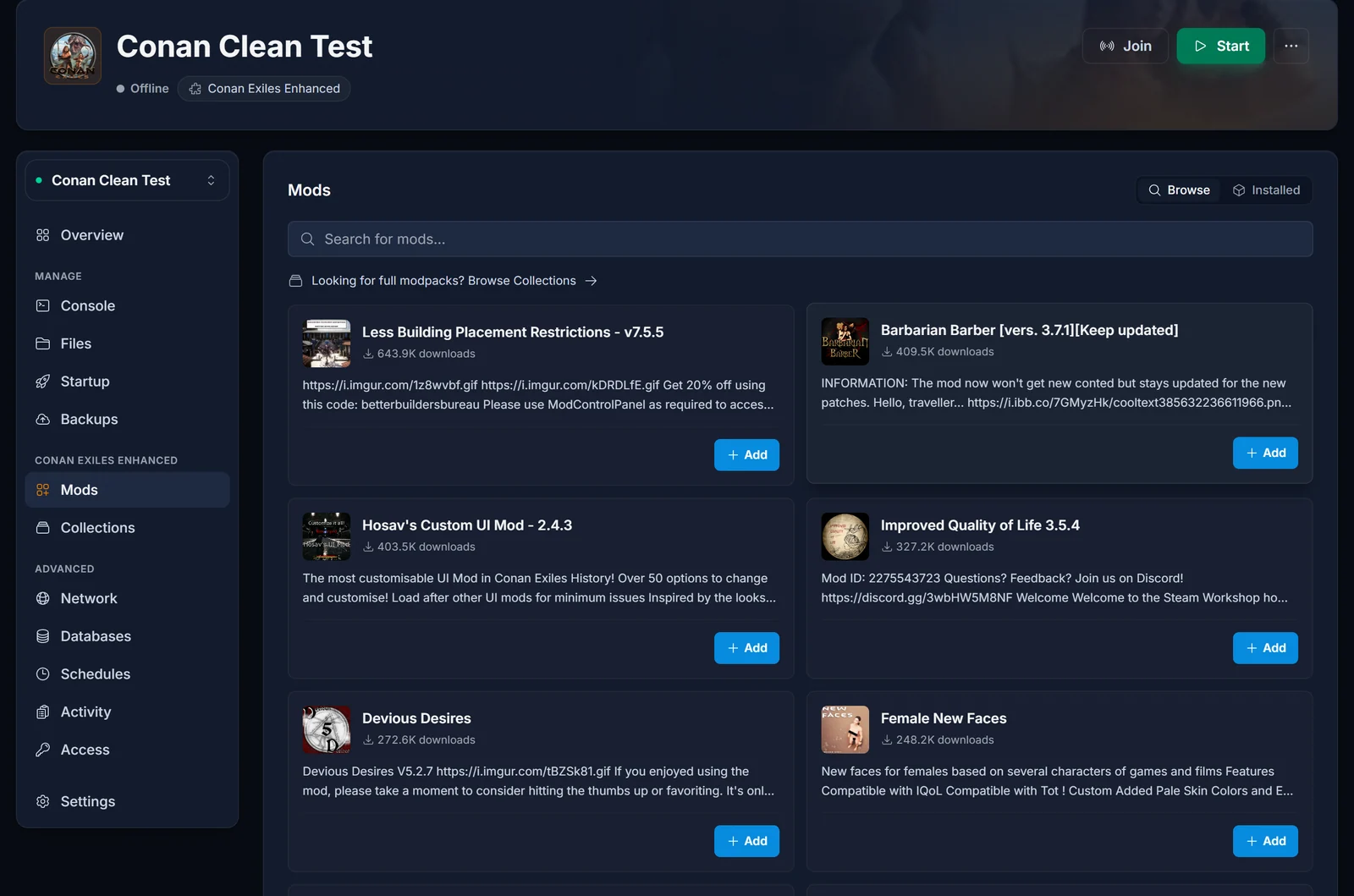
Open your server in the panel and click Mods in the left sidebar, under the Conan Exiles heading. The tab has two views: Browse for searching the Steam Workshop, and Installed for the mods already on your server.
Find and add a mod
Type part of the mod's name into the search box. Results are ranked by name first, so a mod actually called what you typed comes above one that only mentions the word somewhere in its description. Click Add on the one you want.
If that mod declares required mods of its own, they are added at the same time and placed above it in the list, because a dependency has to load before the mod that needs it. Seeing an extra entry appear in Installed is expected, not a mistake.
To add a lot of mods at once, use the Collections tab instead. Paste a Steam Workshop collection and every mod in it is added, in the collection's own order.
Restart to apply
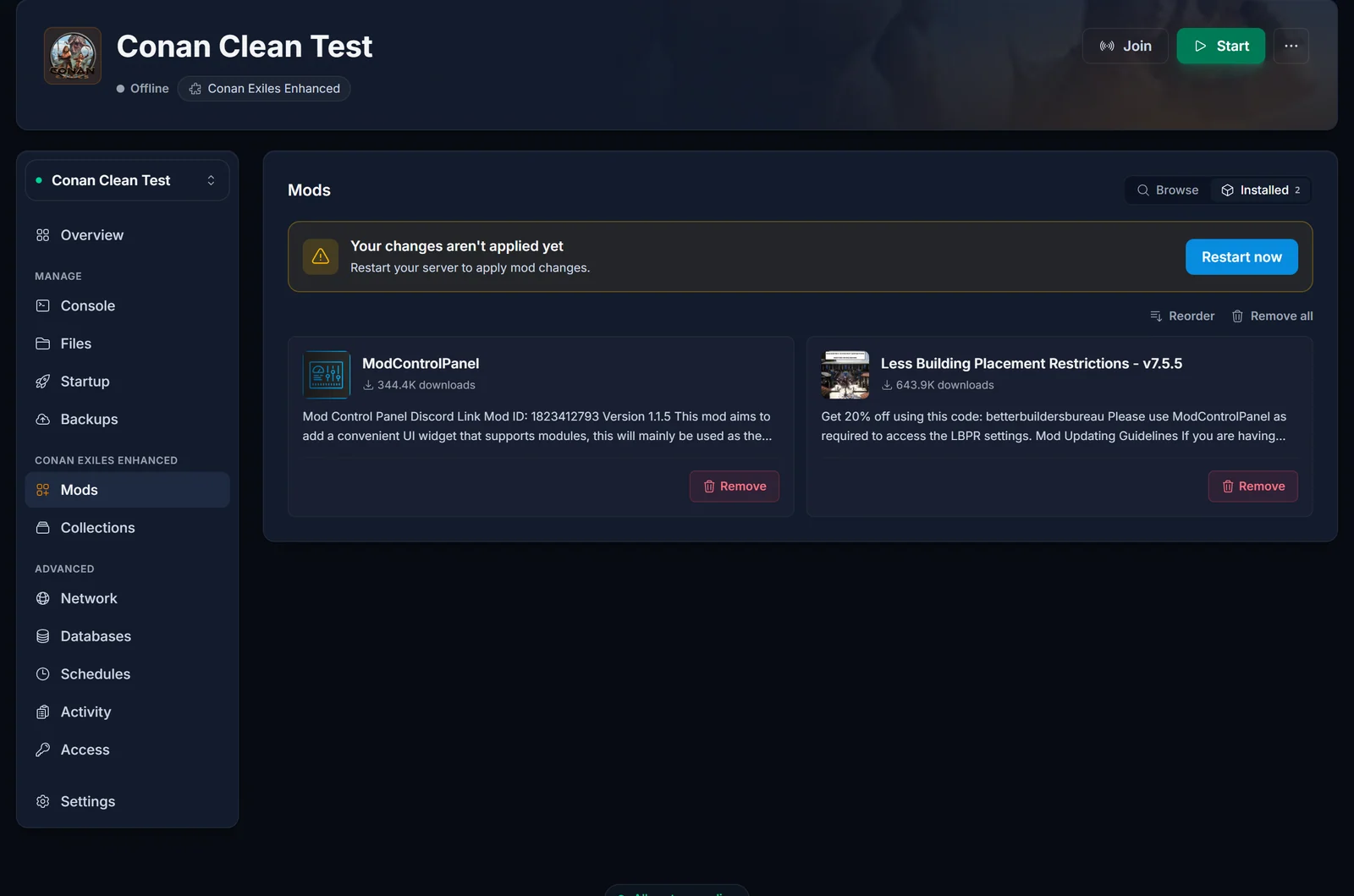
Adding a mod writes it to your server's mod list. Nothing is downloaded until the server starts, so the panel shows a "Your changes aren't applied yet" banner with a Restart now button. Click it.
On that restart the server downloads each mod from the Workshop, copies its files into ConanSandbox/Mods, and writes the load order into ConanSandbox/Mods/modlist.txt. The first restart after adding a large mod takes longer than usual because of the download. Later restarts are quicker, since only what changed is fetched again.
You can watch it on the Console tab. Each mod produces a line like this as the server reaches it:
LogModManager: Mounting mod pak file: /home/container/ConanSandbox/Mods/YourMod.pak
Set the load order
Order matters in Conan Exiles. When two mods change the same item, recipe or building piece, the one further down the list wins. Open the Installed view, click Reorder, drag the mods into the order you want, then restart to apply it.
If a mod author documents a position, for example "load this after any UI mods", follow it. Otherwise the usual pattern is frameworks and libraries near the top, content mods in the middle, and anything that deliberately overrides another mod at the bottom.
Remove a mod
In the Installed view, click Remove on a single mod, or Remove all to clear the list. Restart to apply. The server deletes the mod files and rewrites modlist.txt for you, so nothing is left loading in the background.
Do not edit modlist.txt by hand in the Files tab. The server rewrites that file from your panel list every time it starts, so a hand edit is gone at the next restart.
Make sure your players have the same mods
Everyone connecting needs the same mods the server runs. The easiest way to hand them the list is a Steam Workshop collection: build one containing your mods, share the link, and each player subscribes to the whole thing in one click. Mirror that same collection in the panel's Collections tab so the two never drift apart.
When you add or remove a mod later, tell your players before you restart. A player whose mods do not match the server's is stopped at the connect screen until they update.
Common issues
The mod is in my list but nothing changed in game. Mod changes apply on restart, not when you add them. Look for the unapplied-changes banner on the Mods tab and restart.
The mod installed but does nothing. Nearly always the Legacy build on an Enhanced server. Open the mod on the Steam Workshop and look for an Enhanced version from the same author, then swap it in.
Two mods fight over the same item or recipe. That is a load-order conflict. Move the one whose version you want lower in the list, restart, and check in game again.
The server takes a long time to start after adding mods. It is downloading. Large content mods run to several gigabytes. Open the Console tab and you will see the download finish, then the mod mount lines.
A mod broke after a game update. Mod authors update on their own schedule, so there is often a gap after a patch. Remove the mod, restart to get your server back up, and add it again once the author has pushed a fix.
Need admin rights in game to test a mod? See how to set the admin password on your Conan Exiles server. For plans and specs, see Conan Exiles server hosting.
