

Two things decide which game mode a player is in on a Minecraft server: the mode saved for that player, and the server's default. To put everyone in Creative and keep them there, open the Config tab, set Default game mode to Creative, turn on Force game mode and restart. To switch the players who are online right now, run gamemode creative @a in the console.
Most "it doesn't work" cases come from using only one of the two. This guide covers both, and why each one fails on its own.
Quick answer
| You want | Do this |
|---|---|
| Everyone in Creative, every time they join | Config tab: Default game mode = Creative, Force game mode on, then restart |
| The players online right now in Creative | Console tab: gamemode creative @a |
| One player in Creative | Console tab: gamemode creative PlayerName |
Set Creative as the server default (Config tab)
- Open your server in the panel and click the Config tab.
- In the Gameplay section, set Default game mode to Creative.
- Turn on Force game mode.
- Restart the server. The panel saves the setting by itself, and the game only reads it when it starts.
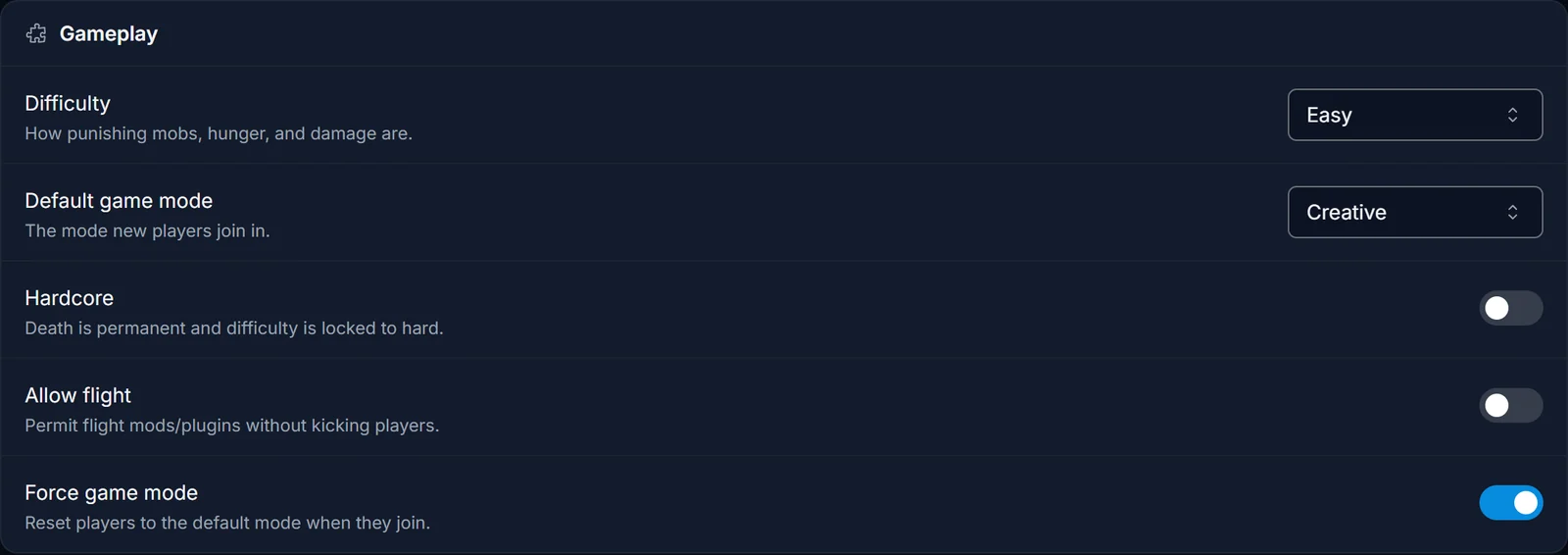
The same dropdown holds Survival, Adventure and Spectator, so this is also how you move a server back to Survival later.
Why setting Creative alone does not work
Default game mode is the gamemode line in server.properties. It only applies to players who join for the first time. Minecraft saves each player's game mode in their player data, so anyone who has already played on the server comes back in the mode they left in. On a server that has been running for a while, that is everybody, and the change looks like it did nothing.
Force game mode is the force-gamemode line. When it is true, every player is reset to the default game mode each time they join, whatever their player data says. That is the setting that makes Creative apply to existing players.
Switch online players to Creative right now (console)
- Click the Console tab.
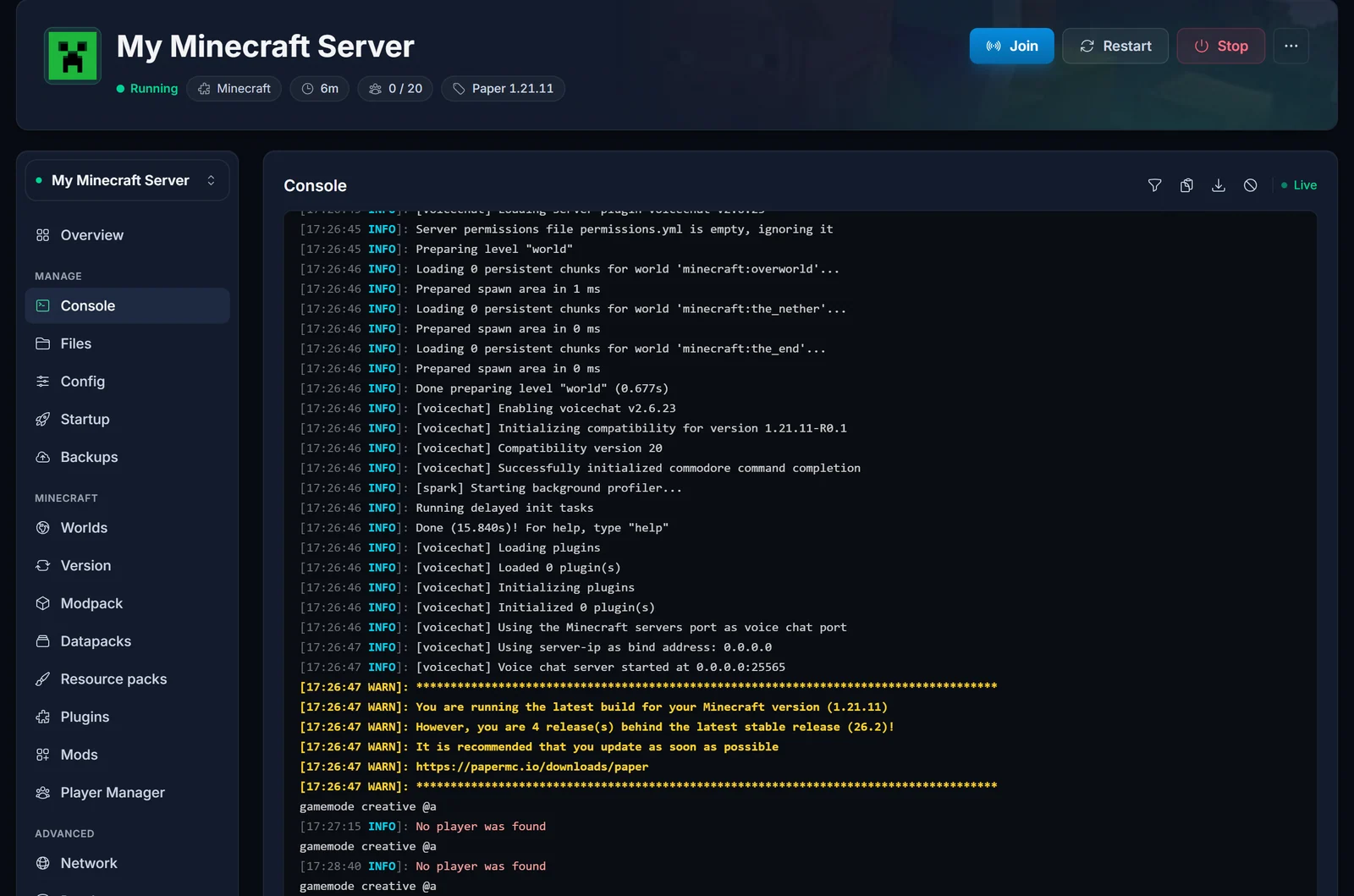
- Type the command and press Enter. The console does not need the leading slash.
gamemode creative @a
@a means every player who is online at that moment. For a single player, use their name instead:
gamemode creative PlayerName
Three things to know about the command:
- It only reaches players who are connected. If the console answers
No player was found, nobody was online when you ran it. Join the server first, then run it again. - From the console you must name a target. A bare
gamemode creativeanswersA player is required to run this command here, because the console is not a player. - It does not change the default. Players who join later still get the server's default game mode.
In-game you can type /gamemode creative yourself, but only as an operator. If the game says you do not have permission, see how to OP yourself on your Minecraft server.
Edit server.properties by hand
If you prefer the file, the Config tab writes these two lines for you:
gamemode=creative
force-gamemode=true
Stop the server, open server.properties in the Files tab, change both lines, save and start the server again. The console prints Default game type: CREATIVE during startup when the file was read correctly.
Should Force game mode stay on?
With Force game mode on, the default always wins at join. If you put one player in Survival or Spectator with a command, they are back in Creative the next time they connect.
- Pure creative or build server: leave it on.
- Mixed server where some players should keep another mode: turn it on, restart, let everyone join once so their saved mode becomes Creative, then turn it off and restart again. From then on the command decides per player.
What about /defaultgamemode?
defaultgamemode creative changes the default while the server is running, and the console confirms it with The default game mode is now Creative Mode. It does not survive a restart on a dedicated server: server.properties is read again on every start and replaces it. Use the Config tab so the setting sticks.
Minecraft Bedrock servers
Bedrock uses the same two settings, in different places. Gamemode is a field in the Startup tab, and force-gamemode=true goes into server.properties through the Files tab. On Bedrock an existing world keeps the game mode it was created with unless force-gamemode is true. In-game commands such as /gamemode also need Allow cheats turned on in the Startup tab. Restart after changing any of them.
Common issues
The console says No player was found
Nobody was online. gamemode creative @a only changes connected players. Join first, or set the default in the Config tab instead.
I changed Default game mode and I am still in Survival Either the server has not been restarted yet, or Force game mode is off and your player data still says Survival. Turn it on and restart.
Players go back to Survival every time they rejoin Force game mode is on while Default game mode is still Survival. Change the default to Creative, or turn Force game mode off.
The command says I do not have permission In-game commands need operator rights. Run the command from the Console tab, or give yourself OP first.
A plugin keeps changing the mode back World-management plugins such as Multiverse-Core can enforce their own game mode per world, and that wins over the server setting when a player enters the world. Set the game mode in the plugin as well.
Want to tune the rest of the world too? See how to change the difficulty on your Minecraft server and the Minecraft game rules guide. All of this runs from the DoomHosting game panel. Need a server first? Have a look at Minecraft server hosting.
